The best microSD cards for the Steam Deck
Expand your Steam Deck’s storage with these tried-and-tested cards
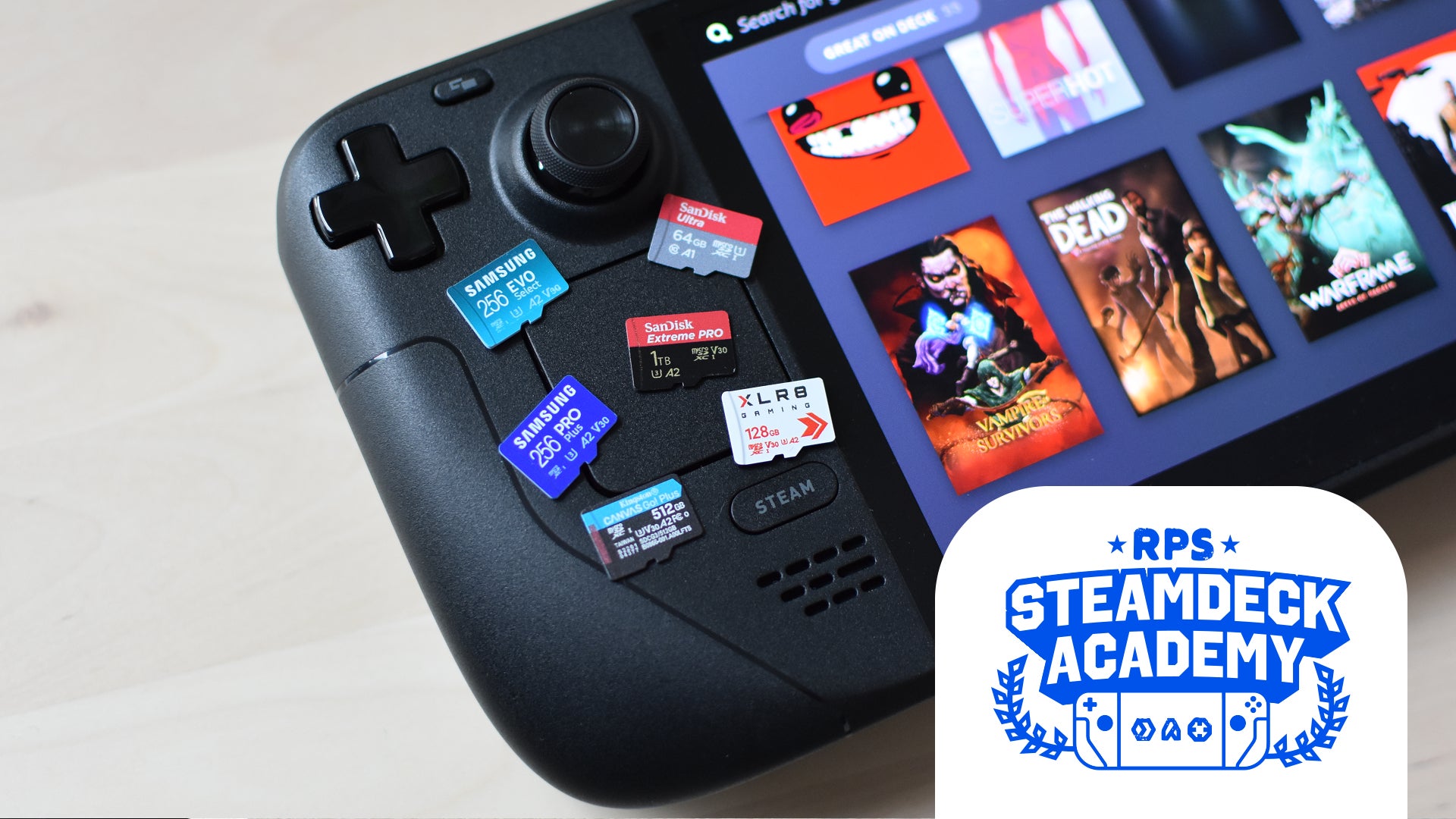
Image credit:Rock Paper Shotgun

An argument could be made that even the best Steam Deck microSD cards will begin waning in importance, now that the LCD Steam Deck – i.e., the one with the smallest internal SSD options – is being phased out . With only the more capacious Steam Deck OLEDs staying on Valve’s production line, could the need for supplementary storage fade away?
Not likely, no. Even a 512GB or 1TB Deck OLED can be easily – and in contrast to rising SSD prices , cheaply – improved by pairing it with one of these tiny cards, especially if you’re a partial to a big, fat , AAA adventure now and then. And if anything, 2026 will see them become key components in Valve’s growing SteamOS ecosystem, as the upcoming Steam Machine and Steam Frame will both sport matching microSD slots to the Deck’s, making it possible to hot-swap your installed game libraries between devices. It’s the year of the microSD, as Nintendo – yes, fine, different handheld company – would say.
| Image credit: Samsung | Our Favourite Steam Deck microSD Card Excellent speeds, reasonable prices, and a good range of capacities - including a nice, airy 1TB model - make the Samsung Pro Plus the best microSD card you can get for your Steam Deck. Buy at Amazon US / Buy at Currys UK |
|---|
Nonetheless, we must still determine which are most deserving of your cash. I’ve gathered my favourites here, following real-world benchmark testing using load time measurements from Shadow of the Tomb Raider and Aperture Desk Job . Speed is king, for the most part – there’s no sense investing in a microSD card that takes eons to launch the games installed on it – but I’ve aimed to keep things balanced with a mix of higher- and lower-budget cards, with extra kudos for those that offer a good choice of capacity options. Just don’t bother plumping for a microSD Express model, as the Deck’s slot isn’t specced to take advantage of their top speeds.
Now, behold: recommendations.
Best microSD cards for the Steam Deck
- Samsung Pro Plus - The best microSD card for the Steam Deck overall
- SanDisk Extreme Pro - The fastest microSD card for the Steam Deck
- SanDisk Ultra - The best cheap microSD card for the Steam Deck
- PNY Pro Elite - Fast game launches with better capacity options than the XLR8
- Integral Ultima Pro - Huge capacity options with competitive load times
- Kingston Canvas Go! Plus - Good speeds with a wide range of capacities
- PNY XLR8 microSDXC Gaming – A fast, affordable alternative to the SanDisk Ultra
- Samsung Evo Select - Varied performance, but super cheap
| Samsung Pro Plus The best microSD card for the Steam Deck overall | 256GB - Check UK price / US price 512GB - Check UK price / US price 1TB - Check UK price / US price |
|---|
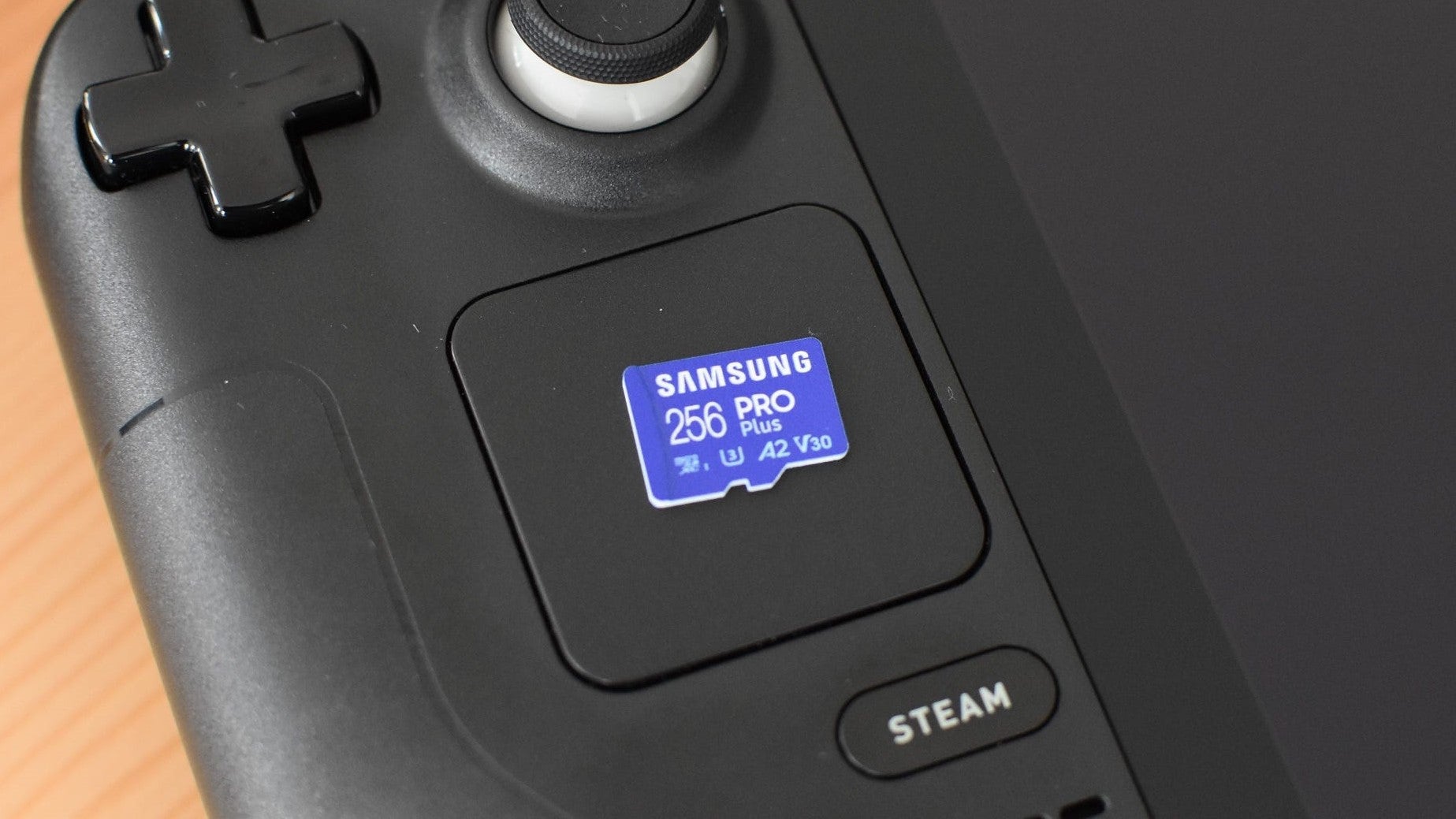
Image credit:Rock Paper Shotgun
- Type : microSDXC
- Interface : UHS-I
- Speed class : U3
- Read speed : Up to 180MB/s
- Write speed : Up to 130MB/s
- Capacities : 128GB / 256GB / 512GB / 1TB
Samsung have crafted some of the finest PC SSDs (the 870 Evo , the 870 Qvo , the 990 Pro and so on), so it’s not terribly surprising they know their way around a brilliant microSD card for the Steam Deck as well. The Samsung Pro Plus was the first card I tested to get under 11s in the Aperture Desk Job launch test, as well as the first to hit 16s dead in the Shadow of the Tomb Raider loading test. The SanDisk Extreme Pro has since posted even faster load times, but Samsung’s microSD has a generally better balance of price and performance.
That’s not the same as it being cheap per se , especially compared to the SanDisk Ultra, but generally it’s only a few quids’ / bucks’ difference. Also, it’s now got a 1TB option, deleting its past weakness of limited high-capacity options.

Aperture Desk Job had an average launch time of 10.9s, and an average load time of 3.4s. Shadow of the Tomb Raider had an average launch time of 14.6s, and an average load time of 16s.
What we like: ✔️ Fast launch times ✔️ Great performance for the price ✔️ 1TB storage option
| SanDisk Extreme Pro The fastest microSD card for the Steam Deck | 128GB - Check UK price / US price 512GB - Check UK price / US price 1TB - Check UK price / US price 2TB - Check UK price / US price |
|---|

- Type : microSDXC
- Interface : UHS-I
- Speed class : U3
- Read speed : Up to 250MB/s
- Write speed : Up to 150MB/s
- Capacities : 32GB / 64GB / 128GB / 256GB / 512GB / 1TB / 2TB
Even if it’s just by fractions of a second, the SanDisk Extreme Pro has the honour of being the only microSD card here to consistently outspeed the 512GB Steam Deck’s SSD: its 15.6s time in the Shadow of the Tomb Raider game loading test just noses past the SSD’s 15.9s. Should you mainly care about shaving off every possible half-second from your game loading times on the Steam Deck, then the Extreme Pro is the card to go for.
The only reason it’s not at the very top of this list is that the Samsung Pro Plus, which is also quick off the mark, tends to be more attractively priced. That said, some of the Extreme Pro’s capacities – like the 512GB version – are more on par with the Pro Plus in the UK, in which case it’s an excellent alternative. SanDisk’s microSD card also has a wider range of size options than most, including a spacious (if very pricey) 2TB model in the UK.

Aperture Desk Job had an average launch time of 10.3s, and an average load time of 3.3s. Shadow of the Tomb Raider had an average launch time of 14.3s, and an average load time of 15.6s.
What we like: ✔️ Premium performance ✔️ Wide variety of storage options ✔️ Gigantic 2TB option
| SanDisk Ultra The best cheap microSD card for the Steam Deck | 128GB - Check UK price / US price 256GB - Check UK price / US price 512GB - Check UK price / US price 1TB - Check UK price / US price 1.5TB - Check UK price / US price |
|---|

Image credit:Rock Paper Shotgun
- Type : microSDXC
- Interface : UHS-I
- Speed class : U1
- Read speed : Up to 150MB/s
- Capacities : 32GB / 64GB / 128GB / 256GB / 400GB / 512GB / 1TB / 1.5TB
The SanDisk Ultra offers a wider range of capacities than the Pro Plus, with lower prices across the board. This is partly owing to its lower U1 speed class, meaning its write speeds aren’t as fast as U3 models, but that’s more of a concern for videographers needing a microSD card for their camera. Where games performance is concerned, read speed is king, and the affordable Ultra can keep pace with pricier cards.
It put up an especially spry challenge in Aperture Desk Job, and even its ‘worst’ performance – the Shadow of the Tomb Raider load test – was less than half a second slower than the Deck’s top-spec SSD. That said, I’d recommend going for a bigger capacity than the 64GB card I used for testing; the 256GB and 512GB models are both particularly good deals at their current prices, and the 1TB version is a bargain compared to the 1TB SanDisk Extreme Pro. The SanDisk Ultra also offers a 1.5TB option which, outside of a few, extremely rare 2TB cards, is as much microSD storage as your Steam Deck can get.

Aperture Desk Job had an average launch time of 11.1s, and an average load time of 3.4s. Shadow of the Tomb Raider had an average launch time of 14.8s, and an average load time of 16.3s.
What we like: ✔️ Low prices for all models ✔️ Only fractionally slower than the Deck’s top-spec SSD ✔️ 1TB and 1.5TB capacities
| PNY Pro Elite Fast game launches with better capacity options than the XLR8 | 128GB - Check UK price / US price 256GB - Check UK price / US price 512GB - Check UK price / US price 1TB - Check UK price / US price |
|---|
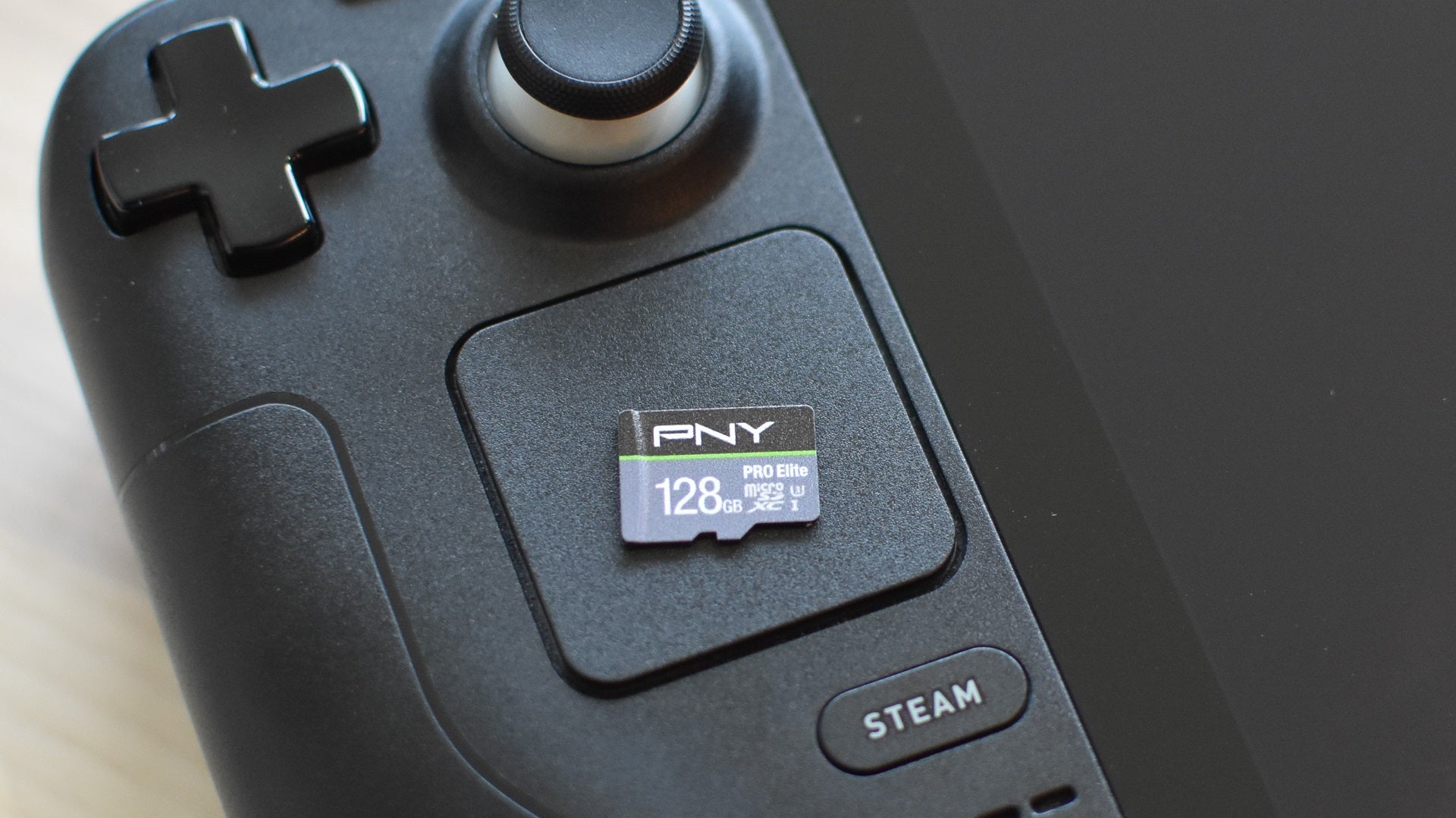
Image credit:Rock Paper Shotgun
- Type : microSDXC
- Interface : UHS-I
- Speed class : U1
- Read speed : Up to 100MB/s
- Write speed : Up to 90MB/s
- Capacities : 64GB / 128GB / 256GB / 512GB / 1TB
Despite a U1 speed class putting it among the slower microSDs on theoretical read/write speeds, the PNY Pro Elite actually manages some pretty enviable launch times: it matched the Samsung Pro Plus at booting up Aperture Desk Job, and even beat it (if only by 0.1 seconds) in Shadow of the Tomb Raider.
Its in-game save loading times aren’t quite as impressive, but they’re still a step up from most budget microSDs. Its 3.3s in Aperture Desk Job also gives it a win against its PNY stablemate, the XLR8 microSDXC Gaming, as does its wider range of available capacities. These stretch right up to 1TB, enough to give even the most basic Steam Deck the storage space of a proper desktop PC.

Aperture Desk Job had an average launch time of 10.9s, and an average load time of 3.3s. Shadow of the Tomb Raider had an average launch time of 14.5s, and an average load time of 18.7s.
What we like: ✔️ Fast launch times despite speed class ✔️ Budget price tags ✔️ Up to 1TB extra storage
| Integral Ultima Pro Competitive load times, though hard to find in stock | 128GB - Check UK price / US price 256GB - Check UK price / US price 512GB - Check UK price |
|---|
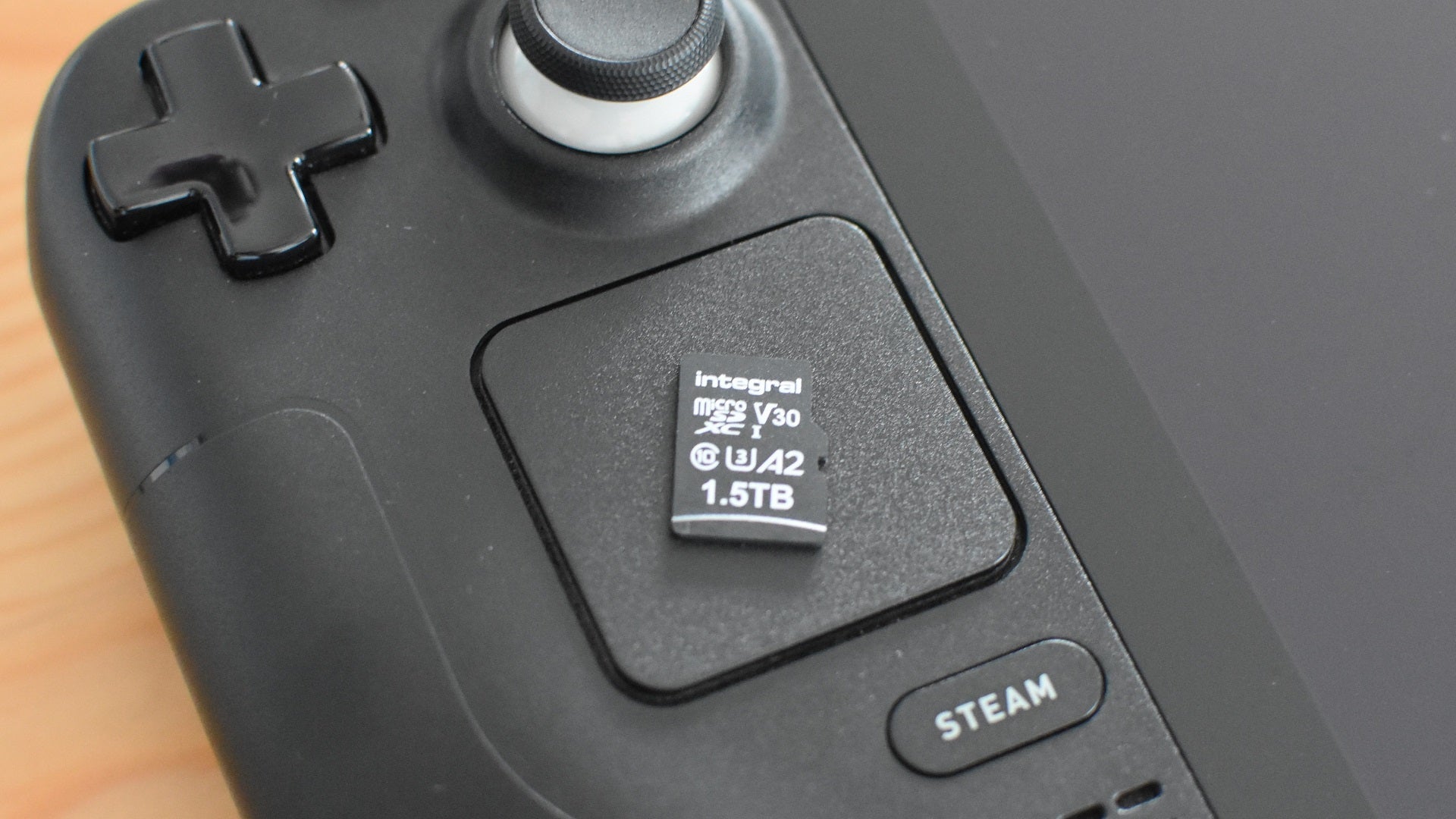
Image credit:Rock Paper Shotgun
- Type : microSDXC
- Interface : UHS-I
- Speed class : U3
- Read speed : Up to 100MB/s
- Write speed : Up to 30MB/s
- Capacities : 32GB / 64GB / 128GB / 256GB / 512GB / 1TB / 1.5TB
MicroSD cards took their sweet time in offering capacities above 1TB, but they’re here now – to the Steam Deck’s benefit. The SanDisk Ultra’s 1.5TB model is cheaper but the Integral Ultima Pro is another compelling option, maxing out at the same high capacity and often keeping pace with the faster cards in this list. Its Aperture Desk Job load times are right up there with the best of the best, and although its Shadow of the Tomb Raider results aren’t quite as elite, they still beat budget fare like the Samsung Evo Select. Which, not to labour the point, doesn’t come anywhere near the sheer spaciousness of the biggest Ultima Pro variants.
It’s just a shame that, at the time of writing, this card isn’t reliably sold in the US, and its roomier capacities - 1TB and 1.5TB - are widely stock-deprived. The smaller models are still nice and fast, but you might need to look elsewhere (i.e. a few paragraphs above) for full-on terabytes.
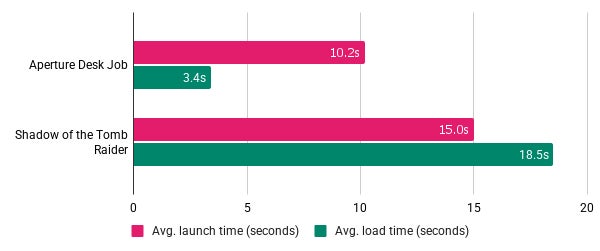
Aperture Desk Job had an average launch time of 10.2s, and an average load time of 3.4s. Shadow of the Tomb Raider had an average launch time of 15s, and an average load time of 18.5s.
What we like: ✔️ 1.5TB model ✔️ Impressive load times ✔️ Relatively cheap 1TB model
| Kingston Canvas Go! Plus Good speeds with a wide range of capacities | 64GB - Check UK price / US price 512GB - Check UK price / US price 1TB - Check UK price / US price |
|---|

Image credit:Rock Paper Shotgun
- Type : microSDXC
- Interface : UHS-I
- Speed class : U3
- Read speed : Up to 170MB/s
- Write speed : Up to 70MB/s
- Capacities : 64GB / 128GB / 256GB / 512GB / 1TB
According to its marketing prose, the Kingston Canvas Go! Plus is for “adventurers.” Is playing God of War on the 11:55 Paddington to Swindon service an adventure? Either way, this microSD card proves it can suit the Steam Deck just as well as a GoPro, with a particularly zippy average time in the Shadow of the Tomb Raider launch test.
Since I originally added it to this list, the family has also welcomed a 1TB model, eliminating the previous weakness of maxing out at 512GB. The catch is that no particular version of the Canvas Go Exclamation Mark Plus is especially cheap, even compared to faster microSDs like the Samsung Pro Plus, but they’re all still decently priced for the performance they offer.
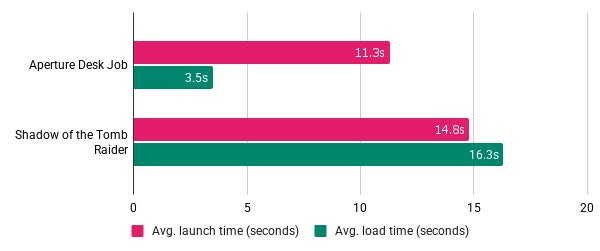
Aperture Desk Job had an average launch time of 11.3s, and an average load time of 3.5s. Shadow of the Tomb Raider had an average launch time of 14.8s, and an average load time of 16.3s.
What we like: ✔️ Good launch times ✔️ Decent price tag ✔️ 1TB storage option
| PNY XLR8 microSDXC Gaming A fast, affordable alternative to the SanDisk Ultra | 128GB - Check UK price / US price 256GB - Check UK price / US price 512GB - Check UK price / US price |
|---|
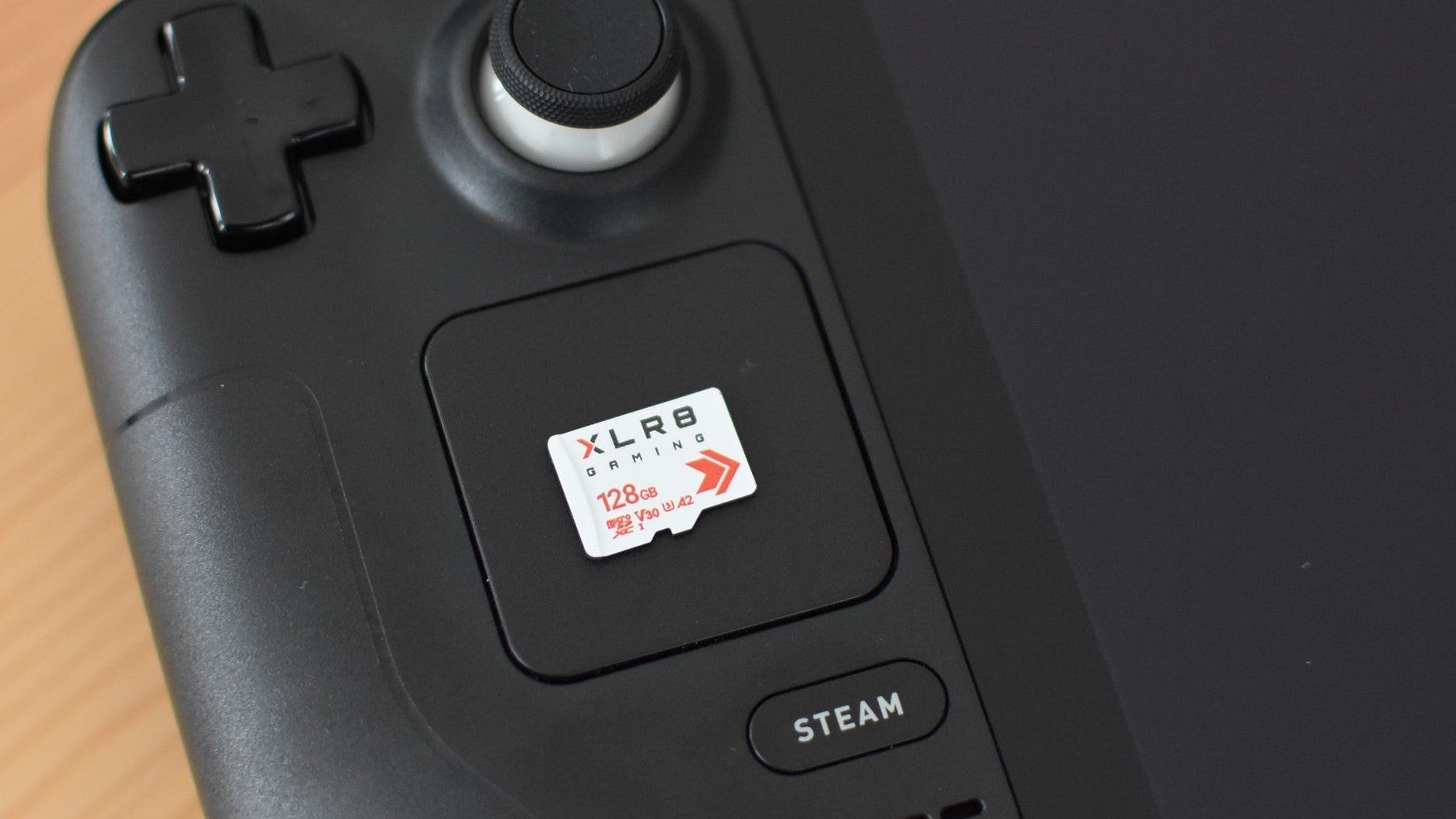
Image credit:Rock Paper Shotgun
- Type : microSDXC
- Interface : UHS-I
- Speed class : U3
- Read speed : Up to 100MB/s
- Write speed : Up to 90MB/s
- Capacities : 128GB / 256GB / 512GB
A rare games-focused card, the PNY XLR8 microSDXC Gaming put up respectable times in all four speed tests without any cheeky price premiums. In fact, for sheer affordability, the XLR8 is either a few pounds less or just a little more than the equivalent SanDisk Ultra capacity. And that’s while offering class U3 write speeds, which might be helpful if you’re planning to use the Steam Deck as a desktop PC even if they’re not as useful to gaming specifically.
After months of largely being a US-favoured proposition, all three varieties of the XLR8 are now easily available in the UK as well. The SanDisk Ultra has the advantage of a wider capacity range, including a 1TB model, but otherwise there’s very little between these two microSD cards on price or Steam Deck performance.
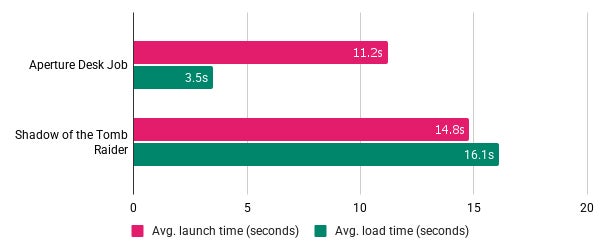
Aperture Desk Job had an average launch time of 11.2s, and an average load time of 3.5s. Shadow of the Tomb Raider had an average launch time of 14.8s, and an average load time of 16.1s.
What we like: ✔️ Rare to find a gaming-focused card ✔️ Did well in all our speed tests ✔️ Reasonable prices
| Samsung Evo Select Varied performance, but super cheap | 64GB - Check UK price / US price 256GB - Check UK price / US price 512GB - Check UK price / US price |
|---|

Image credit:Rock Paper Shotgun
- Type : microSDXC
- Interface : UHS-I
- Speed class : U3
- Read speed : Up to 160MB/s
- Capacities : 64GB / 128GB / 256GB / 512GB / 1TB
The Samsung Evo Select looks like a tasty microSD bargain: as I’m writing this it’s even cheaper than the SanDisk Ultra, despite its higher specs, and its performance in our Aperture Desk Job benchmarks was only behind the elite Samsung Pro Plus and SanDisk Extreme Pro. If you felt the sting of the Steam Deck itself in your finances, this kind of affordability will feel like a soothing aloe balm.
It’s only a disappointing result in the Shadow of the Tomb Raider loading test that denies the Evo Select a higher position in this list, though to be fair, its launching speed for the same game is much more competitive with the pricier stuff. It’s still a good bet for those wanting a budget microSD specifically.
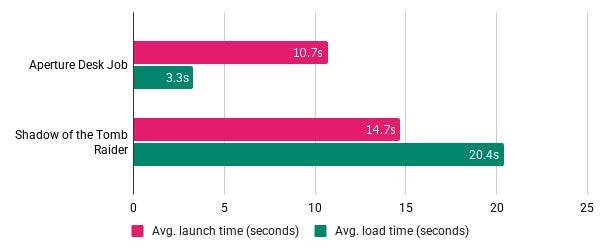
Aperture Desk Job had an average launch time of 10.7s, and an average load time of 3.3s. Shadow of the Tomb Raider had an average launch time of 14.7s, and an average load time of 20.4s.
What we like: ✔️ Bargain price tags ✔️ Respectable launch speeds ✔️ Only beaten in our tests by a few, elite cards
What microSD cards are compatible with the Steam Deck?
Whereas over in console land, the Nintendo Switch 2 requires a high-end microSD Express card, the Steam Deck’s microSD requirements aren’t very demanding at all. Any UHS-I microSD should work, including microSDXC (Expanded Capacity) and microSDHC (High Capacity) cards. You’re best off looking at SDXC cards, though, like the ones listed above: standard microSD cards are limited to a piddly 2GB, while microSDHC cards max out at 32GB. Since only microSDXC cards can therefore occupy the 64GB-2TB range, they’re the ones to focus on to make sure you’re adding sufficient space.
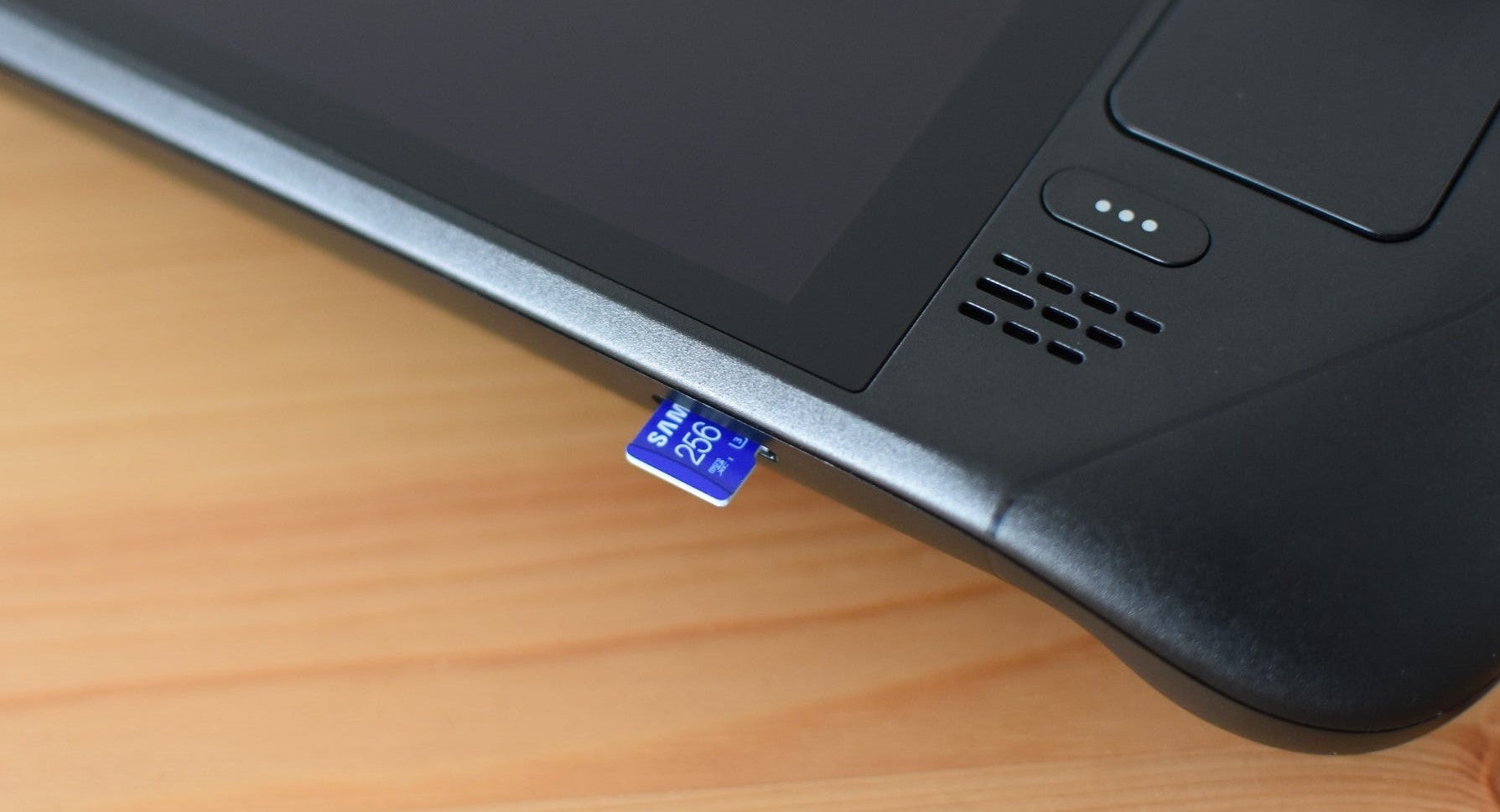
Image credit:Rock Paper Shotgun
Once you’ve got a compatible microSD card, it’s just a case of pushing it into the slot on the bottom edge of the Steam Deck until it clicks into place, then going into the SteamOS System settings to format it. From there, you can set it as the default game installation location in the Storage settings. To remove the microSD card, push it even further into the slot until the lock releases, sending it popping partway out.
Do I need to format my Steam Deck’s microSD card?
Probably, as microSDs normally don’t come ready-to-use on a Linux system like the Steam Deck. Luckily, formatting the microSD card yourself is easy. Just slide it into the port on the Deck’s bottom edge, power it on, then navigate to the System section of the main Settings menu. Scroll down to ‘Format SD Card’, hit the Format button, and in a few moments your card will be set up and ready to roll.
Is there any performance difference between installing games on a microSD card or on the Steam Deck’s SSD?
In most games, the only tangible difference is in load times; you won’t get slower framerates on a microSD card, for example. The only games that might not work as well as they do on the SSD are those that specifically take advantage of high SSD speeds, like Cyberpunk 2077’s open world streaming and Ratchet & Clank: Rift Apart’s dimension-hopping sequences . In the latter’s case, the game essentially sits on a loop for a few seconds so the game can load in the new scene from the microSD card, a transition that’s more or less instantaneous on an SSD.
To be clear, though, these examples are extremely rare. The only other egregious example I can think of is Starfield, which needs an SSD even on a beefy desktop PC. And that won’t run at acceptable framerates on the Steam Deck’s APU anyway, so storage is a moot point. The vast majority of your library should run just fine off a microSD.
Can I set a microSD card as my Steam Deck’s default drive?
Yep! In the main Settings menu, scroll down to the Storage section, then highlight the microSD card and press the X button to set it as the default installation location.

Image credit:Rock Paper Shotgun
In this same sub-menu, you can also move games between the internal drive and the microSD. Select the game you want to move, press the Y button, make sure the other drive is selected in the drop-down menu, and finally hit ‘Move’ to transfer it over.
What do microSD interfaces and speed classes mean?

Image credit:Rock Paper Shotgun
Steam Deck Academy brings together all our guides and explainers on getting the most out of your Steam Deck, no student loans or sweaty dormitories required.
UHS (Ultra High Speed) is the current interface standard for SD and microSD cards, with specific ratings like UHS-I, UHS-II, and UHS-III denoting maximum transfer speeds. UHS-I cards have a max speed of 104MB/s, while UHS-II and UHS-III can reach 312MB/s and 624MB/s respectively.
On the Steam Deck, Valve opted for the UHS-I interface, the same that Nintendo used for the original Switch (which, I guess, makes the above list a guide to Switch microSD cards as well). UHS-II and UHS-III cards are backwards compatible with UHS-I, so you could use them in the Deck, but you’d be limited to UHS-I speeds; as such, theres’s little point in spending more to get the newer interfaces. Besides, game launching and loading times depend on non-sequential read speeds, which normally don’t come close to the advertised maximum sequential speeds anyway.
(For what it’s worth, UHS-II and UHS-III microSD slots are likewise backwards compatible with UHS-I microSD cards, which is why you can use any of the cards listed above with the UHS-II-equipped Asus ROG Ally. If, hypothetically, you wanted to ditch your Steam Deck in favour of Asus’ more powerful handheld, any microSD card you bought for the former would still work in the latter.)
Another spec you might see printed on microSD cards is the speed class, like U1 or U3. Rather than general maximum speeds, these represent minimum sequential write speeds: U1 is 10MB/s, U3 is 30MB/s. Again, these ratings don’t have any real bearing on how fast your Steam Deck games will load, though it might be worth plumping for a U3 card if you’re using your Deck as a full-on desktop replacement, where faster write speeds will come in handy more often.
Finally, there are “Application Performance Class” ratings, which might actually be more relevant to the Steam Deck than UHS or U ratings as they pertain specifically to how well-suited the cards are to running software apps. Games, in other words. These also represent minimum read/write speeds rather than maximums, which you might find more reassuring for heavy usage.
There are only two ratings to consider: A1 and A2. A1 cards are rated for 1500 IOPS (Input/Output Operations Per Second) for reads and 500 IOPS for writes, while A2 cards are rated for 4000 and 2000 IOPS for reads and writes respectively. Clearly, then, you should aim for an A2 microSD if you want high performance, though some A1 cards can be surprisingly peppy as well, as the SanDisk Ultra demonstrates.
Rock Paper Shotgun is better when you sign in
Sign in and join us on our journey to discover strange and compelling PC games.

All 75 Arc Raiders Blueprints and where to get them
These areas have the highest chance of giving you Blueprints

Image credit:Rock Paper Shotgun/Embark Studios

Looking for more Arc Raiders Blueprints? It’s a special day when you find a Blueprint, as they’re among the most valuable items in Arc Raiders. If you find a Blueprint that you haven’t already found, then you must make sure you hold onto it at all costs, because Blueprints are the key to one of the most important and powerful systems of meta-progression in the game.
This guide aims to be the very best guide on Blueprints you can find, starting with a primer on what exactly they are and how they work in Arc Raiders, before delving into exactly where to get Blueprints and the very best farming spots for you to take in your search.
We’ll also go over how to get Blueprints from other unlikely activities, such as destroying Surveyors and completing specific quests. And you’ll also find the full list of all 75 Blueprints in Arc Raiders on this page (including the newest Blueprints added with the Cold Snap update , such as the Deadline Blueprint and Firework Box Blueprint), giving you all the information you need to expand your own crafting repertoire.
In this guide:
- What are Blueprints in Arc Raiders?
- Full Blueprint list: All crafting recipes
- Where to find Blueprints in Arc Raiders Blueprints obtained from quests Blueprints obtained from Trials Best Blueprint farming locations

What are Blueprints in Arc Raiders?
Blueprints in Arc Raiders are special items which, if you manage to extract with them, you can expend to permanently unlock a new crafting recipe in your Workshop. If you manage to extract from a raid with an Anvil Blueprint, for example, you can unlock the ability to craft your very own Anvil Pistol, as many times as you like (as long as you have the crafting materials).
To use a Blueprint, simply open your Inventory while in the lobby, then right-click on the Blueprint and click “Learn And Consume” . This will permanently unlock the recipe for that item in your Workshop. As of the Stella Montis update, there are allegedly 75 different Blueprints to unlock - although only 68 are confirmed to be in the game so far. You can see all the Blueprints you’ve found and unlocked by going to the Workshop menu, and hitting “R” to bring up the Blueprint screen.
It’s possible to find duplicates of past Blueprints you’ve already unlocked. If you find these, then you can either sell them, or - if you like to play with friends - you can take it into a match and gift it to your friend so they can unlock that recipe for themselves. Another option is to keep hold of them until the time comes to donate them to the Expedition.
Full Blueprint list: All crafting recipes
Below is the full list of all the Blueprints that are currently available to find in Arc Raiders, and the crafting recipe required for each item:
| Blueprint | Type | Recipe | Crafted At |
|---|---|---|---|
| Bettina | Weapon | 3x Advanced Mechanical Components 3x Heavy Gun Parts 3x Canister | Gunsmith 3 |
| Blue Light Stick | Quick Use | 3x Chemicals | Utility Station 1 |
| Aphelion | Weapon | 3x Magnetic Accelerator 3x Complex Gun Parts 1x Matriarch Reactor | Gunsmith 3 |
| Combat Mk. 3 (Flanking) | Augment | 2x Advanced Electrical Components 3x Processor | Gear Bench 3 |
| Combat Mk. 3 (Aggressive) | Augment | 2x Advanced Electrical Components 3x Processor | Gear Bench 3 |
| Complex Gun Parts | Material | 2x Light Gun Parts 2x Medium Gun Parts 2x Heavy Gun Parts | Refiner 3 |
| Fireworks Box | Quick Use | 1x Explosive Compound 3x Pop Trigger | Explosives Station 2 |
| Gas Mine | Mine | 4x Chemicals 2x Rubber Parts | Explosives Station 1 |
| Green Light Stick | Quick Use | 3x Chemicals | Utility Station 1 |
| Pulse Mine | Mine | 1x Crude Explosives 1x Wires | Explosives Station 1 |
| Seeker Grenade | Grenade | 1x Crude Explosives 2x ARC Alloy | Explosives Station 1 |
| Looting Mk. 3 (Survivor) | Augment | 2x Advanced Electrical Components 3x Processor | Gear Bench 3 |
| Angled Grip II | Mod | 2x Mechanical Components 3x Duct Tape | Gunsmith 2 |
| Angled Grip III | Mod | 2x Mod Components 5x Duct Tape | Gunsmith 3 |
| Hullcracker | Weapon | 1x Magnetic Accelerator 3x Heavy Gun Parts 1x Exodus Modules | Gunsmith 3 |
| Launcher Ammo | Ammo | 5x Metal Parts 1x Crude Explosives | Workbench 1 |
| Anvil | Weapon | 5x Mechanical Components 5x Simple Gun Parts | Gunsmith 2 |
| Anvil Splitter | Mod | 2x Mod Components 3x Processor | Gunsmith 3 |
| ??? | ??? | ??? | ??? |
| Barricade Kit | Quick Use | 1x Mechanical Components | Utility Station 2 |
| Blaze Grenade | Grenade | 1x Explosive Compound 2x Oil | Explosives Station 3 |
| Bobcat | Weapon | 3x Advanced Mechanical Components 3x Light Gun Parts | Gunsmith 3 |
| Osprey | Weapon | 2x Advanced Mechanical Components 3x Medium Gun Parts 7x Wires | Gunsmith 3 |
| Burletta | Weapon | 3x Mechanical Components 3x Simple Gun Parts | Gunsmith 1 |
| Compensator II | Mod | 2x Mechanical Components 4x Wires | Gunsmith 2 |
| Compensator III | Mod | 2x Mod Components 8x Wires | Gunsmith 3 |
| Defibrillator | Quick Use | 9x Plastic Parts 1x Moss | Medical Lab 2 |
| ??? | ??? | ??? | ??? |
| Equalizer | Weapon | 3x Magnetic Accelerator 3x Complex Gun Parts 1x Queen Reactor | Gunsmith 3 |
| Extended Barrel | Mod | 2x Mod Components 8x Wires | Gunsmith 3 |
| Extended Light Mag II | Mod | 2x Mechanical Components 3x Steel Spring | Gunsmith 2 |
| Extended Light Mag III | Mod | 2x Mod Components 5x Steel Spring | Gunsmith 3 |
| Extended Medium Mag II | Mod | 2x Mechanical Components 3x Steel Spring | Gunsmith 2 |
| Extended Medium Mag III | Mod | 2x Mod Components 5x Steel Spring | Gunsmith 3 |
| Extended Shotgun Mag II | Mod | 2x Mechanical Components 3x Steel Spring | Gunsmith 2 |
| Extended Shotgun Mag III | Mod | 2x Mod Components 5x Steel Spring | Gunsmith 3 |
| Remote Raider Flare | Quick Use | 2x Chemicals 4x Rubber Parts | Utility Station 1 |
| Heavy Gun Parts | Material | 4x Simple Gun Parts | Refiner 2 |
| Venator | Weapon | 2x Advanced Mechanical Components 3x Medium Gun Parts 5x Magnet | Gunsmith 3 |
| Il Toro | Weapon | 5x Mechanical Components 6x Simple Gun Parts | Gunsmith 1 |
| Jolt Mine | Mine | 1x Electrical Components 1x Battery | Explosives Station 2 |
| Explosive Mine | Mine | 1x Explosive Compound 1x Sensors | Explosives Station 3 |
| Jupiter | Weapon | 3x Magnetic Accelerator 3x Complex Gun Parts 1x Queen Reactor | Gunsmith 3 |
| Light Gun Parts | Material | 4x Simple Gun Parts | Refiner 2 |
| Lightweight Stock | Mod | 2x Mod Components 5x Duct Tape | Gunsmith 3 |
| Lure Grenade | Grenade | 1x Speaker Component 1x Electrical Components | Utility Station 2 |
| Medium Gun Parts | Material | 4x Simple Gun Parts | Refiner 2 |
| Torrente | Weapon | 2x Advanced Mechanical Components 3x Medium Gun Parts 6x Steel Spring | Gunsmith 3 |
| Muzzle Brake II | Mod | 2x Mechanical Components 4x Wires | Gunsmith 2 |
| Muzzle Brake III | Mod | 2x Mod Components 8x Wires | Gunsmith 3 |
| Padded Stock | Mod | 2x Mod Components 5x Duct Tape | Gunsmith 3 |
| Shotgun Choke II | Mod | 2x Mechanical Components 4x Wires | Gunsmith 2 |
| Shotgun Choke III | Mod | 2x Mod Components 8x Wires | Gunsmith 3 |
| Shotgun Silencer | Mod | 2x Mod Components 8x Wires | Gunsmith 3 |
| Showstopper | Grenade | 1x Advanced Electrical Components 1x Voltage Converter | Explosives Station 3 |
| Silencer I | Mod | 2x Mechanical Components 4x Wires | Gunsmith 2 |
| Silencer II | Mod | 2x Mod Components 8x Wires | Gunsmith 3 |
| Snap Hook | Quick Use | 2x Power Rod 3x Rope 1x Exodus Modules | Utility Station 3 |
| Stable Stock II | Mod | 2x Mechanical Components 3x Duct Tape | Gunsmith 2 |
| Stable Stock III | Mod | 2x Mod Components 5x Duct Tape | Gunsmith 3 |
| Tagging Grenade | Grenade | 1x Electrical Components 1x Sensors | Utility Station 3 |
| Tempest | Weapon | 3x Advanced Mechanical Components 3x Medium Gun Parts 3x Canister | Gunsmith 3 |
| Trigger Nade | Grenade | 2x Crude Explosives 1x Processor | Explosives Station 2 |
| Vertical Grip II | Mod | 2x Mechanical Components 3x Duct Tape | Gunsmith 2 |
| Vertical Grip III | Mod | 2x Mod Components 5x Duct Tape | Gunsmith 3 |
| Vita Shot | Quick Use | 2x Antiseptic 1x Syringe | Medical Lab 3 |
| Vita Spray | Quick Use | 3x Antiseptic 1x Canister | Medical Lab 3 |
| Vulcano | Weapon | 1x Magnetic Accelerator 3x Heavy Gun Parts 1x Exodus Modules | Gunsmith 3 |
| Wolfpack | Grenade | 2x Explosive Compound 2x Sensors | Explosives Station 3 |
| Red Light Stick | Quick Use | 3x Chemicals | Utility Station 1 |
| Smoke Grenade | Grenade | 14x Chemicals 1x Canister | Utility Station 2 |
| Deadline | Mine | 3x Explosive Compound 2x ARC Circuitry | Explosives Station 3 |
| Trailblazer | Grenade | 1x Explosive Compound 1x Synthesized Fuel | Explosives Station 3 |
| Tactical Mk. 3 (Defensive) | Augment | 2x Advanced Electrical Components 3x Processor | Gear Bench 3 |
| Tactical Mk. 3 (Healing) | Augment | 2x Advanced Electrical Components 3x Processor | Gear Bench 3 |
| Yellow Light Stick | Quick Use | 3x Chemicals | Utility Station 1 |
Note: The missing Blueprints in this list likely have not actually been added to the game at the time of writing, because none of the playerbase has managed to find any of them. As they are added to the game, I will update this page with the most relevant information so you know exactly how to get all 75 Arc Raiders Blueprints.
Where to find Blueprints in Arc Raiders
Below is a list of all containers, modifiers, and events which maximise your chances of finding Blueprints:
- Certain quests reward you with specific Blueprints .
- Completing Trials has a high chance of offering Blueprints as rewards.
- Surveyors have a decent chance of dropping Blueprints on death.
- High loot value areas tend to have a greater chance of spawning Blueprints.
- Night Raids and Storms may increase rare Blueprint spawn chances in containers.
- Containers with higher numbers of items may have a higher tendency to spawn Blueprints. As a result, Blue Gate (which has many “large” containers containing multiple items) may give you a higher chance of spawning Blueprints.
- Raider containers (Raider Caches, Weapon Boxes, Medical Bags, Grenade Tubes) have increased Blueprint drop rates. As a result, the Uncovered Caches event gives you a high chance of finding Blueprints.
- Security Lockers have a higher than average chance of containing Blueprints.
- Certain Blueprints only seem to spawn under specific circumstances: Tempest Blueprint only spawns during Night Raid events. Vulcano Blueprint only spawns during Hidden Bunker events. Jupiter and Equaliser Blueprints only spawn during Harvester events.

Raider Caches, Weapon Boxes, and other raider-oriented container types have a good chance of offering Blueprints. |Image credit:Rock Paper Shotgun/Embark Studios
Blueprints have a very low chance of spawning in any container in Arc Raiders, around 1-2% on average. However, there is a higher chance of finding Blueprints in particular container types. Specifically, you can find more Blueprints in Raider containers and security lockers.
Beyond this, if you’re looking for Blueprints you should focus on regions of the map which are marked as having particularly high-value loot. Areas such as the Control Tower in Dam Battlegrounds, the Arrival and Departure Buildings in Spaceport, and Pilgrim’s Peak in Blue Gate all have a better-than-average chance of spawning Blueprints somewhere amongst all their containers. Night Raids and Electromagnetic Storm events also increase the drop chances of certain Blueprints .
In addition to these containers, you can often loot Blueprints from destroyed Surveyors - the largest of the rolling ball ARC. Surveyors are more commonly found on the later maps - Spaceport and Blue Gate - and if one spawns in your match, you’ll likely see it by the blue laser beam that it casts into the sky while “surveying”.
Surveyors are quite well-armoured and will very speedily run away from you once it notices you, but if you can take one down then make sure you loot all its parts for a chance of obtaining certain unusual Blueprints.
Blueprints obtained from quests
One way in which you can get Blueprints is by completing certain quests for the vendors in Speranza. Some quests will reward you with a specific item Blueprint upon completion, so as long as you work through all the quests in Arc Raiders, you are guaranteed those Blueprints.
Here is the full list of all Blueprints you can get from quest rewards:
- Trigger Nade Blueprint: Rewarded after completing “Sparks Fly”.
- Lure Grenade Blueprint: Rewarded after completing “Greasing Her Palms”.
- Burletta Blueprint: Rewarded after completing “Industrial Espionage”.
- Hullcracker Blueprint (and Launcher Ammo Blueprint): Rewarded after completing “The Major’s Footlocker”.
Alas, that’s only 4 Blueprints out of a total of 75 to unlock, so for the vast majority you will need to find them yourself during a raid. If you’re intent on farming Blueprints, then it’s best to equip yourself with cheap gear in case you lose it, but don’t use a free loadout because then you won’t get a safe pocket to stash any new Blueprint you find. No pain in Arc Raiders is sharper than failing to extract with a new Blueprint you’ve been after for a dozen hours already.

One of the best ways to get Blueprints is by hitting three stars on all five Trials every week. |Image credit:Rock Paper Shotgun/Embark Studios
Blueprints obtained from Trials
One of the very best ways to get Blueprints is as rewards for completing Trials in Arc Raiders. Trials are unlocked from Level 15 onwards, and allow you to earn rewards by focusing on certain tasks over the course of several raids. For example, one Trial might task you with dealing damage to Hornets, while another might challenge you to loot Supply Drops.
Trials refresh on a weekly basis, with a new week bringing five new Trials. Each Trial can offer up to three rewards after passing certain score milestones, and it’s possible to receive very high level loot from these reward crates - including Blueprints. So if you want to unlock as many Blueprints as possible, you should make a point of completing as many Trials as possible each week.
Best Blueprint farming locations
The very best way to get Blueprints is to frequent specific areas of the maps which combine high-tier loot pools with the right types of containers to search. Here are my recommendations for where to find Blueprints on every map, so you can always keep the search going for new crafting recipes to unlock.

Image credit:Rock Paper Shotgun/Embark Studios
Dam Battlegrounds
The best places to farm Blueprints on Dam Battlegrounds are the Control Tower, Power Generation Complex, Ruby Residence, and Pale Apartments . The first two regions, despite only being marked on the map as mid-tier loot, contain a phenomenal number of containers to loot. The Control Tower can also contain a couple of high-tier Security Lockers - though of course, you’ll need to have unlocked the Security Breach skill at the end of the Survival tree.
There’s also a lot of reporting amongst the playerbase that the Residential areas in the top-left of the map - Pale Apartments and Ruby Residence - give you a comparatively strong chance of finding Blueprints. Considering their size, there’s a high density of containers to loot in both locations, and they also have the benefit of being fairly out of the way. So you’re more likely to have all the containers to yourself.
Buried City
The best Blueprint farming locations on Buried City are the Santa Maria Houses, Grandioso Apartments, Town Hall, and the various buildings of the New District . Grandioso Apartments has a lower number of containers than the rest, but a high chance of spawning weapon cases - which have good Blueprint drop rates. The others are high-tier loot areas, with plenty of lootable containers - including Security Lockers.
Spaceport
The best places to find Blueprints on Spaceport are the Arrival and Departure Buildings, as well as Control Tower A6 and the Launch Towers . All these areas are labelled as high-value loot regions, and many of them are also very handily connected to one another by the Spaceport wall, which you can use to quickly run from one area to the next. At the tops of most of these buildings you’ll find at least one Security Locker, so this is an excellent farming route for players looking to find Blueprints.
The downside to looting Blueprints on Spaceport is that all these areas are hotly contested, particularly in Duos and Squads. You’ll need to be very focused and fast in order to complete the full farming route.

Image credit:Rock Paper Shotgun/Embark Studios
Blue Gate
Blue Gate tends to have a good chance of dropping Blueprints, potentially because it generally has a high number of containers which can hold lots of items; so there’s a higher chance of a Blueprint spawning in each container. In my experience, the best Blueprint farming spots on Blue Gate are Pilgrim’s Peak, Raider’s Refuge, the Ancient Fort, and the Underground Complex beneath the Warehouse .
All of these areas contain a wealth of containers to loot. Raider’s Refuge has less to loot, but the majority of the containers in and around the Refuge are raider containers, which have a high chance of containing Blueprints - particularly during major events.
Stella Montis
On the whole, Stella Montis seems to have a very low drop rate for Blueprints (though a high chance of dropping other high-tier loot). If you do want to try farming Blueprints on this map, the best places to find Blueprints in Stella Montis are Medical Research, Assembly Workshop, and the Business Center . These areas have the highest density of containers to loot on the map.
In addition to this, the Western Tunnel has a few different Security Lockers to loot, so while there’s very little to loot elsewhere in this area of the map, it’s worth hitting those Security Lockers if you spawn there at the start of a match.
That wraps up this primer on how to get all the Blueprints in Arc Raiders as quickly as possible. With the Expedition system constantly resetting a large number of players’ Blueprints, it’s more important than ever to have the most up-to-date information on where to find all these Blueprints.
While you’re here, be sure to check out our Arc Raiders best guns tier list , as well as our primers on the best skills to unlock and all the different Field Depot locations on every map.

ARC Raiders
PS5 , Xbox Series X/S , PC
Rock Paper Shotgun is better when you sign in
Sign in and join us on our journey to discover strange and compelling PC games.
