The best handheld PCs
RPS-approved portables that give your games the right to roam

Image credit:Rock Paper Shotgun

Y’know what, I think we’ve lived long enough in the post- Steam Deck world that it bears weighing up what the current best handheld PCs are. A few years ago this would have just been a vaguely-ranked list of whatever portables were available, but after Valve demonstrated that the palm-resting format could not just work, but actually be good , handhelds have arguably become the most interesting and rapidly-changing thing in all of PC hardware. Even Microsoft are having a go, slapping their branding on the upcoming Asus ROG Xbox Ally – though here, I’m sticking strictly to the finest handhelds that I’ve tested and that you can buy.
| Image credit: Valve | Our Favourite Handheld PC It’s got to be the Steam Deck OLED. There are faster handhelds, but none feel as tightly tuned or thoughtfully designed as this upgraded Deck – despite it usually costing less to boot. Buy from Steam |
|---|
Every handheld PC that lands in my lap, once I pick it back up again, goes through a lengthy regimen of games benchmarks, battery tests, and display measurements, so I can say for a fact that my opinions on them are wise and correct. No need to thank me. But do have a good look through all your options, as pretty much all devices are better on certain points (performance, battery life etc.) while being weaker on others. Once you’ve decided, you can also start augmenting your new machine with some handy hardware extras: our microSD card and Steam Deck accessories guides obviously favour a certain model or two, though a lot of what’s in them will work on other portables as well.
Best handheld PCs
- Steam Deck OLED – The best handheld PC overall
- MSI Claw 8 AI+ – The best handheld PC for performance
- Steam Deck – The best value handheld PC
- Asus ROG Ally X – The best handheld PC for portability
- Lenovo Legion Go – The best big-screen handheld PC
| Steam Deck OLED The best handheld PC overall | 512GB - Check UK price / US price 1TB - Check UK price / US price |
|---|
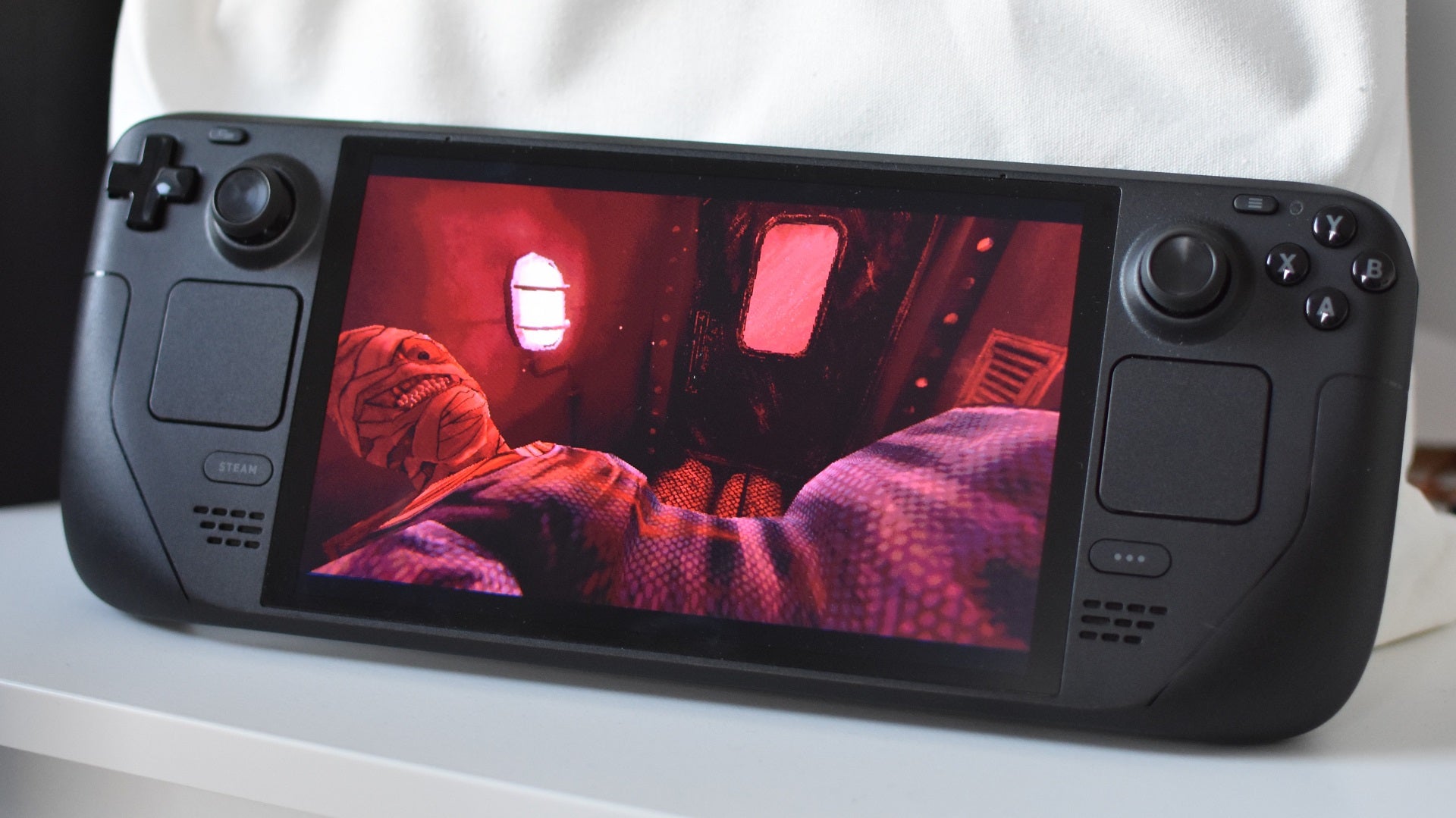
Image credit:Rock Paper Shotgun
Steam Deck OLED specs CPU/GPU: Custom AMD ‘Van Gogh’ APU RAM: 16GB LPDDR5 Storage: 512GB/1TB NVMe SSD Display: 7.4in, 1280x800, 90Hz OLED Ports: 1x USB-C, 1x 3.5mm, 1x microSD Dimensions: 298x117x50mm Weight: 640g
I’ve spent hundreds of hours testing (and close to a thousand quid on buying) handheld PCs, and the Steam Deck OLED is still my first choice of travel companion. It has everything that made the original, LCD-screen Steam Deck such a transformative success – the comfortable design, the surprising battery life, the absolute UX masterclass that is SteamOS – and makes almost everything slightly better. Sometimes, not even just slightly.
The display is the obvious upgrade, bringing lush colours and a higher refresh rate than on Valve’s first attempt. But this screen tech switcheroo has knock-on effects: because OLED panels are thinner, the whole device becomes lighter, and because it also uses less power than LCD, it’s more efficient too. The end result, thanks also to a refreshed processor, is that the Steam Deck OLED runs cooler, quieter, and with downright excellent battery-drain stamina. Stick to easygoing fare like Portal 2 or Hades 2 and this can last for nearly six hours, while even hyper-thirsty games like Elden Ring can keep going for more than two. With other handhelds, especially those on Windows, you’re lucky to get three hours even on the lighter stuff, and closer to one with the biggest drinkers.
Longevity isn’t everything, and it’s worth noting that an increasing number of recently-released games make graphical demands that are simply beyond the Steam Deck OLED’s abilities. Still, between the superior uptime, the smoothness of SteamOS, and little touches like the upgraded, grippier thumbsticks, I’ve never found any other handheld PC to simply feel as nice as this one. It knows its limits and plays to its strengths, tangibly more so than its rivals, and with the 512GB version starting at £459 / $549 it doesn’t even ask for much in return.
| MSI Claw 8 AI+ The best handheld PC for performance | 1TB - Check UK price / US price |
|---|

Image credit:Rock Paper Shotgun
MSI Claw 8 AI+ specs CPU/GPU: Intel Core Ultra 7 258V/Intel Arc 140V RAM: 32GB LPDDR5X Storage: 1TB NVMe SSD Display: 8in, 1920x1200, 120Hz IPS Ports: 2x USB-C, 1x 3.5mm, 1x microSD Dimensions: 299x126x24mm Weight: 795g
If the Steam Deck OLED was all about perfecting an already strong design, the MSI Claw 8 AI+ was more of a rescue mission, tasked with correcting the original Claw’s failings on performance, battery life, and connectivity. Still, it turned out so successfully that I’m now expecting to see the Claw 8 AI+ on the news, pulling Thai children out of a flooded cave.
Averaged out, this is in the books as the most powerful handheld PC I’ve tested; the Zotac Zone is as fast (or very, very slightly faster) in some games, but in others the Claw 8 AI+ trounces it. In Cyberpunk 2077 , for example, MSI’s handheld clocked 52fps on the ironically-named Steam Deck quality preset versus 38fps from the Zone, even with its higher native screen resolution of 1920x1200 providing more of a challenge than the Zotac’s 1080p display. The Steam Deck itself only produced 30fps on its 800p screen, further demonstrating the Claw 8 AI+’s muscle, and the latter can also stretch to running tough games – like Space Marine 2 – that both the Deck and Deck OLED simply cannot.
A hefty battery upgrade also helps keep this handheld from burning too bright, too fast. It’s no match for the Steam Deck OLED in lighter games – we’re talking 3h 22m in Portal 2, versus the Deck OLED’s 5h 48m – but then it did last for 2h 13m in Elden Ring, just one minute less than Valve’s superlative PC. Both results are very, very good by overall Windows 11 handheld standards, a category that frequently struggles with running out of juice.
This is one of the pricier devices on the market, so you should both expect and demand high performance. Happily, that’s exactly what the Claw 8 AI+ delivers.
| Steam Deck The best value handheld PC | 256GB - Check UK price / US price |
|---|
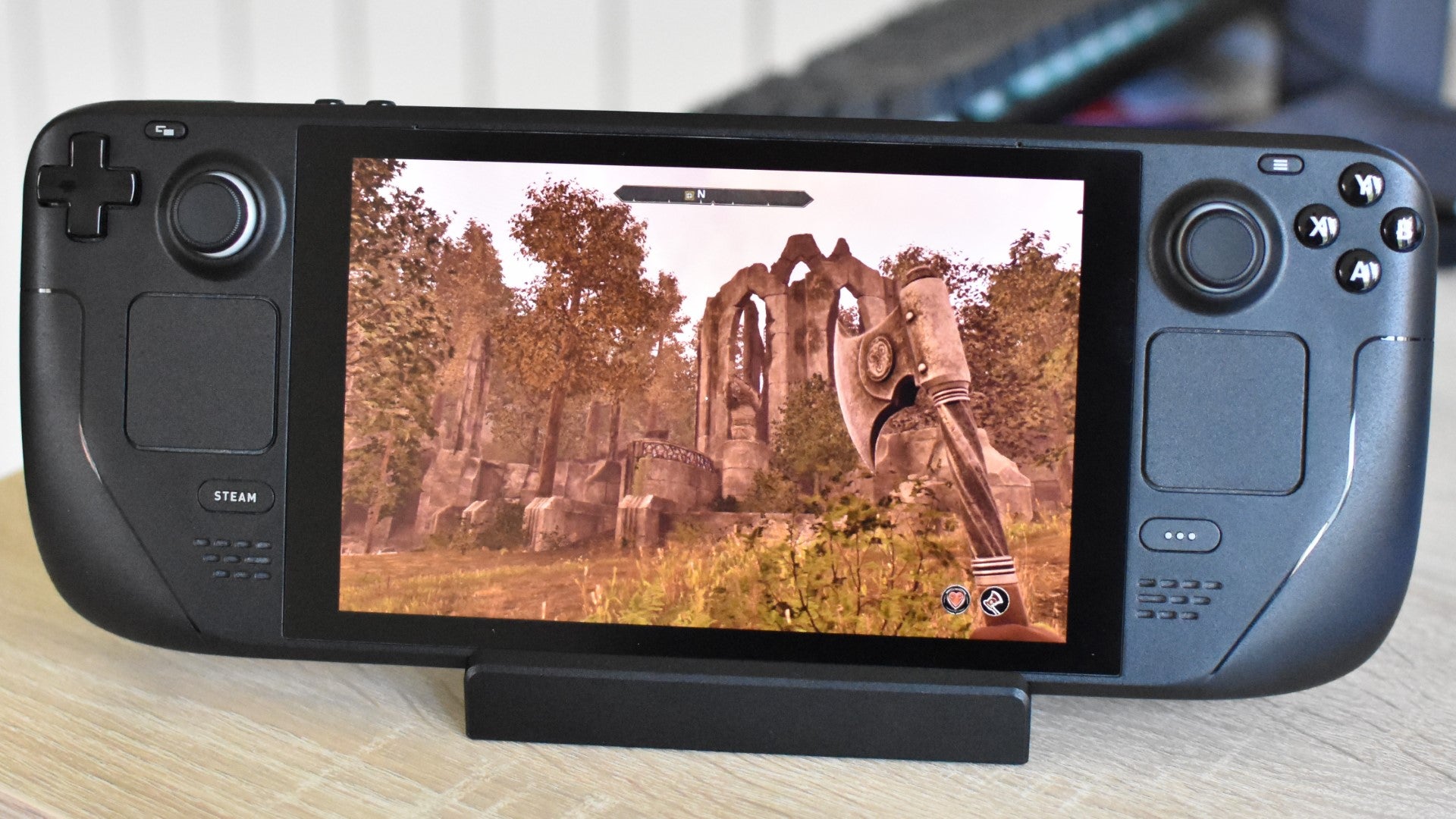
Image credit:Rock Paper Shotgun
Steam Deck specs CPU/GPU: Custom AMD ‘Van Gogh’ APU RAM: 16GB LPDDR5 Storage: 256GB NVMe SSD Display: 7in, 1280x800, 60Hz IPS Ports: 1x USB-C, 1x 3.5mm, 1x microSD Dimensions: 298x117x49mm Weight: 669g
While the absolute cheapest, 64GB-equipped Steam Deck has been chopped by Valve’s ornate discontinuing axe, the remaining 256GB model remains an outrageous bargain. £349 / $399 for a go-anywhere gaming PC that runs Forza Horizon 5 at 60fps and can, when juggling enough cables, transform into a workable desktop ? Mr. Newell, sir, you must take me for a fool. A fool, sir .
But nope, this bargain alarm is not a false one. Even if newer, shinier, pricier handhelds have overtaken the classic Deck on performance, this is still a comfy and reasonably long-lasting portable (5h 17m in RimWorld !) with enough horsepower for tens of thousands of games on Steam’s buckling shelves. Speaking of which, don’t underestimate SteamOS’ ability to get along with games outside of Valve’s own ecosystem, as it’s easy enough to install most non-Steam launchers , widening the Deck’s compatibility with your existing game library even further.
Granted, the Steam Deck’s position as king of the cheap handheld PCs is also partly down to a lack of other serious claimants. Lenovo has had a go with the Ryzen Z2 Go version of its Legion Go S, which outperforms the Deck in games while also offering a sharper 1200p screen, but its battery life disappoints and its fan noise irritates. Besides, the Legion Go S still only starts at £549, which is 1TB Steam Deck OLED money. That leaves the OG Deck as better value, in my book, especially since it also saves you some cash by bundling in a carry case.
| Asus ROG Ally X The best handheld PC for portability | 1TB - Check UK price / US price |
|---|

Image credit:Rock Paper Shotgun
Asus ROG Ally X specs CPU/GPU: AMD Ryzen Z1 Extreme APU RAM: 24GB LPDDR5X Storage: 1TB NVMe SSD Display: 7in, 1920x1080, 120Hz IPS Ports: 2x USB-C, 1x 3.5mm, 1x microSD Dimensions: 280x111x37mm Weight: 678g
Maybe a debateable one, this. What’s even the most important metric for measuring portability? Dimensions? The original Asus ROG Ally is nicely svelte, to be sure. Battery life? That does mean more time without needing to be shackled to a power supply, in which case you could give this one to the Steam Deck OLED as well. I think, however, it’s most sensible to balance the two, in which case we end up with the Asus ROG Ally X .
As balance often means compromise, this is not as thin as the original Ally, nor as long-lasting as the Deck OLED. But it is smaller overall than anything Valve has made, coming in almost two centimetres narrower than the slightly plank-like Deck, and it’s only gained some thickness because of a battery size upgrade that literally doubles the Ally’s full-to-empty time in games like GTA V and Forza Horizon 5. Marrying dinkiness to longevity is clearer harder than it looks, but the ROG Ally X manages it.
Performance-wise, this is bested by the newer MSI Claw 8 AI+ and Zotac Zone, but it’s noticeably lighter (and more compact) than both – winning this round of Handheld PC Top Trumps on portability once more. The only thing it’s really missing in this regard is a case in the box, though they’re easy enough to find elsewhere. I’m especially fond of the Dbrand Project Killswitch , which tightly wraps around the ROG Ally X, protecting it without adding as much bulk as a zip-up case.
| Lenovo Legion Go The best big-screen handheld PC | 512GB - Check UK price / US price 1TB - Check US price |
|---|
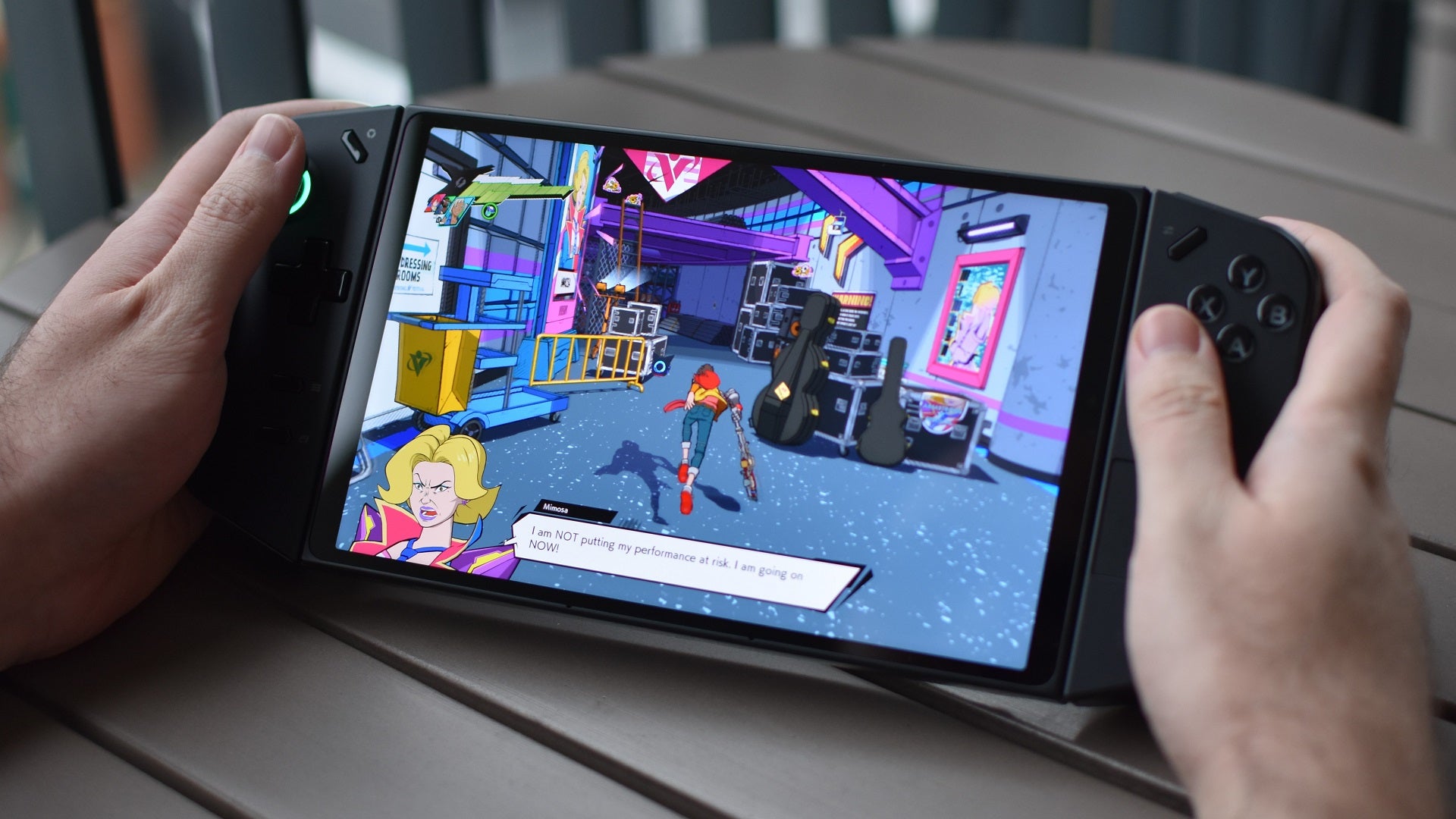
Image credit:Rock Paper Shotgun
Lenovo Legion Go specs CPU/GPU: AMD Ryzen Z1 Extreme RAM: 16GB LPDDR5 Storage: 512GB NVMe SSD Display: 8.8in, 2560x1600, 144Hz IPS Ports: 2 x USB-C, 1x 3.5mm, 1x microSD Dimensions: 299x131x41mm Weight: 854g
In some ways, the sprawling 8.8in IPS panel on the Lenovo Legion Go flies too close to the sun: its 2560x1600 resolution gives it a striking sharpness, but that’s also just too many pixels for the handheld-grade APU to supply with sufficient framerates. The inclusion of a 144Hz refresh rate seems, as a result, like wishful thinking.
Luckily, lowering to 1920x1200 still provides enough detail, permitting the Legion Go to blast that huge slab of LEDs into your face without doing a number on performance. The screen’s size also makes a lot more sense if you ever take advantage of the handheld’s party piece: detachable controllers, one of which functions like a little upright mouse for finer, more PC-like control in strategy and shooter games. Unless you have four hands, and most people don’t, that will mean using the main unit’s kickstand to sit the display on a desk or table, likely further away from your eyes than in a standard holding position and thus where greater dimensions make for less squinting.
It’s this ambitiousness, and this willingness to be weird, that makes the Legion Go a very likeable machine even with some occasionally peculiar specs. This isn’t just a Steam Deck or ROG Ally clone that’s harder to stuff in a bag: it’s a genuinely distinct, even unique alternative that wants to do its own thing, regardless of how niche of a thing that is. And yes, the screen is chuffin’ massive.

Image credit:Rock Paper Shotgun
Should I actually buy a handheld PC?
I mean, I like them. Handheld PCs are often compared to handheld consoles (namely the Switch and Switch 2), but as with any console, you’d typically invest in the latter because you want to play the specific games that have been built for it. Handheld PCs are different in that if you already play PC games on a laptop or desktop, you’ll have a compatible library ready to roll before you even peel the cellophane off. It’s therefore not just a matter of which games you like playing, but how you’d go about playing them.
Dense strategy games or immersion-focused sims, for example, are sadly less suited to handhelds, either because they aren’t a great fit for gamepad-styled controls or because the physical form factor makes it harder to maintain that plane flying/bus driving/train operating fantasy. But platformers, puzzlers, racers, RPGs, soulslikes? These can slip comfortably into portable PCs like a favourite set of jimjams. If you like these, there’s little about the handheld life that diminishes them.
As for how you like playing, that’s also up to you – maybe you just want something else to do on the bog. But the fact is that handhelds free your games from your usual desk, and without the bulk or weight of a gaming laptop crushing your thighs. Mid-commute entertainment is an obvious application, and personally, I sometimes just want to play something relaxed, without remaining bolt upright in the same chair where I work for seven hours a day. With that, it’s Steam Deck in hand and off to the sofa.
I wouldn’t go as far as to say you need a handheld PC, and I wouldn’t necessarily recommend them over and above a traditional desktop (unless you’re looking to enter PC gaming on the tiniest of budgets). But the experience is both a distinct and a worthwhile one, and I’m happy that handhelds have, for want of a less anatomically confused phrase, found their footing.
Is SteamOS or Windows better for handheld PCs?
The most oft-quoted advantage for Windows 11 as a handheld operating system is that it beats SteamOS on game compatibility. The latter is based on Linux, and although it uses compatibility software called Proton to support an impressively wide selection of games and game launchers, it is true that Windows will run more of what you’re used to playing on your desktop. Game Pass games, for instance, can only be installed and enjoyed locally with a Windows handheld; on SteamOS, your best hope is cloud-streaming them .
And yet, SteamOS is better at practically everything else. It’s far easier to navigate on a small handheld screen, owing to the fact that unlike Windows 11, it was designed for them. It’s less buggy. There’s no bloatware. It boots faster. Its gaming-specific features are more numerous, useful, and accessible, from a built-in performance monitor to on-the-fly controller customisation. The release of the Lenovo Legion Go S, the first handheld with full OS and driver support for both Windows and SteamOS, has even produced evidence that games simply run faster on Valve’s system, all other things being equal.
Considering that SteamOS can still launch and run loads of non-Steam games just fine, native Game Pass compatibility does seem like Windows’ only real advantage. It’s perhaps telling that for the incoming ROG Xbox Ally and ROG Xbox Ally, Microsoft themselves are producing a custom version that boots into a stripped-back, Xbox-branded environment where most of Windows 11’s non-gaming features are switched off. That would be a welcome performance boost if it works, though evidently the operating system’s cshortcomings are apparent even to the people that make it.
Can I open up and customise handheld PCs?
Yep. All the ones I’ve tried so far let you take a screwdriver, crack open the case, and fasten it back up, just like a good ol’ desktop. With the Steam Deck and Steam Deck OLED in particular, you can buy individual (and official) replacement parts to fit yourself, despite Valve frowning on this practice in the past.
Be warned, though, that it’s a much fiddlier process than working inside a desktop, largely because the internals are all so cramped together. So while it’s perfectly possible to, say, replace a Steam Deck’s SSD , it does require a lighter touch than just slotting a full-size NVMe stick into a spacious tower rig. For a lot of handheld PCs, opening the chassis will void the warranty too.
What are some good games for handheld PCs?
Dunno. Wait, no, I have a whole list of those ! It’s based on the Steam Deck, clearly, but in my experience, any game that plays or runs well on a Steam Deck will also work just dandily on similar handhelds. Usually with even better performance, unless you try cranking up the quality or resolution settings too high.
Rock Paper Shotgun is better when you sign in
Sign in and join us on our journey to discover strange and compelling PC games.

All 75 Arc Raiders Blueprints and where to get them
These areas have the highest chance of giving you Blueprints

Image credit:Rock Paper Shotgun/Embark Studios

Looking for more Arc Raiders Blueprints? It’s a special day when you find a Blueprint, as they’re among the most valuable items in Arc Raiders. If you find a Blueprint that you haven’t already found, then you must make sure you hold onto it at all costs, because Blueprints are the key to one of the most important and powerful systems of meta-progression in the game.
This guide aims to be the very best guide on Blueprints you can find, starting with a primer on what exactly they are and how they work in Arc Raiders, before delving into exactly where to get Blueprints and the very best farming spots for you to take in your search.
We’ll also go over how to get Blueprints from other unlikely activities, such as destroying Surveyors and completing specific quests. And you’ll also find the full list of all 75 Blueprints in Arc Raiders on this page (including the newest Blueprints added with the Cold Snap update , such as the Deadline Blueprint and Firework Box Blueprint), giving you all the information you need to expand your own crafting repertoire.
In this guide:
- What are Blueprints in Arc Raiders?
- Full Blueprint list: All crafting recipes
- Where to find Blueprints in Arc Raiders Blueprints obtained from quests Blueprints obtained from Trials Best Blueprint farming locations

What are Blueprints in Arc Raiders?
Blueprints in Arc Raiders are special items which, if you manage to extract with them, you can expend to permanently unlock a new crafting recipe in your Workshop. If you manage to extract from a raid with an Anvil Blueprint, for example, you can unlock the ability to craft your very own Anvil Pistol, as many times as you like (as long as you have the crafting materials).
To use a Blueprint, simply open your Inventory while in the lobby, then right-click on the Blueprint and click “Learn And Consume” . This will permanently unlock the recipe for that item in your Workshop. As of the Stella Montis update, there are allegedly 75 different Blueprints to unlock - although only 68 are confirmed to be in the game so far. You can see all the Blueprints you’ve found and unlocked by going to the Workshop menu, and hitting “R” to bring up the Blueprint screen.
It’s possible to find duplicates of past Blueprints you’ve already unlocked. If you find these, then you can either sell them, or - if you like to play with friends - you can take it into a match and gift it to your friend so they can unlock that recipe for themselves. Another option is to keep hold of them until the time comes to donate them to the Expedition.
Full Blueprint list: All crafting recipes
Below is the full list of all the Blueprints that are currently available to find in Arc Raiders, and the crafting recipe required for each item:
| Blueprint | Type | Recipe | Crafted At |
|---|---|---|---|
| Bettina | Weapon | 3x Advanced Mechanical Components 3x Heavy Gun Parts 3x Canister | Gunsmith 3 |
| Blue Light Stick | Quick Use | 3x Chemicals | Utility Station 1 |
| Aphelion | Weapon | 3x Magnetic Accelerator 3x Complex Gun Parts 1x Matriarch Reactor | Gunsmith 3 |
| Combat Mk. 3 (Flanking) | Augment | 2x Advanced Electrical Components 3x Processor | Gear Bench 3 |
| Combat Mk. 3 (Aggressive) | Augment | 2x Advanced Electrical Components 3x Processor | Gear Bench 3 |
| Complex Gun Parts | Material | 2x Light Gun Parts 2x Medium Gun Parts 2x Heavy Gun Parts | Refiner 3 |
| Fireworks Box | Quick Use | 1x Explosive Compound 3x Pop Trigger | Explosives Station 2 |
| Gas Mine | Mine | 4x Chemicals 2x Rubber Parts | Explosives Station 1 |
| Green Light Stick | Quick Use | 3x Chemicals | Utility Station 1 |
| Pulse Mine | Mine | 1x Crude Explosives 1x Wires | Explosives Station 1 |
| Seeker Grenade | Grenade | 1x Crude Explosives 2x ARC Alloy | Explosives Station 1 |
| Looting Mk. 3 (Survivor) | Augment | 2x Advanced Electrical Components 3x Processor | Gear Bench 3 |
| Angled Grip II | Mod | 2x Mechanical Components 3x Duct Tape | Gunsmith 2 |
| Angled Grip III | Mod | 2x Mod Components 5x Duct Tape | Gunsmith 3 |
| Hullcracker | Weapon | 1x Magnetic Accelerator 3x Heavy Gun Parts 1x Exodus Modules | Gunsmith 3 |
| Launcher Ammo | Ammo | 5x Metal Parts 1x Crude Explosives | Workbench 1 |
| Anvil | Weapon | 5x Mechanical Components 5x Simple Gun Parts | Gunsmith 2 |
| Anvil Splitter | Mod | 2x Mod Components 3x Processor | Gunsmith 3 |
| ??? | ??? | ??? | ??? |
| Barricade Kit | Quick Use | 1x Mechanical Components | Utility Station 2 |
| Blaze Grenade | Grenade | 1x Explosive Compound 2x Oil | Explosives Station 3 |
| Bobcat | Weapon | 3x Advanced Mechanical Components 3x Light Gun Parts | Gunsmith 3 |
| Osprey | Weapon | 2x Advanced Mechanical Components 3x Medium Gun Parts 7x Wires | Gunsmith 3 |
| Burletta | Weapon | 3x Mechanical Components 3x Simple Gun Parts | Gunsmith 1 |
| Compensator II | Mod | 2x Mechanical Components 4x Wires | Gunsmith 2 |
| Compensator III | Mod | 2x Mod Components 8x Wires | Gunsmith 3 |
| Defibrillator | Quick Use | 9x Plastic Parts 1x Moss | Medical Lab 2 |
| ??? | ??? | ??? | ??? |
| Equalizer | Weapon | 3x Magnetic Accelerator 3x Complex Gun Parts 1x Queen Reactor | Gunsmith 3 |
| Extended Barrel | Mod | 2x Mod Components 8x Wires | Gunsmith 3 |
| Extended Light Mag II | Mod | 2x Mechanical Components 3x Steel Spring | Gunsmith 2 |
| Extended Light Mag III | Mod | 2x Mod Components 5x Steel Spring | Gunsmith 3 |
| Extended Medium Mag II | Mod | 2x Mechanical Components 3x Steel Spring | Gunsmith 2 |
| Extended Medium Mag III | Mod | 2x Mod Components 5x Steel Spring | Gunsmith 3 |
| Extended Shotgun Mag II | Mod | 2x Mechanical Components 3x Steel Spring | Gunsmith 2 |
| Extended Shotgun Mag III | Mod | 2x Mod Components 5x Steel Spring | Gunsmith 3 |
| Remote Raider Flare | Quick Use | 2x Chemicals 4x Rubber Parts | Utility Station 1 |
| Heavy Gun Parts | Material | 4x Simple Gun Parts | Refiner 2 |
| Venator | Weapon | 2x Advanced Mechanical Components 3x Medium Gun Parts 5x Magnet | Gunsmith 3 |
| Il Toro | Weapon | 5x Mechanical Components 6x Simple Gun Parts | Gunsmith 1 |
| Jolt Mine | Mine | 1x Electrical Components 1x Battery | Explosives Station 2 |
| Explosive Mine | Mine | 1x Explosive Compound 1x Sensors | Explosives Station 3 |
| Jupiter | Weapon | 3x Magnetic Accelerator 3x Complex Gun Parts 1x Queen Reactor | Gunsmith 3 |
| Light Gun Parts | Material | 4x Simple Gun Parts | Refiner 2 |
| Lightweight Stock | Mod | 2x Mod Components 5x Duct Tape | Gunsmith 3 |
| Lure Grenade | Grenade | 1x Speaker Component 1x Electrical Components | Utility Station 2 |
| Medium Gun Parts | Material | 4x Simple Gun Parts | Refiner 2 |
| Torrente | Weapon | 2x Advanced Mechanical Components 3x Medium Gun Parts 6x Steel Spring | Gunsmith 3 |
| Muzzle Brake II | Mod | 2x Mechanical Components 4x Wires | Gunsmith 2 |
| Muzzle Brake III | Mod | 2x Mod Components 8x Wires | Gunsmith 3 |
| Padded Stock | Mod | 2x Mod Components 5x Duct Tape | Gunsmith 3 |
| Shotgun Choke II | Mod | 2x Mechanical Components 4x Wires | Gunsmith 2 |
| Shotgun Choke III | Mod | 2x Mod Components 8x Wires | Gunsmith 3 |
| Shotgun Silencer | Mod | 2x Mod Components 8x Wires | Gunsmith 3 |
| Showstopper | Grenade | 1x Advanced Electrical Components 1x Voltage Converter | Explosives Station 3 |
| Silencer I | Mod | 2x Mechanical Components 4x Wires | Gunsmith 2 |
| Silencer II | Mod | 2x Mod Components 8x Wires | Gunsmith 3 |
| Snap Hook | Quick Use | 2x Power Rod 3x Rope 1x Exodus Modules | Utility Station 3 |
| Stable Stock II | Mod | 2x Mechanical Components 3x Duct Tape | Gunsmith 2 |
| Stable Stock III | Mod | 2x Mod Components 5x Duct Tape | Gunsmith 3 |
| Tagging Grenade | Grenade | 1x Electrical Components 1x Sensors | Utility Station 3 |
| Tempest | Weapon | 3x Advanced Mechanical Components 3x Medium Gun Parts 3x Canister | Gunsmith 3 |
| Trigger Nade | Grenade | 2x Crude Explosives 1x Processor | Explosives Station 2 |
| Vertical Grip II | Mod | 2x Mechanical Components 3x Duct Tape | Gunsmith 2 |
| Vertical Grip III | Mod | 2x Mod Components 5x Duct Tape | Gunsmith 3 |
| Vita Shot | Quick Use | 2x Antiseptic 1x Syringe | Medical Lab 3 |
| Vita Spray | Quick Use | 3x Antiseptic 1x Canister | Medical Lab 3 |
| Vulcano | Weapon | 1x Magnetic Accelerator 3x Heavy Gun Parts 1x Exodus Modules | Gunsmith 3 |
| Wolfpack | Grenade | 2x Explosive Compound 2x Sensors | Explosives Station 3 |
| Red Light Stick | Quick Use | 3x Chemicals | Utility Station 1 |
| Smoke Grenade | Grenade | 14x Chemicals 1x Canister | Utility Station 2 |
| Deadline | Mine | 3x Explosive Compound 2x ARC Circuitry | Explosives Station 3 |
| Trailblazer | Grenade | 1x Explosive Compound 1x Synthesized Fuel | Explosives Station 3 |
| Tactical Mk. 3 (Defensive) | Augment | 2x Advanced Electrical Components 3x Processor | Gear Bench 3 |
| Tactical Mk. 3 (Healing) | Augment | 2x Advanced Electrical Components 3x Processor | Gear Bench 3 |
| Yellow Light Stick | Quick Use | 3x Chemicals | Utility Station 1 |
Note: The missing Blueprints in this list likely have not actually been added to the game at the time of writing, because none of the playerbase has managed to find any of them. As they are added to the game, I will update this page with the most relevant information so you know exactly how to get all 75 Arc Raiders Blueprints.
Where to find Blueprints in Arc Raiders
Below is a list of all containers, modifiers, and events which maximise your chances of finding Blueprints:
- Certain quests reward you with specific Blueprints .
- Completing Trials has a high chance of offering Blueprints as rewards.
- Surveyors have a decent chance of dropping Blueprints on death.
- High loot value areas tend to have a greater chance of spawning Blueprints.
- Night Raids and Storms may increase rare Blueprint spawn chances in containers.
- Containers with higher numbers of items may have a higher tendency to spawn Blueprints. As a result, Blue Gate (which has many “large” containers containing multiple items) may give you a higher chance of spawning Blueprints.
- Raider containers (Raider Caches, Weapon Boxes, Medical Bags, Grenade Tubes) have increased Blueprint drop rates. As a result, the Uncovered Caches event gives you a high chance of finding Blueprints.
- Security Lockers have a higher than average chance of containing Blueprints.
- Certain Blueprints only seem to spawn under specific circumstances: Tempest Blueprint only spawns during Night Raid events. Vulcano Blueprint only spawns during Hidden Bunker events. Jupiter and Equaliser Blueprints only spawn during Harvester events.

Raider Caches, Weapon Boxes, and other raider-oriented container types have a good chance of offering Blueprints. |Image credit:Rock Paper Shotgun/Embark Studios
Blueprints have a very low chance of spawning in any container in Arc Raiders, around 1-2% on average. However, there is a higher chance of finding Blueprints in particular container types. Specifically, you can find more Blueprints in Raider containers and security lockers.
Beyond this, if you’re looking for Blueprints you should focus on regions of the map which are marked as having particularly high-value loot. Areas such as the Control Tower in Dam Battlegrounds, the Arrival and Departure Buildings in Spaceport, and Pilgrim’s Peak in Blue Gate all have a better-than-average chance of spawning Blueprints somewhere amongst all their containers. Night Raids and Electromagnetic Storm events also increase the drop chances of certain Blueprints .
In addition to these containers, you can often loot Blueprints from destroyed Surveyors - the largest of the rolling ball ARC. Surveyors are more commonly found on the later maps - Spaceport and Blue Gate - and if one spawns in your match, you’ll likely see it by the blue laser beam that it casts into the sky while “surveying”.
Surveyors are quite well-armoured and will very speedily run away from you once it notices you, but if you can take one down then make sure you loot all its parts for a chance of obtaining certain unusual Blueprints.
Blueprints obtained from quests
One way in which you can get Blueprints is by completing certain quests for the vendors in Speranza. Some quests will reward you with a specific item Blueprint upon completion, so as long as you work through all the quests in Arc Raiders, you are guaranteed those Blueprints.
Here is the full list of all Blueprints you can get from quest rewards:
- Trigger Nade Blueprint: Rewarded after completing “Sparks Fly”.
- Lure Grenade Blueprint: Rewarded after completing “Greasing Her Palms”.
- Burletta Blueprint: Rewarded after completing “Industrial Espionage”.
- Hullcracker Blueprint (and Launcher Ammo Blueprint): Rewarded after completing “The Major’s Footlocker”.
Alas, that’s only 4 Blueprints out of a total of 75 to unlock, so for the vast majority you will need to find them yourself during a raid. If you’re intent on farming Blueprints, then it’s best to equip yourself with cheap gear in case you lose it, but don’t use a free loadout because then you won’t get a safe pocket to stash any new Blueprint you find. No pain in Arc Raiders is sharper than failing to extract with a new Blueprint you’ve been after for a dozen hours already.

One of the best ways to get Blueprints is by hitting three stars on all five Trials every week. |Image credit:Rock Paper Shotgun/Embark Studios
Blueprints obtained from Trials
One of the very best ways to get Blueprints is as rewards for completing Trials in Arc Raiders. Trials are unlocked from Level 15 onwards, and allow you to earn rewards by focusing on certain tasks over the course of several raids. For example, one Trial might task you with dealing damage to Hornets, while another might challenge you to loot Supply Drops.
Trials refresh on a weekly basis, with a new week bringing five new Trials. Each Trial can offer up to three rewards after passing certain score milestones, and it’s possible to receive very high level loot from these reward crates - including Blueprints. So if you want to unlock as many Blueprints as possible, you should make a point of completing as many Trials as possible each week.
Best Blueprint farming locations
The very best way to get Blueprints is to frequent specific areas of the maps which combine high-tier loot pools with the right types of containers to search. Here are my recommendations for where to find Blueprints on every map, so you can always keep the search going for new crafting recipes to unlock.

Image credit:Rock Paper Shotgun/Embark Studios
Dam Battlegrounds
The best places to farm Blueprints on Dam Battlegrounds are the Control Tower, Power Generation Complex, Ruby Residence, and Pale Apartments . The first two regions, despite only being marked on the map as mid-tier loot, contain a phenomenal number of containers to loot. The Control Tower can also contain a couple of high-tier Security Lockers - though of course, you’ll need to have unlocked the Security Breach skill at the end of the Survival tree.
There’s also a lot of reporting amongst the playerbase that the Residential areas in the top-left of the map - Pale Apartments and Ruby Residence - give you a comparatively strong chance of finding Blueprints. Considering their size, there’s a high density of containers to loot in both locations, and they also have the benefit of being fairly out of the way. So you’re more likely to have all the containers to yourself.
Buried City
The best Blueprint farming locations on Buried City are the Santa Maria Houses, Grandioso Apartments, Town Hall, and the various buildings of the New District . Grandioso Apartments has a lower number of containers than the rest, but a high chance of spawning weapon cases - which have good Blueprint drop rates. The others are high-tier loot areas, with plenty of lootable containers - including Security Lockers.
Spaceport
The best places to find Blueprints on Spaceport are the Arrival and Departure Buildings, as well as Control Tower A6 and the Launch Towers . All these areas are labelled as high-value loot regions, and many of them are also very handily connected to one another by the Spaceport wall, which you can use to quickly run from one area to the next. At the tops of most of these buildings you’ll find at least one Security Locker, so this is an excellent farming route for players looking to find Blueprints.
The downside to looting Blueprints on Spaceport is that all these areas are hotly contested, particularly in Duos and Squads. You’ll need to be very focused and fast in order to complete the full farming route.

Image credit:Rock Paper Shotgun/Embark Studios
Blue Gate
Blue Gate tends to have a good chance of dropping Blueprints, potentially because it generally has a high number of containers which can hold lots of items; so there’s a higher chance of a Blueprint spawning in each container. In my experience, the best Blueprint farming spots on Blue Gate are Pilgrim’s Peak, Raider’s Refuge, the Ancient Fort, and the Underground Complex beneath the Warehouse .
All of these areas contain a wealth of containers to loot. Raider’s Refuge has less to loot, but the majority of the containers in and around the Refuge are raider containers, which have a high chance of containing Blueprints - particularly during major events.
Stella Montis
On the whole, Stella Montis seems to have a very low drop rate for Blueprints (though a high chance of dropping other high-tier loot). If you do want to try farming Blueprints on this map, the best places to find Blueprints in Stella Montis are Medical Research, Assembly Workshop, and the Business Center . These areas have the highest density of containers to loot on the map.
In addition to this, the Western Tunnel has a few different Security Lockers to loot, so while there’s very little to loot elsewhere in this area of the map, it’s worth hitting those Security Lockers if you spawn there at the start of a match.
That wraps up this primer on how to get all the Blueprints in Arc Raiders as quickly as possible. With the Expedition system constantly resetting a large number of players’ Blueprints, it’s more important than ever to have the most up-to-date information on where to find all these Blueprints.
While you’re here, be sure to check out our Arc Raiders best guns tier list , as well as our primers on the best skills to unlock and all the different Field Depot locations on every map.

ARC Raiders
PS5 , Xbox Series X/S , PC
Rock Paper Shotgun is better when you sign in
Sign in and join us on our journey to discover strange and compelling PC games.
