Sons Of The Forest console commands: How to activate cheatstick console commands and cheats
Learn how to use console commands and cheats in Sons Of The Forest

Image credit:Rock Paper Shotgun/Endnight Games

Want a full Sons Of The Forest console commands and cheats list? With Sons Of The Forest console commands you can turn the spooky survival crafting game into a cakewalk. With the game out of early access, now is the perfect time to get stuck in and experiment with cheats to make the game even more goofy (amidst the horror , of course).
Below we’ve listed all known Sons Of The Forest console commands and cheats to allow you to activate godmode , create multiple Kelvin and Virginia companions and even gain access to the best weapons and armor in the game through item ID codes .
With these, you should be able to storm your way through the cannibalistic island. Read on for all console commands, ID codes and a rundown of how to use them in the game.
In this guide:
- How to use console commands in Sons Of The Forest
- Best Sons Of The Forest console commands
- Sons Of The Forest Item ID list
- All Sons Of The Forest console commands
Looking for ways to survive your first few days in Sons of the Forest? Watch the video above for 15 essential tips.Watch on YouTube
How to use console commands in Sons Of The Forest
To use console commands in Sons Of The Forest, follow these key steps:
- Load up a save, enter the word " cheatstick " (without the quotation marks)
- Press the F1 key. Simply enter “cheatstick” in the normal game, unpaused. Your character might move a bit, but it’ll still trigger.
- If you do this correctly, pressing F1 will bring up a dev console command menu with a huge list of cheats attached.
- From there, simply enter the cheat that you want to use and press the ENTER key.
That’s all there is to it - you can now use Sons Of The Forest console commands and cheats.

Image of all the console commands in Sons Of The Forest |Image credit:Rock Paper Shotgun
Best Sons Of The Forest console commands
Here’s a list of the Sons Of The Forest best console commands that are sure to make your time on the cannibal island a tad easier. This includes the best of the bunch, but see our complete list of all Sons Of The Forest console commands further down this guide too.
| Type | Command | Description |
|---|---|---|
| Player | addallitems | Adds a full stack of every item into your inventory. |
| Player | addallstoryitems | Adds items that are necessary for the story to your inventory. |
| Player | additem [item name] | Adds the specified item to your inventory. |
| Player | additemswithtag [item tag] | Adds an item with the specified tag to your inventory. |
| Player | godmode [on/off] | Enables/disables godmode, making you invincible and giving max health, hunger, hydration, and energy. |
| Player | speedyrun [on/off] | Allows you to run at much higher speed than normal. |
| Player | superjump [on/off] | Allows you to jump higher than usual when enabled. |
| Player | instantbookbuild [on/off] | Allows you to instantly build anything when selected in the build book. |
| Player | setplayerrace [number] | Changes the skin colour of the player character. |
| Player | gotocoords [X number] [Z number] [Y number] | Spawn at the set coordinates. |
| World | addcharacter robby [number] | Spawns the defined number of Kelvins into the game. |
| World | addcharacter virginia [number] | Spawns the defined number of Virginias into the game. |
| World | aiangerlevel [number] | Changes the anger level of all AI. |
| World | aianimspeed [number] | Changes the animation speed of all AI (1 is default, so 10 is super fast and 0.1 is super slow). |
| World | aiarmorlevel [number] | Changes the amount of protection that AI have. |
| World | aidisable [on/off] | Adds/removes all AI from the game. |
| World | aidummy [on/off] | Makes AI un/aware of your presence. |
| World | aigodmode [on/off] | Turns AI invincible. |
| World | aipause [on/off] | Pauses all AI instantly (will turn off if you pause the game). |
| World | animalsenabled [on/off] | Removes all animals when toggled on. |
| World | spawnitem [item tag number] [number of item to spawn] | Spawns a specified amount of the specified item. |
| World | spawnitem 78 50 | Spawns 50 logs. |
| World | spawnitem 362 50 | Spawns 50 cases of Pistol Ammo. |
| World | spawnitem 363 50 | Spawns 50 cases of Shotgun Slugs. |
| World | spawnitem 364 50 | Spawns 50 cases of Buckshot Shotgun Shells. |
| World | spawnitem 369 50 | Spawns 50 cases of Stun Gun ammo. |
| World | settimeofday [number between 1 and 24] | Set the time of day. |
| World | treescutall [on/off] | Cuts all trees around the player, useful if you want to clear space for a base. |
| System | airadar [on/off] | Creates a box at the feet of every AI, displaying their distance from the player. |
| System | aishowdebugcamera [on/off] | Moves your camera position away from your character’s perspective. |
| System | aishowstats [on/off] | Creates a box at the feet of every AI, displaying their general anger, fear, and energy stats. |
| System | aishowsurvivalstats [on/off] | Creates a box at the feet of AI, displaying their fullness, hydration, and energy stats. |
| System | aistatadjust [stat] [+/- number] | Allows you to change the individual stats of an AI. |
| System | aivillageclosest [on/off] | Creates a box displaying the distance and direction of the nearest village to the player. |
| System | aiworldeventstats [on/off] | Displays a box in the top-left showing cannibal anger, the time of day, and other world events. |
| System | aiworldstats [on/off] | Displays a box in the top-left showing stats of cannibals, animals, and other AI throughout the world. |
| System | aizonestats [on/off] | Displays a box in the top-left showing stats of cannibals, animals, and other AI throughout your current zone. |
| System | showfps [on/off] | Shows your FPS count in the top-right corner. |
| System | showhud [on/off] | Toggles the HUD on and off. |
| System | showui [on/off] | Toggles the UI on and off. |
Sons Of The Forest Item ID list: How to spawn items
If you simply want to spawn every item in the game, you can do so with the addallitems command. However, if you want to spawn a specific item into your inventory, you’ll need to specify the item that you want. This is written as:
additem [item name]
Note that you’ll need to remove the square brackets , and type the item name as one word , without any spaces.
You can also add items to your game through item IDs . Each Sons Of The Forest item has a unique ID code. With this, you can add the item to your inventory by adjusting the game’s source code and inputting the exact amount of the item you want. To do so:
- Enter your SonsOfTheForest\Saves\ folder.
- Open the folder with 17 digits .
- Open either the Single Player or Multiplayer folder, whichever you are playing.
- Click on the folder containing your most recent save file. (We suggest making a copy of your save before tampering with cheats).
- Look for the PlayerInventorySaveData file and open it in Notepad.
- Input the following sequence: {"ItemId":XXX,"TotalCount":X,"UniqueItems":[]},
- Make sure you replace the ’ XXX ’ with the item ID of the item you wish to spawn into your inventory. Likewise, replace the ’ X ’ with the quantity of the item you want.
Below we’ve included an item ID list of all Sons Of The Forest items. With these, you should be able to spawn weapons and armor like the Pistol and Golden Armor without needing to traipse through cannibal-infested caves. You’ll also be able to spawn tools like the Rope Gun or Shovel with ultimate ease.
| Item | Item ID |
|---|---|
| Alcohol | 414 |
| Aloe Vera | 451 |
| Air Canister | 469 |
| Backpack | 402 |
| Battery | 527 |
| Blueprint Book | 552 |
| Bone Armor | 494 |
| Buckshot | 364 |
| Canned Food | 434 |
| Cash | 496 |
| Chainsaw | 394 |
| Cloth | 415 |
| Cooking Pot | 517 |
| Crafted Spear | 474 |
| Creepy Armor | 593 |
| Cross | 468 |
| Crossbow | 365 |
| Crossbow Bolt | 368 |
| Duct Tape | 419 |
| Emergency Pack | 483 |
| Energy Drink | 439 |
| Energy Bar | 441 |
| Energy Mix | 461 |
| Energy Mix + | 462 |
| Feather | 479 |
| Fish | 436 |
| Flare | 440 |
| Flashlight | 471 |
| Flask | 426 |
| Food Tray | 512 |
| Frag Grenade | 381 |
| Golden Armor | 572 |
| GPS Locator | 529 |
| GPS Tracker | 412 |
| Grab Bag | 351 |
| Grappling Hook | 560 |
| Guest Keycard | 526 |
| Guide Book | 589 |
| Health Mix | 455 |
| Health Mix + | 456 |
| Hide Armor | 519 |
| Knife | 380 |
| Leaf | 484 |
| Leaf Armor | 473 |
| Loot Pouch | 508 |
| Log | 78 |
| Maintenance Keycard | 566 |
| Medium Rock | 506 |
| Modern Arrow | 373 |
| Molotovs | 388 |
| MRE Snack Rations | 438 |
| Noodles | 421 |
| Pistol | 355 |
| Pistol ammo | 362 |
| Pistol Silencer | 374 |
| Plasma Lighter | 413 |
| Printer Arrow | 618 |
| Printer Resin | 390 |
| Radio | 590 |
| Raw Meat | 433 |
| Rebreather | 444 |
| Revolver | 386 |
| Rock | 393 |
| Rope | 403 |
| Rope Gun | 522 |
| Severed Arm | 480 |
| Severed Leg | 481 |
| Shotgun | 358 |
| Skin Pouch | 508 |
| Skull | 430 |
| Sled | 428 |
| Slug | 363 |
| Small Rock | 476 |
| Stick | 392 |
| Stone Arrow | 507 |
| Stun Gun | 353 |
| Stun Gun Ammo | 369 |
| Swimsuit | 619 |
| Tactical Axe | 379 |
| Tarp | 504 |
| Tech Armor | 554 |
| Tech Mesh | 553 |
| Torch | 503 |
| Turtle Shell | 506 |
| VIP Keycard | 568 |
| Walkie Talkie | 486 |
| Wristwatch | 410 |
| Zipline Rope | 523 |
All Sons Of The Forest console commands and cheats listed
Here’s a full list of all console commands and cheats that you can use in Sons Of The Forest, in alphabetical order. Remember to consult our above section on how to use console commands , if you get stuck.
| Command |
|---|
| addallbookpages |
| addallitems |
| addallstoryitems |
| addcharacter |
| additem |
| additemswithtag |
| addmemory |
| addprefab |
| addvirginia |
| aiangerlevel |
| aianimspeed |
| aiarmorlevel |
| aiarmortier |
| aidisable |
| aidodgetest |
| aidummy |
| aiforcestrafe |
| aighostplayer |
| aigodmode |
| aijumpdebug |
| aiknockdowndisable |
| aimemoryadjust |
| aipause |
| aipoolstats |
| airadar |
| airnworldevent |
| aishowanims |
| aishowdebug |
| aishowdebugcamera |
| aishoweventmemory |
| aishowhealth |
| aishownavgraph |
| aishowpaths |
| aishowplayerinfluences |
| aishowstats |
| aishowsurvivalstats |
| aishowthoughts |
| aistatadjust |
| aistructurelog |
| aitestsleeo |
| aithought |
| aithoughtnocooldown |
| aivailstats |
| aiverboselog |
| aivillageclosest |
| aiworldeventstats |
| aiworldstats |
| aizonestats |
| allowasync |
| ammohack |
| animallimitmult |
| animalsenabled |
| animstatesgui |
| anisoenabled |
| anisominmax |
| applydefaultmaterials |
| areashadow |
| astar |
| audio2dtest |
| audiodebug |
| audiodebugstates |
| audiodescription |
| audioparameter |
| audioplayevent |
| billboardenabled |
| billboardignorechanges |
| blockplayerfinaldeath |
| breakobjects |
| buffstats |
| buildermode |
| buildhack |
| cameradlss |
| camerafov |
| capsulemode |
| cavelight |
| characterlods |
| checkattechedentities |
| checkexitmenu |
| checkfrozenentities |
| clear |
| clearallsettings |
| clearaudioparameters |
| clearbushradius |
| clearmidactionflag |
| cloudenable |
| cloudfactor |
| cloudshadowsenable |
| combatteststart |
| count |
| countgowithlayer |
| countlinkedstructures |
| counttag |
| createlight |
| creepyvillage |
| crouchtoggle |
| damgedebug |
| damagefreeformstructure |
| deathcount |
| debugplayerhitlog |
| debugplayermelee |
| demomode |
| destroy |
| destroyfreeformstructure |
| destroyragdoll |
| destroywildcard |
| diagrenderers |
| diggingclear |
| disablecomponent |
| disablegameobjecttester |
| disablego |
| disablegowildcard |
| disablescene |
| disconnectplayer |
| disconnectplayers |
| dismemberradius |
| dumplobbyinfo |
| duplicateobject |
| dynamicresolutioncycletest |
| dynamicresolutionoverride |
| dynamicresolutiontarget |
| enablecheats |
| enablecollisionbasedkillbox |
| enablecomponent |
| enablego |
| enablescene |
| enablestructureghosts |
| energyhack |
| exportlinkedstructurestojson |
| exposuresetspeed |
| filteraudio |
| findobjectswithshader |
| firstlookforce |
| follow |
| followstop |
| footstepdebug |
| forcecloud |
| forcecloudprofile |
| forceplayerexpression |
| forcerain |
| forceremovetrees |
| freecamera |
| gainstrength |
| gameoverdelaytime |
| gamepaddeadzone |
| gamepadxsensitivity |
| gamepadysensitivity |
| gccollect |
| getgamemode |
| getlayerculldistance |
| godmode |
| goto |
| gotocoords |
| gotoforce |
| gototag |
| gotozone |
| grabsgeneratebuilt |
| gravity |
| greebledrockscollision |
| heallocalplayer |
| help |
| hideworldposfor |
| hitlocalplayer |
| igniteradius |
| importlinkedstructuresfromfile |
| inspectgo |
| instantbookbuild |
| instantrespawnhere |
| invertlook |
| invisible |
| joinsteamlobby |
| jumptimeofday |
| kickplayers |
| killlocalplayer |
| killradius |
| knockdownlocalplayer |
| lightninghittreechance |
| lightninghittreemustbeinfrontplayer |
| lightninginterval |
| listachievements |
| listactiveentities |
| listdeathmarkers |
| listgowithlayer |
| listitems |
| listitemswithtags |
| listobjects |
| loaddebugconsolemod |
| loadmacros |
| loadplayer |
| loadscene |
| loadscenesingle |
| locktimeofday |
| loddebugmaterials |
| loddebugranges |
| lodforce2ddistance |
| lodforce3ddistance |
| logging |
| loghack |
| logshowerrors |
| logshowinfo |
| logshownone |
| logshowwarnings |
| logtextures |
| logvirtual |
| mipmapstreamingbudget |
| mipmapstreamingdiscard |
| mousexsensitivity |
| mouseysensitivity |
| navgraphforceupdate |
| netanimator |
| netskinnedbones |
| netspawnplayer |
| openmacrosfolder |
| outputsnappointstofile |
| physicsupdatetime |
| playcutscene |
| playdeathcutscene |
| playdeathmarker |
| playdeathmarker |
| playeranimparams |
| playerdebugcamera |
| playerinterruptedkeys |
| playernetanimator |
| playervisibility |
| playgameover |
| postprocessingcomponent |
| profilersample |
| profilersnapshot |
| qualitytexture |
| radiodebug |
| refillcontainers |
| refreshentities |
| regenhealth |
| removeallitems |
| removeallstoryitems |
| removedead |
| removeitem |
| removeliving |
| removeshader |
| renderspheres |
| replaceshader |
| reporterrorsnow |
| reportlogsnow |
| reportwarningsnow |
| resetachievement |
| resetallachievements |
| resetinputaes |
| resetsettings |
| revivelocalplayer |
| robbycarry |
| robbyincutscenes |
| rumbletest |
| save |
| saveplayer |
| season |
| sendmessageto |
| setcurrentday |
| setdifficultymode |
| setexitedendgame |
| setgamemode |
| setgamesetupsetting |
| setgametimespeed |
| setinventorypercent |
| setlayerculldistance |
| setlookrotation |
| setopeningcrash |
| setplayerrace |
| setproperty |
| setsetting |
| setspeakermode |
| setstat |
| setstrengthlevel |
| settimeofday |
| setwindintensity |
| setworldobjectstaterange |
| showactivelights |
| showbutterflyinfo |
| showcollisionobjectnames |
| showdebugzones |
| showfps |
| showhud |
| showinworldui |
| showmeshmaterialnames |
| showmeshobjectnames |
| showmeshtrianglecounts |
| showobjectlocation |
| showprojectiletraits |
| showstimuli |
| showtriggercollision |
| showui |
| showworldobjects |
| showworldposfor |
| slapchap |
| spawnedobjectstats |
| spawnfallingtree |
| spawnitem |
| spawnpickup |
| spawnrenderspheres |
| spawnworldobject |
| speedyrun |
| sprinttoggle |
| superjump |
| survival |
| targetframerate |
| terrainparallax |
| terrainpixelerror |
| terrainrender |
| terrainrendersimple |
| terraintess |
| terraintessdist |
| testeventmask |
| testingsamplefps |
| timeofdayconnectiondebug |
| timeofdaydebug |
| timescale |
| togglebeamdebug |
| togglefiredebug |
| togglefpsdisplay |
| togglego |
| togglegrabberdebug |
| togglegrabsfacedebug |
| toggleocclusionculling |
| toggleoverlay |
| toggleplayerstats |
| togglestructureresistancedebug |
| togglesuperstructureroomsvisualdebug |
| togglevsync |
| toggleworkscheduler |
| trailer3 |
| treecutsimulatebolt |
| treefallcontactinfo |
| treeocclusionbonus |
| treeradius |
| tresscutall |
| unloadscene |
| unloadunusedassets |
| unlockseason |
| userigidbodyrotation |
| veganmode |
| virginiagiveitem |
| virginiagiveplayer |
| virginiaincutscenes |
| virginiasentiment |
| virginiavisit |
| vitalsshowdebug |
| vrfps |
| workscheduler |
| worldgroupid |
| worldobectdisableall |
| worldobjectenableall |
| wsscaling |
That wraps up our guide on Sons Of The Forest console commands and cheats. For more vital info, check out our Sons Of The Forest map for all item locations, points of interest, and anything else you may need to find. If you want to cheat up an awesome base in the perfect spot, take a look at our guide on the best base locations in Sons Of The Forest too.

Sons of the Forest
PC
Rock Paper Shotgun is better when you sign in
Sign in and join us on our journey to discover strange and compelling PC games.

All 75 Arc Raiders Blueprints and where to get them
These areas have the highest chance of giving you Blueprints

Image credit:Rock Paper Shotgun/Embark Studios

Looking for more Arc Raiders Blueprints? It’s a special day when you find a Blueprint, as they’re among the most valuable items in Arc Raiders. If you find a Blueprint that you haven’t already found, then you must make sure you hold onto it at all costs, because Blueprints are the key to one of the most important and powerful systems of meta-progression in the game.
This guide aims to be the very best guide on Blueprints you can find, starting with a primer on what exactly they are and how they work in Arc Raiders, before delving into exactly where to get Blueprints and the very best farming spots for you to take in your search.
We’ll also go over how to get Blueprints from other unlikely activities, such as destroying Surveyors and completing specific quests. And you’ll also find the full list of all 75 Blueprints in Arc Raiders on this page (including the newest Blueprints added with the Cold Snap update , such as the Deadline Blueprint and Firework Box Blueprint), giving you all the information you need to expand your own crafting repertoire.
In this guide:
- What are Blueprints in Arc Raiders?
- Full Blueprint list: All crafting recipes
- Where to find Blueprints in Arc Raiders Blueprints obtained from quests Blueprints obtained from Trials Best Blueprint farming locations

What are Blueprints in Arc Raiders?
Blueprints in Arc Raiders are special items which, if you manage to extract with them, you can expend to permanently unlock a new crafting recipe in your Workshop. If you manage to extract from a raid with an Anvil Blueprint, for example, you can unlock the ability to craft your very own Anvil Pistol, as many times as you like (as long as you have the crafting materials).
To use a Blueprint, simply open your Inventory while in the lobby, then right-click on the Blueprint and click “Learn And Consume” . This will permanently unlock the recipe for that item in your Workshop. As of the Stella Montis update, there are allegedly 75 different Blueprints to unlock - although only 68 are confirmed to be in the game so far. You can see all the Blueprints you’ve found and unlocked by going to the Workshop menu, and hitting “R” to bring up the Blueprint screen.
It’s possible to find duplicates of past Blueprints you’ve already unlocked. If you find these, then you can either sell them, or - if you like to play with friends - you can take it into a match and gift it to your friend so they can unlock that recipe for themselves. Another option is to keep hold of them until the time comes to donate them to the Expedition.
Full Blueprint list: All crafting recipes
Below is the full list of all the Blueprints that are currently available to find in Arc Raiders, and the crafting recipe required for each item:
| Blueprint | Type | Recipe | Crafted At |
|---|---|---|---|
| Bettina | Weapon | 3x Advanced Mechanical Components 3x Heavy Gun Parts 3x Canister | Gunsmith 3 |
| Blue Light Stick | Quick Use | 3x Chemicals | Utility Station 1 |
| Aphelion | Weapon | 3x Magnetic Accelerator 3x Complex Gun Parts 1x Matriarch Reactor | Gunsmith 3 |
| Combat Mk. 3 (Flanking) | Augment | 2x Advanced Electrical Components 3x Processor | Gear Bench 3 |
| Combat Mk. 3 (Aggressive) | Augment | 2x Advanced Electrical Components 3x Processor | Gear Bench 3 |
| Complex Gun Parts | Material | 2x Light Gun Parts 2x Medium Gun Parts 2x Heavy Gun Parts | Refiner 3 |
| Fireworks Box | Quick Use | 1x Explosive Compound 3x Pop Trigger | Explosives Station 2 |
| Gas Mine | Mine | 4x Chemicals 2x Rubber Parts | Explosives Station 1 |
| Green Light Stick | Quick Use | 3x Chemicals | Utility Station 1 |
| Pulse Mine | Mine | 1x Crude Explosives 1x Wires | Explosives Station 1 |
| Seeker Grenade | Grenade | 1x Crude Explosives 2x ARC Alloy | Explosives Station 1 |
| Looting Mk. 3 (Survivor) | Augment | 2x Advanced Electrical Components 3x Processor | Gear Bench 3 |
| Angled Grip II | Mod | 2x Mechanical Components 3x Duct Tape | Gunsmith 2 |
| Angled Grip III | Mod | 2x Mod Components 5x Duct Tape | Gunsmith 3 |
| Hullcracker | Weapon | 1x Magnetic Accelerator 3x Heavy Gun Parts 1x Exodus Modules | Gunsmith 3 |
| Launcher Ammo | Ammo | 5x Metal Parts 1x Crude Explosives | Workbench 1 |
| Anvil | Weapon | 5x Mechanical Components 5x Simple Gun Parts | Gunsmith 2 |
| Anvil Splitter | Mod | 2x Mod Components 3x Processor | Gunsmith 3 |
| ??? | ??? | ??? | ??? |
| Barricade Kit | Quick Use | 1x Mechanical Components | Utility Station 2 |
| Blaze Grenade | Grenade | 1x Explosive Compound 2x Oil | Explosives Station 3 |
| Bobcat | Weapon | 3x Advanced Mechanical Components 3x Light Gun Parts | Gunsmith 3 |
| Osprey | Weapon | 2x Advanced Mechanical Components 3x Medium Gun Parts 7x Wires | Gunsmith 3 |
| Burletta | Weapon | 3x Mechanical Components 3x Simple Gun Parts | Gunsmith 1 |
| Compensator II | Mod | 2x Mechanical Components 4x Wires | Gunsmith 2 |
| Compensator III | Mod | 2x Mod Components 8x Wires | Gunsmith 3 |
| Defibrillator | Quick Use | 9x Plastic Parts 1x Moss | Medical Lab 2 |
| ??? | ??? | ??? | ??? |
| Equalizer | Weapon | 3x Magnetic Accelerator 3x Complex Gun Parts 1x Queen Reactor | Gunsmith 3 |
| Extended Barrel | Mod | 2x Mod Components 8x Wires | Gunsmith 3 |
| Extended Light Mag II | Mod | 2x Mechanical Components 3x Steel Spring | Gunsmith 2 |
| Extended Light Mag III | Mod | 2x Mod Components 5x Steel Spring | Gunsmith 3 |
| Extended Medium Mag II | Mod | 2x Mechanical Components 3x Steel Spring | Gunsmith 2 |
| Extended Medium Mag III | Mod | 2x Mod Components 5x Steel Spring | Gunsmith 3 |
| Extended Shotgun Mag II | Mod | 2x Mechanical Components 3x Steel Spring | Gunsmith 2 |
| Extended Shotgun Mag III | Mod | 2x Mod Components 5x Steel Spring | Gunsmith 3 |
| Remote Raider Flare | Quick Use | 2x Chemicals 4x Rubber Parts | Utility Station 1 |
| Heavy Gun Parts | Material | 4x Simple Gun Parts | Refiner 2 |
| Venator | Weapon | 2x Advanced Mechanical Components 3x Medium Gun Parts 5x Magnet | Gunsmith 3 |
| Il Toro | Weapon | 5x Mechanical Components 6x Simple Gun Parts | Gunsmith 1 |
| Jolt Mine | Mine | 1x Electrical Components 1x Battery | Explosives Station 2 |
| Explosive Mine | Mine | 1x Explosive Compound 1x Sensors | Explosives Station 3 |
| Jupiter | Weapon | 3x Magnetic Accelerator 3x Complex Gun Parts 1x Queen Reactor | Gunsmith 3 |
| Light Gun Parts | Material | 4x Simple Gun Parts | Refiner 2 |
| Lightweight Stock | Mod | 2x Mod Components 5x Duct Tape | Gunsmith 3 |
| Lure Grenade | Grenade | 1x Speaker Component 1x Electrical Components | Utility Station 2 |
| Medium Gun Parts | Material | 4x Simple Gun Parts | Refiner 2 |
| Torrente | Weapon | 2x Advanced Mechanical Components 3x Medium Gun Parts 6x Steel Spring | Gunsmith 3 |
| Muzzle Brake II | Mod | 2x Mechanical Components 4x Wires | Gunsmith 2 |
| Muzzle Brake III | Mod | 2x Mod Components 8x Wires | Gunsmith 3 |
| Padded Stock | Mod | 2x Mod Components 5x Duct Tape | Gunsmith 3 |
| Shotgun Choke II | Mod | 2x Mechanical Components 4x Wires | Gunsmith 2 |
| Shotgun Choke III | Mod | 2x Mod Components 8x Wires | Gunsmith 3 |
| Shotgun Silencer | Mod | 2x Mod Components 8x Wires | Gunsmith 3 |
| Showstopper | Grenade | 1x Advanced Electrical Components 1x Voltage Converter | Explosives Station 3 |
| Silencer I | Mod | 2x Mechanical Components 4x Wires | Gunsmith 2 |
| Silencer II | Mod | 2x Mod Components 8x Wires | Gunsmith 3 |
| Snap Hook | Quick Use | 2x Power Rod 3x Rope 1x Exodus Modules | Utility Station 3 |
| Stable Stock II | Mod | 2x Mechanical Components 3x Duct Tape | Gunsmith 2 |
| Stable Stock III | Mod | 2x Mod Components 5x Duct Tape | Gunsmith 3 |
| Tagging Grenade | Grenade | 1x Electrical Components 1x Sensors | Utility Station 3 |
| Tempest | Weapon | 3x Advanced Mechanical Components 3x Medium Gun Parts 3x Canister | Gunsmith 3 |
| Trigger Nade | Grenade | 2x Crude Explosives 1x Processor | Explosives Station 2 |
| Vertical Grip II | Mod | 2x Mechanical Components 3x Duct Tape | Gunsmith 2 |
| Vertical Grip III | Mod | 2x Mod Components 5x Duct Tape | Gunsmith 3 |
| Vita Shot | Quick Use | 2x Antiseptic 1x Syringe | Medical Lab 3 |
| Vita Spray | Quick Use | 3x Antiseptic 1x Canister | Medical Lab 3 |
| Vulcano | Weapon | 1x Magnetic Accelerator 3x Heavy Gun Parts 1x Exodus Modules | Gunsmith 3 |
| Wolfpack | Grenade | 2x Explosive Compound 2x Sensors | Explosives Station 3 |
| Red Light Stick | Quick Use | 3x Chemicals | Utility Station 1 |
| Smoke Grenade | Grenade | 14x Chemicals 1x Canister | Utility Station 2 |
| Deadline | Mine | 3x Explosive Compound 2x ARC Circuitry | Explosives Station 3 |
| Trailblazer | Grenade | 1x Explosive Compound 1x Synthesized Fuel | Explosives Station 3 |
| Tactical Mk. 3 (Defensive) | Augment | 2x Advanced Electrical Components 3x Processor | Gear Bench 3 |
| Tactical Mk. 3 (Healing) | Augment | 2x Advanced Electrical Components 3x Processor | Gear Bench 3 |
| Yellow Light Stick | Quick Use | 3x Chemicals | Utility Station 1 |
Note: The missing Blueprints in this list likely have not actually been added to the game at the time of writing, because none of the playerbase has managed to find any of them. As they are added to the game, I will update this page with the most relevant information so you know exactly how to get all 75 Arc Raiders Blueprints.
Where to find Blueprints in Arc Raiders
Below is a list of all containers, modifiers, and events which maximise your chances of finding Blueprints:
- Certain quests reward you with specific Blueprints .
- Completing Trials has a high chance of offering Blueprints as rewards.
- Surveyors have a decent chance of dropping Blueprints on death.
- High loot value areas tend to have a greater chance of spawning Blueprints.
- Night Raids and Storms may increase rare Blueprint spawn chances in containers.
- Containers with higher numbers of items may have a higher tendency to spawn Blueprints. As a result, Blue Gate (which has many “large” containers containing multiple items) may give you a higher chance of spawning Blueprints.
- Raider containers (Raider Caches, Weapon Boxes, Medical Bags, Grenade Tubes) have increased Blueprint drop rates. As a result, the Uncovered Caches event gives you a high chance of finding Blueprints.
- Security Lockers have a higher than average chance of containing Blueprints.
- Certain Blueprints only seem to spawn under specific circumstances: Tempest Blueprint only spawns during Night Raid events. Vulcano Blueprint only spawns during Hidden Bunker events. Jupiter and Equaliser Blueprints only spawn during Harvester events.

Raider Caches, Weapon Boxes, and other raider-oriented container types have a good chance of offering Blueprints. |Image credit:Rock Paper Shotgun/Embark Studios
Blueprints have a very low chance of spawning in any container in Arc Raiders, around 1-2% on average. However, there is a higher chance of finding Blueprints in particular container types. Specifically, you can find more Blueprints in Raider containers and security lockers.
Beyond this, if you’re looking for Blueprints you should focus on regions of the map which are marked as having particularly high-value loot. Areas such as the Control Tower in Dam Battlegrounds, the Arrival and Departure Buildings in Spaceport, and Pilgrim’s Peak in Blue Gate all have a better-than-average chance of spawning Blueprints somewhere amongst all their containers. Night Raids and Electromagnetic Storm events also increase the drop chances of certain Blueprints .
In addition to these containers, you can often loot Blueprints from destroyed Surveyors - the largest of the rolling ball ARC. Surveyors are more commonly found on the later maps - Spaceport and Blue Gate - and if one spawns in your match, you’ll likely see it by the blue laser beam that it casts into the sky while “surveying”.
Surveyors are quite well-armoured and will very speedily run away from you once it notices you, but if you can take one down then make sure you loot all its parts for a chance of obtaining certain unusual Blueprints.
Blueprints obtained from quests
One way in which you can get Blueprints is by completing certain quests for the vendors in Speranza. Some quests will reward you with a specific item Blueprint upon completion, so as long as you work through all the quests in Arc Raiders, you are guaranteed those Blueprints.
Here is the full list of all Blueprints you can get from quest rewards:
- Trigger Nade Blueprint: Rewarded after completing “Sparks Fly”.
- Lure Grenade Blueprint: Rewarded after completing “Greasing Her Palms”.
- Burletta Blueprint: Rewarded after completing “Industrial Espionage”.
- Hullcracker Blueprint (and Launcher Ammo Blueprint): Rewarded after completing “The Major’s Footlocker”.
Alas, that’s only 4 Blueprints out of a total of 75 to unlock, so for the vast majority you will need to find them yourself during a raid. If you’re intent on farming Blueprints, then it’s best to equip yourself with cheap gear in case you lose it, but don’t use a free loadout because then you won’t get a safe pocket to stash any new Blueprint you find. No pain in Arc Raiders is sharper than failing to extract with a new Blueprint you’ve been after for a dozen hours already.

One of the best ways to get Blueprints is by hitting three stars on all five Trials every week. |Image credit:Rock Paper Shotgun/Embark Studios
Blueprints obtained from Trials
One of the very best ways to get Blueprints is as rewards for completing Trials in Arc Raiders. Trials are unlocked from Level 15 onwards, and allow you to earn rewards by focusing on certain tasks over the course of several raids. For example, one Trial might task you with dealing damage to Hornets, while another might challenge you to loot Supply Drops.
Trials refresh on a weekly basis, with a new week bringing five new Trials. Each Trial can offer up to three rewards after passing certain score milestones, and it’s possible to receive very high level loot from these reward crates - including Blueprints. So if you want to unlock as many Blueprints as possible, you should make a point of completing as many Trials as possible each week.
Best Blueprint farming locations
The very best way to get Blueprints is to frequent specific areas of the maps which combine high-tier loot pools with the right types of containers to search. Here are my recommendations for where to find Blueprints on every map, so you can always keep the search going for new crafting recipes to unlock.

Image credit:Rock Paper Shotgun/Embark Studios
Dam Battlegrounds
The best places to farm Blueprints on Dam Battlegrounds are the Control Tower, Power Generation Complex, Ruby Residence, and Pale Apartments . The first two regions, despite only being marked on the map as mid-tier loot, contain a phenomenal number of containers to loot. The Control Tower can also contain a couple of high-tier Security Lockers - though of course, you’ll need to have unlocked the Security Breach skill at the end of the Survival tree.
There’s also a lot of reporting amongst the playerbase that the Residential areas in the top-left of the map - Pale Apartments and Ruby Residence - give you a comparatively strong chance of finding Blueprints. Considering their size, there’s a high density of containers to loot in both locations, and they also have the benefit of being fairly out of the way. So you’re more likely to have all the containers to yourself.
Buried City
The best Blueprint farming locations on Buried City are the Santa Maria Houses, Grandioso Apartments, Town Hall, and the various buildings of the New District . Grandioso Apartments has a lower number of containers than the rest, but a high chance of spawning weapon cases - which have good Blueprint drop rates. The others are high-tier loot areas, with plenty of lootable containers - including Security Lockers.
Spaceport
The best places to find Blueprints on Spaceport are the Arrival and Departure Buildings, as well as Control Tower A6 and the Launch Towers . All these areas are labelled as high-value loot regions, and many of them are also very handily connected to one another by the Spaceport wall, which you can use to quickly run from one area to the next. At the tops of most of these buildings you’ll find at least one Security Locker, so this is an excellent farming route for players looking to find Blueprints.
The downside to looting Blueprints on Spaceport is that all these areas are hotly contested, particularly in Duos and Squads. You’ll need to be very focused and fast in order to complete the full farming route.

Image credit:Rock Paper Shotgun/Embark Studios
Blue Gate
Blue Gate tends to have a good chance of dropping Blueprints, potentially because it generally has a high number of containers which can hold lots of items; so there’s a higher chance of a Blueprint spawning in each container. In my experience, the best Blueprint farming spots on Blue Gate are Pilgrim’s Peak, Raider’s Refuge, the Ancient Fort, and the Underground Complex beneath the Warehouse .
All of these areas contain a wealth of containers to loot. Raider’s Refuge has less to loot, but the majority of the containers in and around the Refuge are raider containers, which have a high chance of containing Blueprints - particularly during major events.
Stella Montis
On the whole, Stella Montis seems to have a very low drop rate for Blueprints (though a high chance of dropping other high-tier loot). If you do want to try farming Blueprints on this map, the best places to find Blueprints in Stella Montis are Medical Research, Assembly Workshop, and the Business Center . These areas have the highest density of containers to loot on the map.
In addition to this, the Western Tunnel has a few different Security Lockers to loot, so while there’s very little to loot elsewhere in this area of the map, it’s worth hitting those Security Lockers if you spawn there at the start of a match.
That wraps up this primer on how to get all the Blueprints in Arc Raiders as quickly as possible. With the Expedition system constantly resetting a large number of players’ Blueprints, it’s more important than ever to have the most up-to-date information on where to find all these Blueprints.
While you’re here, be sure to check out our Arc Raiders best guns tier list , as well as our primers on the best skills to unlock and all the different Field Depot locations on every map.

ARC Raiders
PS5 , Xbox Series X/S , PC
Rock Paper Shotgun is better when you sign in
Sign in and join us on our journey to discover strange and compelling PC games.
How to find the 3D printer in Sons Of The Forest
Learn where to find the 3D printer in Sons Of The Forest
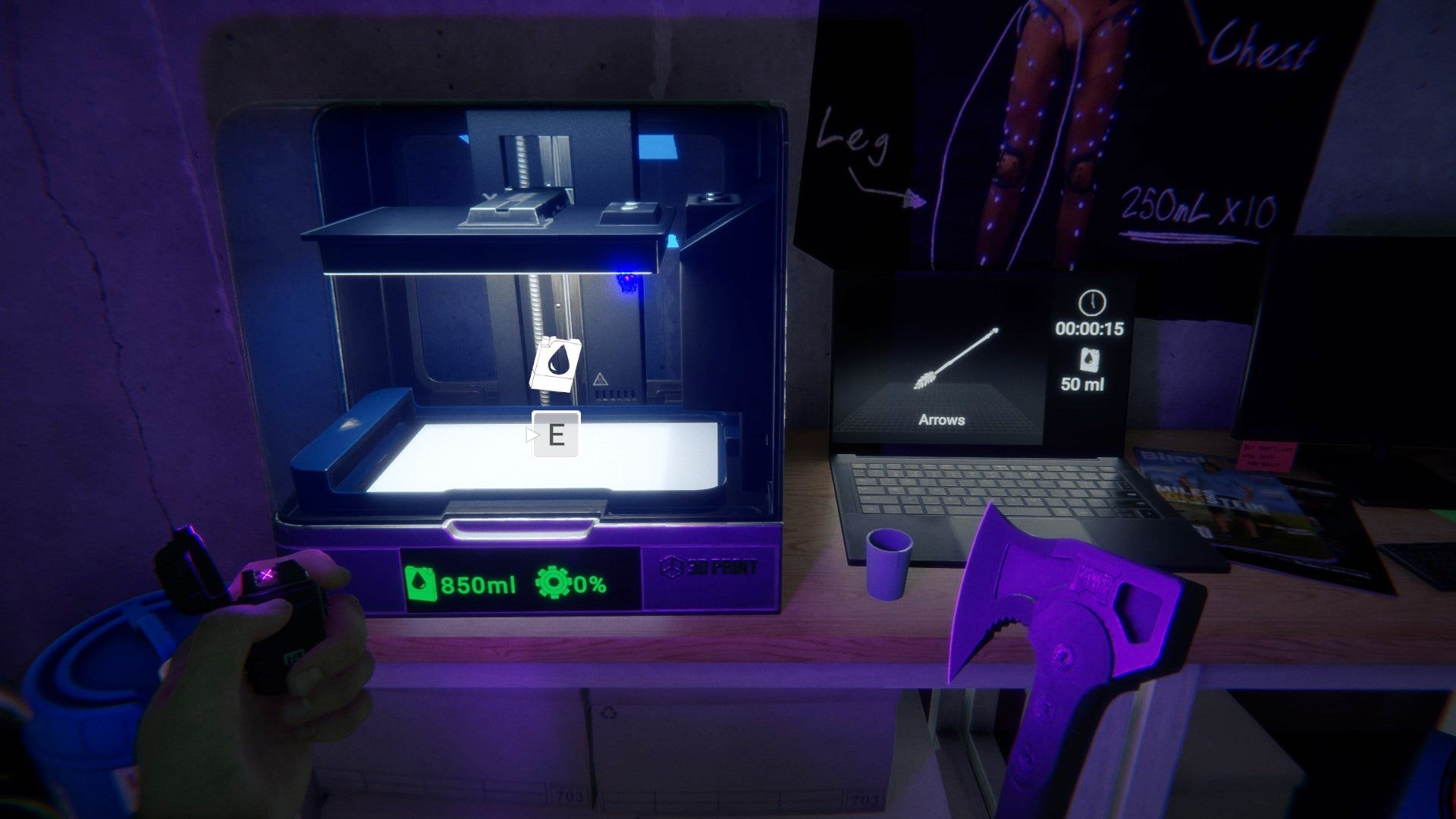
Image credit:Rock Paper Shotgun/Endnight Games
Looking for the 3D printer in Sons Of The Forest? Sons Of The Forest is a tough survival game, but you can make it a little easier with the 3D printer. No, you won’t use it to make your own custom Warhammer miniatures! Instead, you can use it to print crucial items, such as the flask to store water , or the mask to pacify enemies. If you’re itching to find the 3D printer and don’t know where to look, that’s where we come in.
We’ll break down how to find the 3D printer in Sons Of The Forest, which is no longer in early access after the release of the version 1.0 update. We’ll explain exactly where you need to go to get the 3D printer, and list all of the items you can print.
In this guide:
- How to get the 3D printer in Sons Of The Forest
- How to use the 3D printer in Sons Of The Forest
Looking for ways to survive your first few days in Sons of the Forest? Watch the video above for 15 essential tips.Watch on YouTube
How to get the 3D printer in Sons Of the Forest
The 3D printer is found in a cave that’s marked by a green pulse on the map. You can find the exact location in the image below.
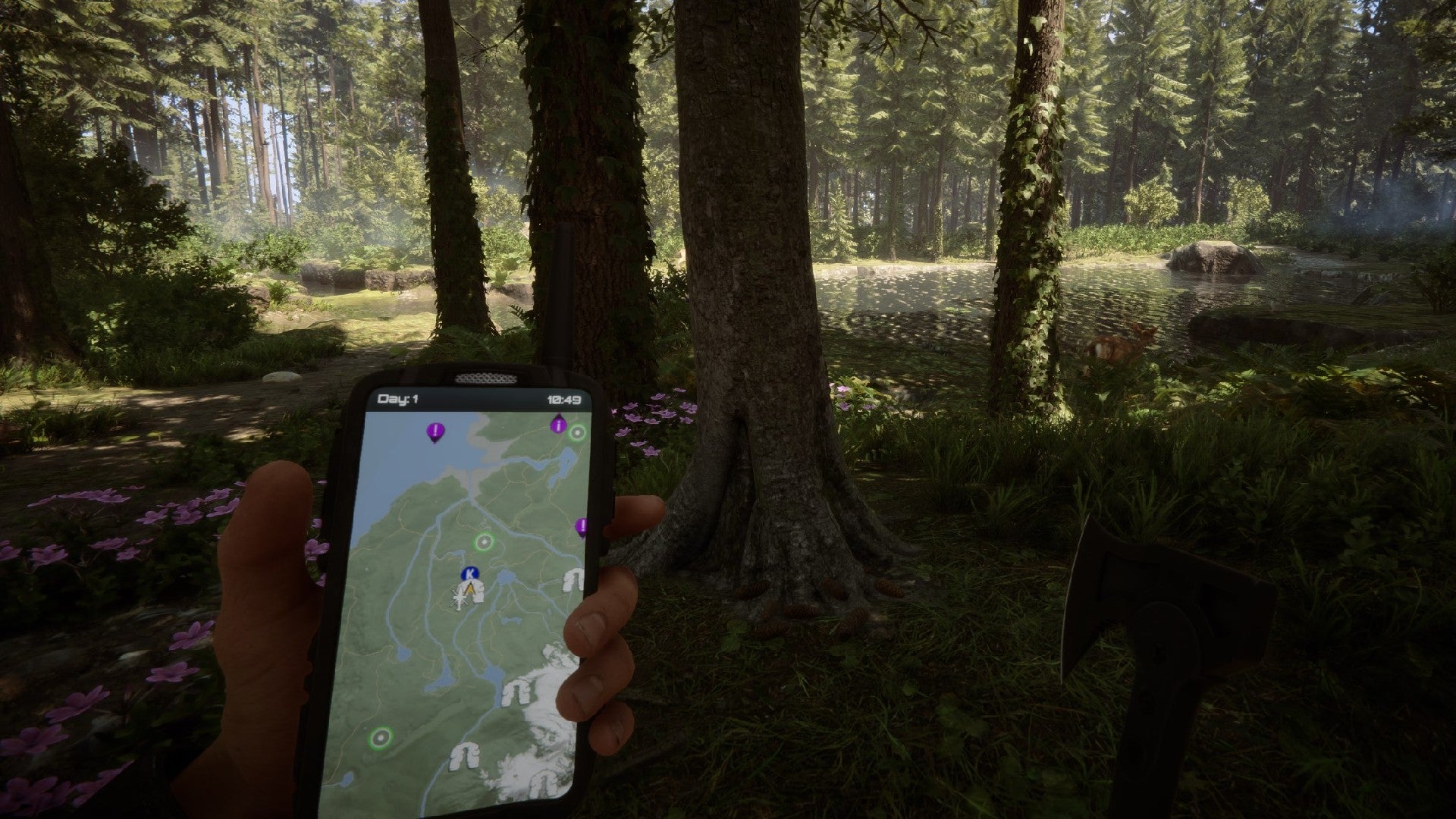
Follow the green pulse above the player in this image. |Image credit:Rock Paper Shotgun/Endnight Games
Once you arrive at the marker, simply head down the slope and into the cave. Shuffle through the gap to get in, and then continue into the darkness until you see a light up ahead. You’ll find yourself in a corridor that seems kind of like a mysterious underground lab, and the light up ahead leads into a safe room.
When you enter the safe room, you’ll find the 3D printer on a desk by the wall. It’s already loaded with some resin, but you can find more on the shelves nearby.
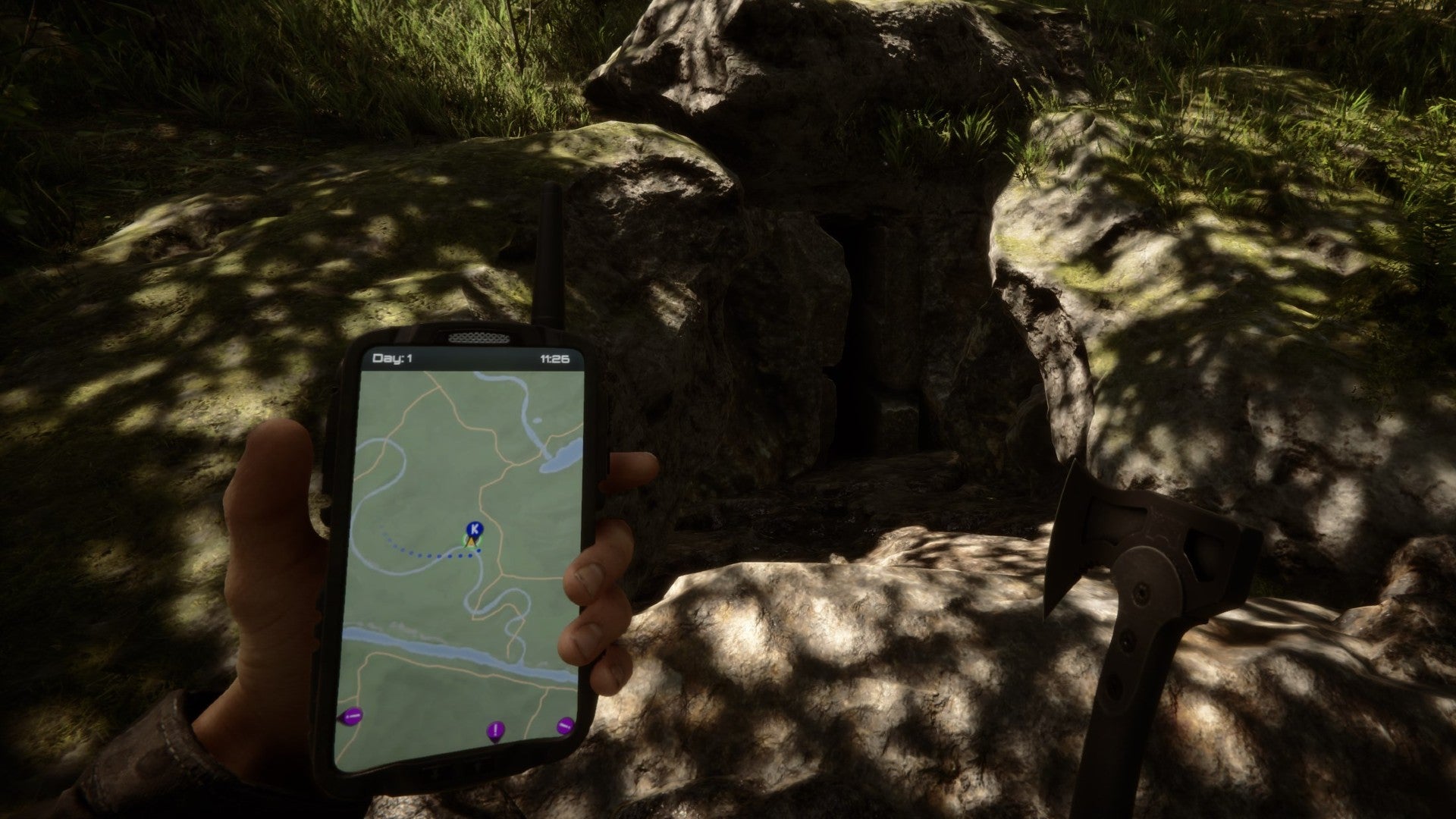
The exact 3D printer location in Sons Of The Forest. |Image credit:Rock Paper Shotgun/Endnight Games
How to use the 3D printer in Sons Of The Forest
To use the 3D printer in Sons Of The Forest, you must press “R” on the nearby computer to cycle through the various items that you can print. When you’ve settled on an item (and checked that the 3D printer has enough resin), you can hit the “E” key to start printing.
Below, you’ll find a list of items that you can make using the 3D printer:
- Arrows (50 resin)
- Flask (100 resin)
- Mask (150 resin)
- Grappling Hooks (100 resin)
- Tech Mesh (250 resin)
- Sled (1000 resin)
With the resin available in this room alone, you should be able to make most of the cheap items, or a single sled. We’d recommend getting the flask and mask first, along with some arrows if you prefer ranged weapons.
Before heading out, make sure to also search the rest of the room. You’ll find some Carbon Fiber arrows in the corner, and there is also a bed here that you can use to save and sleep. It’s the perfect shelter!
If you’re not comfortable with lighting a fire and making a tent in Sons Of The Forest to survive in the outdoors, then this is the ideal base.
That wraps up our guide on how to find the 3D printer in Sons Of The Forest. Of course, the items that you can 3D print aren’t the only important tools that you’ll need to survive. If you want to explore underwater, for example, you’ll need to get the Rebreather in Sons Of The Forest . This also allows you to get the Shovel in Sons Of The Forest , which you can use to dig up hidden items. If you’re scared of exploring, consider learning how to get Virginia in Sons Of The Forest first, as she makes an excellent combat companion.
Sons of the Forest
PC
Rock Paper Shotgun is better when you sign in
Sign in and join us on our journey to discover strange and compelling PC games.
