Storage, docks, controllers, and power for less.
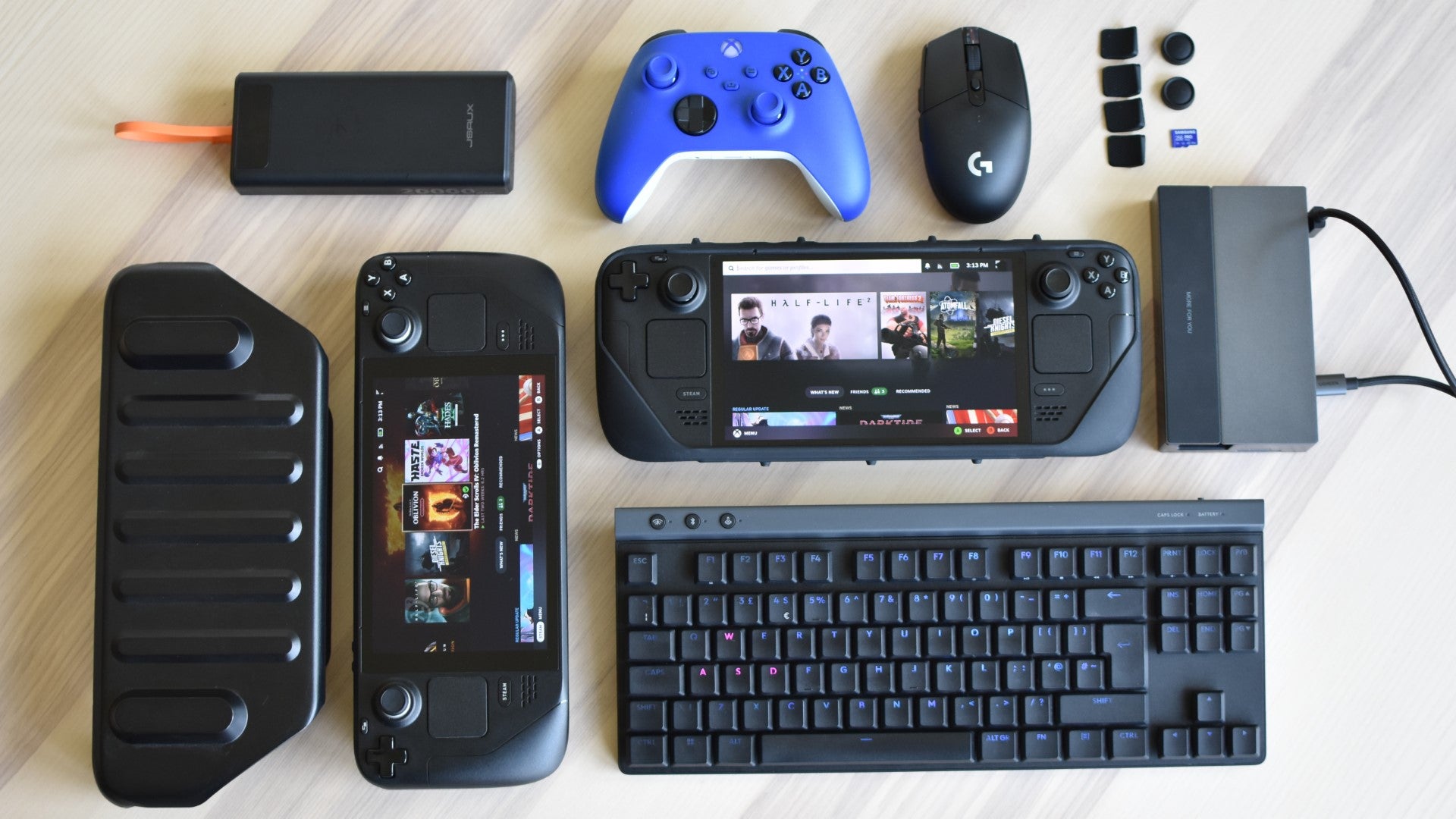
Image credit:Rock Paper Shotgun
_Y8SUErz.png?width=2048&height=2048&fit=bounds&quality=85&format=jpg&auto=webp)
Steam Deck Powerbanks
| Image credit: SHARGEEK SHARGEEK 170 Power Bank | SHARGEEK 170 Power Bank 24,000mAh 140W $98.99 (41% off, was $169.00) See here |
|---|
This SHARGEEK 170 isn’t just about raw power—it’s got personality. Between the futuristic clear shell, that clean smart display, and IP66 water resistance, this thing feels ready for travel. The 140W PD3.1 charging gets a full Steam Deck recharge in no time, and it can top up two other devices at once thanks to the triple-port setup. I like that it recharges itself quickly too—fully topped up in under 45 minutes via USB-C. Pricey at launch, but this 41% discount makes it way more justifiable now.
| Image credit: UGREEN | UGREEN 100W Power Bank 20,000mAh with Digital Display $50.34 (37% off, was $79.99) See here |
|---|
UGREEN’s 100W power bank is all about efficiency and value. You get 20,000mAh of juice, three charging ports (two USB-C and one USB-A), and fast charge support for everything from phones to laptops. The Deck charges quickly, and you can top up the power bank itself in just over 90 minutes with a 65W charger. I also appreciate the digital readout and lighter build—makes it easier to pack and keep an eye on while you’re using it.
| Image credit: Anker | Anker 737 Power Bank 24,000mAh 140W $76.99 (30% off, was $109.99) See here |
|---|
The Anker 737 is a workhorse. At 24,000mAh, it packs enough juice to recharge your Steam Deck multiple times or even handle a MacBook mid-trip. The real highlight is the 140W fast charging with a detailed digital readout that keeps you posted on power flow and remaining juice. It’s a little chunky, but if you want something dependable with excellent safety features and broad device support, this is one of Anker’s best deals right now.
| Image credit: INIU | INIU 140W Power Bank 25,000mAh $66.98 (28% off, was $92.99) See here |
|---|
INIU’s 140W power bank brings the goods in a surprisingly compact frame. Despite holding a hefty 25,000mAh of capacity, it’s still airline approved and ready for travel. It’s got smart digital display tech, super-fast dual USB-C ports, and even hits full-speed Steam Deck charging. The build feels premium, and with support for everything from MacBooks to drones, it’s one of the most versatile chargers I’ve tested at this size.
| Image credit: INIU | INIU Ultra Small 10,000mAh 45W PD Power Bank $27.99 (28% off, was $38.99) See here |
|---|
This tiny 10,000mAh INIU pack punches way above its weight. It’s got 45W charging, a smart digital readout, and the ability to juice up a MacBook Air in a pinch. Perfect for keeping in a tech pouch or sling bag, this one’s ideal for short trips or topping up while commuting. And that built-in lanyard cable is a great little bonus for travel.
| Image credit: INIU | INIU 100W Power Bank 25,000mAh $53.99 (23% off, was $69.99) See here |
|---|
If you want full-size power in a minimal frame, the INIU 100W is the sweet spot. It’s compact for a 25,000mAh unit and still manages dual fast-charging USB-C ports and enough output to top up a laptop and Steam Deck together. For tech-heavy users or creators, this is a rock-solid daily driver.
| Image credit: Belkin | Belkin 65W 20,000mAh 3-Port Laptop Power Bank $69.99 (22% off, was $89.99) See here |
|---|
Belkin’s 65W power bank is a sleek, minimal workhorse. With USB-C and USB-A ports, it supports up to three devices at once and has a full-color digital screen that gives you battery levels at a glance. It’s great for laptops and gaming handhelds alike, and the overall build feels like something that’ll survive daily use and then some.
| Image credit: INIU | INIU 65W Power Bank 20,000mAh Ultra Compact $39.34 (21% off, was $49.99) See here |
|---|
This is INIU’s most compact 65W power bank to date. It’s lightweight, travel-safe, and still packs 20,000mAh of juice with fast charging. You’ll get full Steam Deck compatibility, MacBook support, and even juice for wearables. A nice middle ground if you’re after reliable all-in-one performance without carrying a battery brick.
| Image credit: Anker | Anker Prime Power Bank 9,600mAh 65W $69.99 (22% off, was $89.99) See here |
|---|
This smaller Anker Prime unit is perfect if you want something travel-friendly but still powerful. The 65W max output is plenty for the Steam Deck, and the built-in AC plug lets you skip carrying a separate charger. It’s got a smart display, braided cable, and a sturdy metal base that makes it feel more premium than most power banks this size. Ideal for everyday carry or as a quick top-up solution that won’t weigh you down.
| Image credit: CUKTECH | CUKTECH NO.20 Power Bank 25,000mAh 140W $83.63 (15% off, was $98.39) See here |
|---|
The CUKTECH No.20 is built like a tank. It holds 25,000mAh of charge with a high-end auto-grade battery, meaning it’ll outlast a lot of other packs—over 1,000 charge cycles according to the spec sheet. The 140W fast charging and smart TFT display make it super easy to monitor output, and I really dig the matte finish with that blue light accent. It’s slightly bigger than a soda can, so still travel-friendly despite the capacity.
Steam Deck Micro SD Cards
| Image credit: Samsung | Samsung PRO Plus Sonic 1TB microSDXC + Adapter $69.99 (40% off, was $116.99) See here |
|---|
This 1TB Sonic Edition microSD from Samsung is our top pick for Steam Deck, which matches the same specs as the standard edition. With blazing read/write speeds up to 180MB/s and 130MB/s, it’s built for rapid game loading and smooth 4K recording. It’s got A2, U3, and V30 ratings for apps and video, plus rugged protection against water, X-rays, and drops. If you want storage that stands out and performs, this one ticks every box.
The best deal in the UK right now for Steam Deck microSD cards is definitely the Lexar Blue, down to £65.98 for the 1TB version .
| Image credit: Samsung | Samsung PRO Plus Sonic 512GB microSDXC + Adapter $28.49 (34% off, was $42.99) See here |
|---|
The 512GB version of Samsung’s Sonic PRO Plus card hits a perfect balance for most Steam Deck users. It’s got the same speedy 180MB/s read performance, 6-proof durability, and a full SD adapter in the box. This card handles everything from high-speed game installs to 4K media recording—and looks sharp doing it. Great value, great branding, and no compromise on quality.
| Image credit: Lexar | Lexar PLAY 1TB microSDXC UHS-I Card $77.88 (7% off) See here |
|---|
Lexar’s 1TB PLAY card is built with gamers in mind. It’s A2-rated, meaning game and app launches stay quick, and the up to 160MB/s read speeds mean you’ll spend less time waiting on load screens. It’s great for big libraries and perfect for handhelds like the Steam Deck where internal storage can run dry fast. For anyone looking to expand without compromise, this is a high-capacity card at a sweet discount.
| Image credit: GIGASTONE | Gigastone 512GB Gaming Plus microSDXC Card $44.98 (10% off) See here |
|---|
Gigastone’s 512GB Gaming Plus card is built for reliable performance on handheld consoles like the Steam Deck. It offers up to 100MB/s read speeds and supports 4K video, with an A1 app performance rating that helps games and apps run smoother. It’s also waterproof, shockproof, and heat-resistant, making it perfect for travel or daily carry. If you’re looking for a card that’s rugged and fast without overspending, this is a smart choice.
| Image credit: SanDisk 256GB MAX Endurance microSDXC Card with Adapter | SanDisk 256GB MAX Endurance microSDXC Card $39.99 (26% off) See here |
|---|
The 256GB SanDisk MAX Endurance card is perfect for long-term, reliable storage. Originally designed for security cams and dash cams, it’s engineered for extreme durability—up to 120,000 hours of use. That resilience makes it ideal for Steam Deck users who want peace of mind. It supports Full HD and 4K video, and includes U3, V30, and Class 10 ratings for solid read/write performance. It’s a dependable option if you’re looking for lasting value in a mid-size capacity.
| Image credit: Lexar | Lexar PLAY BLUE 2TB microSDXC Card $149.99 (25% off) See here |
|---|
If you want one card to store everything, the Lexar PLAY BLUE 2TB is tough to beat. It’s A2-rated for fast app launches and has up to 160MB/s read speeds to keep big games and large files moving fast. This is a card that’s built for gaming, video, and multitasking on the Steam Deck or any Android device. Plus, it includes rugged features like waterproofing and x-ray protection. It’s pricey, but the capacity and performance speak for themselves.
| Image credit: Lexar | Lexar PLAY 512GB microSDXC UHS-I Card $36.88 (21% off) See here |
|---|
This 512GB Lexar PLAY card hits a sweet spot for Steam Deck owners. It’s large enough to hold a hefty library of indie games or a mix of AAA titles, while still staying fast thanks to A2 app performance rating. The card reads up to 160MB/s too, so even loading times stay snappy. Great for users who want breathing room without going all-in on a 1TB option.
| Image credit: PNY | PNY 256GB Elite-X2 microSDXC 2-Pack + Adapters $15.99 (33% off, was $23.99) See here |
|---|
PNY’s 2-pack of 256GB cards is all about flexibility. Use one for games, and keep the other loaded with media or backups. Both cards hit solid read/write speeds and come with adapters, making them easy to switch between your Steam Deck, camera, or other devices. If you’re managing multiple setups or just like having a backup, this is a great way to stretch your storage across your devices.
| Image credit: SanDisk | SanDisk Ultra 1.5TB Micro SD Card $91.34 (18% off, was $110.55) See here |
|---|
Need max capacity? The SanDisk Ultra 1.5TB is for gamers who’d rather install now and never worry later. It’s not the fastest on this list, but it’s plenty for casual loading and storing massive libraries of games, media, and more. If you’re someone who hates juggling files or relies on offline access, this one gives you breathing room for days.
| Image credit: Samsung | Samsung 256GB PRO Plus Sonic Micro SD Card $19.99 (17% off, was $22.99) See here |
|---|
This 256GB Sonic Edition card from Samsung is ideal for anyone building out a Steam Deck library on a budget. It’s fast, durable, and has that fun Sonic branding without tacking on much cost. Performance-wise, it’s quick enough for most games and a great starter option for those new to handheld PC gaming.
| Image credit: SanDisk | SanDisk Extreme 2TB Micro SD Card $165.60 (17% off, was $199.52) See here |
|---|
The SanDisk 2TB Extreme is the go-to for creators and power users. With read speeds up to 240MB/s and durable construction, it’s designed for performance and reliability. Whether you’re running large installs, video content, or a mixed library of games and media, this card handles it all without breaking a sweat.
Steam Deck Docks
| Image credit: GuliKit | GuliKit 7 in 1 Docking Station for Steam Deck LCD/OLED,ROG Ally Was: $44.99, Now: $24.50, 46% off See here |
|---|
I noticed this one has HDMI 2.0, three USB 3.0 ports, Gigabit Ethernet, and 100W USB-C charging. It works with both the Steam Deck OLED and ROG Ally, which gives it some nice flexibility. It’s marked down to $24.50 from $44.99, and that 46% off caught my attention fast.
| Image credit: UGREEN | UGREEN Steam Deck Dock, 6-in-1 USB C Docking Station Was: $49.99, Now: $29.99, 40% off See here |
|---|
This has the basics covered: USB-C charging, HDMI out, three USB-A 3.0 ports, and wired internet. It’s clean, reliable, and now sitting at $29.99 instead of $49.99. I don’t usually see this model under 30 bucks.
| Image credit: UGREEN | UGREEN Steam Deck Dock 9-in-1 USB C Docking Station Was: $59.99, Now: $37.99, 37% off See here |
|---|
The 9-in-1 version adds SD and microSD slots, DisplayPort, and audio output alongside the core ports. It’s more of an all-in-one dock for people who don’t want to swap cables. The deal price is $37.99, down from $59.99.
| Image credit: WAVLINK | WAVLINK 6-in-1 Docking Station with 4K@144Hz HDMI 2.1 Was: $39.99, Now: $26.10, 35% off See here |
|---|
What stood out here was the HDMI 2.1 port that handles 4K at 144Hz. That’s not common in this price range. It also includes USB 3.0 ports and Ethernet, and right now it’s just $26.10, which is a solid drop from the $39.99 list price.
| Image credit: LISEN | LISEN Docking Station for Steam Deck OLED/ROG Ally X Was: $59.99, Now: $43.69, 27% off See here |
|---|
This dock was made for switching between Steam Deck OLED and ROG Ally. It supports 4K at 120Hz and has both USB-C and USB-A for charging and peripherals. It’s down to $43.69 from $59.99, which helps if you’re looking for high refresh rate support without jumping into premium docks.
| Image credit: iVANKY | iVANKY 14-in-1 RGB 4K@144Hz Docking Station Was: $79.99, Now: $59.98, 25% off See here |
|---|
This one goes all-in with dual HDMI, DisplayPort, multiple USB-A and USB-C ports, Ethernet, and SD card readers. It even adds audio in and out and throws in RGB lighting for setups that care about looks too. It dropped from $79.99 to $59.98.
| Image credit: Maxonar | Maxonar 6 in 1 Docking Station (No Adapter) Was: $39.99, Now: $29.97, 25% off See here |
|---|
This dock doesn’t include a charger, but if you already have one, you get the same USB and HDMI support for a lot less. The current price is $29.97, marked down from $39.99. Not bad if you’re building around what you already own.
| Image credit: iVANKY | iVANKY 8-in-1 Docking Station (No Adapter) Was: $39.99, Now: $29.97, 25% off See here |
|---|
Similar idea here, just with more ports than the 6-in-1. You get USB-C data, Ethernet, dual USB-A, HDMI, and SD slots. It’s now $29.98 instead of $39.99, and it’s a clean pick for someone with a power adapter ready to go.
| Image credit: Maxonar | Maxonar 6 in 1 Dock with 65W PD Charger Was: $69.99, Now: $55.99, 20% off See here |
|---|
This is the version that includes the GaN charger in the box. It’s useful if you want one cable to handle video and power at the same time. It’s currently $55.99, down from $69.99, which brings the charger cost down quite a bit.
| Image credit: JSAUX | JSAUX M.2 Docking Station for Steam Deck Was: $89.99, Now: $71.99, 20% off See here |
|---|
This one adds an M.2 NVMe slot inside the dock, so you get expanded storage without a separate drive case. It also handles HDMI out, Ethernet, USB 3.0, and charging. It’s on sale for $71.99, which is 20% off the usual $89.99.
| Image credit: 12-in-1 | JSAUX RGB Docking Station 12-in-1 Was: $85.99, Now: $68.79, 20% off See here |
|---|
This one’s packed. Dual HDMI, DisplayPort, audio out, SD card reader, Ethernet, and a full lineup of USB ports. It’s got RGB too if you want the lights. Right now it’s going for $68.79, down from $85.99. If you’ve got a cluttered setup, this clears a lot of it up.
| Image credit: SABRENT Docking Station | SABRENT Docking Station w/ M.2 Was: $79.99, Now: $63.99, 20% off See here |
|---|
Here you get an internal SSD slot and a full suite of ports. The M.2 support makes a difference if you’re low on Steam Deck storage but don’t want to keep unplugging drives. It’s down to $63.99 from $79.99.
| Image credit: JSAUX Docking Station & 100W Charger | JSAUX Docking Station & 100W Charger Was: $65.99, Now: $55.99, 15% off See here |
|---|
It combines a 100W USB-C charger with a proper docking station, which saves desk space and cable mess. The discount brings it to $55.99 instead of $65.99. It’s built for people who want to dock once and be done.
| Image credit: JSAUX | JSAUX 6-in-1 Docking Station (HB0609) Was: $39.99, Now: $31.19, 22% off See here |
|---|
This is a straightforward dock that keeps things simple. HDMI, USB 3.0, Ethernet, and charging passthrough all work without hassle. It’s currently $31.19, which is a solid drop from the regular $39.99.
| Image credit: Baseus | Baseus Steam Deck Dock Was: $39.99, Now: $31.99, 20% off See here |
|---|
This one has a cleaner look than most, and still gives you USB-A, HDMI, Ethernet, and power passthrough. The $31.99 price is a nice cut from $39.99, especially if you’re trying to keep your setup compact.
| Image credit: Anker | Anker Steam Deck Dock Was: $29.99, Now: $25.49, 15% off See here |
|---|
Anker keeps it simple and reliable. You’re getting just the core ports here, but with their usual build quality. The deal knocks it down to $25.49 from $29.99. That’s a nice sweet spot for a brand-name dock.
| Image credit: Antank | Antank 6-in-1 Docking Station Was: $24.29, Now: $20.64, 15% off See here |
|---|
This model keeps the footprint small while still including HDMI, USB-A, Ethernet, and 100W charging support. Right now it’s $20.64, which is one of the lowest prices in the whole list.
| Image credit: B3 BIGTHREE | B3 BIGTHREE Docking Station Was: $29.99, Now: $24.99, 17% off See here |
|---|
It covers the essentials with HDMI, three USB 3.0 ports, and charging support. The $24.99 price is already budget-friendly, and it’s down from $29.99.
| Image credit: MEPATEM | MEPATEM Dock (Silver) Was: $39.99, Now: $33.87, 15% off See here |
|---|
Same idea as the adjustable version, just in a silver finish and a little more compact. Includes HDMI, USB ports, and charging. The sale drops it to $33.87 from $39.99.
Mini M.2 drives
| Image credit: WD_BLACK | WD_BLACK SN770M 1TB M.2 2230 NVMe SSD $84.99 (39% off, was $139.99) See here |
|---|
The WD_BLACK SN770M is a performance beast, especially for a 2230-sized drive. It’s Gen 4, hits up to 5,150MB/s, and fits right into the Steam Deck with no fuss. If you’re upgrading for speed and storage, this is a solid bet.
| Image credit: Western Digital | WD_BLACK SN770M 2TB M.2 2230 NVMe SSD $118 (30% off, was $169.19) See here |
|---|
| Image credit: SABRENT | SABRENT Rocket 2230 1TB NVMe SSD (Gen4) $79.99 (20% off, was $99.99) See here |
|---|
SABRENT’s Rocket 2230 has been a go-to for Steam Deck upgrades. It’s fast, reliable, and Gen 4 compliant. And if you’ve got a heat spreader or thermal pad already, this one drops in clean.
| Image credit: KingSpec | KingSpec 512GB M.2 2230 Gen3x4 SSD $31.99 (20% off, was $39.99) See here |
|---|
Need a budget-friendly boost? The KingSpec 512GB drive is perfect if you’re just looking for more space without blowing the budget. It’s Gen 3x4, so not the fastest—but way faster than a microSD.
| Image credit: Fanxiang | fanxiang 1TB 2230 PCIe Gen4 NVMe SSD $69.99 (13% off, was $79.99) See here |
|---|
fanxiang’s 1TB Gen 4 NVMe is one of the better budget options I’ve seen lately. It holds its own for game loading, and while the brand’s not huge, it’s earned some decent reviews for value.
| Image credit: Kingston 1TB | Kingston 1TB M.2 2230 PCIe Gen 4.0 SSD $79.95 (6% off, was $84.95) See here |
|---|
The Kingston 1TB Gen 4 is known for stability and performance. If you’re sticking with brands you trust and want plug-and-play confidence, this one delivers.
Steam Deck Controllers
| Image credit: NACON | NACON Revolution 5 Pro Wireless Controller – Field Camo $119.99 (40% off, was $199.99) See here |
|---|
The NACON Revolution 5 Pro is mega if you want a tournament-grade controller (providing you like the PlayStation-style layout. It’s wireless, customizable, and looks sharp in that Field Camo finish. It’s pricey, but this Prime Day cut makes it way more tempting.
| Image credit: Hyperkin | Hyperkin Duke Wired Xbox Controller – White $57.70 (36% off, was $89.99) See here |
|---|
The Hyperkin Duke is pure Xbox nostalgia. That big old layout isn’t for everyone, but if you used the original Xbox, you’ll get a kick out of this. Plus, the build quality is great and it’s plug-and-play on PC or Deck.
| Image credit: 8Bitdo | 8Bitdo Ultimate Bluetooth Controller + Charging Dock $49.99 (29% off, was $69.99) See here |
|---|
The 8Bitdo Ultimate Bluetooth controller is a fan favorite for a reason. It’s super comfortable, has Hall effect sticks, and comes with its own charging dock. A great upgrade if you’re ready to ditch drift forever.
| Image credit: 8Bitdo | 8Bitdo Ultimate 2 Bluetooth Controller – Black $55.99 (20% off, was $69.99) See here |
|---|
The 8Bitdo Ultimate 2 is basically a refined version of their already-great controller. It adds back paddles and improved software support. I’ve tried earlier models and they’ve always been reliable, so this new one looks like a solid evolution.
| Image credit: SCUF | SCUF VALOR PRO Wired Xbox Controller – Black $89.99 (18% off, was $109.99) See here |
|---|
SCUF’s Valor Pro is built for serious players. If you want programmable back buttons, swappable sticks, and a wired connection that never lags, this one brings pro features without the wireless price bump.
| Image credit: Xbox | Xbox Wireless Controller – Velocity Green $57.99 (17% off, was $69.99) See here |
|---|
The Xbox Velocity Green controller is a safe bet—solid, familiar, and now slightly cheaper. Works out of the box with the Steam Deck over Bluetooth, and the green shell really pops in person.
Cases and Shells
| Image credit: CRKD | Gear Bag Protective Carry Case - Gaming Bag for Nitro Deck/Steam Deck/Playstation Portal/Nintendo Switch Accessories $29.99 (25% off, was $39.99) See here |
|---|
This Gear Bag Protective Carry Case is one of the most travel-friendly options out there, and now it’s 25% off for Prime Day, bringing the price down to just $29.99.
| Image credit: PGmoon | Carrying Backpack Compatible with Steam Deck, Travel Case Bag with Game Card Holder & Multi-Pockets $44.79 (19% off, was $54.99) See here |
|---|
If you want your Steam Deck setup wrapped in maximum protection and organization, this PGmoon backpack is the real deal.
| Image credit: Annapro | annapro Carrying Case for Switch 2 (2025)/Steam Deck/PS5 Portal/Legion Go $36.79 (20% off, was $45.99) See here |
|---|
This annapro carrying case looks cool whilst acting as a fortress for your console. Right now, it’s down to $36.79 for Prime Day.
| Image credit: MeloSync | MeloSync Carrying Case Compatible with Steam Deck/Steam Deck OLED $17.59 (20% off, was $21.99) See here |
|---|
Lightweight, affordable, and no-nonsense, the MeloSync Carrying Case is all about keeping your Steam Deck protected.
| Image credit: eXtremeRate | eXtremeRate Gradient Translucent Bluebell Faceplate Shell for Steam Deck LCD $36.79 (20% off, was $45.99) See here |
|---|
Want to give your Steam Deck a full style makeover? This eXtremeRate Gradient Bluebell faceplate is a bold upgrade.
| Image credit: JSAUX | JSAUX Sling Bag for Steam Deck/Nintendo Switch 2/ROG Ally/PS5 Portal $31.99 (20% off, was $39.99) See here |
|---|
If you’re constantly on the go with your handheld console, this JSAUX Sling Bag is a smart grab. This is currently what I use to cart my chosen handhelds around in when I’m out of the house. Plenty of room for you Deck, a portable charger or two, cables and more. And it’s down to $31.99.
| Image credit: Syntech | Syntech Carrying Case Compatible with Steam Deck OLED/ROG Ally X/Legion Go $31.29 (22% off, was $39.99) See here |
|---|
This Syntech carrying case is the Swiss army knife of console bags and it’s 22% off for Prime Day, down to just $31.29.
| Image credit: JSAUX | JSAUX Transparent Back Plate RGB for Steam Deck OLED/LCD $31.99 (20% off, was $39.99) See here |
|---|
Ready to make your Steam Deck glow? This JSAUX Transparent Back Plate with built-in RGB lighting is your ticket — and it’s $31.99. It’s quite an easy install, it’s more of less just changing out your back cover by unscrewing the old one.
| Image credit: JSAUX | JSAUX Transparent Back Plate for Steam Deck OLED/LCD $23.99 (20% off, was $29.99) See here |
|---|
If RGB lighting feels a bit much but you still want that clean, transparent look, this JSAUX Vents Version back plate is a steal. Plus you don’t need to worry about hooking up the RGB.
| Image credit: EJGAME | Upgraded Ultra Slim TPU Protective Case with Front Cover for Steam Deck/OLED $19.99 (20% off, was $24.99) See here |
|---|
This Ultra Slim TPU Case is the no-fuss protection your Steam Deck deserves, and it’s only $19.99 for Prime Day.
| Image credit: JSAUX | JSAUX Carrying Case for Steam Deck/Steam Deck OLED $15.99 (20% off, was $19.99) See here |
|---|
Here’s a proper bargain: the JSAUX BG0102 Carrying Case is just $15.99 for Prime Day, that’s 20% off its already wallet-friendly price.
Rock Paper Shotgun is better when you sign in
Sign in and join us on our journey to discover strange and compelling PC games.

All 75 Arc Raiders Blueprints and where to get them
These areas have the highest chance of giving you Blueprints

Image credit:Rock Paper Shotgun/Embark Studios

Looking for more Arc Raiders Blueprints? It’s a special day when you find a Blueprint, as they’re among the most valuable items in Arc Raiders. If you find a Blueprint that you haven’t already found, then you must make sure you hold onto it at all costs, because Blueprints are the key to one of the most important and powerful systems of meta-progression in the game.
This guide aims to be the very best guide on Blueprints you can find, starting with a primer on what exactly they are and how they work in Arc Raiders, before delving into exactly where to get Blueprints and the very best farming spots for you to take in your search.
We’ll also go over how to get Blueprints from other unlikely activities, such as destroying Surveyors and completing specific quests. And you’ll also find the full list of all 75 Blueprints in Arc Raiders on this page (including the newest Blueprints added with the Cold Snap update , such as the Deadline Blueprint and Firework Box Blueprint), giving you all the information you need to expand your own crafting repertoire.
In this guide:
- What are Blueprints in Arc Raiders?
- Full Blueprint list: All crafting recipes
- Where to find Blueprints in Arc Raiders Blueprints obtained from quests Blueprints obtained from Trials Best Blueprint farming locations

What are Blueprints in Arc Raiders?
Blueprints in Arc Raiders are special items which, if you manage to extract with them, you can expend to permanently unlock a new crafting recipe in your Workshop. If you manage to extract from a raid with an Anvil Blueprint, for example, you can unlock the ability to craft your very own Anvil Pistol, as many times as you like (as long as you have the crafting materials).
To use a Blueprint, simply open your Inventory while in the lobby, then right-click on the Blueprint and click “Learn And Consume” . This will permanently unlock the recipe for that item in your Workshop. As of the Stella Montis update, there are allegedly 75 different Blueprints to unlock - although only 68 are confirmed to be in the game so far. You can see all the Blueprints you’ve found and unlocked by going to the Workshop menu, and hitting “R” to bring up the Blueprint screen.
It’s possible to find duplicates of past Blueprints you’ve already unlocked. If you find these, then you can either sell them, or - if you like to play with friends - you can take it into a match and gift it to your friend so they can unlock that recipe for themselves. Another option is to keep hold of them until the time comes to donate them to the Expedition.
Full Blueprint list: All crafting recipes
Below is the full list of all the Blueprints that are currently available to find in Arc Raiders, and the crafting recipe required for each item:
| Blueprint | Type | Recipe | Crafted At |
|---|---|---|---|
| Bettina | Weapon | 3x Advanced Mechanical Components 3x Heavy Gun Parts 3x Canister | Gunsmith 3 |
| Blue Light Stick | Quick Use | 3x Chemicals | Utility Station 1 |
| Aphelion | Weapon | 3x Magnetic Accelerator 3x Complex Gun Parts 1x Matriarch Reactor | Gunsmith 3 |
| Combat Mk. 3 (Flanking) | Augment | 2x Advanced Electrical Components 3x Processor | Gear Bench 3 |
| Combat Mk. 3 (Aggressive) | Augment | 2x Advanced Electrical Components 3x Processor | Gear Bench 3 |
| Complex Gun Parts | Material | 2x Light Gun Parts 2x Medium Gun Parts 2x Heavy Gun Parts | Refiner 3 |
| Fireworks Box | Quick Use | 1x Explosive Compound 3x Pop Trigger | Explosives Station 2 |
| Gas Mine | Mine | 4x Chemicals 2x Rubber Parts | Explosives Station 1 |
| Green Light Stick | Quick Use | 3x Chemicals | Utility Station 1 |
| Pulse Mine | Mine | 1x Crude Explosives 1x Wires | Explosives Station 1 |
| Seeker Grenade | Grenade | 1x Crude Explosives 2x ARC Alloy | Explosives Station 1 |
| Looting Mk. 3 (Survivor) | Augment | 2x Advanced Electrical Components 3x Processor | Gear Bench 3 |
| Angled Grip II | Mod | 2x Mechanical Components 3x Duct Tape | Gunsmith 2 |
| Angled Grip III | Mod | 2x Mod Components 5x Duct Tape | Gunsmith 3 |
| Hullcracker | Weapon | 1x Magnetic Accelerator 3x Heavy Gun Parts 1x Exodus Modules | Gunsmith 3 |
| Launcher Ammo | Ammo | 5x Metal Parts 1x Crude Explosives | Workbench 1 |
| Anvil | Weapon | 5x Mechanical Components 5x Simple Gun Parts | Gunsmith 2 |
| Anvil Splitter | Mod | 2x Mod Components 3x Processor | Gunsmith 3 |
| ??? | ??? | ??? | ??? |
| Barricade Kit | Quick Use | 1x Mechanical Components | Utility Station 2 |
| Blaze Grenade | Grenade | 1x Explosive Compound 2x Oil | Explosives Station 3 |
| Bobcat | Weapon | 3x Advanced Mechanical Components 3x Light Gun Parts | Gunsmith 3 |
| Osprey | Weapon | 2x Advanced Mechanical Components 3x Medium Gun Parts 7x Wires | Gunsmith 3 |
| Burletta | Weapon | 3x Mechanical Components 3x Simple Gun Parts | Gunsmith 1 |
| Compensator II | Mod | 2x Mechanical Components 4x Wires | Gunsmith 2 |
| Compensator III | Mod | 2x Mod Components 8x Wires | Gunsmith 3 |
| Defibrillator | Quick Use | 9x Plastic Parts 1x Moss | Medical Lab 2 |
| ??? | ??? | ??? | ??? |
| Equalizer | Weapon | 3x Magnetic Accelerator 3x Complex Gun Parts 1x Queen Reactor | Gunsmith 3 |
| Extended Barrel | Mod | 2x Mod Components 8x Wires | Gunsmith 3 |
| Extended Light Mag II | Mod | 2x Mechanical Components 3x Steel Spring | Gunsmith 2 |
| Extended Light Mag III | Mod | 2x Mod Components 5x Steel Spring | Gunsmith 3 |
| Extended Medium Mag II | Mod | 2x Mechanical Components 3x Steel Spring | Gunsmith 2 |
| Extended Medium Mag III | Mod | 2x Mod Components 5x Steel Spring | Gunsmith 3 |
| Extended Shotgun Mag II | Mod | 2x Mechanical Components 3x Steel Spring | Gunsmith 2 |
| Extended Shotgun Mag III | Mod | 2x Mod Components 5x Steel Spring | Gunsmith 3 |
| Remote Raider Flare | Quick Use | 2x Chemicals 4x Rubber Parts | Utility Station 1 |
| Heavy Gun Parts | Material | 4x Simple Gun Parts | Refiner 2 |
| Venator | Weapon | 2x Advanced Mechanical Components 3x Medium Gun Parts 5x Magnet | Gunsmith 3 |
| Il Toro | Weapon | 5x Mechanical Components 6x Simple Gun Parts | Gunsmith 1 |
| Jolt Mine | Mine | 1x Electrical Components 1x Battery | Explosives Station 2 |
| Explosive Mine | Mine | 1x Explosive Compound 1x Sensors | Explosives Station 3 |
| Jupiter | Weapon | 3x Magnetic Accelerator 3x Complex Gun Parts 1x Queen Reactor | Gunsmith 3 |
| Light Gun Parts | Material | 4x Simple Gun Parts | Refiner 2 |
| Lightweight Stock | Mod | 2x Mod Components 5x Duct Tape | Gunsmith 3 |
| Lure Grenade | Grenade | 1x Speaker Component 1x Electrical Components | Utility Station 2 |
| Medium Gun Parts | Material | 4x Simple Gun Parts | Refiner 2 |
| Torrente | Weapon | 2x Advanced Mechanical Components 3x Medium Gun Parts 6x Steel Spring | Gunsmith 3 |
| Muzzle Brake II | Mod | 2x Mechanical Components 4x Wires | Gunsmith 2 |
| Muzzle Brake III | Mod | 2x Mod Components 8x Wires | Gunsmith 3 |
| Padded Stock | Mod | 2x Mod Components 5x Duct Tape | Gunsmith 3 |
| Shotgun Choke II | Mod | 2x Mechanical Components 4x Wires | Gunsmith 2 |
| Shotgun Choke III | Mod | 2x Mod Components 8x Wires | Gunsmith 3 |
| Shotgun Silencer | Mod | 2x Mod Components 8x Wires | Gunsmith 3 |
| Showstopper | Grenade | 1x Advanced Electrical Components 1x Voltage Converter | Explosives Station 3 |
| Silencer I | Mod | 2x Mechanical Components 4x Wires | Gunsmith 2 |
| Silencer II | Mod | 2x Mod Components 8x Wires | Gunsmith 3 |
| Snap Hook | Quick Use | 2x Power Rod 3x Rope 1x Exodus Modules | Utility Station 3 |
| Stable Stock II | Mod | 2x Mechanical Components 3x Duct Tape | Gunsmith 2 |
| Stable Stock III | Mod | 2x Mod Components 5x Duct Tape | Gunsmith 3 |
| Tagging Grenade | Grenade | 1x Electrical Components 1x Sensors | Utility Station 3 |
| Tempest | Weapon | 3x Advanced Mechanical Components 3x Medium Gun Parts 3x Canister | Gunsmith 3 |
| Trigger Nade | Grenade | 2x Crude Explosives 1x Processor | Explosives Station 2 |
| Vertical Grip II | Mod | 2x Mechanical Components 3x Duct Tape | Gunsmith 2 |
| Vertical Grip III | Mod | 2x Mod Components 5x Duct Tape | Gunsmith 3 |
| Vita Shot | Quick Use | 2x Antiseptic 1x Syringe | Medical Lab 3 |
| Vita Spray | Quick Use | 3x Antiseptic 1x Canister | Medical Lab 3 |
| Vulcano | Weapon | 1x Magnetic Accelerator 3x Heavy Gun Parts 1x Exodus Modules | Gunsmith 3 |
| Wolfpack | Grenade | 2x Explosive Compound 2x Sensors | Explosives Station 3 |
| Red Light Stick | Quick Use | 3x Chemicals | Utility Station 1 |
| Smoke Grenade | Grenade | 14x Chemicals 1x Canister | Utility Station 2 |
| Deadline | Mine | 3x Explosive Compound 2x ARC Circuitry | Explosives Station 3 |
| Trailblazer | Grenade | 1x Explosive Compound 1x Synthesized Fuel | Explosives Station 3 |
| Tactical Mk. 3 (Defensive) | Augment | 2x Advanced Electrical Components 3x Processor | Gear Bench 3 |
| Tactical Mk. 3 (Healing) | Augment | 2x Advanced Electrical Components 3x Processor | Gear Bench 3 |
| Yellow Light Stick | Quick Use | 3x Chemicals | Utility Station 1 |
Note: The missing Blueprints in this list likely have not actually been added to the game at the time of writing, because none of the playerbase has managed to find any of them. As they are added to the game, I will update this page with the most relevant information so you know exactly how to get all 75 Arc Raiders Blueprints.
Where to find Blueprints in Arc Raiders
Below is a list of all containers, modifiers, and events which maximise your chances of finding Blueprints:
- Certain quests reward you with specific Blueprints .
- Completing Trials has a high chance of offering Blueprints as rewards.
- Surveyors have a decent chance of dropping Blueprints on death.
- High loot value areas tend to have a greater chance of spawning Blueprints.
- Night Raids and Storms may increase rare Blueprint spawn chances in containers.
- Containers with higher numbers of items may have a higher tendency to spawn Blueprints. As a result, Blue Gate (which has many “large” containers containing multiple items) may give you a higher chance of spawning Blueprints.
- Raider containers (Raider Caches, Weapon Boxes, Medical Bags, Grenade Tubes) have increased Blueprint drop rates. As a result, the Uncovered Caches event gives you a high chance of finding Blueprints.
- Security Lockers have a higher than average chance of containing Blueprints.
- Certain Blueprints only seem to spawn under specific circumstances: Tempest Blueprint only spawns during Night Raid events. Vulcano Blueprint only spawns during Hidden Bunker events. Jupiter and Equaliser Blueprints only spawn during Harvester events.

Raider Caches, Weapon Boxes, and other raider-oriented container types have a good chance of offering Blueprints. |Image credit:Rock Paper Shotgun/Embark Studios
Blueprints have a very low chance of spawning in any container in Arc Raiders, around 1-2% on average. However, there is a higher chance of finding Blueprints in particular container types. Specifically, you can find more Blueprints in Raider containers and security lockers.
Beyond this, if you’re looking for Blueprints you should focus on regions of the map which are marked as having particularly high-value loot. Areas such as the Control Tower in Dam Battlegrounds, the Arrival and Departure Buildings in Spaceport, and Pilgrim’s Peak in Blue Gate all have a better-than-average chance of spawning Blueprints somewhere amongst all their containers. Night Raids and Electromagnetic Storm events also increase the drop chances of certain Blueprints .
In addition to these containers, you can often loot Blueprints from destroyed Surveyors - the largest of the rolling ball ARC. Surveyors are more commonly found on the later maps - Spaceport and Blue Gate - and if one spawns in your match, you’ll likely see it by the blue laser beam that it casts into the sky while “surveying”.
Surveyors are quite well-armoured and will very speedily run away from you once it notices you, but if you can take one down then make sure you loot all its parts for a chance of obtaining certain unusual Blueprints.
Blueprints obtained from quests
One way in which you can get Blueprints is by completing certain quests for the vendors in Speranza. Some quests will reward you with a specific item Blueprint upon completion, so as long as you work through all the quests in Arc Raiders, you are guaranteed those Blueprints.
Here is the full list of all Blueprints you can get from quest rewards:
- Trigger Nade Blueprint: Rewarded after completing “Sparks Fly”.
- Lure Grenade Blueprint: Rewarded after completing “Greasing Her Palms”.
- Burletta Blueprint: Rewarded after completing “Industrial Espionage”.
- Hullcracker Blueprint (and Launcher Ammo Blueprint): Rewarded after completing “The Major’s Footlocker”.
Alas, that’s only 4 Blueprints out of a total of 75 to unlock, so for the vast majority you will need to find them yourself during a raid. If you’re intent on farming Blueprints, then it’s best to equip yourself with cheap gear in case you lose it, but don’t use a free loadout because then you won’t get a safe pocket to stash any new Blueprint you find. No pain in Arc Raiders is sharper than failing to extract with a new Blueprint you’ve been after for a dozen hours already.

One of the best ways to get Blueprints is by hitting three stars on all five Trials every week. |Image credit:Rock Paper Shotgun/Embark Studios
Blueprints obtained from Trials
One of the very best ways to get Blueprints is as rewards for completing Trials in Arc Raiders. Trials are unlocked from Level 15 onwards, and allow you to earn rewards by focusing on certain tasks over the course of several raids. For example, one Trial might task you with dealing damage to Hornets, while another might challenge you to loot Supply Drops.
Trials refresh on a weekly basis, with a new week bringing five new Trials. Each Trial can offer up to three rewards after passing certain score milestones, and it’s possible to receive very high level loot from these reward crates - including Blueprints. So if you want to unlock as many Blueprints as possible, you should make a point of completing as many Trials as possible each week.
Best Blueprint farming locations
The very best way to get Blueprints is to frequent specific areas of the maps which combine high-tier loot pools with the right types of containers to search. Here are my recommendations for where to find Blueprints on every map, so you can always keep the search going for new crafting recipes to unlock.

Image credit:Rock Paper Shotgun/Embark Studios
Dam Battlegrounds
The best places to farm Blueprints on Dam Battlegrounds are the Control Tower, Power Generation Complex, Ruby Residence, and Pale Apartments . The first two regions, despite only being marked on the map as mid-tier loot, contain a phenomenal number of containers to loot. The Control Tower can also contain a couple of high-tier Security Lockers - though of course, you’ll need to have unlocked the Security Breach skill at the end of the Survival tree.
There’s also a lot of reporting amongst the playerbase that the Residential areas in the top-left of the map - Pale Apartments and Ruby Residence - give you a comparatively strong chance of finding Blueprints. Considering their size, there’s a high density of containers to loot in both locations, and they also have the benefit of being fairly out of the way. So you’re more likely to have all the containers to yourself.
Buried City
The best Blueprint farming locations on Buried City are the Santa Maria Houses, Grandioso Apartments, Town Hall, and the various buildings of the New District . Grandioso Apartments has a lower number of containers than the rest, but a high chance of spawning weapon cases - which have good Blueprint drop rates. The others are high-tier loot areas, with plenty of lootable containers - including Security Lockers.
Spaceport
The best places to find Blueprints on Spaceport are the Arrival and Departure Buildings, as well as Control Tower A6 and the Launch Towers . All these areas are labelled as high-value loot regions, and many of them are also very handily connected to one another by the Spaceport wall, which you can use to quickly run from one area to the next. At the tops of most of these buildings you’ll find at least one Security Locker, so this is an excellent farming route for players looking to find Blueprints.
The downside to looting Blueprints on Spaceport is that all these areas are hotly contested, particularly in Duos and Squads. You’ll need to be very focused and fast in order to complete the full farming route.

Image credit:Rock Paper Shotgun/Embark Studios
Blue Gate
Blue Gate tends to have a good chance of dropping Blueprints, potentially because it generally has a high number of containers which can hold lots of items; so there’s a higher chance of a Blueprint spawning in each container. In my experience, the best Blueprint farming spots on Blue Gate are Pilgrim’s Peak, Raider’s Refuge, the Ancient Fort, and the Underground Complex beneath the Warehouse .
All of these areas contain a wealth of containers to loot. Raider’s Refuge has less to loot, but the majority of the containers in and around the Refuge are raider containers, which have a high chance of containing Blueprints - particularly during major events.
Stella Montis
On the whole, Stella Montis seems to have a very low drop rate for Blueprints (though a high chance of dropping other high-tier loot). If you do want to try farming Blueprints on this map, the best places to find Blueprints in Stella Montis are Medical Research, Assembly Workshop, and the Business Center . These areas have the highest density of containers to loot on the map.
In addition to this, the Western Tunnel has a few different Security Lockers to loot, so while there’s very little to loot elsewhere in this area of the map, it’s worth hitting those Security Lockers if you spawn there at the start of a match.
That wraps up this primer on how to get all the Blueprints in Arc Raiders as quickly as possible. With the Expedition system constantly resetting a large number of players’ Blueprints, it’s more important than ever to have the most up-to-date information on where to find all these Blueprints.
While you’re here, be sure to check out our Arc Raiders best guns tier list , as well as our primers on the best skills to unlock and all the different Field Depot locations on every map.

ARC Raiders
PS5 , Xbox Series X/S , PC
Rock Paper Shotgun is better when you sign in
Sign in and join us on our journey to discover strange and compelling PC games.
