How to record game clips with Steam
Capture, clip, and share footage with Steam Game Recording

Image credit:Rock Paper Shotgun

Steam’s Game Recording feature has launched in be- wait, no, it’s out properly now ! Valve have added this (impressively rich) set of video clipping tools to Steam’s default Stable branch, effectively bringing it to everyone who hasn’t tried it since the Beta branch launch back in June. It comes with tooltips to give you some pointers, but they’re light on detail, so read on for a more comprehensive guide on how to record game clips with Steam – and how to share your clips around.
Part of the appeal behind Steam Game Recording is its versatility: it combines both the manual capturing capability of Nvidia ShadowPlay and the always-on background recording of tools like OBS. Maybe it’s not set up for streaming, as the latter is, but Steam’s ease of use, good recording quality, and integration with the already-familiar Steam interface make it a fine choice when simply capturing clips for personal viewing (or sharing with friends).
It also has a sort of ad-hoc instant replay feature, where you can immediately watch back a recording in Steam’s in-game overlay. Day being ruined by an Elden Ring boss? Review your last death to study their attack patterns. Missed a vital line of dialogue in a verbose RPG ? Just pop open the overlay and replay the conversation.
This is possible using both of Steam Game Recording’s two modes, which are worth going over in a bit more detail. First, there’s Record in Background . This will start passively recording a game as soon as you launch it, capturing everything until you reach either a time limit or a video file size limit (both of which you can set yourself). This is the better mode to choose if you want to record those spontaneous moments of unexpected drama/comedy/tragedy, where you might not get the chance to hit a record button ahead of time.
The catch? You’ll likely end up with a lot more gigabyte-hungry video eating into your SSD storage than with the second mode, Record Manually (previously called Record on Demand). With this, you manually start and end recording using shortcut inputs, meaning you only clip the moments you want to clip – no need to snip them out from hours of raw footage later. In turn, the downside with Record Manually is that if you forget to start recording (or simply don’t have the prescience to know if a clippable moment is approaching), it could come and go before you get it on film.
Both modes have their strengths and weaknesses, though they’re also customisable enough that you shouldn’t have much trouble finding a recording setup that suits your needs. This guide will walk you through how to use Steam Game Recording’s two capturing modes, how to edit and save specific clips, and finally, how to share those clips (or just save them to your PC). Note that this is specifically for recording on via the desktop Steam client; I’ve prepared a separate guide for recording clips on the Steam Deck .
How to record game clips with Steam
Step 1: Previously, this first step was to opt in to Steam’s client beta, but now Game Recording is on the Stable branch there’s no need. Instead, just open up Steam’s main settings menu and look for Game Recording in the left-hand sidebar. As explained above, you have two recording modes to choose from: Record in Background, and Record Manually. Click on the one you wish to use.
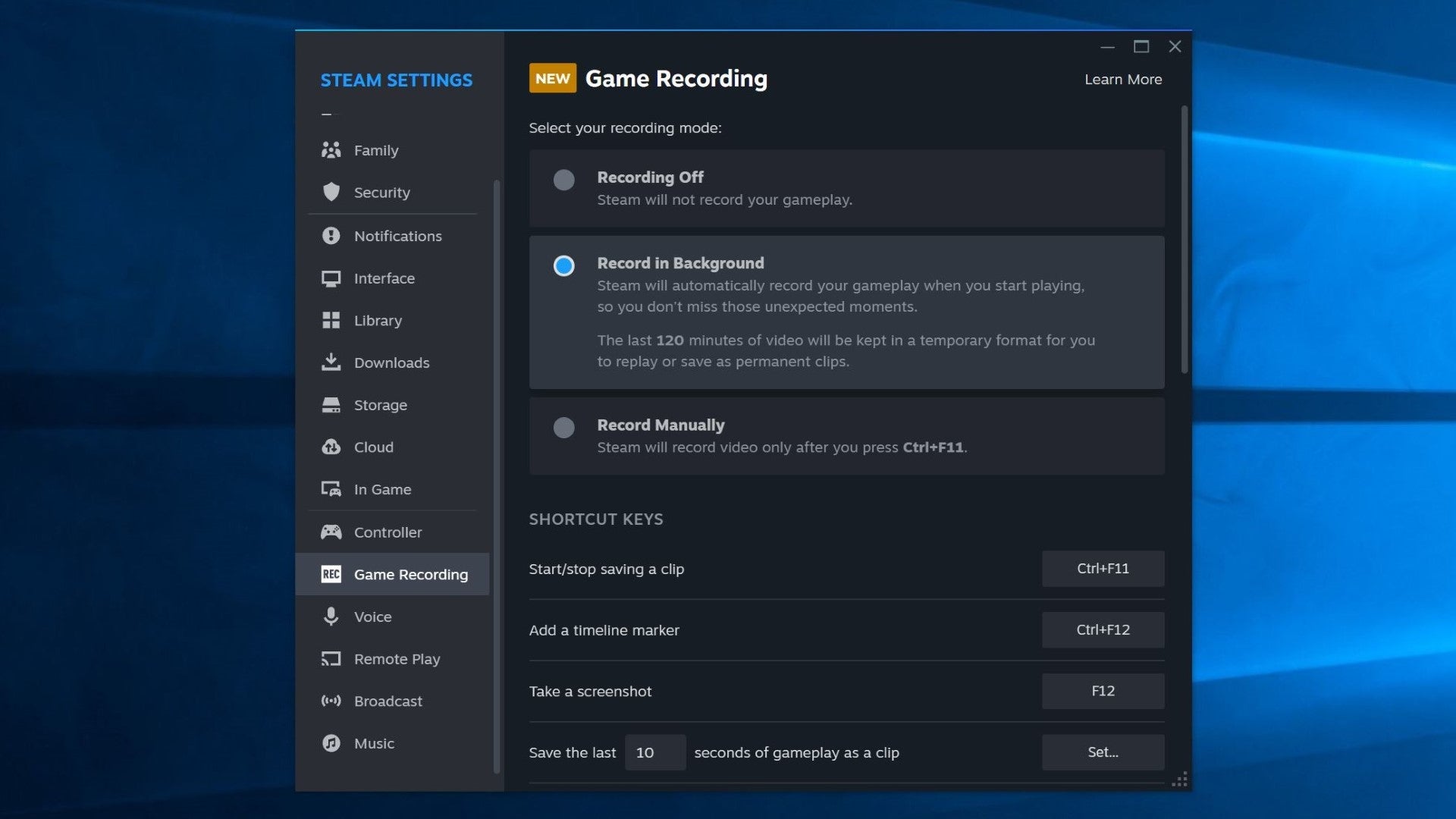
Image credit:Rock Paper Shotgun
Regardless of which mode you’re going with, check over the rest of settings beneath each option. These include recording quality – it defaults to High, but there’s a slightly sharper-looking Higher mode if you’re happy to trade a better picture for higher storage demands – and the folder in which raw recordings are saved. I don’t think you need to urgently change the latter, as you’ll mainly be dealing with clips via the Steam client itself. I also suggest you leave “Enable GPU hardware encoding” switched on.
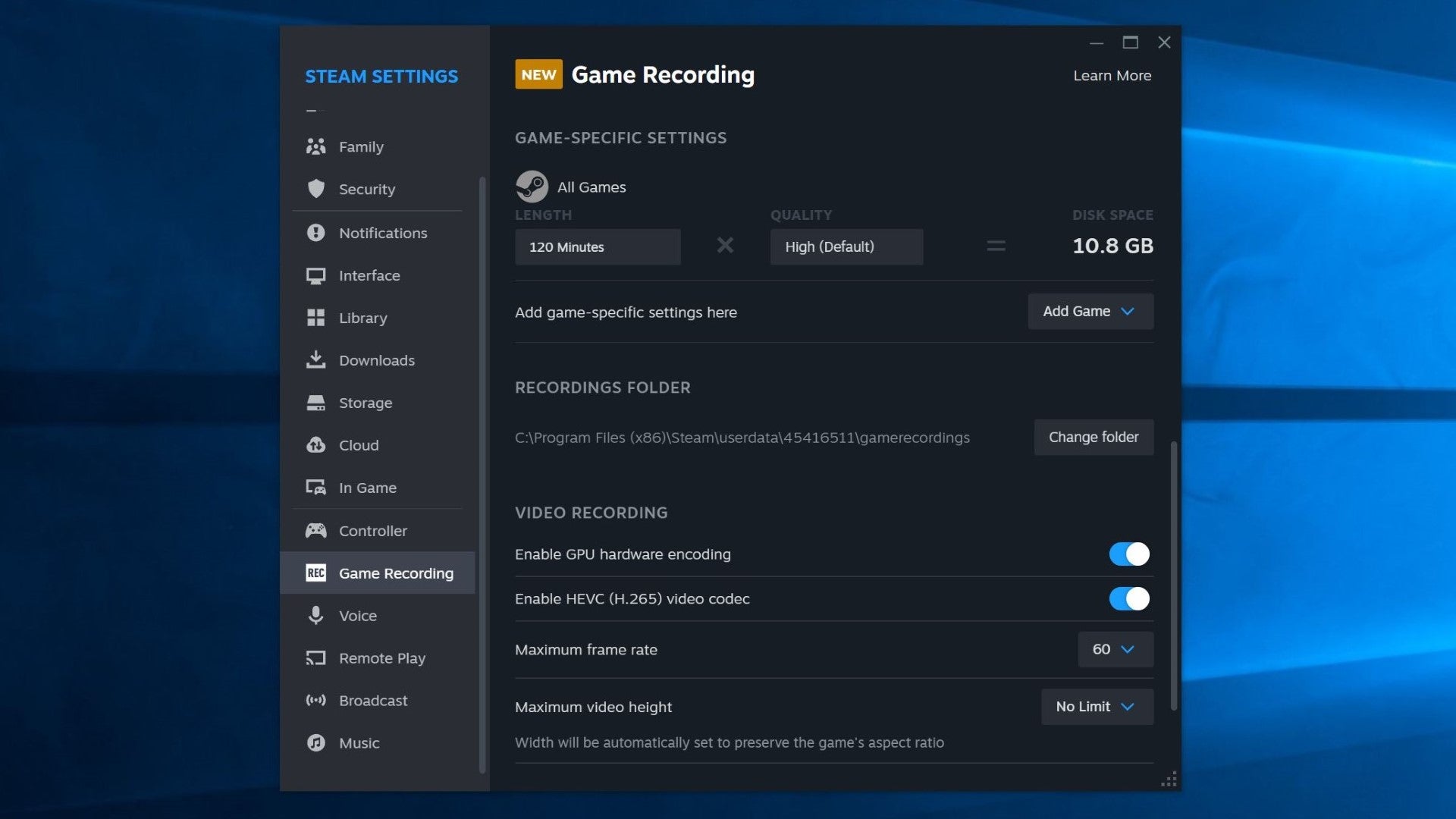
Image credit:Rock Paper Shotgun
Feel free, however, to customise any shortcut keys, and to choose whether you want Steam Game Recording to record audio from your microphone and other applications. Once ready, you can close the Settings menu.
This is where the guide must split up, depending on whether you want to record in the background, or if you’re recording manually. First, we’ll look at background recording.
How to record game clips with Steam: Record in Background
Step 2: Simply launch a game and play normally. Steam will, as it claims, record automatically, but if you open the standard Steam overlay (with Shift + Tab), you’ll notice a new video timeline at the top. You can even click at a point on the timeline to display an instant replay of that moment.
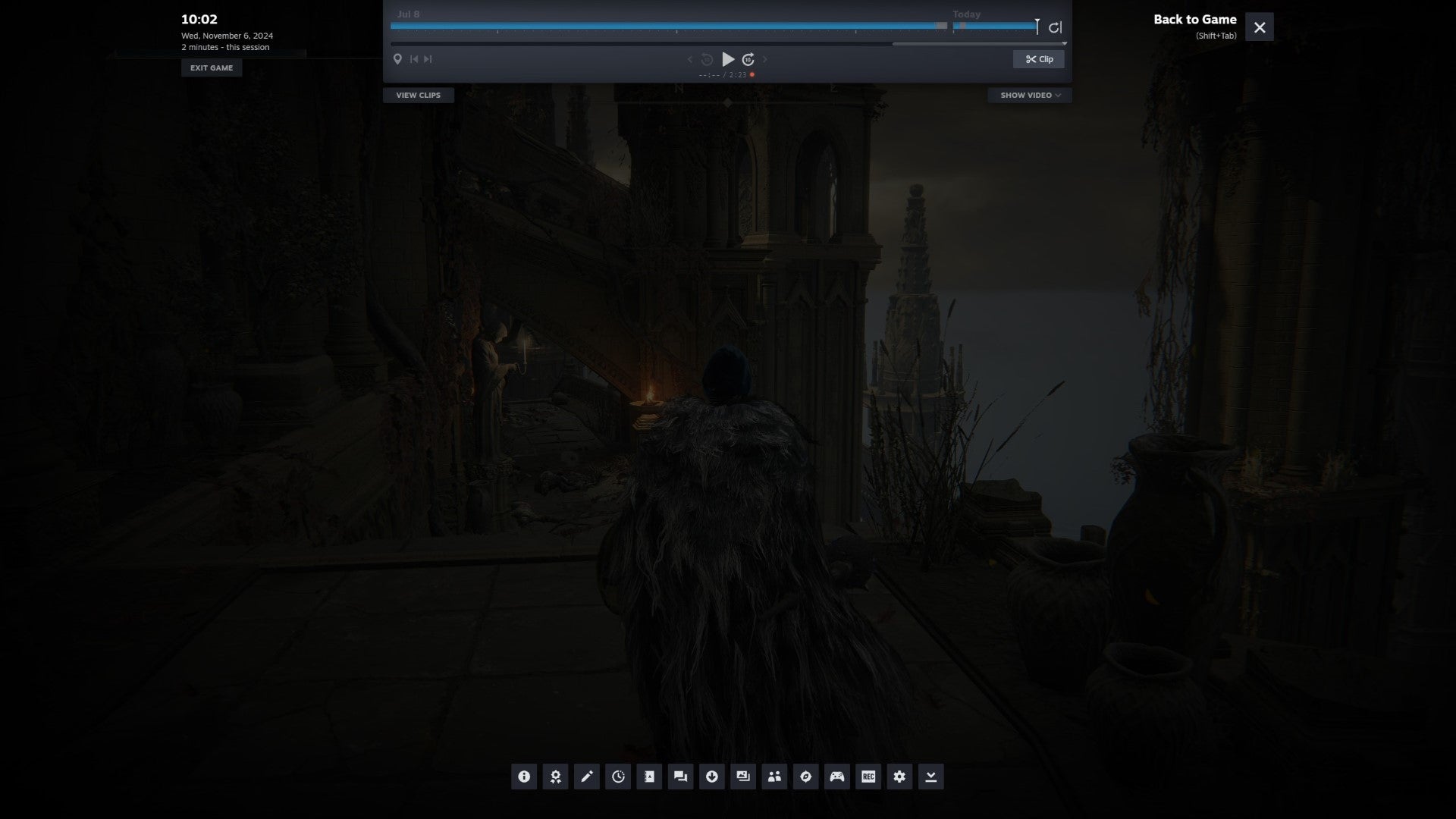
Image credit:Rock Paper Shotgun
Step 3: If you want to just focus on playing, and to deal with clipping specific moments later, you can skip to the " How to edit and share clips " section below. But there are two features you might want to make use of, the first being timeline markers. At any point while using Record in Background, you can press your marker shortcut ( Ctrl+F12 by default) to set a blue marker at that point in the time, making it easier to return to that point later.
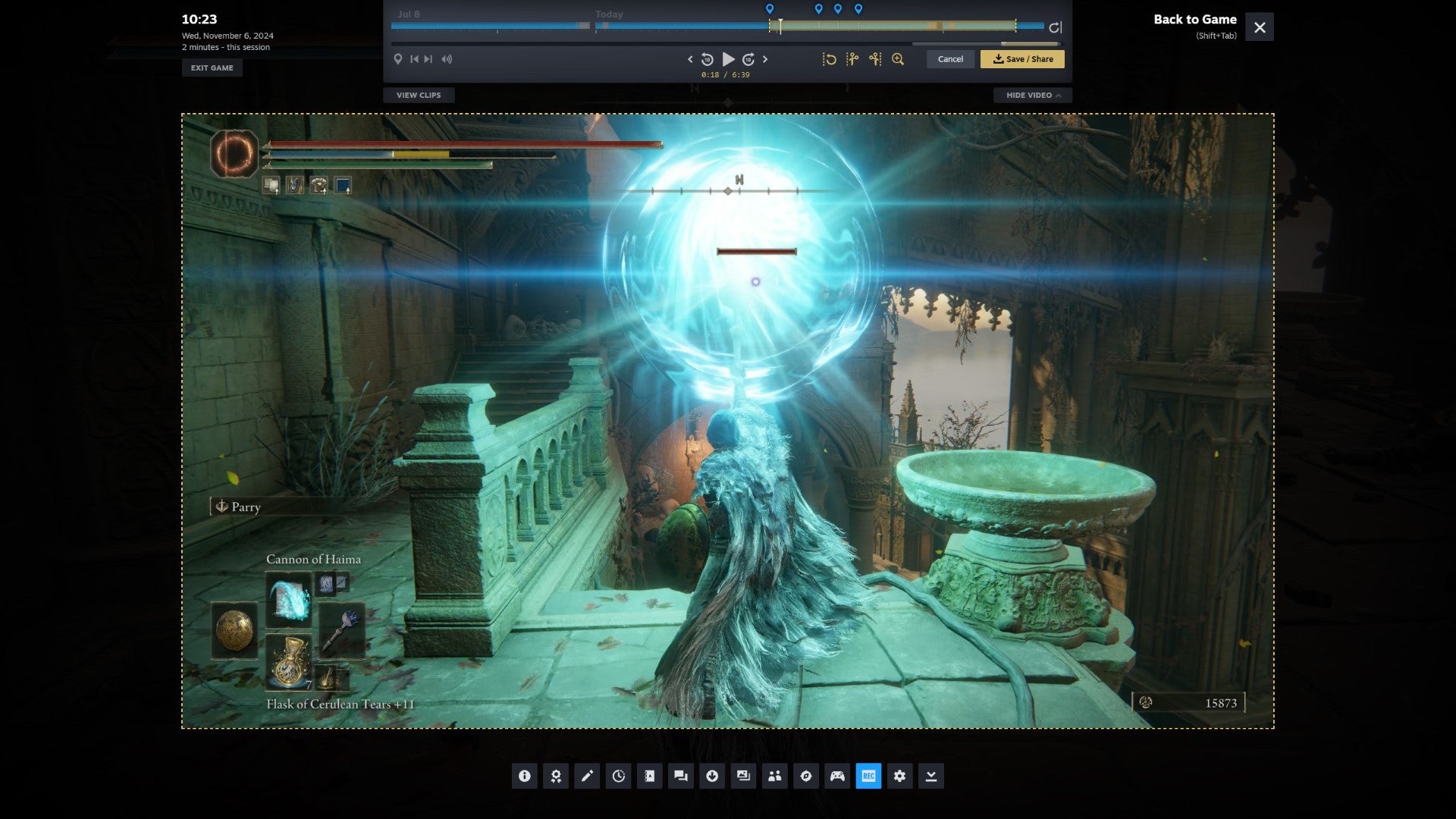
Image credit:Rock Paper Shotgun
You can also edit, save, and share shorter clips directly from within this overlay. Click the “Clip” button and drag the yellow section’s start and end points over the timeline to prepare a clip comprised of that section. Then, click the yellow Save/Share button to export or publish it; full details on the different publishing options are in the “How to edit and share clips” section below.
There’s no need to manually end background recording when you quit a game, though keep in mind that older recordings will be overwritten once you hit the maximum disk space allocation listed in the Game Recording section. Be sure you save any clips you want from that footage before it’s gone.
How to record game clips with Steam: Record Manually
Step 2: With Record Manually selected in the Steam settings, start playing your game and press the “Start/stop recording” shortcut – that’s Ctrl+F11 by default – at any time. When you want to end a clip, simply press the same shortcut to stop recording.
Unlike with the Record in Background option, you won’t see a recording timeline in the Steam overlay until you’ve started recording your first clip in a game session. At any point after this, including during the recording itself, you can click on a clip (or clip in progress) to watch back the footage in the overlay. At any point while recording, you can also use the timeline marker shortcut ( Ctrl+F12 ) to drop a blue marker at that point on the timeline. This doesn’t affect your recordings directly, but markers are useful for keeping track of particularly memorable highlights among your clips.

Image credit:Rock Paper Shotgun

Image credit:Rock Paper Shotgun
How to edit and share clips
Step 1: Your clips are accessible via the Steam Library page for the game they were recorded in; they’ll be near the top in a “Post-Game Summary” section if you just recorded them recently, otherwise they’re a bit further down, in a “Recording and Screenshots” section. Click on the clip you want to edit or share and it will open that clip in a new window, showing both the clip and its timeline.

Image credit:Rock Paper Shotgun
Step 2: To trim down a clip, you can move the timeline indicator to your desired start point, click the “Clip” button, and drag the yellow section of the timeline to select the duration of the finished clip. Alternatively, you can right-click on the timeline and select the clip start and end times that way.

Image credit:Rock Paper Shotgun
Optionally, you can also add blue markers to the timeline, either through the right-click menu or by left-clicking on the marker icon in the little preview window that appears when you hover the cursor over a point on the timeline. These can also serve as start points for trimmed clips, by way of clicking on the marker and then clicking on the “Create Clip” scissor icon.
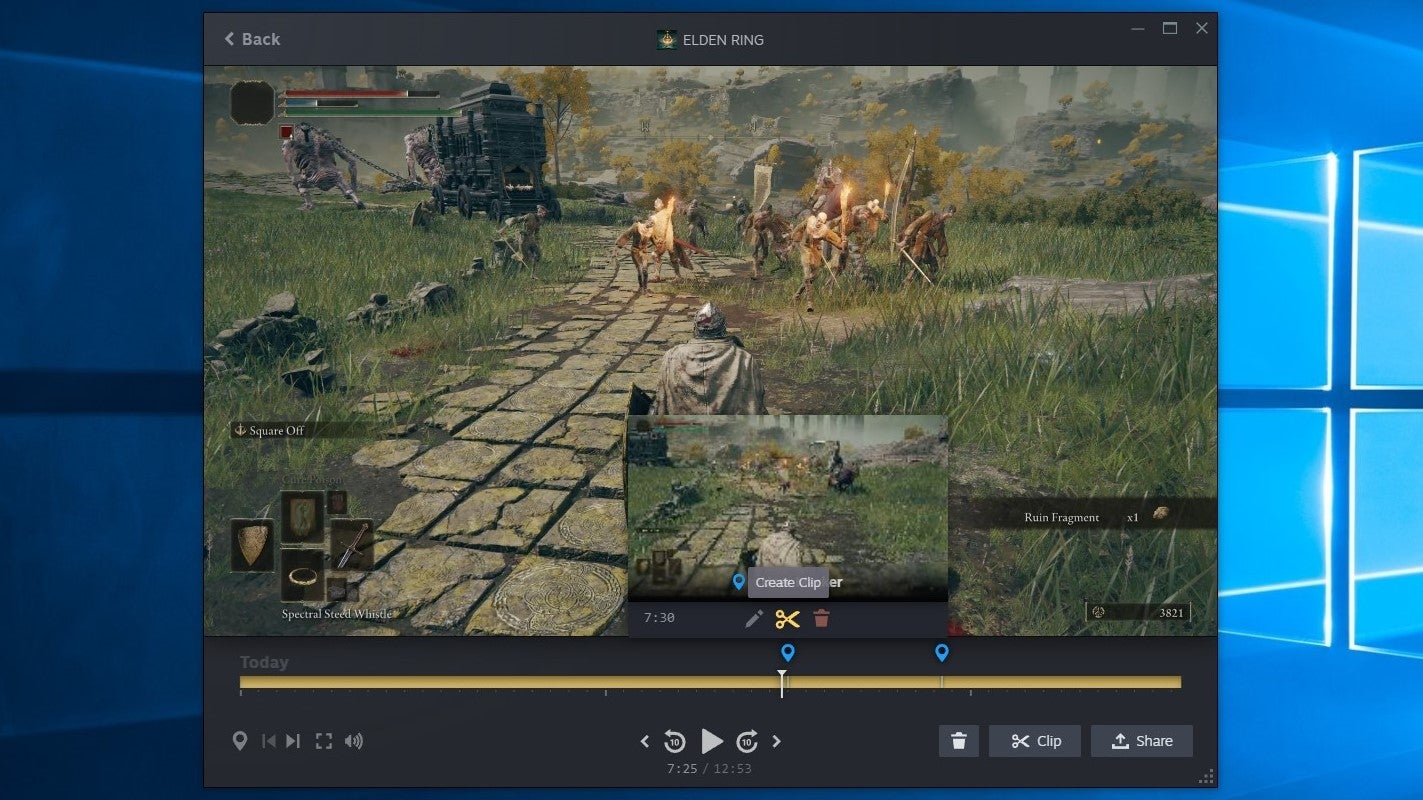
Image credit:Rock Paper Shotgun
Step 3: Once you’ve set the start and end points of your clip – or if you’re happy with the clip length as it is – click the yellow Share/Save button in the bottom-right corner.

Image credit:Rock Paper Shotgun
Step 4: You have quite a few options here. “Save clip” will rewrite the clip you selected from the Library page with this new, trimmed version; “Save new clip” will add the edited version alongside the original. “Export video file” will create an MP4 file of the clip that you can choose to save anywhere you like on your PC storage.
“Copy to Clipboard” is a bit of a weird one – it does indeed appear to add an MP4 copy of the clip to your clipboard, but pasting it into a Windows Explorer folder doesn’t seem to work. “Send to other device” makes the clip viewable and editable on any other PC, laptop, or Steam Deck you’ve previously logged into Steam with.
Finally, we have “Send to Phone”, “Create a Share Link”, and “Share to a Chat”, all of which will be unavailable if the clip is over 60 seconds long. “Send to Phone” can quickly pop the clip over to your smartphone’s Steam app, but you also have the option to scan a QR code with your phone’s camera; this will present the clip in your phone’s browser, though the link will expire after two days.
“Create a Share Link” is basically the same function, giving you a choice of a text link or a QR code that you can (respectively) share immediately or scan on your phone. Both of these will, again, expire after two days. Lastly, “Share to a Chat” lets you choose a Steam friend or group chat to share the clip with. Selecting one will open up the Steam chat interface, but won’t actually upload and send the clip until you confirm Steam can do so.
For keeping permanent copies of clips, I recommend exporting an MP4 to your SSD or hard drive. You can always delete them later if they’re taking up too much room (or whack them on an external drive. Or upload them to cloud storage).

Image credit:Rock Paper Shotgun
Steam Game Recording Q&A
Can I use Steam Game Recording to record non-Steam games?
Yes, if you can launch it through Steam by using the “Add a non-Steam game to my library” feature – I’ve tried this for games that I’d previously only played via rival services like the Epic Games Launcher, and Game Recording appears to work fine.
However, because all the recording, editing, and sharing tools are built into Steam directly, you can’t use it to record games that you’ve launched outside of Steam. If you were to, say, fire up Minecraft using Microsoft’s own launcher, without any involvement of Steam, you couldn’t use the latter for recording.
Why can’t I open the files in my raw recordings folder?
These files aren’t supposed to be watchable video files; think of them as the raw material with which Steam can build your finished videos, via saving them as clips and exporting them as MP4 files. If you’re trying to turn these raw recordings into clips, look in the Steam Library page for the game you recorded them in. You can edit, save, and export them from here, using the steps above.
Does Steam Game Recording affect performance?
It depends on your hardware. The good news is that most PC owners should only face a tiny performance impact, if it’s even noticeable at all: Game Recording, in Valve’s words, “takes advantage of Nvida and AMD graphics cards to remove most of the performance cost of creating video recordings”.
Those with Intel GPUs, or integrated APUs like those found in the Steam Deck and Asus ROG Ally handhelds, will likely see a more noticeable drop in framerates while recording. That’s because the task of capturing footage is being handled by the CPU, unlike in Nvidia and AMD systems where the graphics card can do most of the heavy lifting.
Rock Paper Shotgun is better when you sign in
Sign in and join us on our journey to discover strange and compelling PC games.

All 75 Arc Raiders Blueprints and where to get them
These areas have the highest chance of giving you Blueprints

Image credit:Rock Paper Shotgun/Embark Studios

Looking for more Arc Raiders Blueprints? It’s a special day when you find a Blueprint, as they’re among the most valuable items in Arc Raiders. If you find a Blueprint that you haven’t already found, then you must make sure you hold onto it at all costs, because Blueprints are the key to one of the most important and powerful systems of meta-progression in the game.
This guide aims to be the very best guide on Blueprints you can find, starting with a primer on what exactly they are and how they work in Arc Raiders, before delving into exactly where to get Blueprints and the very best farming spots for you to take in your search.
We’ll also go over how to get Blueprints from other unlikely activities, such as destroying Surveyors and completing specific quests. And you’ll also find the full list of all 75 Blueprints in Arc Raiders on this page (including the newest Blueprints added with the Cold Snap update , such as the Deadline Blueprint and Firework Box Blueprint), giving you all the information you need to expand your own crafting repertoire.
In this guide:
- What are Blueprints in Arc Raiders?
- Full Blueprint list: All crafting recipes
- Where to find Blueprints in Arc Raiders Blueprints obtained from quests Blueprints obtained from Trials Best Blueprint farming locations

What are Blueprints in Arc Raiders?
Blueprints in Arc Raiders are special items which, if you manage to extract with them, you can expend to permanently unlock a new crafting recipe in your Workshop. If you manage to extract from a raid with an Anvil Blueprint, for example, you can unlock the ability to craft your very own Anvil Pistol, as many times as you like (as long as you have the crafting materials).
To use a Blueprint, simply open your Inventory while in the lobby, then right-click on the Blueprint and click “Learn And Consume” . This will permanently unlock the recipe for that item in your Workshop. As of the Stella Montis update, there are allegedly 75 different Blueprints to unlock - although only 68 are confirmed to be in the game so far. You can see all the Blueprints you’ve found and unlocked by going to the Workshop menu, and hitting “R” to bring up the Blueprint screen.
It’s possible to find duplicates of past Blueprints you’ve already unlocked. If you find these, then you can either sell them, or - if you like to play with friends - you can take it into a match and gift it to your friend so they can unlock that recipe for themselves. Another option is to keep hold of them until the time comes to donate them to the Expedition.
Full Blueprint list: All crafting recipes
Below is the full list of all the Blueprints that are currently available to find in Arc Raiders, and the crafting recipe required for each item:
| Blueprint | Type | Recipe | Crafted At |
|---|---|---|---|
| Bettina | Weapon | 3x Advanced Mechanical Components 3x Heavy Gun Parts 3x Canister | Gunsmith 3 |
| Blue Light Stick | Quick Use | 3x Chemicals | Utility Station 1 |
| Aphelion | Weapon | 3x Magnetic Accelerator 3x Complex Gun Parts 1x Matriarch Reactor | Gunsmith 3 |
| Combat Mk. 3 (Flanking) | Augment | 2x Advanced Electrical Components 3x Processor | Gear Bench 3 |
| Combat Mk. 3 (Aggressive) | Augment | 2x Advanced Electrical Components 3x Processor | Gear Bench 3 |
| Complex Gun Parts | Material | 2x Light Gun Parts 2x Medium Gun Parts 2x Heavy Gun Parts | Refiner 3 |
| Fireworks Box | Quick Use | 1x Explosive Compound 3x Pop Trigger | Explosives Station 2 |
| Gas Mine | Mine | 4x Chemicals 2x Rubber Parts | Explosives Station 1 |
| Green Light Stick | Quick Use | 3x Chemicals | Utility Station 1 |
| Pulse Mine | Mine | 1x Crude Explosives 1x Wires | Explosives Station 1 |
| Seeker Grenade | Grenade | 1x Crude Explosives 2x ARC Alloy | Explosives Station 1 |
| Looting Mk. 3 (Survivor) | Augment | 2x Advanced Electrical Components 3x Processor | Gear Bench 3 |
| Angled Grip II | Mod | 2x Mechanical Components 3x Duct Tape | Gunsmith 2 |
| Angled Grip III | Mod | 2x Mod Components 5x Duct Tape | Gunsmith 3 |
| Hullcracker | Weapon | 1x Magnetic Accelerator 3x Heavy Gun Parts 1x Exodus Modules | Gunsmith 3 |
| Launcher Ammo | Ammo | 5x Metal Parts 1x Crude Explosives | Workbench 1 |
| Anvil | Weapon | 5x Mechanical Components 5x Simple Gun Parts | Gunsmith 2 |
| Anvil Splitter | Mod | 2x Mod Components 3x Processor | Gunsmith 3 |
| ??? | ??? | ??? | ??? |
| Barricade Kit | Quick Use | 1x Mechanical Components | Utility Station 2 |
| Blaze Grenade | Grenade | 1x Explosive Compound 2x Oil | Explosives Station 3 |
| Bobcat | Weapon | 3x Advanced Mechanical Components 3x Light Gun Parts | Gunsmith 3 |
| Osprey | Weapon | 2x Advanced Mechanical Components 3x Medium Gun Parts 7x Wires | Gunsmith 3 |
| Burletta | Weapon | 3x Mechanical Components 3x Simple Gun Parts | Gunsmith 1 |
| Compensator II | Mod | 2x Mechanical Components 4x Wires | Gunsmith 2 |
| Compensator III | Mod | 2x Mod Components 8x Wires | Gunsmith 3 |
| Defibrillator | Quick Use | 9x Plastic Parts 1x Moss | Medical Lab 2 |
| ??? | ??? | ??? | ??? |
| Equalizer | Weapon | 3x Magnetic Accelerator 3x Complex Gun Parts 1x Queen Reactor | Gunsmith 3 |
| Extended Barrel | Mod | 2x Mod Components 8x Wires | Gunsmith 3 |
| Extended Light Mag II | Mod | 2x Mechanical Components 3x Steel Spring | Gunsmith 2 |
| Extended Light Mag III | Mod | 2x Mod Components 5x Steel Spring | Gunsmith 3 |
| Extended Medium Mag II | Mod | 2x Mechanical Components 3x Steel Spring | Gunsmith 2 |
| Extended Medium Mag III | Mod | 2x Mod Components 5x Steel Spring | Gunsmith 3 |
| Extended Shotgun Mag II | Mod | 2x Mechanical Components 3x Steel Spring | Gunsmith 2 |
| Extended Shotgun Mag III | Mod | 2x Mod Components 5x Steel Spring | Gunsmith 3 |
| Remote Raider Flare | Quick Use | 2x Chemicals 4x Rubber Parts | Utility Station 1 |
| Heavy Gun Parts | Material | 4x Simple Gun Parts | Refiner 2 |
| Venator | Weapon | 2x Advanced Mechanical Components 3x Medium Gun Parts 5x Magnet | Gunsmith 3 |
| Il Toro | Weapon | 5x Mechanical Components 6x Simple Gun Parts | Gunsmith 1 |
| Jolt Mine | Mine | 1x Electrical Components 1x Battery | Explosives Station 2 |
| Explosive Mine | Mine | 1x Explosive Compound 1x Sensors | Explosives Station 3 |
| Jupiter | Weapon | 3x Magnetic Accelerator 3x Complex Gun Parts 1x Queen Reactor | Gunsmith 3 |
| Light Gun Parts | Material | 4x Simple Gun Parts | Refiner 2 |
| Lightweight Stock | Mod | 2x Mod Components 5x Duct Tape | Gunsmith 3 |
| Lure Grenade | Grenade | 1x Speaker Component 1x Electrical Components | Utility Station 2 |
| Medium Gun Parts | Material | 4x Simple Gun Parts | Refiner 2 |
| Torrente | Weapon | 2x Advanced Mechanical Components 3x Medium Gun Parts 6x Steel Spring | Gunsmith 3 |
| Muzzle Brake II | Mod | 2x Mechanical Components 4x Wires | Gunsmith 2 |
| Muzzle Brake III | Mod | 2x Mod Components 8x Wires | Gunsmith 3 |
| Padded Stock | Mod | 2x Mod Components 5x Duct Tape | Gunsmith 3 |
| Shotgun Choke II | Mod | 2x Mechanical Components 4x Wires | Gunsmith 2 |
| Shotgun Choke III | Mod | 2x Mod Components 8x Wires | Gunsmith 3 |
| Shotgun Silencer | Mod | 2x Mod Components 8x Wires | Gunsmith 3 |
| Showstopper | Grenade | 1x Advanced Electrical Components 1x Voltage Converter | Explosives Station 3 |
| Silencer I | Mod | 2x Mechanical Components 4x Wires | Gunsmith 2 |
| Silencer II | Mod | 2x Mod Components 8x Wires | Gunsmith 3 |
| Snap Hook | Quick Use | 2x Power Rod 3x Rope 1x Exodus Modules | Utility Station 3 |
| Stable Stock II | Mod | 2x Mechanical Components 3x Duct Tape | Gunsmith 2 |
| Stable Stock III | Mod | 2x Mod Components 5x Duct Tape | Gunsmith 3 |
| Tagging Grenade | Grenade | 1x Electrical Components 1x Sensors | Utility Station 3 |
| Tempest | Weapon | 3x Advanced Mechanical Components 3x Medium Gun Parts 3x Canister | Gunsmith 3 |
| Trigger Nade | Grenade | 2x Crude Explosives 1x Processor | Explosives Station 2 |
| Vertical Grip II | Mod | 2x Mechanical Components 3x Duct Tape | Gunsmith 2 |
| Vertical Grip III | Mod | 2x Mod Components 5x Duct Tape | Gunsmith 3 |
| Vita Shot | Quick Use | 2x Antiseptic 1x Syringe | Medical Lab 3 |
| Vita Spray | Quick Use | 3x Antiseptic 1x Canister | Medical Lab 3 |
| Vulcano | Weapon | 1x Magnetic Accelerator 3x Heavy Gun Parts 1x Exodus Modules | Gunsmith 3 |
| Wolfpack | Grenade | 2x Explosive Compound 2x Sensors | Explosives Station 3 |
| Red Light Stick | Quick Use | 3x Chemicals | Utility Station 1 |
| Smoke Grenade | Grenade | 14x Chemicals 1x Canister | Utility Station 2 |
| Deadline | Mine | 3x Explosive Compound 2x ARC Circuitry | Explosives Station 3 |
| Trailblazer | Grenade | 1x Explosive Compound 1x Synthesized Fuel | Explosives Station 3 |
| Tactical Mk. 3 (Defensive) | Augment | 2x Advanced Electrical Components 3x Processor | Gear Bench 3 |
| Tactical Mk. 3 (Healing) | Augment | 2x Advanced Electrical Components 3x Processor | Gear Bench 3 |
| Yellow Light Stick | Quick Use | 3x Chemicals | Utility Station 1 |
Note: The missing Blueprints in this list likely have not actually been added to the game at the time of writing, because none of the playerbase has managed to find any of them. As they are added to the game, I will update this page with the most relevant information so you know exactly how to get all 75 Arc Raiders Blueprints.
Where to find Blueprints in Arc Raiders
Below is a list of all containers, modifiers, and events which maximise your chances of finding Blueprints:
- Certain quests reward you with specific Blueprints .
- Completing Trials has a high chance of offering Blueprints as rewards.
- Surveyors have a decent chance of dropping Blueprints on death.
- High loot value areas tend to have a greater chance of spawning Blueprints.
- Night Raids and Storms may increase rare Blueprint spawn chances in containers.
- Containers with higher numbers of items may have a higher tendency to spawn Blueprints. As a result, Blue Gate (which has many “large” containers containing multiple items) may give you a higher chance of spawning Blueprints.
- Raider containers (Raider Caches, Weapon Boxes, Medical Bags, Grenade Tubes) have increased Blueprint drop rates. As a result, the Uncovered Caches event gives you a high chance of finding Blueprints.
- Security Lockers have a higher than average chance of containing Blueprints.
- Certain Blueprints only seem to spawn under specific circumstances: Tempest Blueprint only spawns during Night Raid events. Vulcano Blueprint only spawns during Hidden Bunker events. Jupiter and Equaliser Blueprints only spawn during Harvester events.

Raider Caches, Weapon Boxes, and other raider-oriented container types have a good chance of offering Blueprints. |Image credit:Rock Paper Shotgun/Embark Studios
Blueprints have a very low chance of spawning in any container in Arc Raiders, around 1-2% on average. However, there is a higher chance of finding Blueprints in particular container types. Specifically, you can find more Blueprints in Raider containers and security lockers.
Beyond this, if you’re looking for Blueprints you should focus on regions of the map which are marked as having particularly high-value loot. Areas such as the Control Tower in Dam Battlegrounds, the Arrival and Departure Buildings in Spaceport, and Pilgrim’s Peak in Blue Gate all have a better-than-average chance of spawning Blueprints somewhere amongst all their containers. Night Raids and Electromagnetic Storm events also increase the drop chances of certain Blueprints .
In addition to these containers, you can often loot Blueprints from destroyed Surveyors - the largest of the rolling ball ARC. Surveyors are more commonly found on the later maps - Spaceport and Blue Gate - and if one spawns in your match, you’ll likely see it by the blue laser beam that it casts into the sky while “surveying”.
Surveyors are quite well-armoured and will very speedily run away from you once it notices you, but if you can take one down then make sure you loot all its parts for a chance of obtaining certain unusual Blueprints.
Blueprints obtained from quests
One way in which you can get Blueprints is by completing certain quests for the vendors in Speranza. Some quests will reward you with a specific item Blueprint upon completion, so as long as you work through all the quests in Arc Raiders, you are guaranteed those Blueprints.
Here is the full list of all Blueprints you can get from quest rewards:
- Trigger Nade Blueprint: Rewarded after completing “Sparks Fly”.
- Lure Grenade Blueprint: Rewarded after completing “Greasing Her Palms”.
- Burletta Blueprint: Rewarded after completing “Industrial Espionage”.
- Hullcracker Blueprint (and Launcher Ammo Blueprint): Rewarded after completing “The Major’s Footlocker”.
Alas, that’s only 4 Blueprints out of a total of 75 to unlock, so for the vast majority you will need to find them yourself during a raid. If you’re intent on farming Blueprints, then it’s best to equip yourself with cheap gear in case you lose it, but don’t use a free loadout because then you won’t get a safe pocket to stash any new Blueprint you find. No pain in Arc Raiders is sharper than failing to extract with a new Blueprint you’ve been after for a dozen hours already.

One of the best ways to get Blueprints is by hitting three stars on all five Trials every week. |Image credit:Rock Paper Shotgun/Embark Studios
Blueprints obtained from Trials
One of the very best ways to get Blueprints is as rewards for completing Trials in Arc Raiders. Trials are unlocked from Level 15 onwards, and allow you to earn rewards by focusing on certain tasks over the course of several raids. For example, one Trial might task you with dealing damage to Hornets, while another might challenge you to loot Supply Drops.
Trials refresh on a weekly basis, with a new week bringing five new Trials. Each Trial can offer up to three rewards after passing certain score milestones, and it’s possible to receive very high level loot from these reward crates - including Blueprints. So if you want to unlock as many Blueprints as possible, you should make a point of completing as many Trials as possible each week.
Best Blueprint farming locations
The very best way to get Blueprints is to frequent specific areas of the maps which combine high-tier loot pools with the right types of containers to search. Here are my recommendations for where to find Blueprints on every map, so you can always keep the search going for new crafting recipes to unlock.

Image credit:Rock Paper Shotgun/Embark Studios
Dam Battlegrounds
The best places to farm Blueprints on Dam Battlegrounds are the Control Tower, Power Generation Complex, Ruby Residence, and Pale Apartments . The first two regions, despite only being marked on the map as mid-tier loot, contain a phenomenal number of containers to loot. The Control Tower can also contain a couple of high-tier Security Lockers - though of course, you’ll need to have unlocked the Security Breach skill at the end of the Survival tree.
There’s also a lot of reporting amongst the playerbase that the Residential areas in the top-left of the map - Pale Apartments and Ruby Residence - give you a comparatively strong chance of finding Blueprints. Considering their size, there’s a high density of containers to loot in both locations, and they also have the benefit of being fairly out of the way. So you’re more likely to have all the containers to yourself.
Buried City
The best Blueprint farming locations on Buried City are the Santa Maria Houses, Grandioso Apartments, Town Hall, and the various buildings of the New District . Grandioso Apartments has a lower number of containers than the rest, but a high chance of spawning weapon cases - which have good Blueprint drop rates. The others are high-tier loot areas, with plenty of lootable containers - including Security Lockers.
Spaceport
The best places to find Blueprints on Spaceport are the Arrival and Departure Buildings, as well as Control Tower A6 and the Launch Towers . All these areas are labelled as high-value loot regions, and many of them are also very handily connected to one another by the Spaceport wall, which you can use to quickly run from one area to the next. At the tops of most of these buildings you’ll find at least one Security Locker, so this is an excellent farming route for players looking to find Blueprints.
The downside to looting Blueprints on Spaceport is that all these areas are hotly contested, particularly in Duos and Squads. You’ll need to be very focused and fast in order to complete the full farming route.

Image credit:Rock Paper Shotgun/Embark Studios
Blue Gate
Blue Gate tends to have a good chance of dropping Blueprints, potentially because it generally has a high number of containers which can hold lots of items; so there’s a higher chance of a Blueprint spawning in each container. In my experience, the best Blueprint farming spots on Blue Gate are Pilgrim’s Peak, Raider’s Refuge, the Ancient Fort, and the Underground Complex beneath the Warehouse .
All of these areas contain a wealth of containers to loot. Raider’s Refuge has less to loot, but the majority of the containers in and around the Refuge are raider containers, which have a high chance of containing Blueprints - particularly during major events.
Stella Montis
On the whole, Stella Montis seems to have a very low drop rate for Blueprints (though a high chance of dropping other high-tier loot). If you do want to try farming Blueprints on this map, the best places to find Blueprints in Stella Montis are Medical Research, Assembly Workshop, and the Business Center . These areas have the highest density of containers to loot on the map.
In addition to this, the Western Tunnel has a few different Security Lockers to loot, so while there’s very little to loot elsewhere in this area of the map, it’s worth hitting those Security Lockers if you spawn there at the start of a match.
That wraps up this primer on how to get all the Blueprints in Arc Raiders as quickly as possible. With the Expedition system constantly resetting a large number of players’ Blueprints, it’s more important than ever to have the most up-to-date information on where to find all these Blueprints.
While you’re here, be sure to check out our Arc Raiders best guns tier list , as well as our primers on the best skills to unlock and all the different Field Depot locations on every map.

ARC Raiders
PS5 , Xbox Series X/S , PC
Rock Paper Shotgun is better when you sign in
Sign in and join us on our journey to discover strange and compelling PC games.
