How to install the Epic Games Launcher on the Steam Deck
No Windows installation or hardcore Linux engineering required

Image credit:Rock Paper Shotgun

Knowing how to install the Epic Games Launcher on your Steam Deck will let you sneakily bypass the handheld’s innate lack of… well, ability to play any games that aren’t out on Steam. You have a choice of installation methods, too, including the quick and easy Lutris launcher manager or a more complex (but more direct and flexible) manual installation. In this guide, we’ll show you how to do both.

Image credit:Rock Paper Shotgun
Steam Deck Academy brings together all our guides and explainers on getting the most out of your Steam Deck, no student loans or sweaty dormitories required.
While as Epic’s platform has enjoyed mixed fortunes , there’s no denying that it’s become part of the PC furniture, complete with its own exclusives and access to a steady supply of free games. Out of the box, the Steam Deck will only know how to run games from your Steam library, but with a little tinkering – explained below, step by step – it’s possible to trick the Windows-based Epic Games Launcher into working on the Deck’s SteamOS . And once you’ve got the launcher, you’ve got the games, and plenty of the Epic Store’s wares can run just fine on the Steam Deck without any further meddling.
We’ll start with the Lutris method, as this is not only simpler, but also gives you a useful tool for easily installing other non-Steam launchers (like Ubisoft Connect and Battle.net ) while you’re at it. Whichever technique you choose, I’d also recommend you approach it with a mouse and keyboard attached via a Steam Deck dock or USB hub. Poking about in the Deck’s Desktop Mode , which is necessary for both methods, is just easier this way – though you can get by the handheld’s own inputs and touchscreen as well.
- How to install the Epic Games Launcher on the Steam Deck with Lutris
- How to install the Epic Games Launcher on the Steam Deck manually
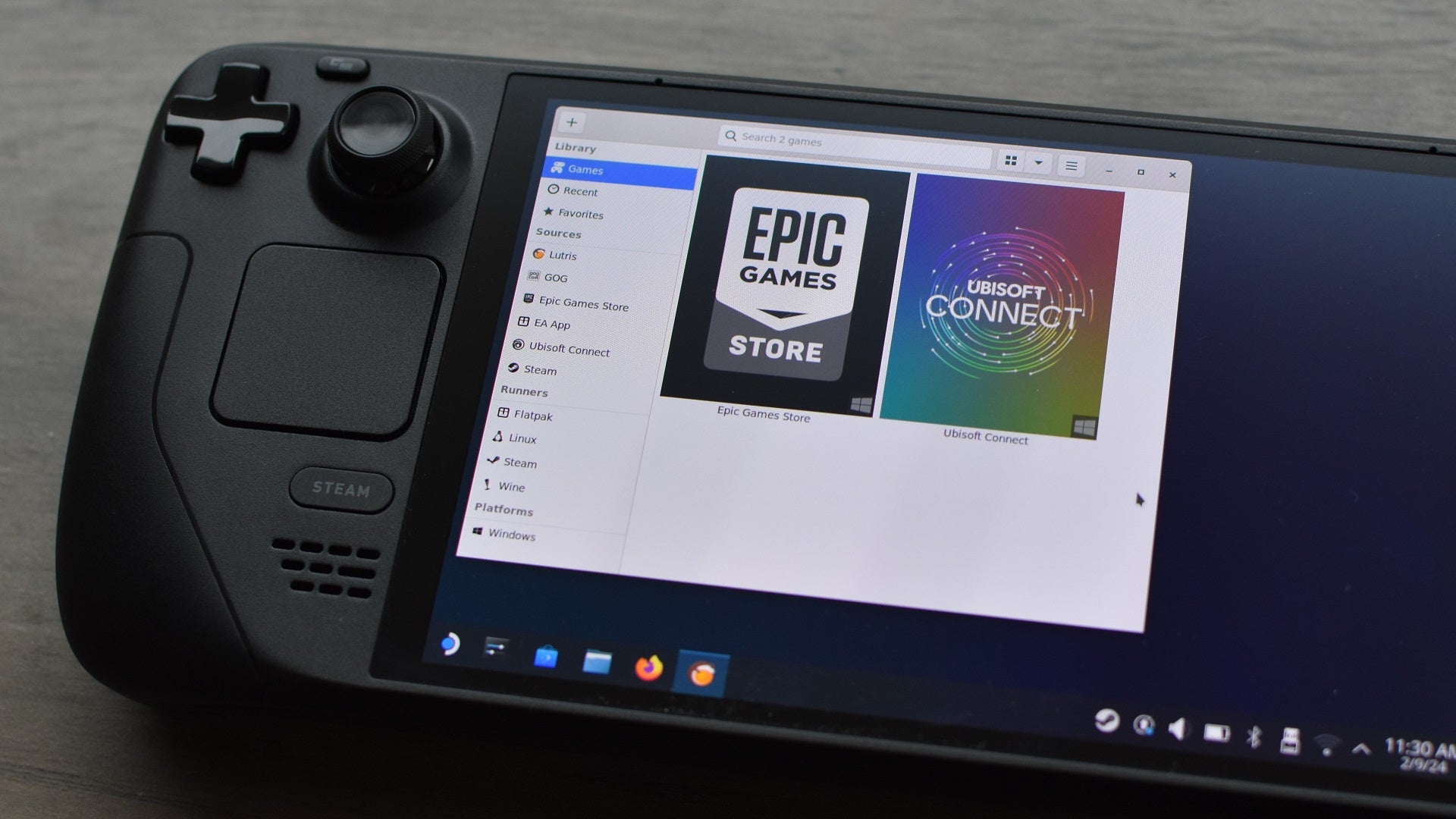
Image credit:Rock Paper Shotgun
How to install the Epic Games Launcher on the Steam Deck with Lutris
Install the Lutris app
Step 1: Hold down the Steam Deck’s power button and select “Switch to Desktop.”

Image credit:Rock Paper Shotgun
Step 2: Open the Discover app – the shortcut is the blue shopping bag in the taskbar – and search for Lutris. Click Install.

Image credit:Rock Paper Shotgun
Use Lutris to install the Epic Games Launcher
Step 3: Once it’s downloaded and installed, launch Lutris. You should see Epic Games Store listed in the left sidebar – click on the Connect icon, which looks like a tiny person, next to it.

Image credit:Rock Paper Shotgun
Step 4: Click OK on the window that appears, then click the Install button to start installing Wine. This is a compatibility layer, similar to Valve’s Proton, that helps Windows applications to run on the Linux-based SteamOS.

Image credit:Rock Paper Shotgun
Step 5: Click Continue on the next screen – don’t bother checking any of the options to create shortcuts – and wait a while. If you’re prompted to approve any additional downloads, click Install. Eventually you’ll see a fast-scrolling window of green Matrix text, which in non-technical terms means that it’s working.
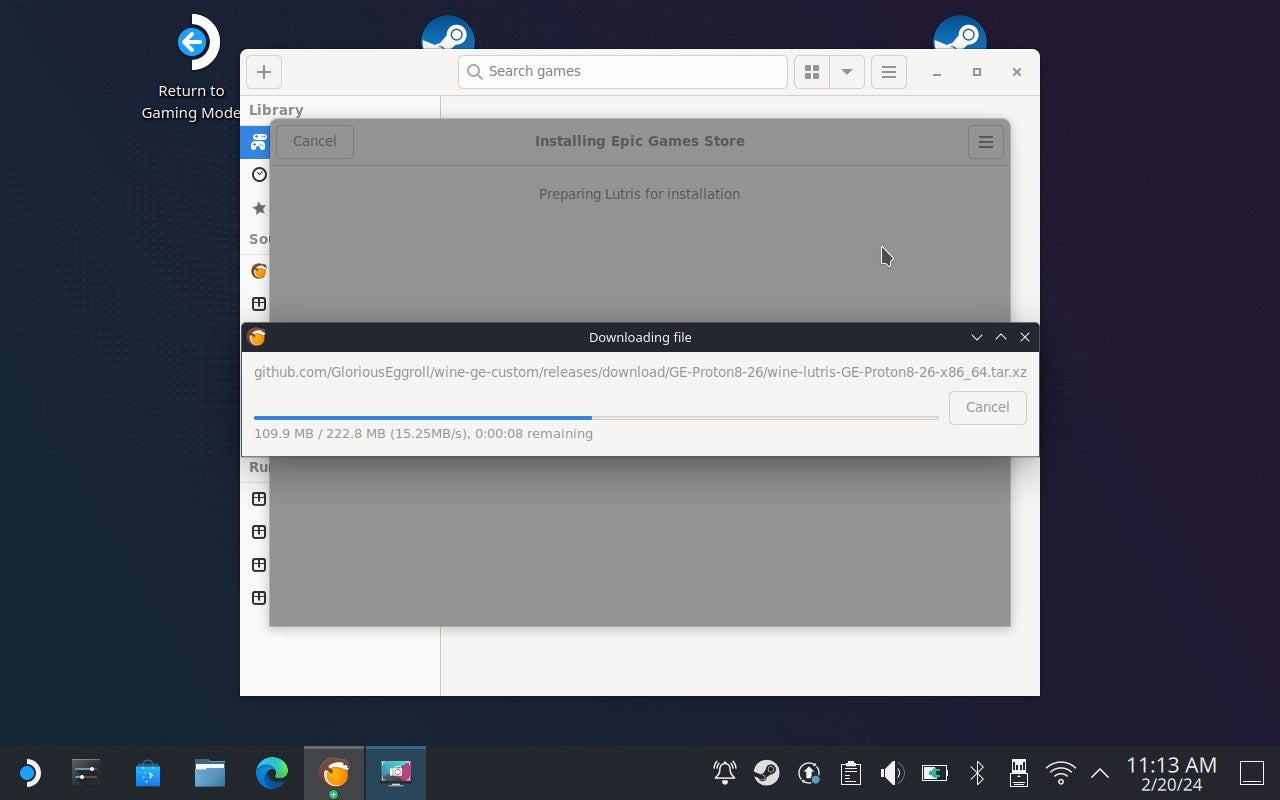
Image credit:Rock Paper Shotgun
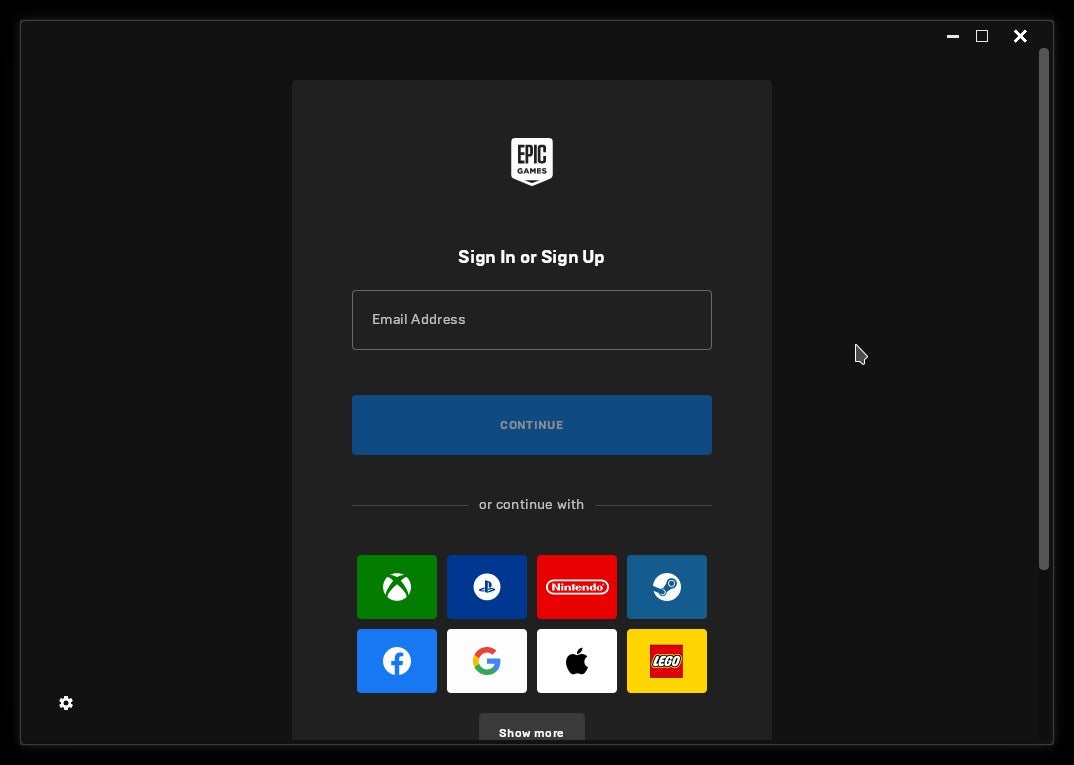
Image credit:Rock Paper Shotgun
Add a Lutris shortcut to Steam
At this point, you can log into the Epic Games Launcher and set about installing your games. Still, it’s worth taking a moment to createSteam shortcut for Lutris, lest you have to return to Desktop Mode every time you want to use it.
Step 7: While still in Desktop Mode, open Steam, click on “Games” at the top, then select “Add a non-Steam game to My Library.” From here, simply find Lutris in the list of apps, select it, then click the Add Selected Programs button.

Image credit:Rock Paper Shotgun
The next time you boot in the Steam Deck’s default Gaming Mode, you should then be able to find Lutris – and by extension, the Epic Games Launcher – in your Steam library. It’ll be in the Non-Steam section.
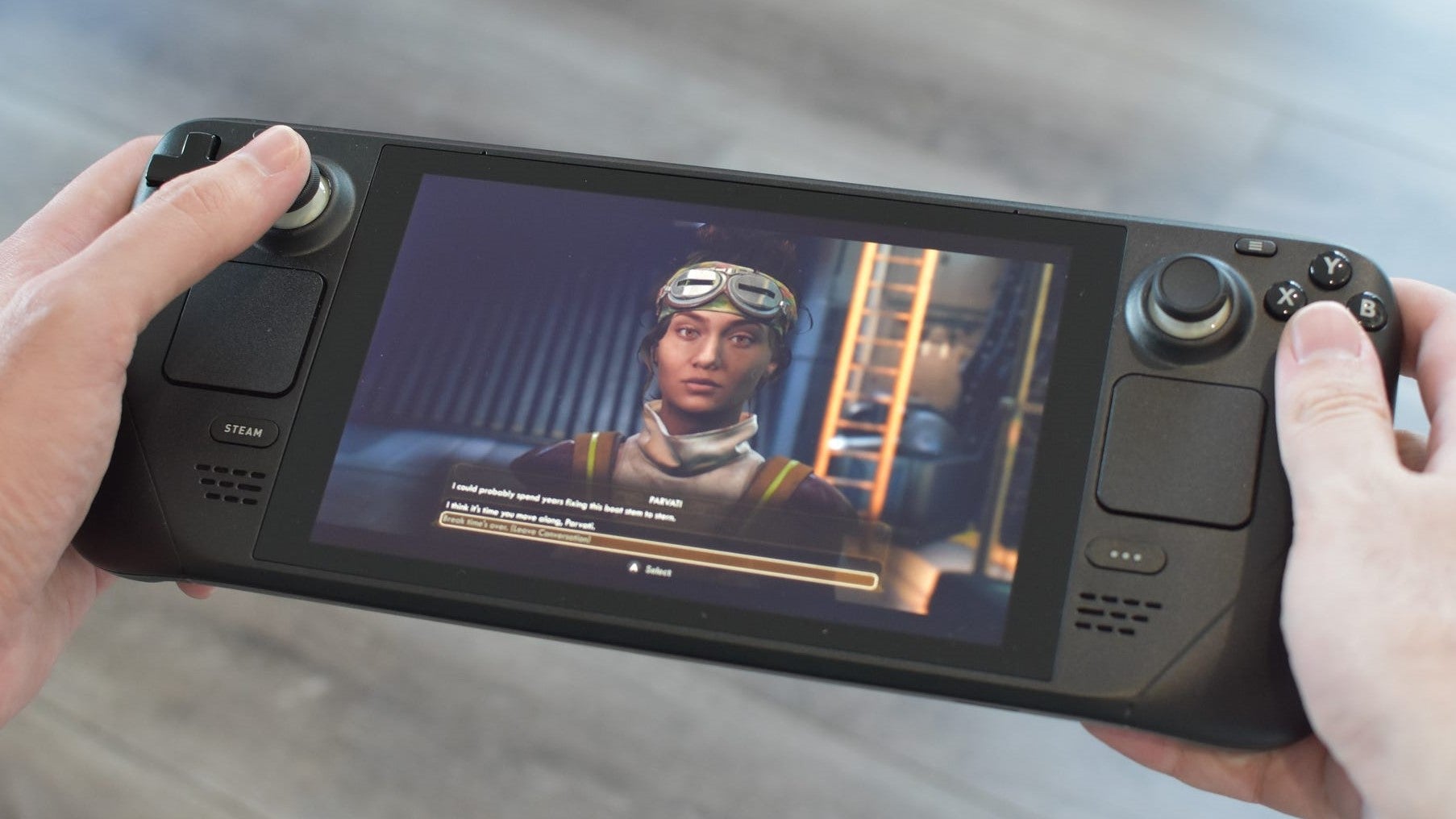
Image credit:Rock Paper Shotgun
How to install the Epic Games Launcher on the Steam Deck manually
Originally discovered by (and all credit to) GamingOnLinux ’s Liam Dawe, this method cuts out the middleman and lets you fire up the Epic Games Launcher directly from Steam.
It is more complicated than the Lutris method, and comes with the quirk of needing you to launch it from within the Desk’s Desktop Mode whenever you want to update the Launcher to a newer version - a process that involves the application restarting itself, which doesn’t work in Gaming Mode. At the same time, it’s not actually as hack-y as it looks; the worst thing that can go wrong is accidentally skipping a step so that the Launcher won’t launch, and ultimately, nothing here will be too scary if you’ve ever used a file manager before. Since you’re reading a PC gaming site, I’m assuming you have.
Download the Epic Games Launcher installer
Step 1: Enter Desktop Mode by holding down the power button, then selecting “Switch to Desktop” from the list of options.
Image credit:Rock Paper Shotgun
Step 2: Open up a browser (Firefox comes pre-installed), head to Epic Games and download the launcher’s installer. Make a note of wherever you save it to – it should be in Home > Downloads by default.
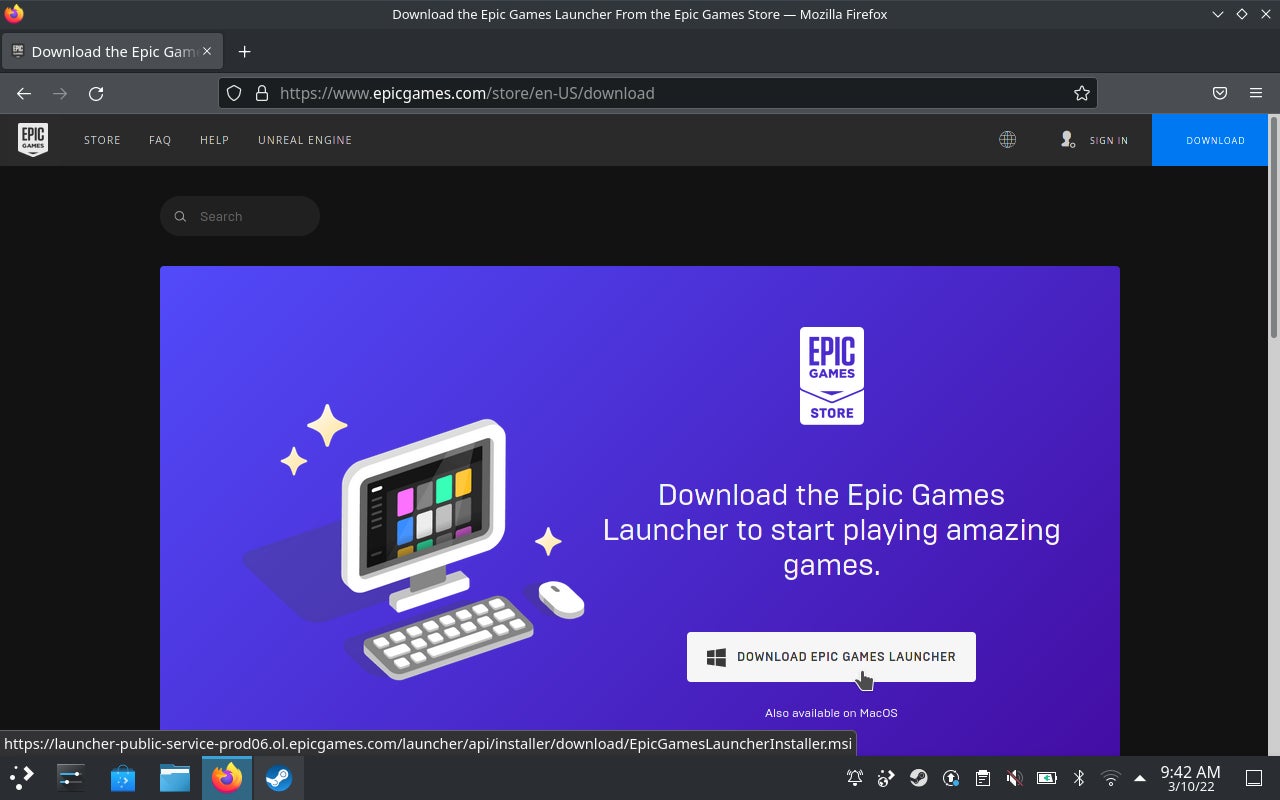
Image credit:Rock Paper Shotgun
Step 3: Open up the Steam app, click “Games” at the top, then “Add a Non-Steam Game to My Library.” Just as you may have done loads of times on a desktop!
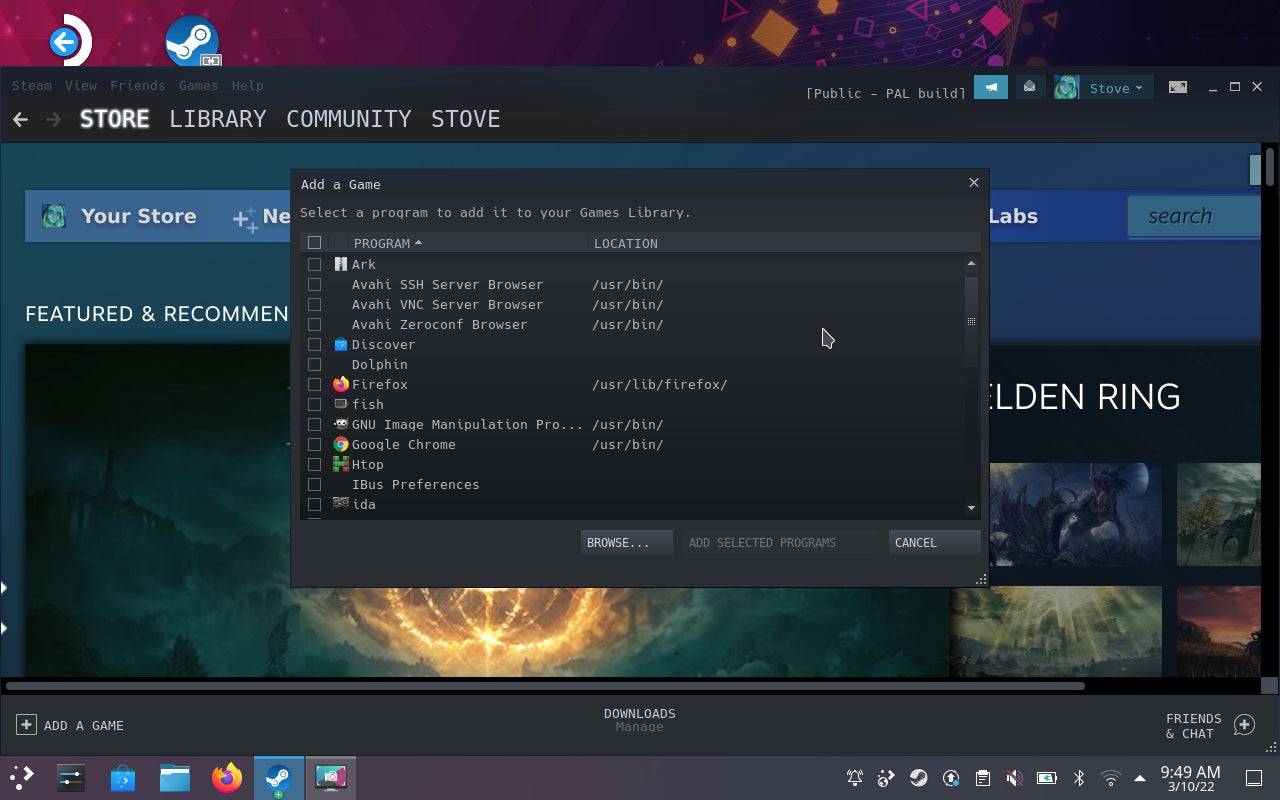
Image credit:Rock Paper Shotgun
Step 4: The Epic installer won’t initially appear in the list of apps that pops up, so click the Browse button and navigate to wherever you saved it. Make sure the File Type field is set to “All Files” so that the installer can appear at all, then select it and click “Open.” Back in the “Add a Game” window, the installer should now be selected, so click “Add selected programs.”
<img loading=“lazy” src=“https://assetsio.gnwcdn.com/how-to-install-epic-games-launcher-on-steam-deck-step-4.png?width=2048&height=2048&fit=bounds&quality=85&format=jpg&auto=webp" onerror=“this.onerror=null;this.src=‘https://blogger.googleusercontent.com/img/a/AVvXsEhe7F7TRXHtjiKvHb5vS7DmnxvpHiDyoYyYvm1nHB3Qp2_w3BnM6A2eq4v7FYxCC9bfZt3a9vIMtAYEKUiaDQbHMg-ViyGmRIj39MLp0bGFfgfYw1Dc9q_H-T0wiTm3l0Uq42dETrN9eC8aGJ9_IORZsxST1AcLR7np1koOfcc7tnHa4S8Mwz_xD9d0=s16000';" alt=“Step 4 of how to install the Epic Games Launcher on the Steam Deck: Finding the installer in your files and clicking “Open”. - 16”>
Image credit:Rock Paper Shotgun
Run the installer
Step 5: Success part one: Steam now recognises the installer. Find it in your Steam library by searching for “Epic,” or just scrolling down through your list of games, then right-click it and select “Properties.” If you’re using the Deck’s trackpads instead of a mouse, pressing down on the left pad registers a right-click. Which sounds odd but also feels totally normal if you’re right-handed? Ergonomics are weird.
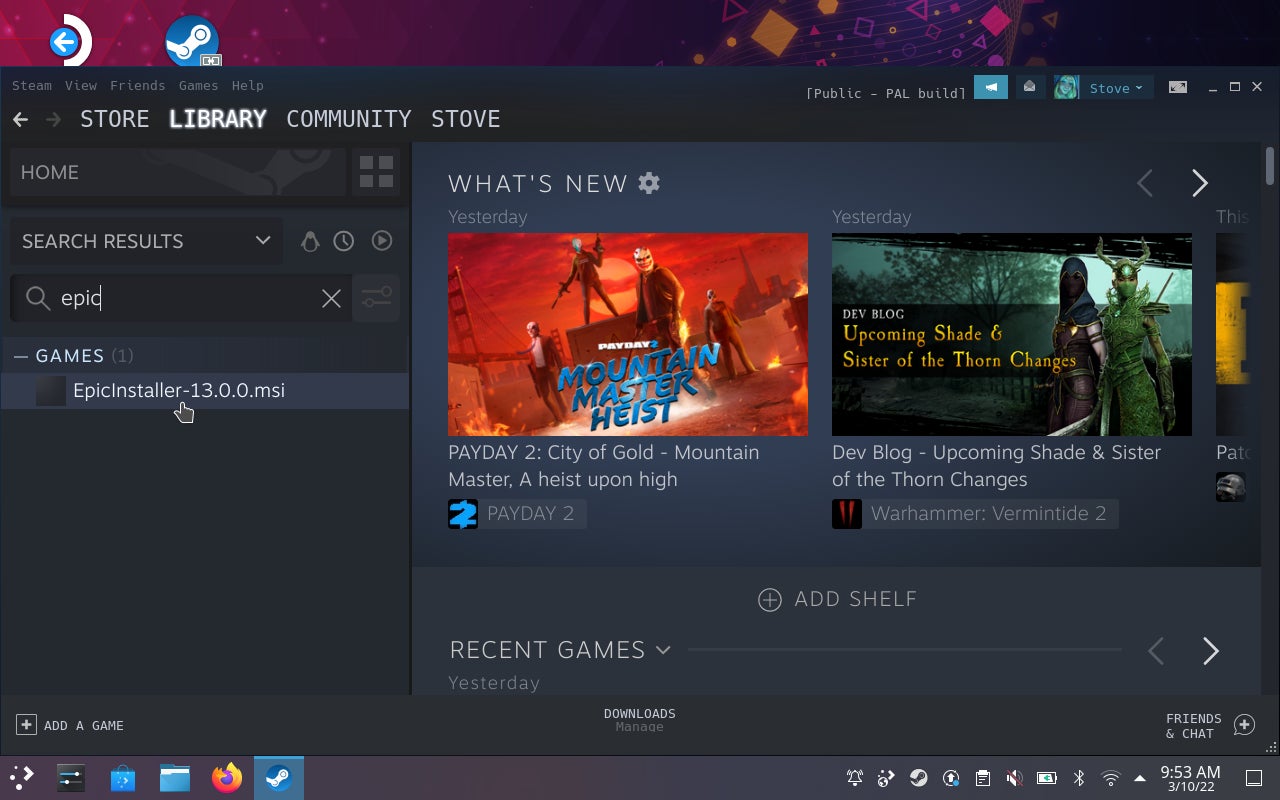
Image credit:Rock Paper Shotgun
Step 6: In the Compatibility tab of the Properties menu, check the “Force the use…” box, then select the latest installed version of Proton from the drop-down menu below. This will get the Epic Games Launcher running under the same Linux compatibility layer that the Steam Deck uses to get most Steam games running.
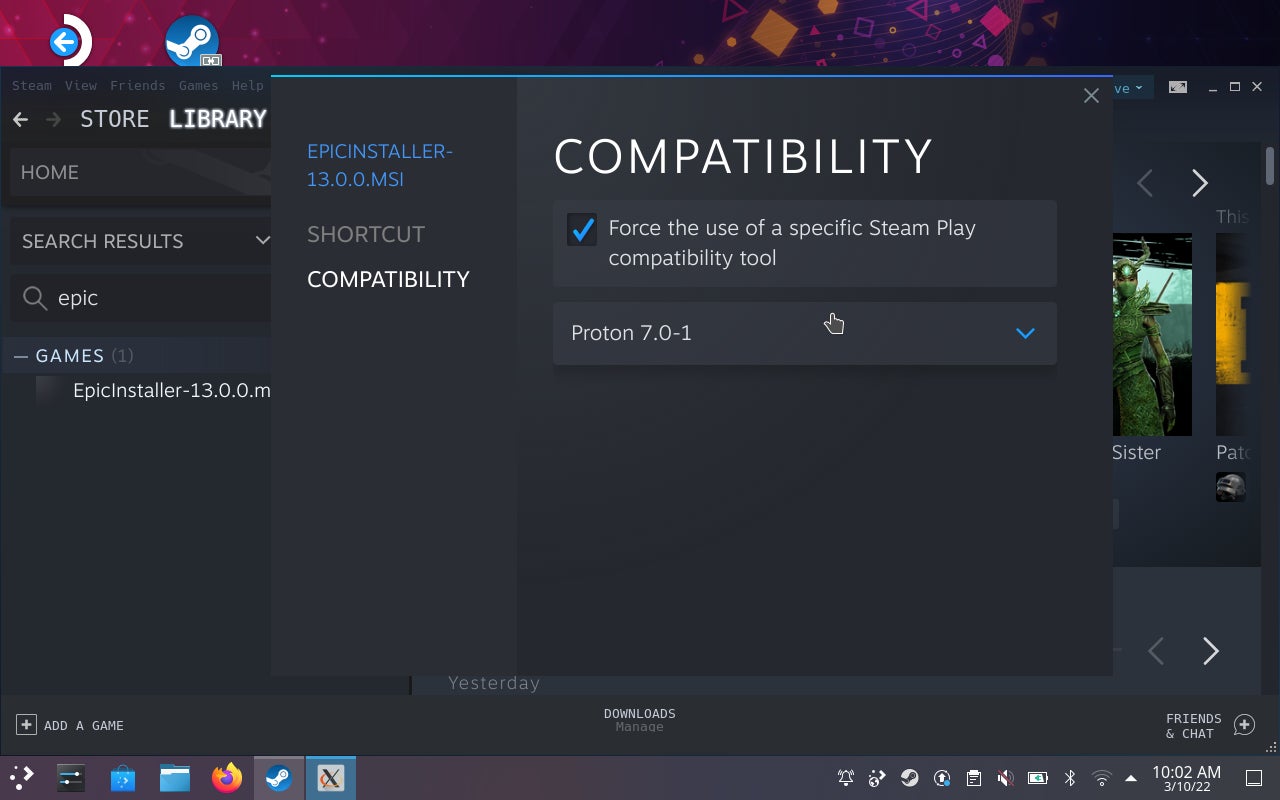
Image credit:Rock Paper Shotgun
Step 7: Close the Properties window and launch the installer in Steam. Click “Install” in the setup wizard and wait a bit.
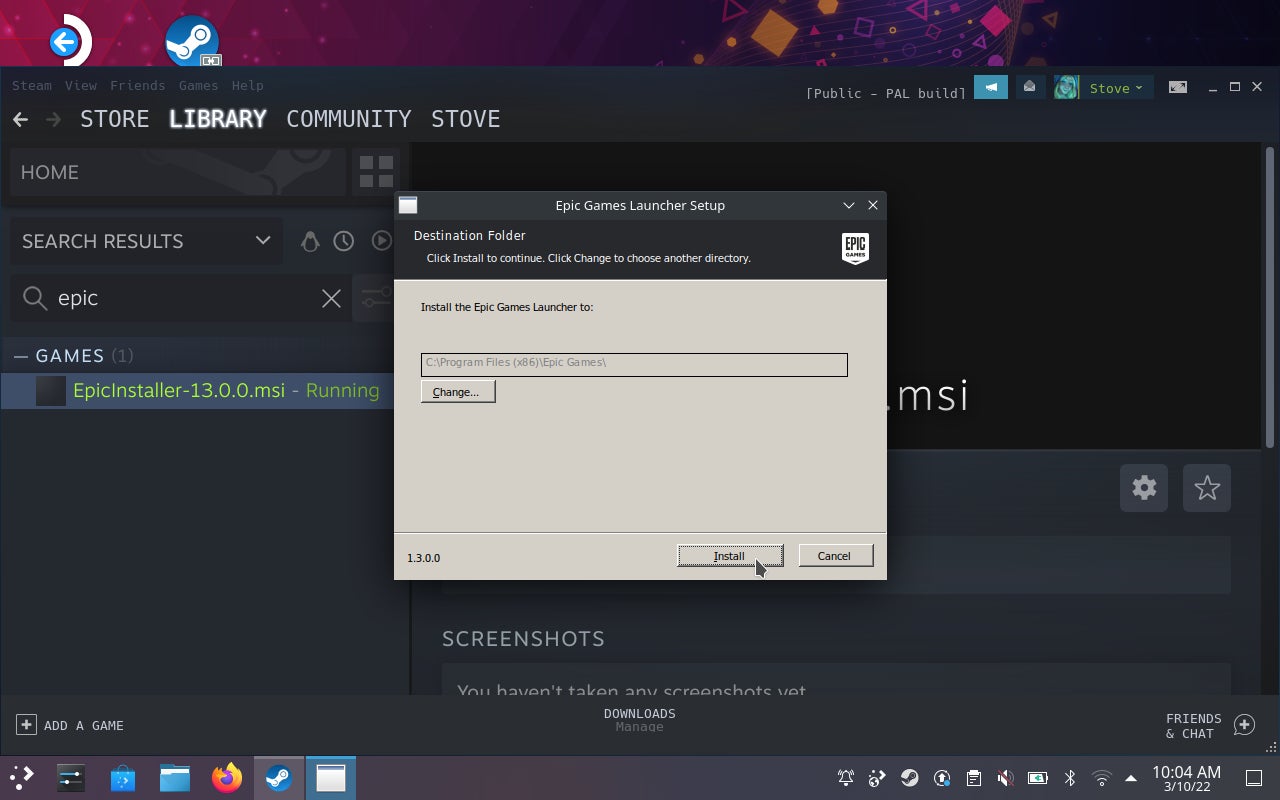
Image credit:Rock Paper Shotgun
Create a Steam shortcut to the Epic Games Launcher
Step 8: The next few steps require some spelunking into Steam’s own files. Open up the Dolphin file manager, click the three-line icon in the top-right corner, then select “Show Hidden Files.” Then, navigate to Home > .local > share > Steam > steamapps > compatdata .
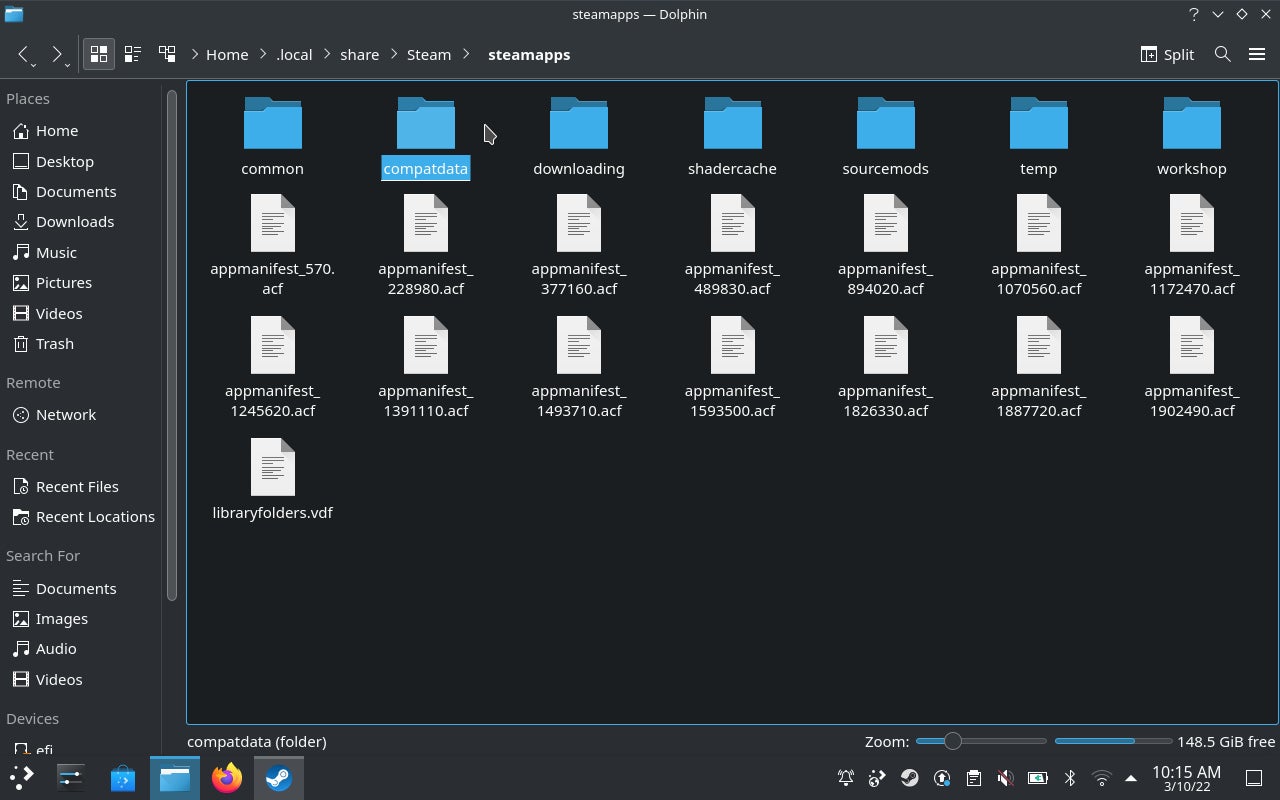
Image credit:Rock Paper Shotgun
Step 9: Annoyingly, the folder you want is named with a random string of numbers, but as the first GamingOnLinux video points out it should be a much longer string of numbers than the others in compatdata. Open it up, then continue navigating through pfx > drive_c > Program Files (x86) > Launcher > Portal > Binaries > Win32 .
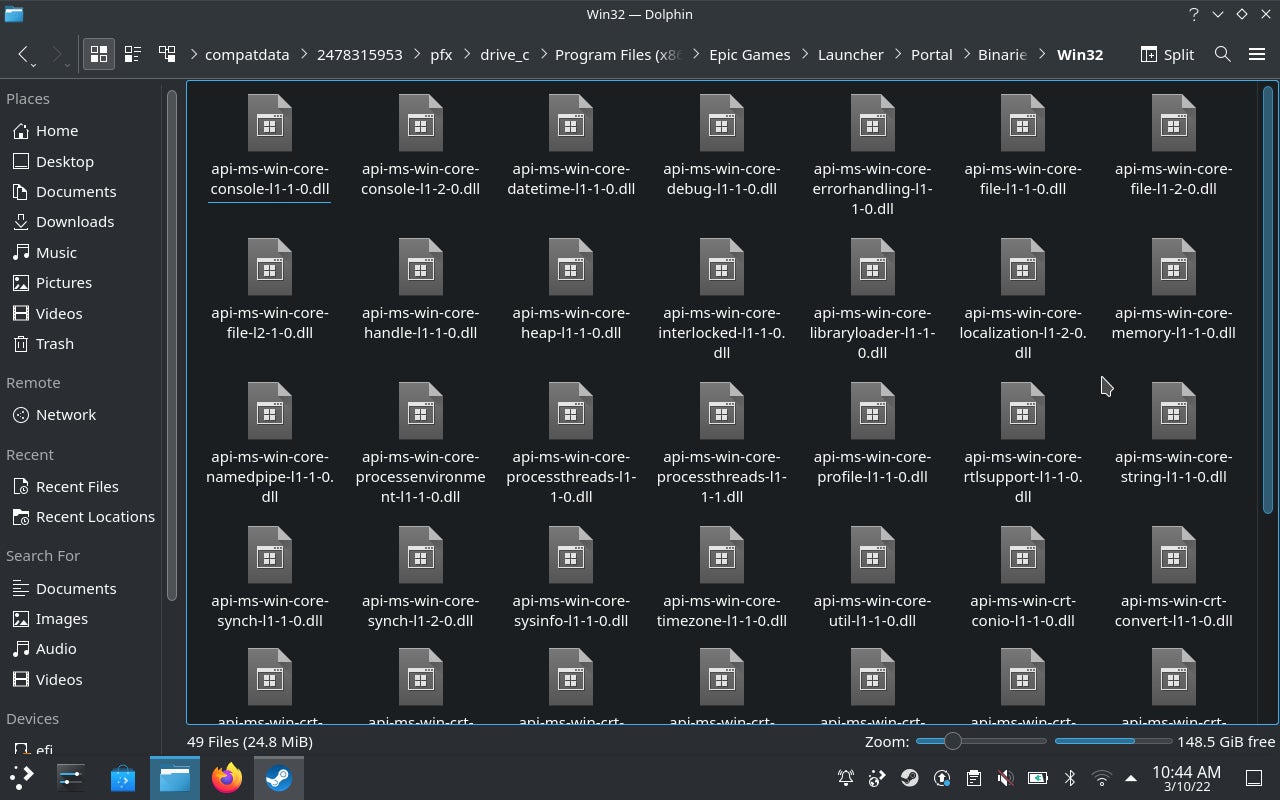
Image credit:Rock Paper Shotgun
Step 10: Find the EpicGamesLauncher.exe file, right-click it and select “Copy Location” to copy that exceedingly lengthy file path. Then, head back into Steam and right-click on the Epic installer to open its Properties menu again.

Image credit:Rock Paper Shotgun
Step 11: In the “Shortcut” field, delete the existing shortcut path (except for the quote marks) and paste in the new one. Do the same with the “Start In” field, except this time, delete “EpicGamesLauncher.exe” from the end of the path. Close the window once you’re done.

Image credit:Rock Paper Shotgun
Customise the Epic Games Launcher for SteamOS
Step 12: Success part two! Launch the installer in Steam again, and there it is: the Epic Games Launcher. After it finishes installing, you can log in with your existing credentials and set about installing games from your Epic library. However, we’re not quite done yet…

Image credit:Rock Paper Shotgun
Step 13: Remember how the executable was in a Win32? Once the Epic Games Launcher is fully installed and updated, it creates and starts using a Win64 folder instead, and leaving “Win32” in the Shortcut and Start In paths will break both. Fortunately, you don’t have to deep-dive into those files again to fix this: just open up the installer’s Properties again in Steam, and in both the Shortcut and Start In fields, delete “Win32” and replace it with “Win64.”
<img loading=“lazy” src=“https://assetsio.gnwcdn.com/how-to-install-epic-games-launcher-on-steam-deck-step-13.png?width=2048&height=2048&fit=bounds&quality=85&format=jpg&auto=webp" onerror=“this.onerror=null;this.src=‘https://blogger.googleusercontent.com/img/a/AVvXsEhe7F7TRXHtjiKvHb5vS7DmnxvpHiDyoYyYvm1nHB3Qp2_w3BnM6A2eq4v7FYxCC9bfZt3a9vIMtAYEKUiaDQbHMg-ViyGmRIj39MLp0bGFfgfYw1Dc9q_H-T0wiTm3l0Uq42dETrN9eC8aGJ9_IORZsxST1AcLR7np1koOfcc7tnHa4S8Mwz_xD9d0=s16000';" alt=“Step 13 of how to install the Epic Games Launcher on the Steam Deck: Closing the launcher, then going back into its Properties and replacing both instances of “Win32” with “Win64”. - 25”>
Image credit:Rock Paper Shotgun
While you’re here, you can also rename the app from “EpicInstaller-(version name).msi” to whatever you want, though the obvious choice is just “Epic Games Launcher.” Then, close the window.
Enable game installs on microSD
Step 14: The other big issue to address is accessing microSD cards; by default, the Epic Games Launcher can only install games to the Deck’s integrated storage due to a Proton quirk. To fix this, start by opening Dolphin and finding “primary” in the Removable Devices section of the sidebar – this is your microSD card. Click on it.

Image credit:Rock Paper Shotgun
Step 15: Click near the top of the Dolphin window, where it reads “primary”, to see the file path. Highlight and copy this path.

Image credit:Rock Paper Shotgun
Step 16: Once again, head back into Steam and open the Properties menu of the Epic installer (which at this point is essentially the full Epic Games Launcher). Scroll down to the “Launch Options” field and manually type in (without quotes) “STEAM_COMPAT_MOUNTS=” . Then, paste in the file path, followed by a space, then “%command%” (also without quotes). Close the window and you should now be able to select the microSD as an installation location for Epic game downloads.

Image credit:Rock Paper Shotgun
Disable Epic Game Launcher notifications
Step 17: One last bit of optional but recommended setup is to disable those pop-up notifications (y’know, ads) that appear whenever you load up the Epic Games Launcher. This is especially important when loading the Launcher from the Deck’s main Gaming Mode, as unlike in Desktop Mode, those pop-ups will mess with the Launcher’s window size. It’s easily done: in the Launcher, click on the circular icon with the first initial of your username in it, then click Settings. Scroll down to the Desktop notification section, and simply uncheck both boxes to nix the notifications.

Image credit:Rock Paper Shotgun
Getting there is quite the trek, but having access to Epic Games… games on the Steam Deck is absolutely worth the effort. Besides, all it really takes is searching through files and tinkering with Steam settings, which you may well have done before in Windows. You don’t need to be a savant of Linux’s more arcane utilities, like the command line interface.
Having to switch to Desktop Mode to install updates isn’t ideal either, though don’t worry about these updates themselves interfering with how the Epic Games Launcher runs on your Steam Deck. I’ve tested on a couple of different Deck models, and more recent updates don’t break the Launcher in any way.
Game compatibility, meanwhile, is no more hit-and-miss than it is on native Steam. The Outer Worlds ran flawlessly, so too did Control after a one-time failure to launch. Both work seamlessly with the Deck controls, and don’t interfere with the quick suspend/resume feature. The main compatibility issue will be anti-cheat; Epic have said they’ve no plans to adjust Fortnite’s Easy Anti-Cheat to work on Linux, and getting the Epic Games Launcher to work won’t change that on the user end. Unlike Steam, Epic’s app also won’t track which games are and aren’t compatible with the Steam Deck – but for games available from both storefronts, you could always check our regularly updated list of Steam Deck Verified games . If Valve has granted a game a Verified rating, it should (in theory) work just as well when running it through the Epic Games Launcher.
Rock Paper Shotgun is better when you sign in
Sign in and join us on our journey to discover strange and compelling PC games.

All 75 Arc Raiders Blueprints and where to get them
These areas have the highest chance of giving you Blueprints

Image credit:Rock Paper Shotgun/Embark Studios

Looking for more Arc Raiders Blueprints? It’s a special day when you find a Blueprint, as they’re among the most valuable items in Arc Raiders. If you find a Blueprint that you haven’t already found, then you must make sure you hold onto it at all costs, because Blueprints are the key to one of the most important and powerful systems of meta-progression in the game.
This guide aims to be the very best guide on Blueprints you can find, starting with a primer on what exactly they are and how they work in Arc Raiders, before delving into exactly where to get Blueprints and the very best farming spots for you to take in your search.
We’ll also go over how to get Blueprints from other unlikely activities, such as destroying Surveyors and completing specific quests. And you’ll also find the full list of all 75 Blueprints in Arc Raiders on this page (including the newest Blueprints added with the Cold Snap update , such as the Deadline Blueprint and Firework Box Blueprint), giving you all the information you need to expand your own crafting repertoire.
In this guide:
- What are Blueprints in Arc Raiders?
- Full Blueprint list: All crafting recipes
- Where to find Blueprints in Arc Raiders Blueprints obtained from quests Blueprints obtained from Trials Best Blueprint farming locations

What are Blueprints in Arc Raiders?
Blueprints in Arc Raiders are special items which, if you manage to extract with them, you can expend to permanently unlock a new crafting recipe in your Workshop. If you manage to extract from a raid with an Anvil Blueprint, for example, you can unlock the ability to craft your very own Anvil Pistol, as many times as you like (as long as you have the crafting materials).
To use a Blueprint, simply open your Inventory while in the lobby, then right-click on the Blueprint and click “Learn And Consume” . This will permanently unlock the recipe for that item in your Workshop. As of the Stella Montis update, there are allegedly 75 different Blueprints to unlock - although only 68 are confirmed to be in the game so far. You can see all the Blueprints you’ve found and unlocked by going to the Workshop menu, and hitting “R” to bring up the Blueprint screen.
It’s possible to find duplicates of past Blueprints you’ve already unlocked. If you find these, then you can either sell them, or - if you like to play with friends - you can take it into a match and gift it to your friend so they can unlock that recipe for themselves. Another option is to keep hold of them until the time comes to donate them to the Expedition.
Full Blueprint list: All crafting recipes
Below is the full list of all the Blueprints that are currently available to find in Arc Raiders, and the crafting recipe required for each item:
| Blueprint | Type | Recipe | Crafted At |
|---|---|---|---|
| Bettina | Weapon | 3x Advanced Mechanical Components 3x Heavy Gun Parts 3x Canister | Gunsmith 3 |
| Blue Light Stick | Quick Use | 3x Chemicals | Utility Station 1 |
| Aphelion | Weapon | 3x Magnetic Accelerator 3x Complex Gun Parts 1x Matriarch Reactor | Gunsmith 3 |
| Combat Mk. 3 (Flanking) | Augment | 2x Advanced Electrical Components 3x Processor | Gear Bench 3 |
| Combat Mk. 3 (Aggressive) | Augment | 2x Advanced Electrical Components 3x Processor | Gear Bench 3 |
| Complex Gun Parts | Material | 2x Light Gun Parts 2x Medium Gun Parts 2x Heavy Gun Parts | Refiner 3 |
| Fireworks Box | Quick Use | 1x Explosive Compound 3x Pop Trigger | Explosives Station 2 |
| Gas Mine | Mine | 4x Chemicals 2x Rubber Parts | Explosives Station 1 |
| Green Light Stick | Quick Use | 3x Chemicals | Utility Station 1 |
| Pulse Mine | Mine | 1x Crude Explosives 1x Wires | Explosives Station 1 |
| Seeker Grenade | Grenade | 1x Crude Explosives 2x ARC Alloy | Explosives Station 1 |
| Looting Mk. 3 (Survivor) | Augment | 2x Advanced Electrical Components 3x Processor | Gear Bench 3 |
| Angled Grip II | Mod | 2x Mechanical Components 3x Duct Tape | Gunsmith 2 |
| Angled Grip III | Mod | 2x Mod Components 5x Duct Tape | Gunsmith 3 |
| Hullcracker | Weapon | 1x Magnetic Accelerator 3x Heavy Gun Parts 1x Exodus Modules | Gunsmith 3 |
| Launcher Ammo | Ammo | 5x Metal Parts 1x Crude Explosives | Workbench 1 |
| Anvil | Weapon | 5x Mechanical Components 5x Simple Gun Parts | Gunsmith 2 |
| Anvil Splitter | Mod | 2x Mod Components 3x Processor | Gunsmith 3 |
| ??? | ??? | ??? | ??? |
| Barricade Kit | Quick Use | 1x Mechanical Components | Utility Station 2 |
| Blaze Grenade | Grenade | 1x Explosive Compound 2x Oil | Explosives Station 3 |
| Bobcat | Weapon | 3x Advanced Mechanical Components 3x Light Gun Parts | Gunsmith 3 |
| Osprey | Weapon | 2x Advanced Mechanical Components 3x Medium Gun Parts 7x Wires | Gunsmith 3 |
| Burletta | Weapon | 3x Mechanical Components 3x Simple Gun Parts | Gunsmith 1 |
| Compensator II | Mod | 2x Mechanical Components 4x Wires | Gunsmith 2 |
| Compensator III | Mod | 2x Mod Components 8x Wires | Gunsmith 3 |
| Defibrillator | Quick Use | 9x Plastic Parts 1x Moss | Medical Lab 2 |
| ??? | ??? | ??? | ??? |
| Equalizer | Weapon | 3x Magnetic Accelerator 3x Complex Gun Parts 1x Queen Reactor | Gunsmith 3 |
| Extended Barrel | Mod | 2x Mod Components 8x Wires | Gunsmith 3 |
| Extended Light Mag II | Mod | 2x Mechanical Components 3x Steel Spring | Gunsmith 2 |
| Extended Light Mag III | Mod | 2x Mod Components 5x Steel Spring | Gunsmith 3 |
| Extended Medium Mag II | Mod | 2x Mechanical Components 3x Steel Spring | Gunsmith 2 |
| Extended Medium Mag III | Mod | 2x Mod Components 5x Steel Spring | Gunsmith 3 |
| Extended Shotgun Mag II | Mod | 2x Mechanical Components 3x Steel Spring | Gunsmith 2 |
| Extended Shotgun Mag III | Mod | 2x Mod Components 5x Steel Spring | Gunsmith 3 |
| Remote Raider Flare | Quick Use | 2x Chemicals 4x Rubber Parts | Utility Station 1 |
| Heavy Gun Parts | Material | 4x Simple Gun Parts | Refiner 2 |
| Venator | Weapon | 2x Advanced Mechanical Components 3x Medium Gun Parts 5x Magnet | Gunsmith 3 |
| Il Toro | Weapon | 5x Mechanical Components 6x Simple Gun Parts | Gunsmith 1 |
| Jolt Mine | Mine | 1x Electrical Components 1x Battery | Explosives Station 2 |
| Explosive Mine | Mine | 1x Explosive Compound 1x Sensors | Explosives Station 3 |
| Jupiter | Weapon | 3x Magnetic Accelerator 3x Complex Gun Parts 1x Queen Reactor | Gunsmith 3 |
| Light Gun Parts | Material | 4x Simple Gun Parts | Refiner 2 |
| Lightweight Stock | Mod | 2x Mod Components 5x Duct Tape | Gunsmith 3 |
| Lure Grenade | Grenade | 1x Speaker Component 1x Electrical Components | Utility Station 2 |
| Medium Gun Parts | Material | 4x Simple Gun Parts | Refiner 2 |
| Torrente | Weapon | 2x Advanced Mechanical Components 3x Medium Gun Parts 6x Steel Spring | Gunsmith 3 |
| Muzzle Brake II | Mod | 2x Mechanical Components 4x Wires | Gunsmith 2 |
| Muzzle Brake III | Mod | 2x Mod Components 8x Wires | Gunsmith 3 |
| Padded Stock | Mod | 2x Mod Components 5x Duct Tape | Gunsmith 3 |
| Shotgun Choke II | Mod | 2x Mechanical Components 4x Wires | Gunsmith 2 |
| Shotgun Choke III | Mod | 2x Mod Components 8x Wires | Gunsmith 3 |
| Shotgun Silencer | Mod | 2x Mod Components 8x Wires | Gunsmith 3 |
| Showstopper | Grenade | 1x Advanced Electrical Components 1x Voltage Converter | Explosives Station 3 |
| Silencer I | Mod | 2x Mechanical Components 4x Wires | Gunsmith 2 |
| Silencer II | Mod | 2x Mod Components 8x Wires | Gunsmith 3 |
| Snap Hook | Quick Use | 2x Power Rod 3x Rope 1x Exodus Modules | Utility Station 3 |
| Stable Stock II | Mod | 2x Mechanical Components 3x Duct Tape | Gunsmith 2 |
| Stable Stock III | Mod | 2x Mod Components 5x Duct Tape | Gunsmith 3 |
| Tagging Grenade | Grenade | 1x Electrical Components 1x Sensors | Utility Station 3 |
| Tempest | Weapon | 3x Advanced Mechanical Components 3x Medium Gun Parts 3x Canister | Gunsmith 3 |
| Trigger Nade | Grenade | 2x Crude Explosives 1x Processor | Explosives Station 2 |
| Vertical Grip II | Mod | 2x Mechanical Components 3x Duct Tape | Gunsmith 2 |
| Vertical Grip III | Mod | 2x Mod Components 5x Duct Tape | Gunsmith 3 |
| Vita Shot | Quick Use | 2x Antiseptic 1x Syringe | Medical Lab 3 |
| Vita Spray | Quick Use | 3x Antiseptic 1x Canister | Medical Lab 3 |
| Vulcano | Weapon | 1x Magnetic Accelerator 3x Heavy Gun Parts 1x Exodus Modules | Gunsmith 3 |
| Wolfpack | Grenade | 2x Explosive Compound 2x Sensors | Explosives Station 3 |
| Red Light Stick | Quick Use | 3x Chemicals | Utility Station 1 |
| Smoke Grenade | Grenade | 14x Chemicals 1x Canister | Utility Station 2 |
| Deadline | Mine | 3x Explosive Compound 2x ARC Circuitry | Explosives Station 3 |
| Trailblazer | Grenade | 1x Explosive Compound 1x Synthesized Fuel | Explosives Station 3 |
| Tactical Mk. 3 (Defensive) | Augment | 2x Advanced Electrical Components 3x Processor | Gear Bench 3 |
| Tactical Mk. 3 (Healing) | Augment | 2x Advanced Electrical Components 3x Processor | Gear Bench 3 |
| Yellow Light Stick | Quick Use | 3x Chemicals | Utility Station 1 |
Note: The missing Blueprints in this list likely have not actually been added to the game at the time of writing, because none of the playerbase has managed to find any of them. As they are added to the game, I will update this page with the most relevant information so you know exactly how to get all 75 Arc Raiders Blueprints.
Where to find Blueprints in Arc Raiders
Below is a list of all containers, modifiers, and events which maximise your chances of finding Blueprints:
- Certain quests reward you with specific Blueprints .
- Completing Trials has a high chance of offering Blueprints as rewards.
- Surveyors have a decent chance of dropping Blueprints on death.
- High loot value areas tend to have a greater chance of spawning Blueprints.
- Night Raids and Storms may increase rare Blueprint spawn chances in containers.
- Containers with higher numbers of items may have a higher tendency to spawn Blueprints. As a result, Blue Gate (which has many “large” containers containing multiple items) may give you a higher chance of spawning Blueprints.
- Raider containers (Raider Caches, Weapon Boxes, Medical Bags, Grenade Tubes) have increased Blueprint drop rates. As a result, the Uncovered Caches event gives you a high chance of finding Blueprints.
- Security Lockers have a higher than average chance of containing Blueprints.
- Certain Blueprints only seem to spawn under specific circumstances: Tempest Blueprint only spawns during Night Raid events. Vulcano Blueprint only spawns during Hidden Bunker events. Jupiter and Equaliser Blueprints only spawn during Harvester events.

Raider Caches, Weapon Boxes, and other raider-oriented container types have a good chance of offering Blueprints. |Image credit:Rock Paper Shotgun/Embark Studios
Blueprints have a very low chance of spawning in any container in Arc Raiders, around 1-2% on average. However, there is a higher chance of finding Blueprints in particular container types. Specifically, you can find more Blueprints in Raider containers and security lockers.
Beyond this, if you’re looking for Blueprints you should focus on regions of the map which are marked as having particularly high-value loot. Areas such as the Control Tower in Dam Battlegrounds, the Arrival and Departure Buildings in Spaceport, and Pilgrim’s Peak in Blue Gate all have a better-than-average chance of spawning Blueprints somewhere amongst all their containers. Night Raids and Electromagnetic Storm events also increase the drop chances of certain Blueprints .
In addition to these containers, you can often loot Blueprints from destroyed Surveyors - the largest of the rolling ball ARC. Surveyors are more commonly found on the later maps - Spaceport and Blue Gate - and if one spawns in your match, you’ll likely see it by the blue laser beam that it casts into the sky while “surveying”.
Surveyors are quite well-armoured and will very speedily run away from you once it notices you, but if you can take one down then make sure you loot all its parts for a chance of obtaining certain unusual Blueprints.
Blueprints obtained from quests
One way in which you can get Blueprints is by completing certain quests for the vendors in Speranza. Some quests will reward you with a specific item Blueprint upon completion, so as long as you work through all the quests in Arc Raiders, you are guaranteed those Blueprints.
Here is the full list of all Blueprints you can get from quest rewards:
- Trigger Nade Blueprint: Rewarded after completing “Sparks Fly”.
- Lure Grenade Blueprint: Rewarded after completing “Greasing Her Palms”.
- Burletta Blueprint: Rewarded after completing “Industrial Espionage”.
- Hullcracker Blueprint (and Launcher Ammo Blueprint): Rewarded after completing “The Major’s Footlocker”.
Alas, that’s only 4 Blueprints out of a total of 75 to unlock, so for the vast majority you will need to find them yourself during a raid. If you’re intent on farming Blueprints, then it’s best to equip yourself with cheap gear in case you lose it, but don’t use a free loadout because then you won’t get a safe pocket to stash any new Blueprint you find. No pain in Arc Raiders is sharper than failing to extract with a new Blueprint you’ve been after for a dozen hours already.

One of the best ways to get Blueprints is by hitting three stars on all five Trials every week. |Image credit:Rock Paper Shotgun/Embark Studios
Blueprints obtained from Trials
One of the very best ways to get Blueprints is as rewards for completing Trials in Arc Raiders. Trials are unlocked from Level 15 onwards, and allow you to earn rewards by focusing on certain tasks over the course of several raids. For example, one Trial might task you with dealing damage to Hornets, while another might challenge you to loot Supply Drops.
Trials refresh on a weekly basis, with a new week bringing five new Trials. Each Trial can offer up to three rewards after passing certain score milestones, and it’s possible to receive very high level loot from these reward crates - including Blueprints. So if you want to unlock as many Blueprints as possible, you should make a point of completing as many Trials as possible each week.
Best Blueprint farming locations
The very best way to get Blueprints is to frequent specific areas of the maps which combine high-tier loot pools with the right types of containers to search. Here are my recommendations for where to find Blueprints on every map, so you can always keep the search going for new crafting recipes to unlock.

Image credit:Rock Paper Shotgun/Embark Studios
Dam Battlegrounds
The best places to farm Blueprints on Dam Battlegrounds are the Control Tower, Power Generation Complex, Ruby Residence, and Pale Apartments . The first two regions, despite only being marked on the map as mid-tier loot, contain a phenomenal number of containers to loot. The Control Tower can also contain a couple of high-tier Security Lockers - though of course, you’ll need to have unlocked the Security Breach skill at the end of the Survival tree.
There’s also a lot of reporting amongst the playerbase that the Residential areas in the top-left of the map - Pale Apartments and Ruby Residence - give you a comparatively strong chance of finding Blueprints. Considering their size, there’s a high density of containers to loot in both locations, and they also have the benefit of being fairly out of the way. So you’re more likely to have all the containers to yourself.
Buried City
The best Blueprint farming locations on Buried City are the Santa Maria Houses, Grandioso Apartments, Town Hall, and the various buildings of the New District . Grandioso Apartments has a lower number of containers than the rest, but a high chance of spawning weapon cases - which have good Blueprint drop rates. The others are high-tier loot areas, with plenty of lootable containers - including Security Lockers.
Spaceport
The best places to find Blueprints on Spaceport are the Arrival and Departure Buildings, as well as Control Tower A6 and the Launch Towers . All these areas are labelled as high-value loot regions, and many of them are also very handily connected to one another by the Spaceport wall, which you can use to quickly run from one area to the next. At the tops of most of these buildings you’ll find at least one Security Locker, so this is an excellent farming route for players looking to find Blueprints.
The downside to looting Blueprints on Spaceport is that all these areas are hotly contested, particularly in Duos and Squads. You’ll need to be very focused and fast in order to complete the full farming route.

Image credit:Rock Paper Shotgun/Embark Studios
Blue Gate
Blue Gate tends to have a good chance of dropping Blueprints, potentially because it generally has a high number of containers which can hold lots of items; so there’s a higher chance of a Blueprint spawning in each container. In my experience, the best Blueprint farming spots on Blue Gate are Pilgrim’s Peak, Raider’s Refuge, the Ancient Fort, and the Underground Complex beneath the Warehouse .
All of these areas contain a wealth of containers to loot. Raider’s Refuge has less to loot, but the majority of the containers in and around the Refuge are raider containers, which have a high chance of containing Blueprints - particularly during major events.
Stella Montis
On the whole, Stella Montis seems to have a very low drop rate for Blueprints (though a high chance of dropping other high-tier loot). If you do want to try farming Blueprints on this map, the best places to find Blueprints in Stella Montis are Medical Research, Assembly Workshop, and the Business Center . These areas have the highest density of containers to loot on the map.
In addition to this, the Western Tunnel has a few different Security Lockers to loot, so while there’s very little to loot elsewhere in this area of the map, it’s worth hitting those Security Lockers if you spawn there at the start of a match.
That wraps up this primer on how to get all the Blueprints in Arc Raiders as quickly as possible. With the Expedition system constantly resetting a large number of players’ Blueprints, it’s more important than ever to have the most up-to-date information on where to find all these Blueprints.
While you’re here, be sure to check out our Arc Raiders best guns tier list , as well as our primers on the best skills to unlock and all the different Field Depot locations on every map.

ARC Raiders
PS5 , Xbox Series X/S , PC
Rock Paper Shotgun is better when you sign in
Sign in and join us on our journey to discover strange and compelling PC games.


