How to install a new SSD on the Steam Deck
Venture inside your Deck to make a permanent storage upgrade
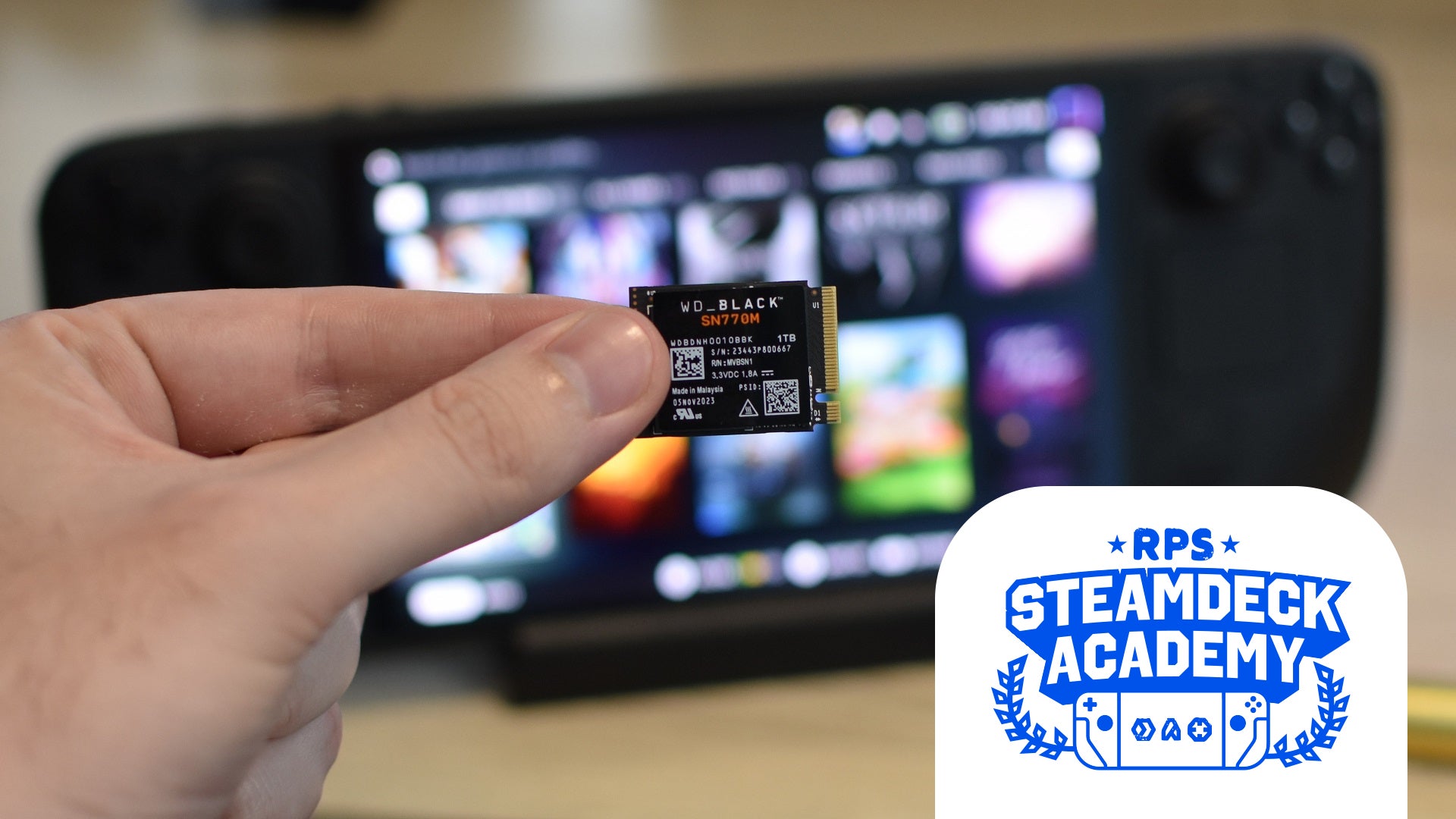
Image credit:Rock Paper Shotgun

Here’s the thing: I’ll gladly show you how to install an SSD in a Steam Deck , but be warned that it’s by far the trickier of your two storage upgrade options. Whereas adding a microSD card is as easy as pushing it into the dedicated slot, swapping out the Deck’s internal drive involves fiddling with some seriously sensitive components . It’s not for the faint of heart nor the shaky of hand, and unlike the majority cool things you can do with Valve’s handheld PC – be it adding fun plugins with Decky Loader or unleashing its versatile Desktop Mode – swapping the SSD does require a fair few tools.
Image credit:Rock Paper Shotgun
Steam Deck Academy brings together all our guides and explainers on getting the most out of your Steam Deck, no student loans or sweaty dormitories required.
All that said, upgrading the SSD does make a bit more sense today than it did when the Steam Deck first launched. Mainly because there are actually now some decent SSDs to choose from; back in 2022, solid state drives that came in the Deck-friendly M.2 2230 form factor were both rare and expensive. Now, likely driven by the growth of both the Steam Deck and its Windows-based rivals (like the Asus ROG Ally ), 2230 SSDs are widely available, and sometimes even cheaper than an equivalently-sized microSD card. Because some kind of SteamOS magic keeps the latter performing quickly in most games, I still reckon they’re ideal for most Deck owners, but if you’re willing and able to crack yours open, then installing a whole new SSD has become a more viable alternative. And more appealing, if you went for a 64GB or 256GB Steam Deck model and quickly found yourself running low on game space.
This guide will cover both the SSD upgrade itself, and the process for installing a fresh copy of SteamOS once it’s in place. Note that LCD-screened Steam Decks won’t all have exactly the same internal design, as Valve rejigged it very slightly in 2023, and the Steam Deck OLED has yet another unique layout of its own. Nonetheless, I’ve written this guide as such that all three should be covered.
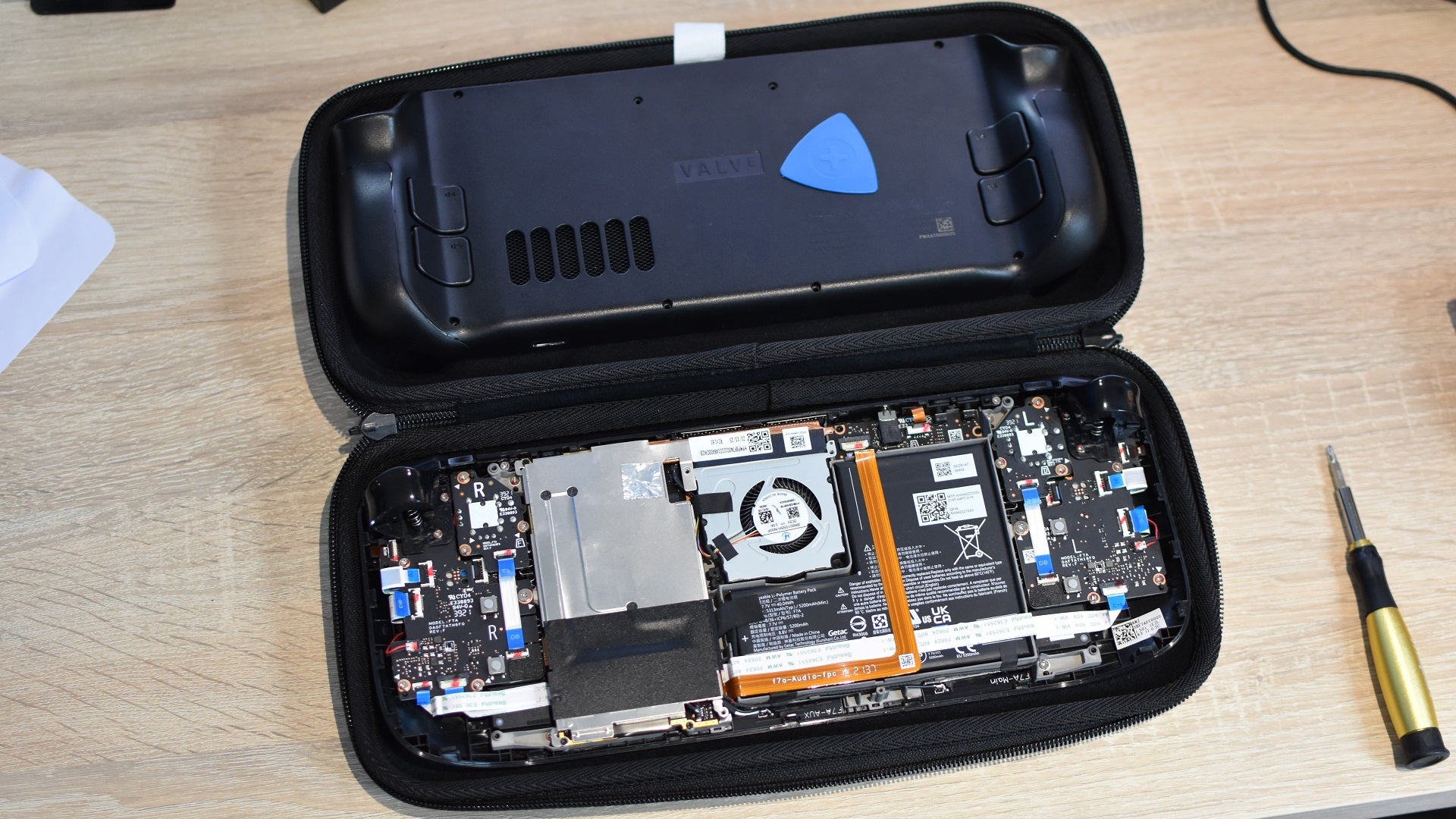
Image credit:Rock Paper Shotgun
How to install a new SSD on the Steam Deck: What you’ll need and prep steps
As forewarned, changing the SSD on a Steam Deck is trickier than installing an SSD in a desktop . Full-sized PC parts can be surprisingly sturdy, but the Steam Deck was never really intended to be poked around in, so we’re going to be dealing with some preposterously tiny screws, plastic casing that really doesn’t want to budge, and highly fragile components. To name a few things.
Besides the new SSD itself, then, there are few more pieces of kit you’ll need before starting the installation in earnest. I’d recommend you also take a couple of preparatory steps as well:
- Make sure you have the right screwdriver: Depending on which Steam Deck model you have, you’ll need a specific mini-screwdriver head to get inside. For all the original, LCD Decks, get yourself a small (no wider than size 0) Phillips head ‘driver. The Steam Deck OLED, on the other hand, uses six-point star-sharped Torx screws throughout. Again, go for a smaller head size – T6 did the job for me.
- Get a pry tool: Even with all its outside screws removed, pulling the Steam Deck’s backplate is a fingernail-shredding hard time with bare hands. You can make your life a lot easier with a simple plastic pry tool, which you can run around the edges of the rear cover to harmlessly pop it out of its fastening clips. I use the trianglular ones in the iFixit Essential Electronics Toolkit (which, by the by, includes all the screwdriver parts you’ll need as well), though a thick guitar plectrum or a sturdy credit card can work in a pinch. Don’t use anything metal (like a flathead screwdriver), or you’ll damage the casing.
- Clear a USB stick, and make sure you can connect it to your Deck: The method below involves creating SteamOS boot media out of a USB drive, which should be at least 8GB in size. Clear or format it first, and remember that to connect it to the Steam Deck, you’ll also need either a USB-A to USB-C adapter, a USB-C hub, or a Steam Deck dock.
- Run down the battery: Valve have previously recommended that you only open your Deck with a flat battery, but it’s safe enough to just stick the device in Battery Storage mode instead. This prevents you from accidentally switching it on mid-upgrade, though for extra safety, you should first get the Steam Deck’s battery down below at least 80% and ideally below 25%.
- Remove your microSD card, if you have one: The Steam Deck’s microSD slot is positioned as such that an inserted card can stop you from pulling the back cover off. Unless you pull too hard, in which case you could snap your card in half. I know we’re focusing on the SSD here but come on, that’s just harsh.
- Ground yourself: At least some classic PC building advice is applicable here. To minimise the risk of static messing up your Steam Deck, try to wear loose cotton clothing when you do this, and touch a piece of conductive metal beforehand to remove any static you already had on your body.
All sorted? Then enough preamble – let’s get that new SSD in place.
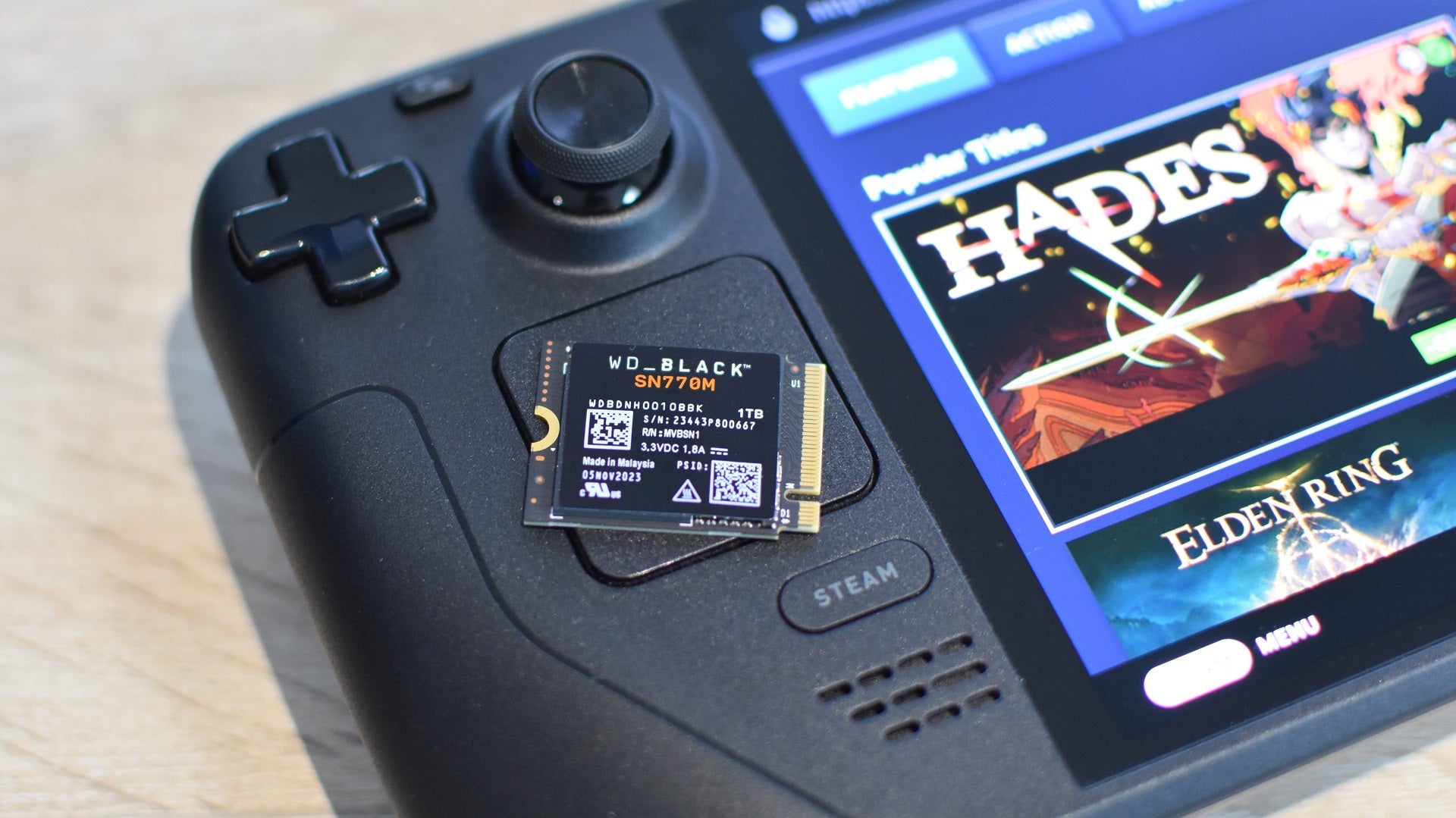
Image credit:Rock Paper Shotgun
How to install a new SSD on the Steam Deck: step-by-step guide
Step 1: First up, put your Steam Deck into Battery Storage mode, to prevent accidentally powering it on while you’re working on the insides. Start with your Deck switched off, then hold down the Power button and the Volume Up button at the same time to boot into the BIOS. Once you’re in, use either the D-pad or the right trackpad to navigate to Setup Utility, then the Power menu. Select Battery Storage mode and confirm. Now, your Deck will shut down and won’t respond to any pressing of the power button (though don’t worry, we’ll reverse this later).
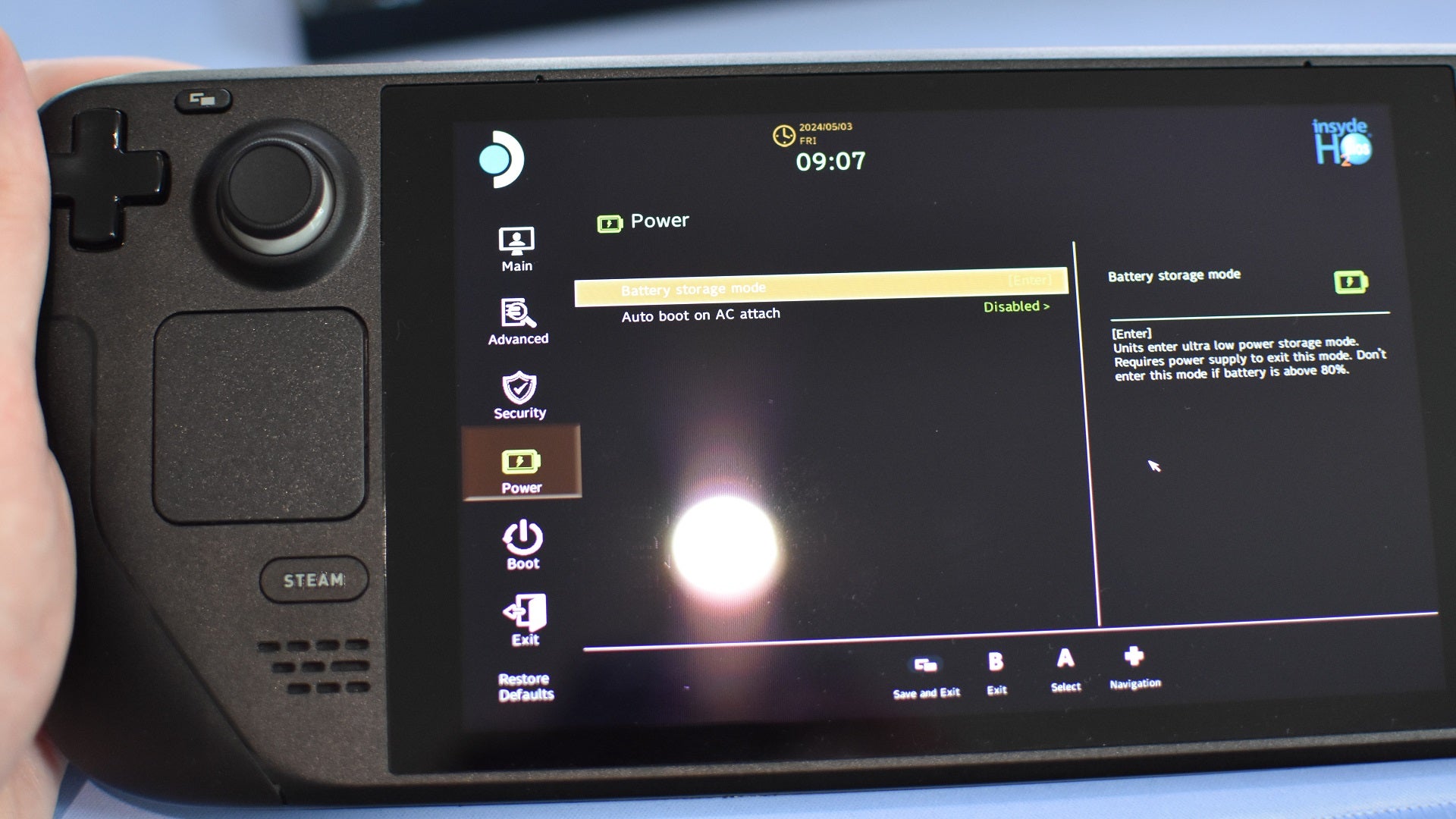
Image credit:Rock Paper Shotgun
Step 2: Lay out your Steam Deck’s bundled carry case and place the handheld face-down inside, holding it in place without putting any stress on the thumbsticks. Then get to work removing all the screws – on the original Steam Deck, some of these are different sizes, so do keep track of which screws need to go back in which holes. Laying the loose screws out on a table, in the pattern that matches their positions on the Steam Deck, can help. On the Steam Deck OLED, all the screws are identical, so you don’t need to be so careful (beyond not losing any).
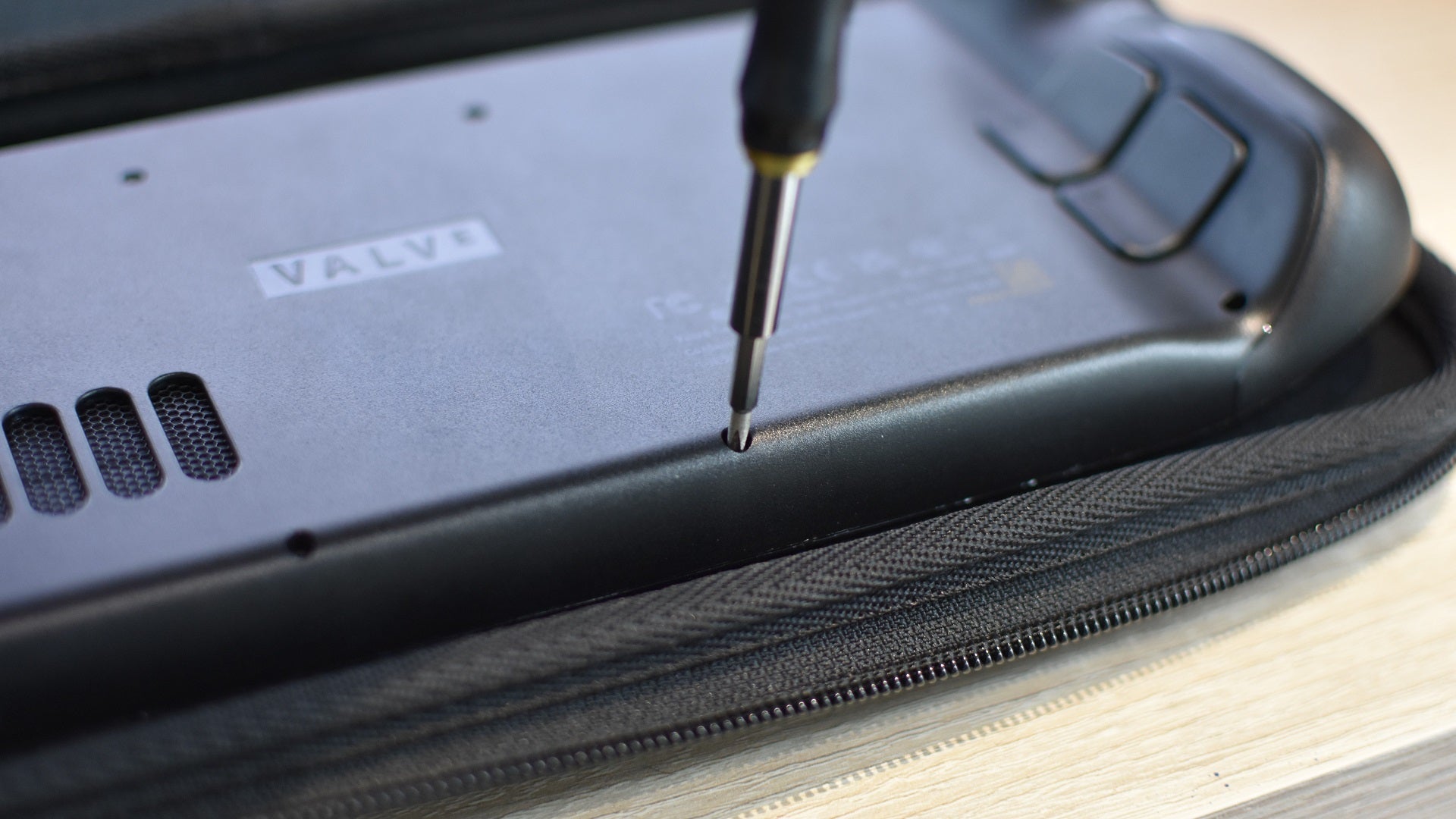
Image credit:Rock Paper Shotgun
Step 3: With all the screws removed, VERY CAREFULLY remove the Deck’s back cover. This is where a proper pry tool is useful, as you can just work it inside the seam and run it along the edge to slowly push the rear cover away from the body.
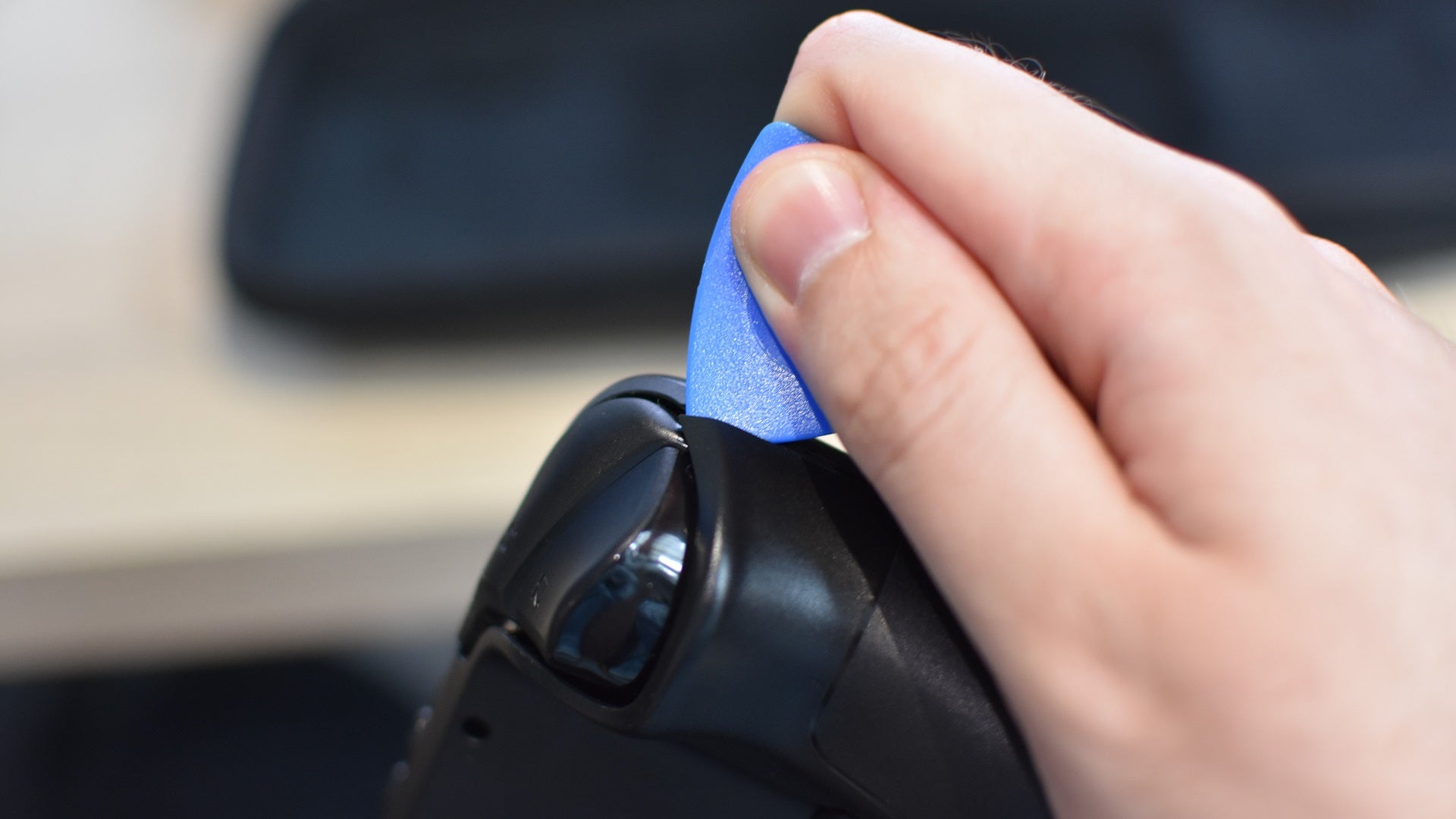
Image credit:Rock Paper Shotgun
The next step varies depending on which Steam Deck version you have, so OLED owners, skip a paragraph.
Step 4 (LCD Steam Decks): On the left side of the Deck’s internal layout is a large metal plate. On newer models, this should be plain black, with just a couple of small screws holding it in place. On older Decks, it’s silver-coloured, and has a small piece of foil hiding a third screw, so you’ll need to carefully peel this back to access it. In both cases, remove all the screws holding the plate in place, keep them safe to the side, and (also carefully) lift away the plate. Avoid touching any of the thermal pads on the underside as you do so.
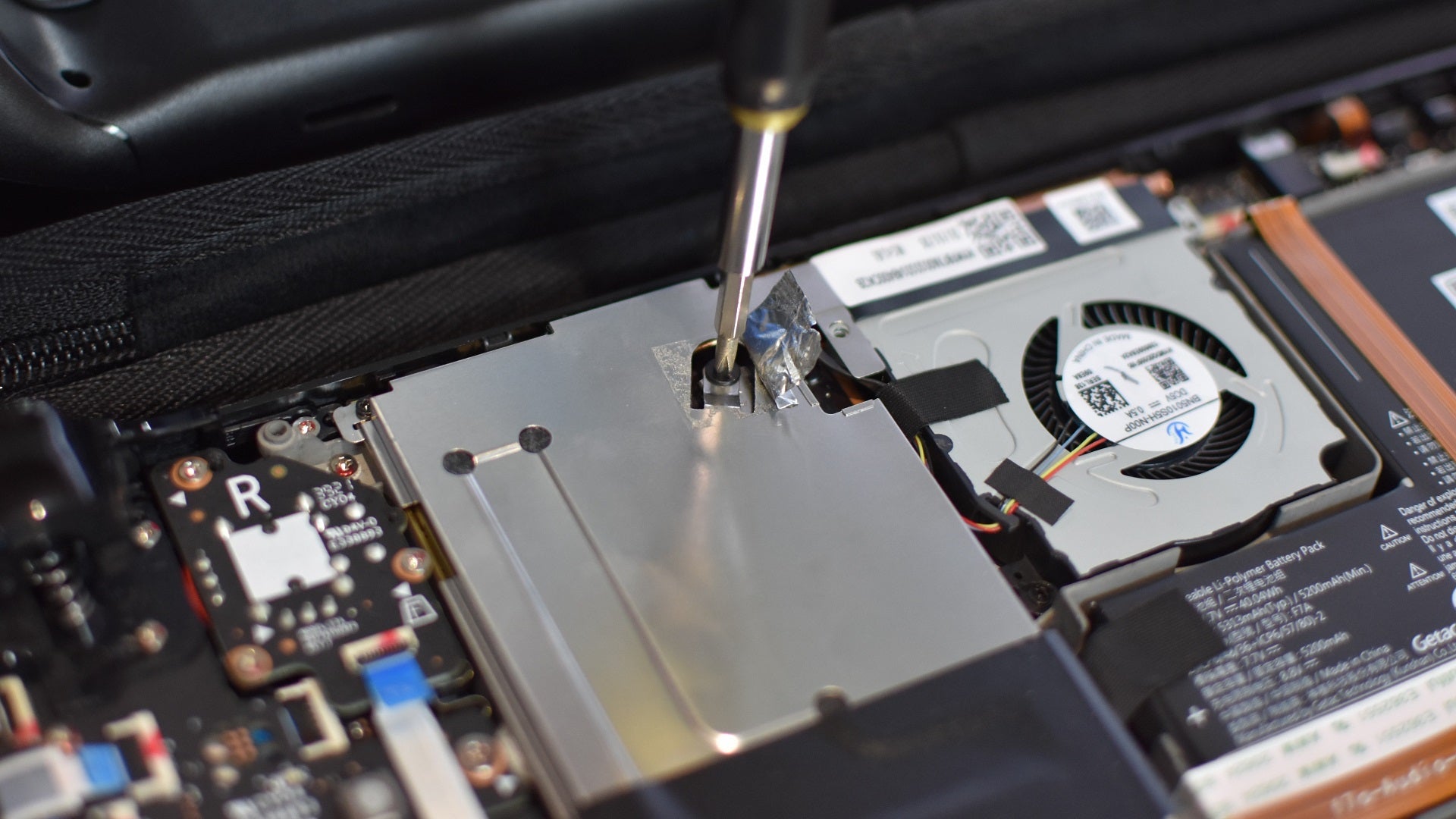
Image credit:Rock Paper Shotgun
Step 4 (Step Deck OLED): Unlike the LCD models, the plate you’ll need to remove is covered by a ribbon cable, so you’ll need to disconnect that first. Locate the end of the ribbon, just a bit further to the left – the cable should have “C-R” printed on it. Very, very carefully, lift up the white plastic tab holding the ribbon cable in place, then gently pull it out. Then, remove the two Torx screws on the plate itself, lift it up, and gently flip it over to the right. It will still be connected to the ribbon, but that’s fine as long as it’s out of the way.
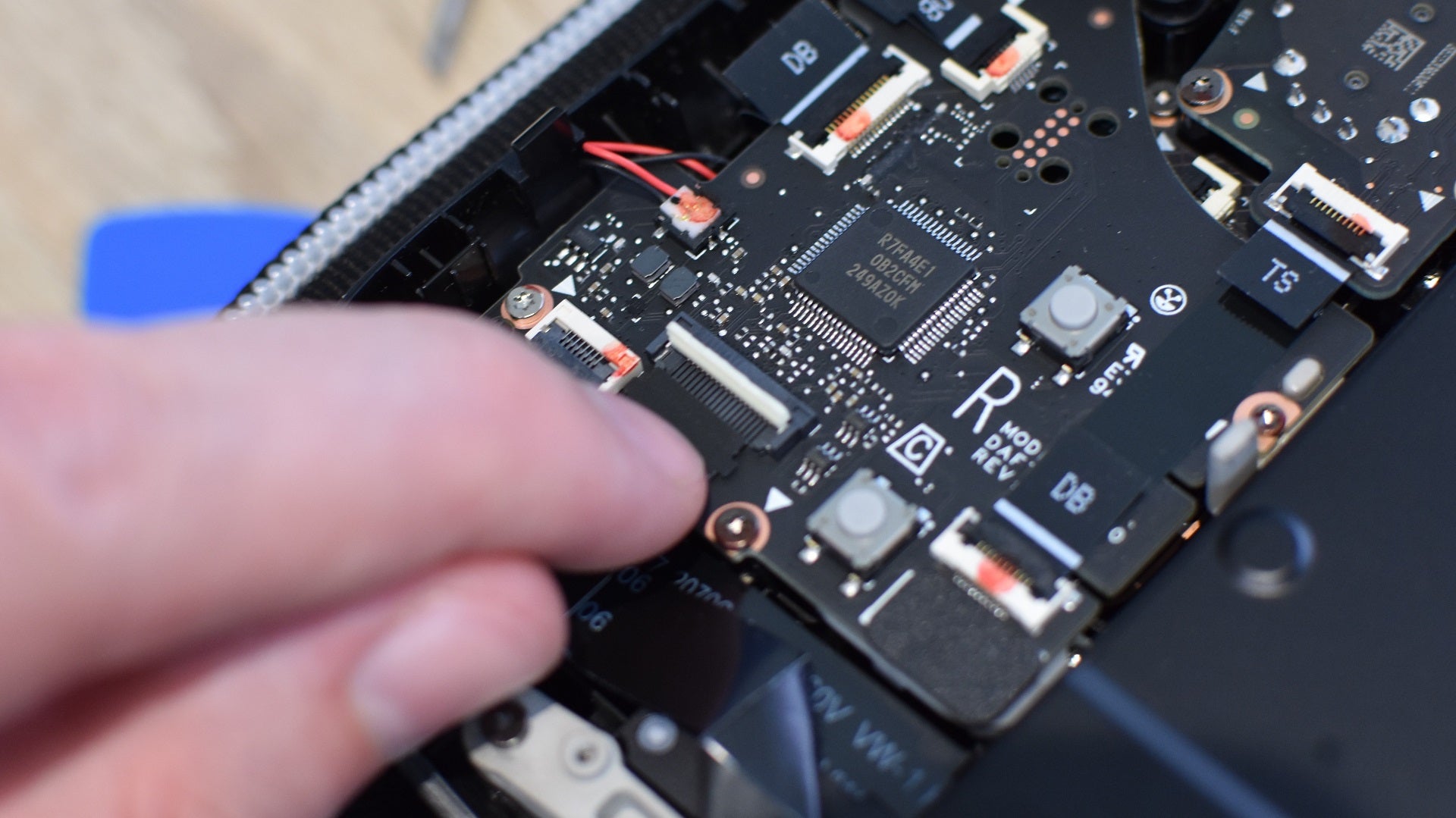
Image credit:Rock Paper Shotgun
Step 5: Disconnect the battery connector, which was previously hidden by that plate. A pry tool is handy here, as you’ll need to slide the connector out to the side, though this can also be done with a deft fingernail.
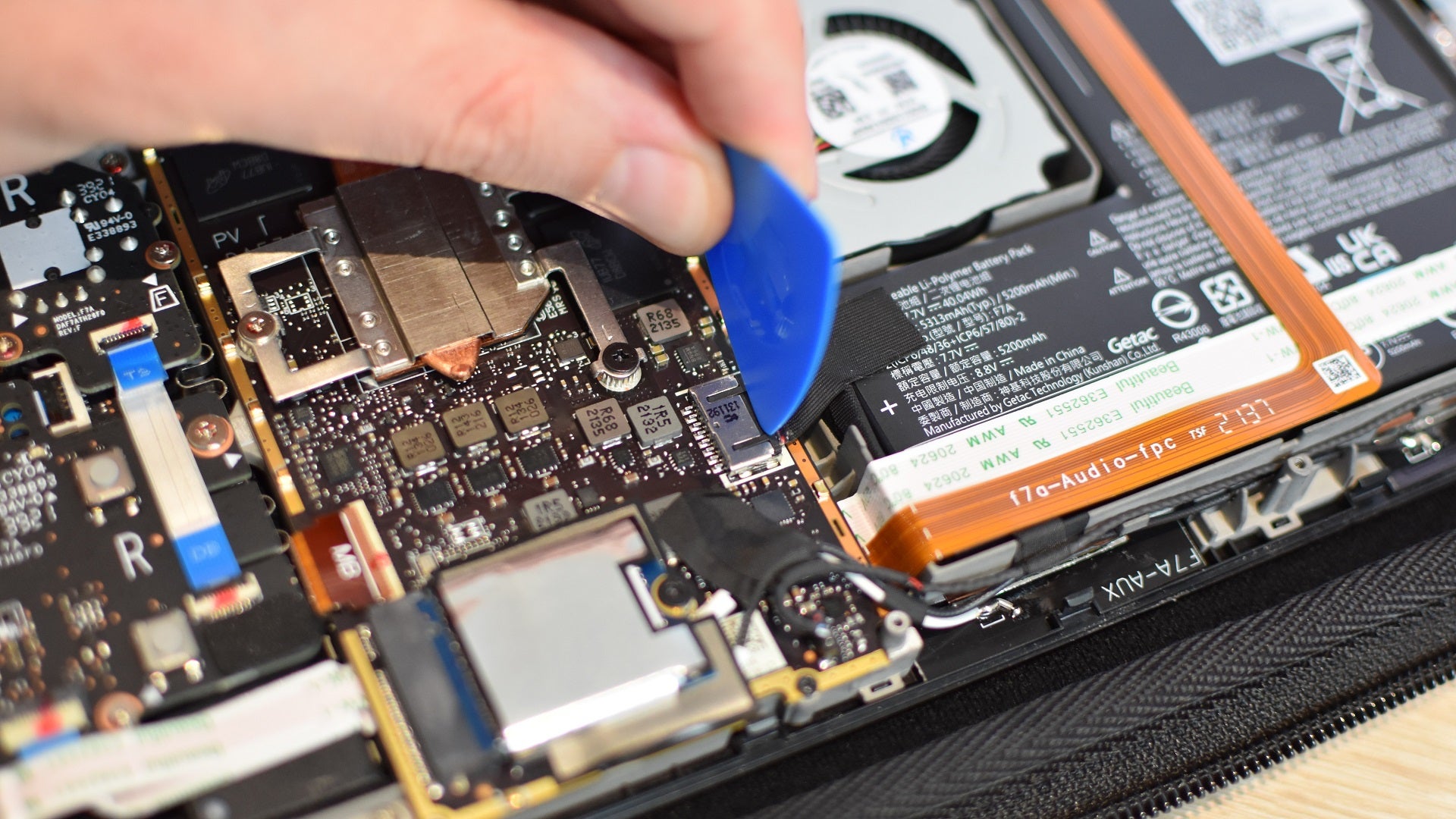
Image credit:Rock Paper Shotgun
Step 6: Also revealed by the plate’s removal: the SSD! Remove the screw holding it in place (again, don’t lose this, or get it mixed up with the other screws) and lightly pull the SSD, including its protective sleeve, out of the M.2 slot.
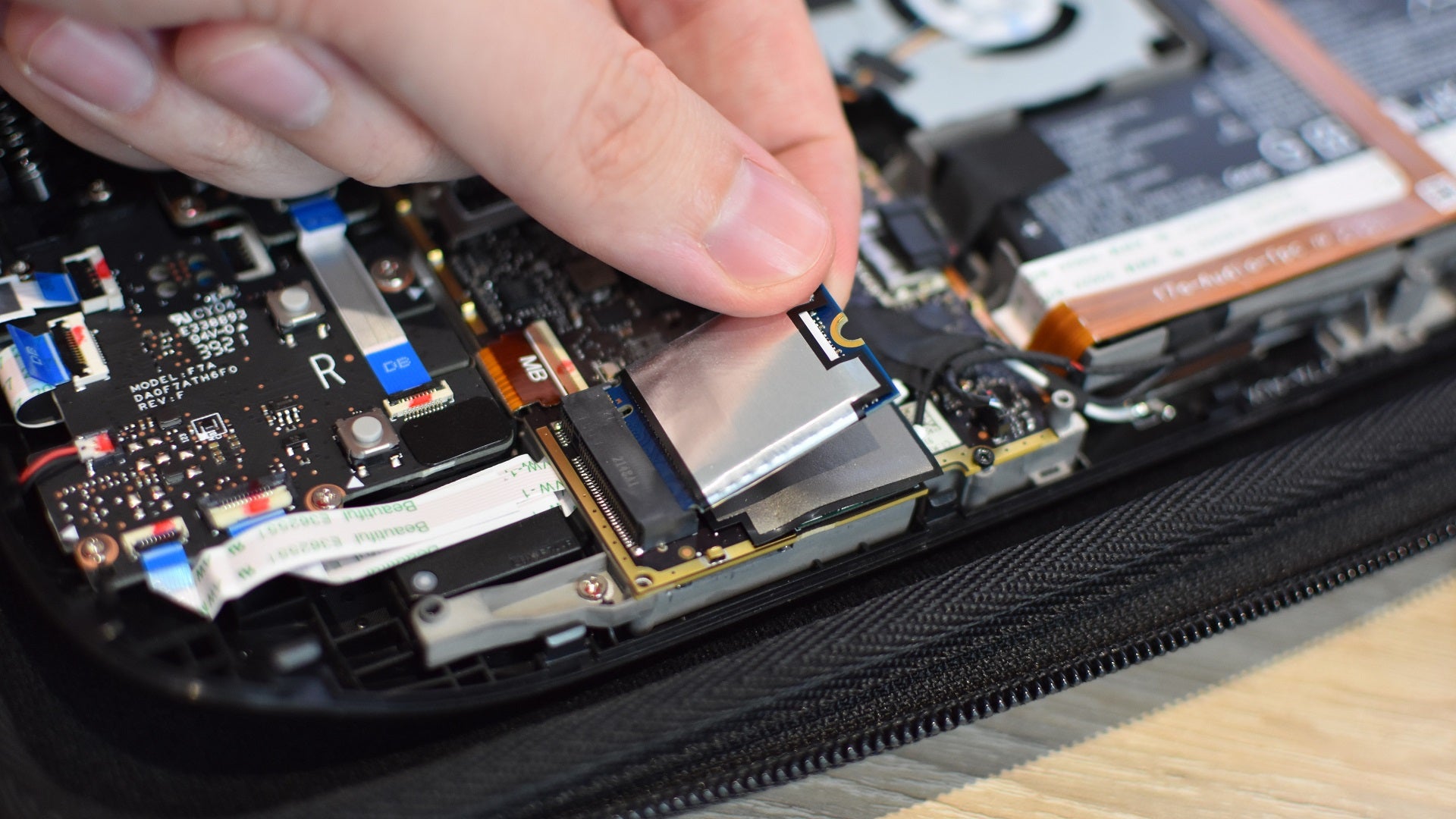
Image credit:Rock Paper Shotgun
Step 7: Remove that shiny sheath from the old SSD and slide it onto your new drive, in the exact same position. The new drive’s screw cutout and the connecting contacts should both be exposed.
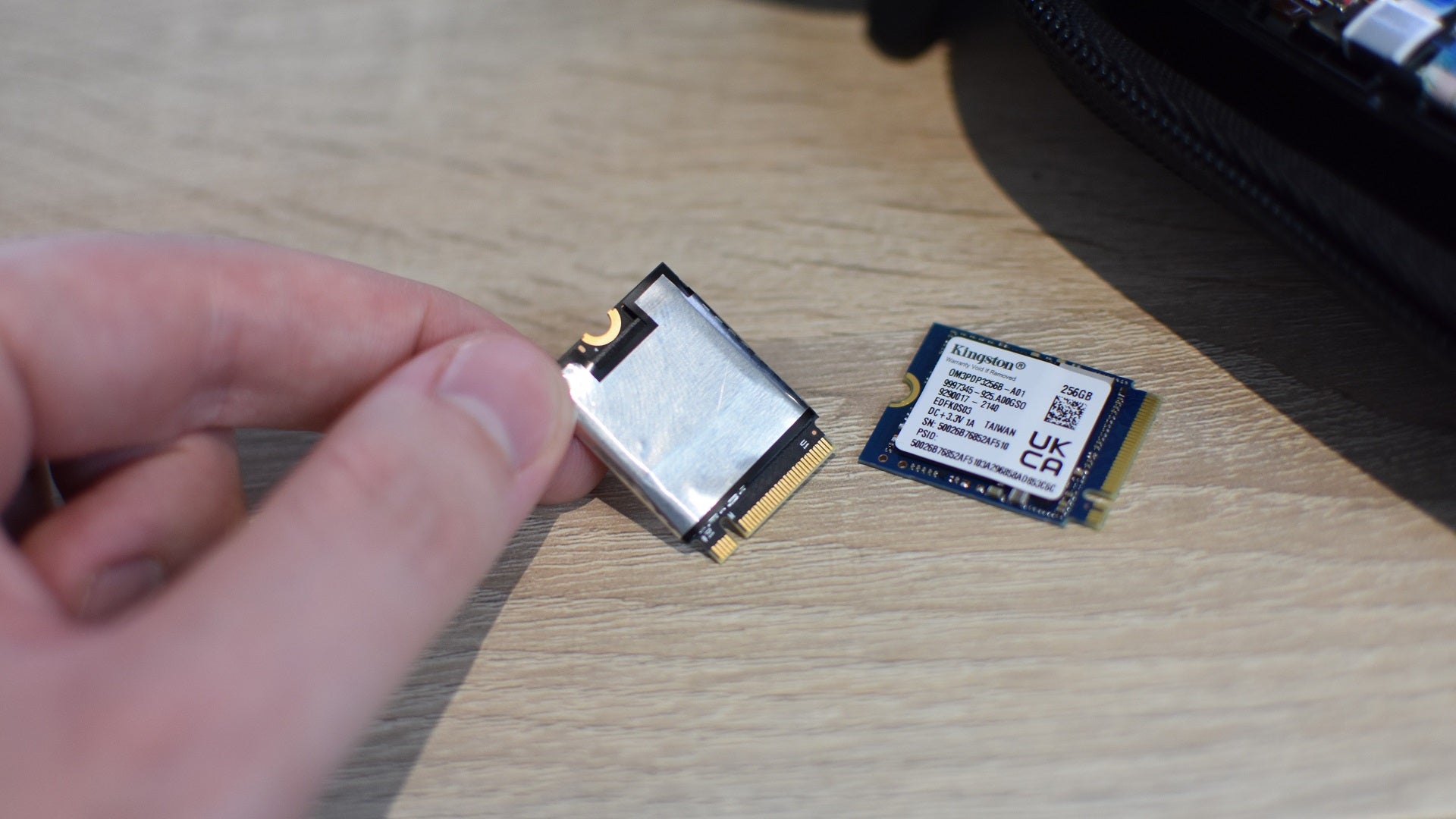
Image credit:Rock Paper Shotgun
Step 8: Push the new SSD into the M.2 slot, and use the same screw you just removed to fasten it in place.
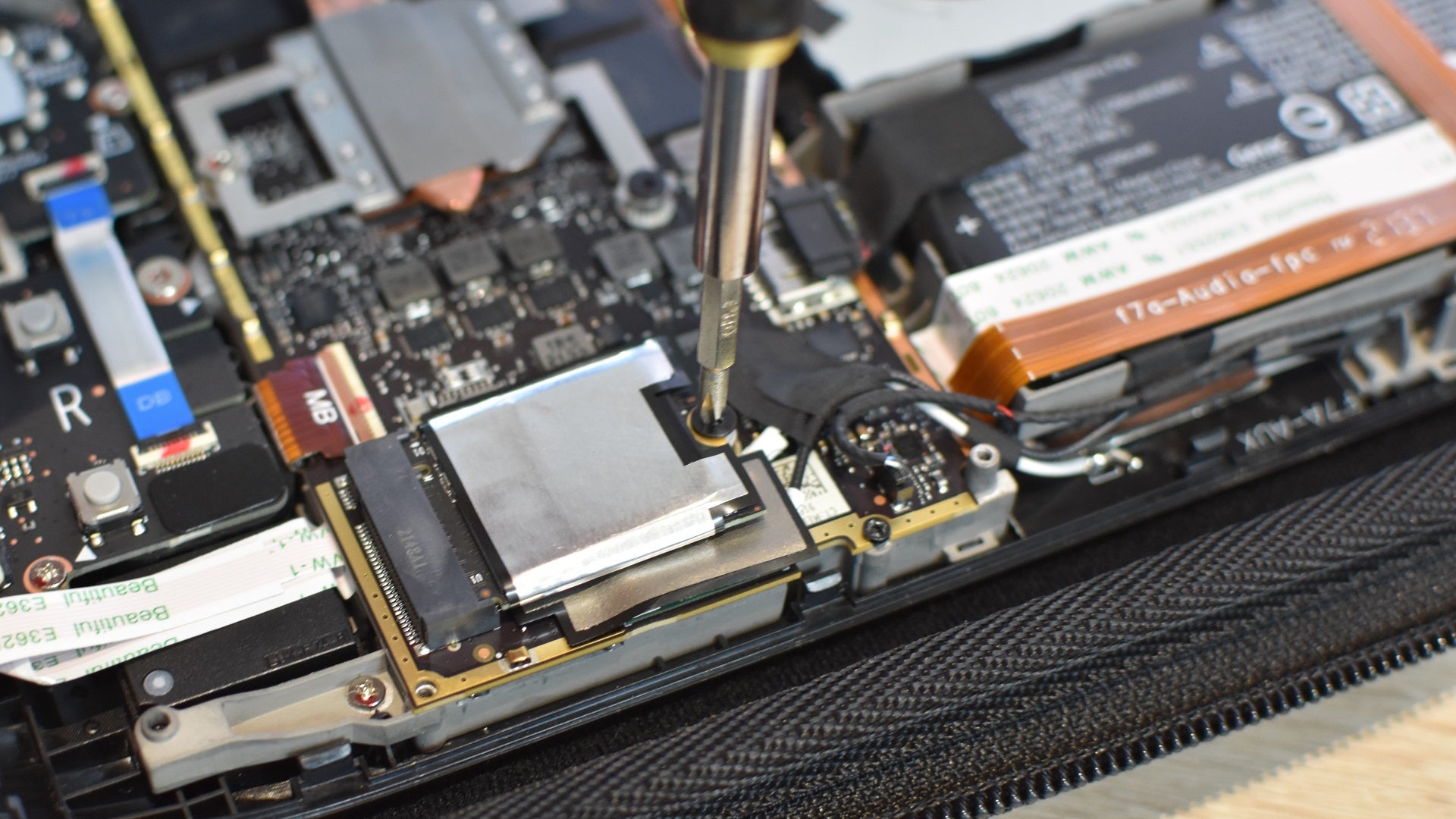
Image credit:Rock Paper Shotgun
Step 9: Reconnect the battery cable, then replace the metal cover and fasten that down with its screws as well. On older LCD models, re-cover that third screw with the foil.
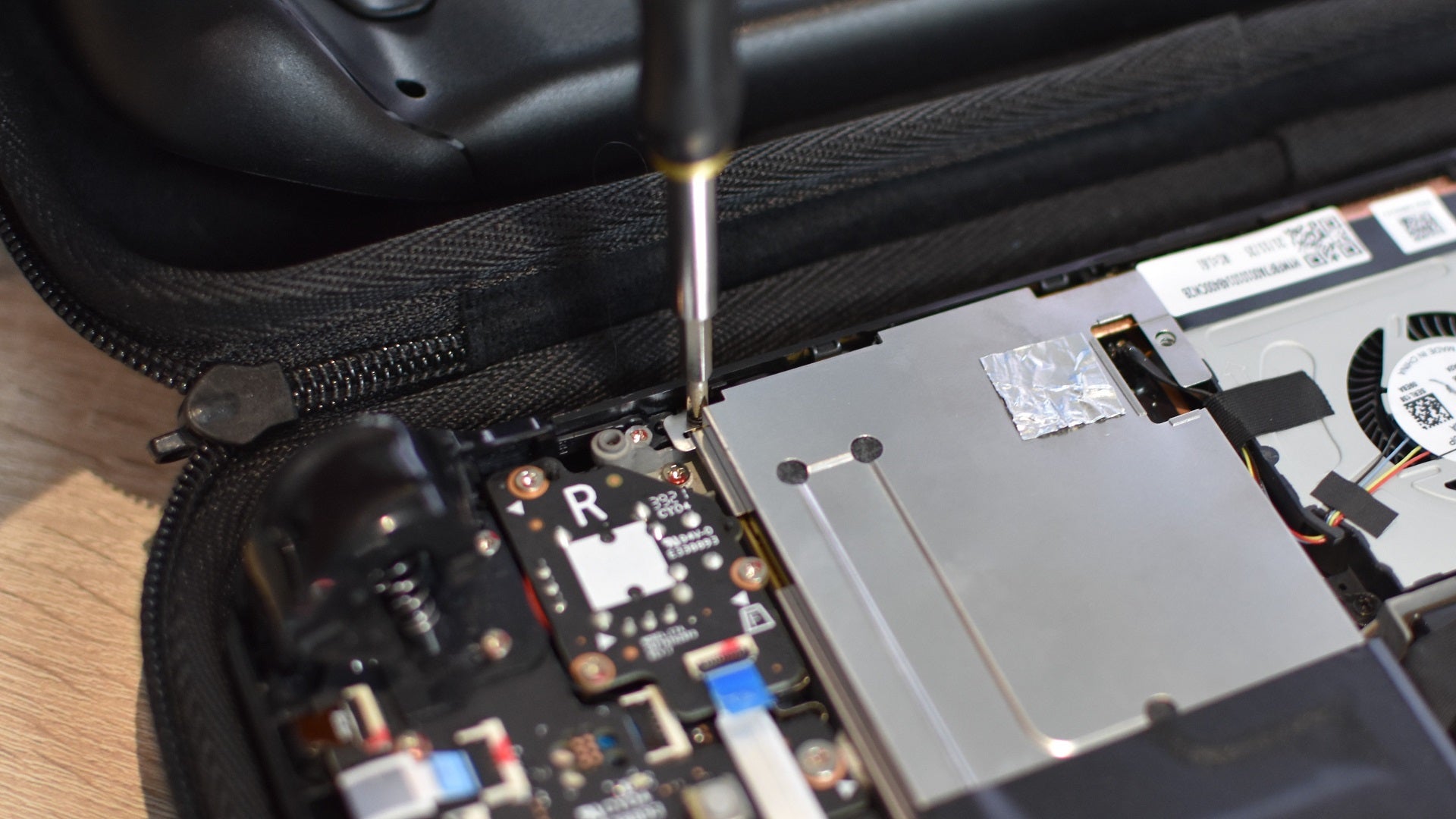
Image credit:Rock Paper Shotgun
On the Steam Deck OLED, don’t forget to reconnect that ribbon cable too. Slide it in fully, then flip the plastic tab back down to secure it.
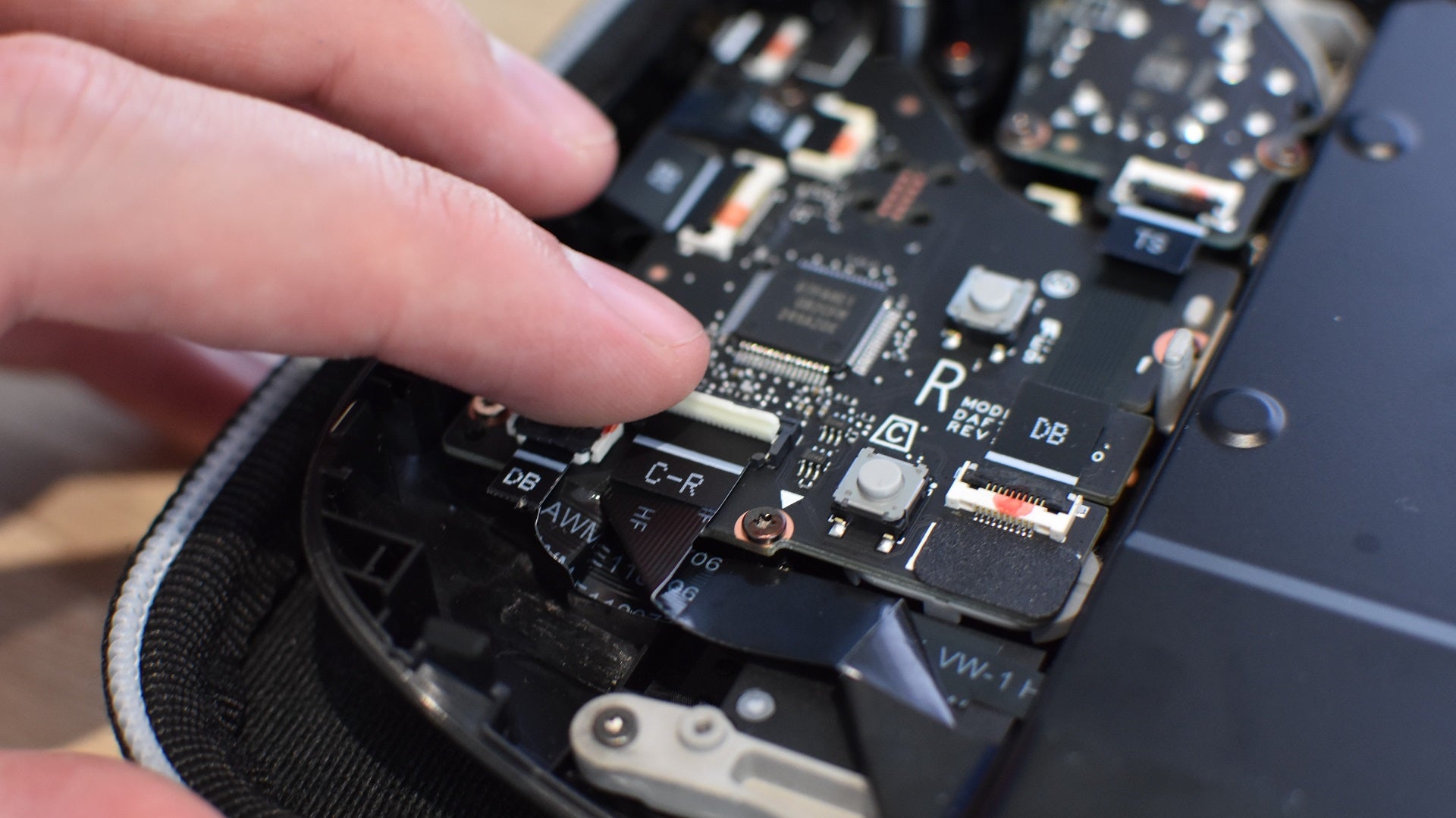
Image credit:Rock Paper Shotgun
Step 10: Snap the Steam Deck’s backplate back into place, making sure it’s fully clipped together all around, and replace the screws you removed in step 2.
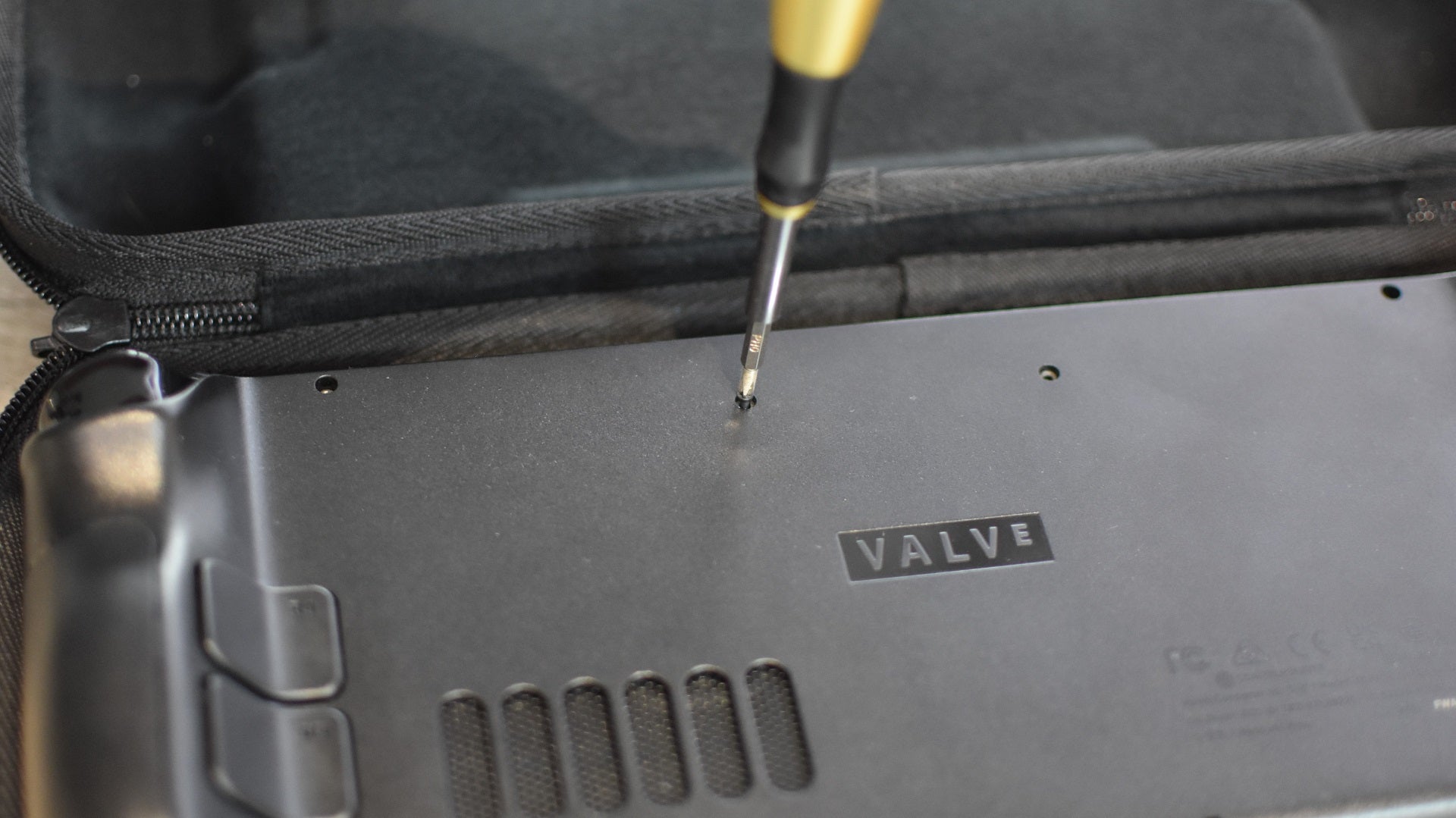
Image credit:Rock Paper Shotgun
Step 11: Good news! That’s the tricky part done. But you still need to install SteamOS, so on your PC or laptop, head to Valve’s Steam Deck recovery instructions page and download the SteamOS recovery image. You’ll also need an appropriate writing tool to turn your USB stick into a bootable device that the Deck can use – if you’re on a Windows PC, Valve recommend Rufus , as do I.
Once both the recovery image and Rufus are downloaded, plug in your USB drive and run Rufus. It should detect and list your drive in the “Device” field. Just below that, click the “Select” button, navigate to your downloads folder, and select the recovery image (it’s a .bz2 file) to set it as the boot selection. Finally, click “Start” then “OK” to write the SteamOS image to the USB.
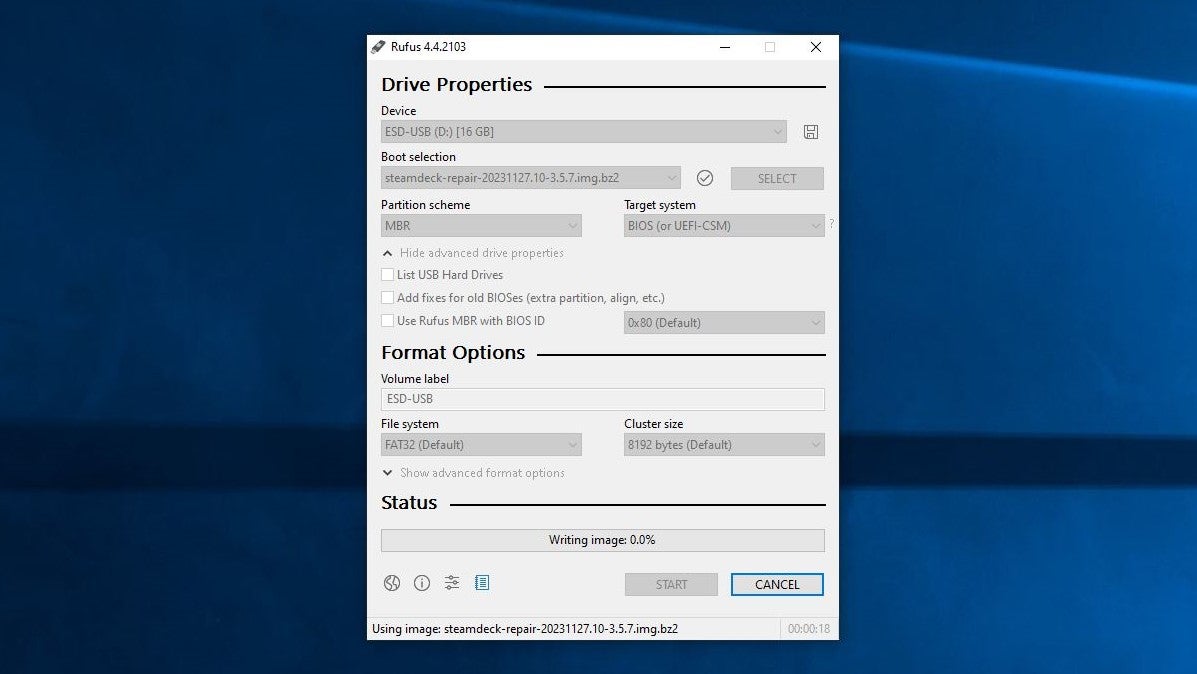
Image credit:Rock Paper Shotgun
Step 12: Start prepping your Steam Deck for the OS install. First, plug in its charging cable and press the power button – this will have it leave Battery Storage mode. Then, unplug the power and connect a USB-C adapter, hub or docking station, into which you’ve also connected the USB drive with the SteamOS recovery image.
Once everything’s connected, hold down the Volume Down button and press the power button once. After a few moments, your Steam Deck will load up its boot menu. Select the “EFI USB Device” option here.
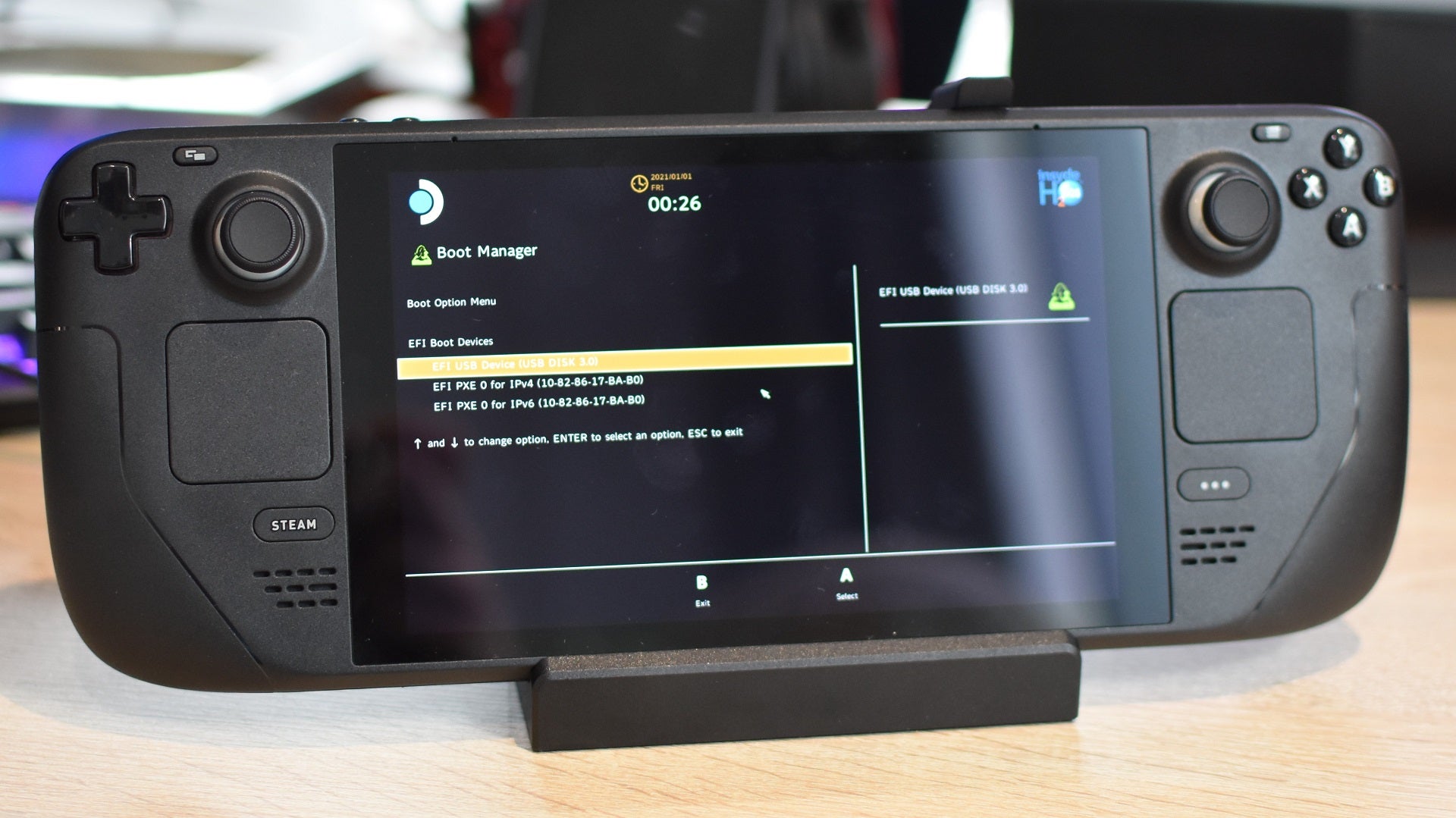
Image credit:Rock Paper Shotgun
Step 13: Now, wait a bit while SteamOS settles in on your new SSD. At one point you might face a sustained black screen, but resist the urge to reset and just let the installation process play out. Eventually, you’ll arrive on a desktop-like screen. Use the right trackpad to double-click the “Reimage Steam Deck” shortcut here, then click “Proceed” once the dialogue box appears. Finally, after waiting a minute or two for the reimaging to complete, click “Proceed” again.
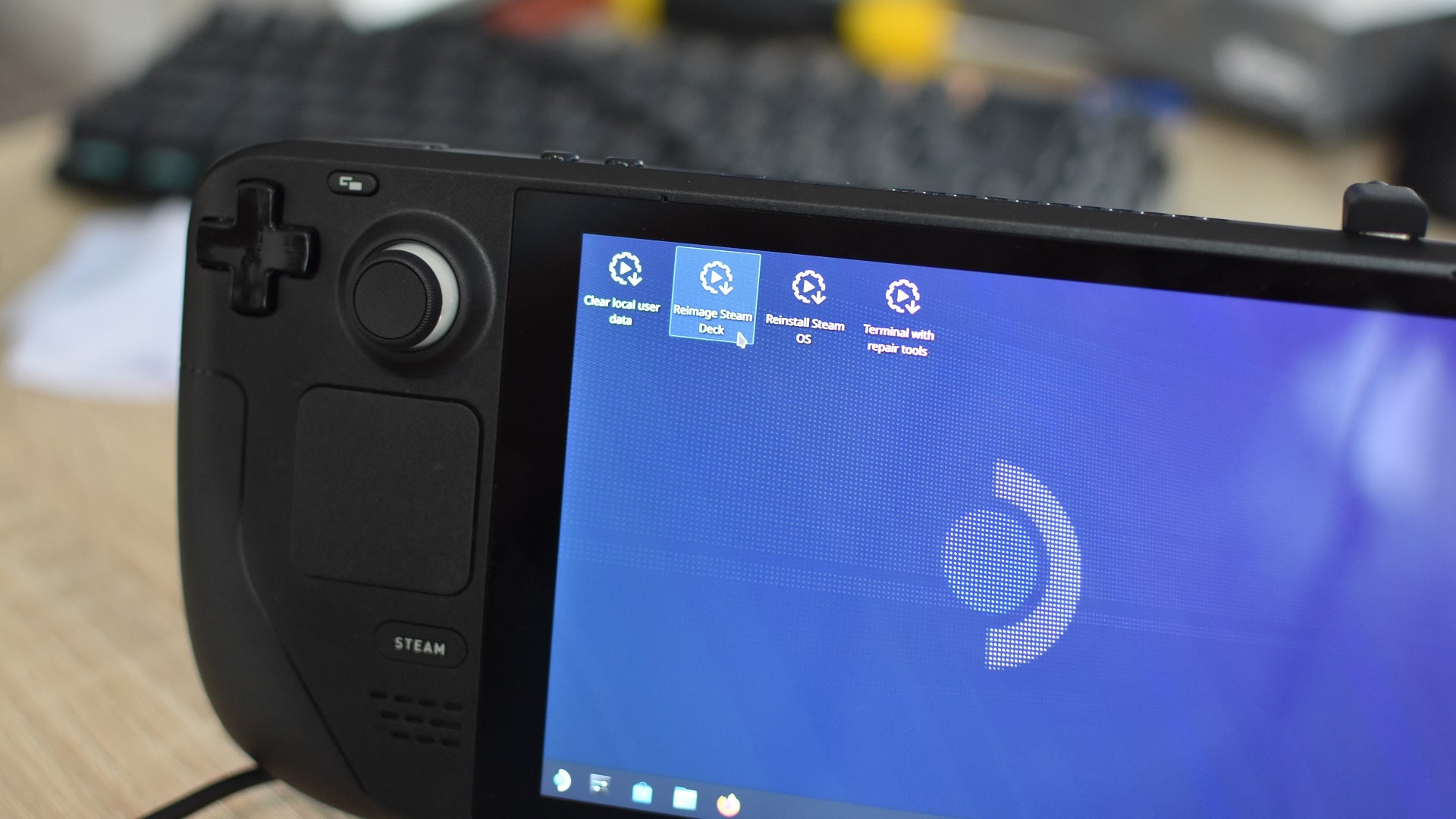
Image credit:Rock Paper Shotgun
You’ll see a bunch more code on the screen after this, but give the Steam Deck a moment and it will soon reboot into the same standard setup procedure that you encountered when it was fresh out of the box. At this point, you can consider your new SSD installed. Disconnect that USB adapter/hub/dock, get set up, and log into your Steam account. There are games that need installin’.
Rock Paper Shotgun is better when you sign in
Sign in and join us on our journey to discover strange and compelling PC games.

All 75 Arc Raiders Blueprints and where to get them
These areas have the highest chance of giving you Blueprints

Image credit:Rock Paper Shotgun/Embark Studios

Looking for more Arc Raiders Blueprints? It’s a special day when you find a Blueprint, as they’re among the most valuable items in Arc Raiders. If you find a Blueprint that you haven’t already found, then you must make sure you hold onto it at all costs, because Blueprints are the key to one of the most important and powerful systems of meta-progression in the game.
This guide aims to be the very best guide on Blueprints you can find, starting with a primer on what exactly they are and how they work in Arc Raiders, before delving into exactly where to get Blueprints and the very best farming spots for you to take in your search.
We’ll also go over how to get Blueprints from other unlikely activities, such as destroying Surveyors and completing specific quests. And you’ll also find the full list of all 75 Blueprints in Arc Raiders on this page (including the newest Blueprints added with the Cold Snap update , such as the Deadline Blueprint and Firework Box Blueprint), giving you all the information you need to expand your own crafting repertoire.
In this guide:
- What are Blueprints in Arc Raiders?
- Full Blueprint list: All crafting recipes
- Where to find Blueprints in Arc Raiders Blueprints obtained from quests Blueprints obtained from Trials Best Blueprint farming locations

What are Blueprints in Arc Raiders?
Blueprints in Arc Raiders are special items which, if you manage to extract with them, you can expend to permanently unlock a new crafting recipe in your Workshop. If you manage to extract from a raid with an Anvil Blueprint, for example, you can unlock the ability to craft your very own Anvil Pistol, as many times as you like (as long as you have the crafting materials).
To use a Blueprint, simply open your Inventory while in the lobby, then right-click on the Blueprint and click “Learn And Consume” . This will permanently unlock the recipe for that item in your Workshop. As of the Stella Montis update, there are allegedly 75 different Blueprints to unlock - although only 68 are confirmed to be in the game so far. You can see all the Blueprints you’ve found and unlocked by going to the Workshop menu, and hitting “R” to bring up the Blueprint screen.
It’s possible to find duplicates of past Blueprints you’ve already unlocked. If you find these, then you can either sell them, or - if you like to play with friends - you can take it into a match and gift it to your friend so they can unlock that recipe for themselves. Another option is to keep hold of them until the time comes to donate them to the Expedition.
Full Blueprint list: All crafting recipes
Below is the full list of all the Blueprints that are currently available to find in Arc Raiders, and the crafting recipe required for each item:
| Blueprint | Type | Recipe | Crafted At |
|---|---|---|---|
| Bettina | Weapon | 3x Advanced Mechanical Components 3x Heavy Gun Parts 3x Canister | Gunsmith 3 |
| Blue Light Stick | Quick Use | 3x Chemicals | Utility Station 1 |
| Aphelion | Weapon | 3x Magnetic Accelerator 3x Complex Gun Parts 1x Matriarch Reactor | Gunsmith 3 |
| Combat Mk. 3 (Flanking) | Augment | 2x Advanced Electrical Components 3x Processor | Gear Bench 3 |
| Combat Mk. 3 (Aggressive) | Augment | 2x Advanced Electrical Components 3x Processor | Gear Bench 3 |
| Complex Gun Parts | Material | 2x Light Gun Parts 2x Medium Gun Parts 2x Heavy Gun Parts | Refiner 3 |
| Fireworks Box | Quick Use | 1x Explosive Compound 3x Pop Trigger | Explosives Station 2 |
| Gas Mine | Mine | 4x Chemicals 2x Rubber Parts | Explosives Station 1 |
| Green Light Stick | Quick Use | 3x Chemicals | Utility Station 1 |
| Pulse Mine | Mine | 1x Crude Explosives 1x Wires | Explosives Station 1 |
| Seeker Grenade | Grenade | 1x Crude Explosives 2x ARC Alloy | Explosives Station 1 |
| Looting Mk. 3 (Survivor) | Augment | 2x Advanced Electrical Components 3x Processor | Gear Bench 3 |
| Angled Grip II | Mod | 2x Mechanical Components 3x Duct Tape | Gunsmith 2 |
| Angled Grip III | Mod | 2x Mod Components 5x Duct Tape | Gunsmith 3 |
| Hullcracker | Weapon | 1x Magnetic Accelerator 3x Heavy Gun Parts 1x Exodus Modules | Gunsmith 3 |
| Launcher Ammo | Ammo | 5x Metal Parts 1x Crude Explosives | Workbench 1 |
| Anvil | Weapon | 5x Mechanical Components 5x Simple Gun Parts | Gunsmith 2 |
| Anvil Splitter | Mod | 2x Mod Components 3x Processor | Gunsmith 3 |
| ??? | ??? | ??? | ??? |
| Barricade Kit | Quick Use | 1x Mechanical Components | Utility Station 2 |
| Blaze Grenade | Grenade | 1x Explosive Compound 2x Oil | Explosives Station 3 |
| Bobcat | Weapon | 3x Advanced Mechanical Components 3x Light Gun Parts | Gunsmith 3 |
| Osprey | Weapon | 2x Advanced Mechanical Components 3x Medium Gun Parts 7x Wires | Gunsmith 3 |
| Burletta | Weapon | 3x Mechanical Components 3x Simple Gun Parts | Gunsmith 1 |
| Compensator II | Mod | 2x Mechanical Components 4x Wires | Gunsmith 2 |
| Compensator III | Mod | 2x Mod Components 8x Wires | Gunsmith 3 |
| Defibrillator | Quick Use | 9x Plastic Parts 1x Moss | Medical Lab 2 |
| ??? | ??? | ??? | ??? |
| Equalizer | Weapon | 3x Magnetic Accelerator 3x Complex Gun Parts 1x Queen Reactor | Gunsmith 3 |
| Extended Barrel | Mod | 2x Mod Components 8x Wires | Gunsmith 3 |
| Extended Light Mag II | Mod | 2x Mechanical Components 3x Steel Spring | Gunsmith 2 |
| Extended Light Mag III | Mod | 2x Mod Components 5x Steel Spring | Gunsmith 3 |
| Extended Medium Mag II | Mod | 2x Mechanical Components 3x Steel Spring | Gunsmith 2 |
| Extended Medium Mag III | Mod | 2x Mod Components 5x Steel Spring | Gunsmith 3 |
| Extended Shotgun Mag II | Mod | 2x Mechanical Components 3x Steel Spring | Gunsmith 2 |
| Extended Shotgun Mag III | Mod | 2x Mod Components 5x Steel Spring | Gunsmith 3 |
| Remote Raider Flare | Quick Use | 2x Chemicals 4x Rubber Parts | Utility Station 1 |
| Heavy Gun Parts | Material | 4x Simple Gun Parts | Refiner 2 |
| Venator | Weapon | 2x Advanced Mechanical Components 3x Medium Gun Parts 5x Magnet | Gunsmith 3 |
| Il Toro | Weapon | 5x Mechanical Components 6x Simple Gun Parts | Gunsmith 1 |
| Jolt Mine | Mine | 1x Electrical Components 1x Battery | Explosives Station 2 |
| Explosive Mine | Mine | 1x Explosive Compound 1x Sensors | Explosives Station 3 |
| Jupiter | Weapon | 3x Magnetic Accelerator 3x Complex Gun Parts 1x Queen Reactor | Gunsmith 3 |
| Light Gun Parts | Material | 4x Simple Gun Parts | Refiner 2 |
| Lightweight Stock | Mod | 2x Mod Components 5x Duct Tape | Gunsmith 3 |
| Lure Grenade | Grenade | 1x Speaker Component 1x Electrical Components | Utility Station 2 |
| Medium Gun Parts | Material | 4x Simple Gun Parts | Refiner 2 |
| Torrente | Weapon | 2x Advanced Mechanical Components 3x Medium Gun Parts 6x Steel Spring | Gunsmith 3 |
| Muzzle Brake II | Mod | 2x Mechanical Components 4x Wires | Gunsmith 2 |
| Muzzle Brake III | Mod | 2x Mod Components 8x Wires | Gunsmith 3 |
| Padded Stock | Mod | 2x Mod Components 5x Duct Tape | Gunsmith 3 |
| Shotgun Choke II | Mod | 2x Mechanical Components 4x Wires | Gunsmith 2 |
| Shotgun Choke III | Mod | 2x Mod Components 8x Wires | Gunsmith 3 |
| Shotgun Silencer | Mod | 2x Mod Components 8x Wires | Gunsmith 3 |
| Showstopper | Grenade | 1x Advanced Electrical Components 1x Voltage Converter | Explosives Station 3 |
| Silencer I | Mod | 2x Mechanical Components 4x Wires | Gunsmith 2 |
| Silencer II | Mod | 2x Mod Components 8x Wires | Gunsmith 3 |
| Snap Hook | Quick Use | 2x Power Rod 3x Rope 1x Exodus Modules | Utility Station 3 |
| Stable Stock II | Mod | 2x Mechanical Components 3x Duct Tape | Gunsmith 2 |
| Stable Stock III | Mod | 2x Mod Components 5x Duct Tape | Gunsmith 3 |
| Tagging Grenade | Grenade | 1x Electrical Components 1x Sensors | Utility Station 3 |
| Tempest | Weapon | 3x Advanced Mechanical Components 3x Medium Gun Parts 3x Canister | Gunsmith 3 |
| Trigger Nade | Grenade | 2x Crude Explosives 1x Processor | Explosives Station 2 |
| Vertical Grip II | Mod | 2x Mechanical Components 3x Duct Tape | Gunsmith 2 |
| Vertical Grip III | Mod | 2x Mod Components 5x Duct Tape | Gunsmith 3 |
| Vita Shot | Quick Use | 2x Antiseptic 1x Syringe | Medical Lab 3 |
| Vita Spray | Quick Use | 3x Antiseptic 1x Canister | Medical Lab 3 |
| Vulcano | Weapon | 1x Magnetic Accelerator 3x Heavy Gun Parts 1x Exodus Modules | Gunsmith 3 |
| Wolfpack | Grenade | 2x Explosive Compound 2x Sensors | Explosives Station 3 |
| Red Light Stick | Quick Use | 3x Chemicals | Utility Station 1 |
| Smoke Grenade | Grenade | 14x Chemicals 1x Canister | Utility Station 2 |
| Deadline | Mine | 3x Explosive Compound 2x ARC Circuitry | Explosives Station 3 |
| Trailblazer | Grenade | 1x Explosive Compound 1x Synthesized Fuel | Explosives Station 3 |
| Tactical Mk. 3 (Defensive) | Augment | 2x Advanced Electrical Components 3x Processor | Gear Bench 3 |
| Tactical Mk. 3 (Healing) | Augment | 2x Advanced Electrical Components 3x Processor | Gear Bench 3 |
| Yellow Light Stick | Quick Use | 3x Chemicals | Utility Station 1 |
Note: The missing Blueprints in this list likely have not actually been added to the game at the time of writing, because none of the playerbase has managed to find any of them. As they are added to the game, I will update this page with the most relevant information so you know exactly how to get all 75 Arc Raiders Blueprints.
Where to find Blueprints in Arc Raiders
Below is a list of all containers, modifiers, and events which maximise your chances of finding Blueprints:
- Certain quests reward you with specific Blueprints .
- Completing Trials has a high chance of offering Blueprints as rewards.
- Surveyors have a decent chance of dropping Blueprints on death.
- High loot value areas tend to have a greater chance of spawning Blueprints.
- Night Raids and Storms may increase rare Blueprint spawn chances in containers.
- Containers with higher numbers of items may have a higher tendency to spawn Blueprints. As a result, Blue Gate (which has many “large” containers containing multiple items) may give you a higher chance of spawning Blueprints.
- Raider containers (Raider Caches, Weapon Boxes, Medical Bags, Grenade Tubes) have increased Blueprint drop rates. As a result, the Uncovered Caches event gives you a high chance of finding Blueprints.
- Security Lockers have a higher than average chance of containing Blueprints.
- Certain Blueprints only seem to spawn under specific circumstances: Tempest Blueprint only spawns during Night Raid events. Vulcano Blueprint only spawns during Hidden Bunker events. Jupiter and Equaliser Blueprints only spawn during Harvester events.

Raider Caches, Weapon Boxes, and other raider-oriented container types have a good chance of offering Blueprints. |Image credit:Rock Paper Shotgun/Embark Studios
Blueprints have a very low chance of spawning in any container in Arc Raiders, around 1-2% on average. However, there is a higher chance of finding Blueprints in particular container types. Specifically, you can find more Blueprints in Raider containers and security lockers.
Beyond this, if you’re looking for Blueprints you should focus on regions of the map which are marked as having particularly high-value loot. Areas such as the Control Tower in Dam Battlegrounds, the Arrival and Departure Buildings in Spaceport, and Pilgrim’s Peak in Blue Gate all have a better-than-average chance of spawning Blueprints somewhere amongst all their containers. Night Raids and Electromagnetic Storm events also increase the drop chances of certain Blueprints .
In addition to these containers, you can often loot Blueprints from destroyed Surveyors - the largest of the rolling ball ARC. Surveyors are more commonly found on the later maps - Spaceport and Blue Gate - and if one spawns in your match, you’ll likely see it by the blue laser beam that it casts into the sky while “surveying”.
Surveyors are quite well-armoured and will very speedily run away from you once it notices you, but if you can take one down then make sure you loot all its parts for a chance of obtaining certain unusual Blueprints.
Blueprints obtained from quests
One way in which you can get Blueprints is by completing certain quests for the vendors in Speranza. Some quests will reward you with a specific item Blueprint upon completion, so as long as you work through all the quests in Arc Raiders, you are guaranteed those Blueprints.
Here is the full list of all Blueprints you can get from quest rewards:
- Trigger Nade Blueprint: Rewarded after completing “Sparks Fly”.
- Lure Grenade Blueprint: Rewarded after completing “Greasing Her Palms”.
- Burletta Blueprint: Rewarded after completing “Industrial Espionage”.
- Hullcracker Blueprint (and Launcher Ammo Blueprint): Rewarded after completing “The Major’s Footlocker”.
Alas, that’s only 4 Blueprints out of a total of 75 to unlock, so for the vast majority you will need to find them yourself during a raid. If you’re intent on farming Blueprints, then it’s best to equip yourself with cheap gear in case you lose it, but don’t use a free loadout because then you won’t get a safe pocket to stash any new Blueprint you find. No pain in Arc Raiders is sharper than failing to extract with a new Blueprint you’ve been after for a dozen hours already.

One of the best ways to get Blueprints is by hitting three stars on all five Trials every week. |Image credit:Rock Paper Shotgun/Embark Studios
Blueprints obtained from Trials
One of the very best ways to get Blueprints is as rewards for completing Trials in Arc Raiders. Trials are unlocked from Level 15 onwards, and allow you to earn rewards by focusing on certain tasks over the course of several raids. For example, one Trial might task you with dealing damage to Hornets, while another might challenge you to loot Supply Drops.
Trials refresh on a weekly basis, with a new week bringing five new Trials. Each Trial can offer up to three rewards after passing certain score milestones, and it’s possible to receive very high level loot from these reward crates - including Blueprints. So if you want to unlock as many Blueprints as possible, you should make a point of completing as many Trials as possible each week.
Best Blueprint farming locations
The very best way to get Blueprints is to frequent specific areas of the maps which combine high-tier loot pools with the right types of containers to search. Here are my recommendations for where to find Blueprints on every map, so you can always keep the search going for new crafting recipes to unlock.

Image credit:Rock Paper Shotgun/Embark Studios
Dam Battlegrounds
The best places to farm Blueprints on Dam Battlegrounds are the Control Tower, Power Generation Complex, Ruby Residence, and Pale Apartments . The first two regions, despite only being marked on the map as mid-tier loot, contain a phenomenal number of containers to loot. The Control Tower can also contain a couple of high-tier Security Lockers - though of course, you’ll need to have unlocked the Security Breach skill at the end of the Survival tree.
There’s also a lot of reporting amongst the playerbase that the Residential areas in the top-left of the map - Pale Apartments and Ruby Residence - give you a comparatively strong chance of finding Blueprints. Considering their size, there’s a high density of containers to loot in both locations, and they also have the benefit of being fairly out of the way. So you’re more likely to have all the containers to yourself.
Buried City
The best Blueprint farming locations on Buried City are the Santa Maria Houses, Grandioso Apartments, Town Hall, and the various buildings of the New District . Grandioso Apartments has a lower number of containers than the rest, but a high chance of spawning weapon cases - which have good Blueprint drop rates. The others are high-tier loot areas, with plenty of lootable containers - including Security Lockers.
Spaceport
The best places to find Blueprints on Spaceport are the Arrival and Departure Buildings, as well as Control Tower A6 and the Launch Towers . All these areas are labelled as high-value loot regions, and many of them are also very handily connected to one another by the Spaceport wall, which you can use to quickly run from one area to the next. At the tops of most of these buildings you’ll find at least one Security Locker, so this is an excellent farming route for players looking to find Blueprints.
The downside to looting Blueprints on Spaceport is that all these areas are hotly contested, particularly in Duos and Squads. You’ll need to be very focused and fast in order to complete the full farming route.

Image credit:Rock Paper Shotgun/Embark Studios
Blue Gate
Blue Gate tends to have a good chance of dropping Blueprints, potentially because it generally has a high number of containers which can hold lots of items; so there’s a higher chance of a Blueprint spawning in each container. In my experience, the best Blueprint farming spots on Blue Gate are Pilgrim’s Peak, Raider’s Refuge, the Ancient Fort, and the Underground Complex beneath the Warehouse .
All of these areas contain a wealth of containers to loot. Raider’s Refuge has less to loot, but the majority of the containers in and around the Refuge are raider containers, which have a high chance of containing Blueprints - particularly during major events.
Stella Montis
On the whole, Stella Montis seems to have a very low drop rate for Blueprints (though a high chance of dropping other high-tier loot). If you do want to try farming Blueprints on this map, the best places to find Blueprints in Stella Montis are Medical Research, Assembly Workshop, and the Business Center . These areas have the highest density of containers to loot on the map.
In addition to this, the Western Tunnel has a few different Security Lockers to loot, so while there’s very little to loot elsewhere in this area of the map, it’s worth hitting those Security Lockers if you spawn there at the start of a match.
That wraps up this primer on how to get all the Blueprints in Arc Raiders as quickly as possible. With the Expedition system constantly resetting a large number of players’ Blueprints, it’s more important than ever to have the most up-to-date information on where to find all these Blueprints.
While you’re here, be sure to check out our Arc Raiders best guns tier list , as well as our primers on the best skills to unlock and all the different Field Depot locations on every map.

ARC Raiders
PS5 , Xbox Series X/S , PC
Rock Paper Shotgun is better when you sign in
Sign in and join us on our journey to discover strange and compelling PC games.
