Asus ROG Xbox Ally X review: Falling short of Xboctations
The best version of Windows on a handheld, let down by bugs and iffy hardware
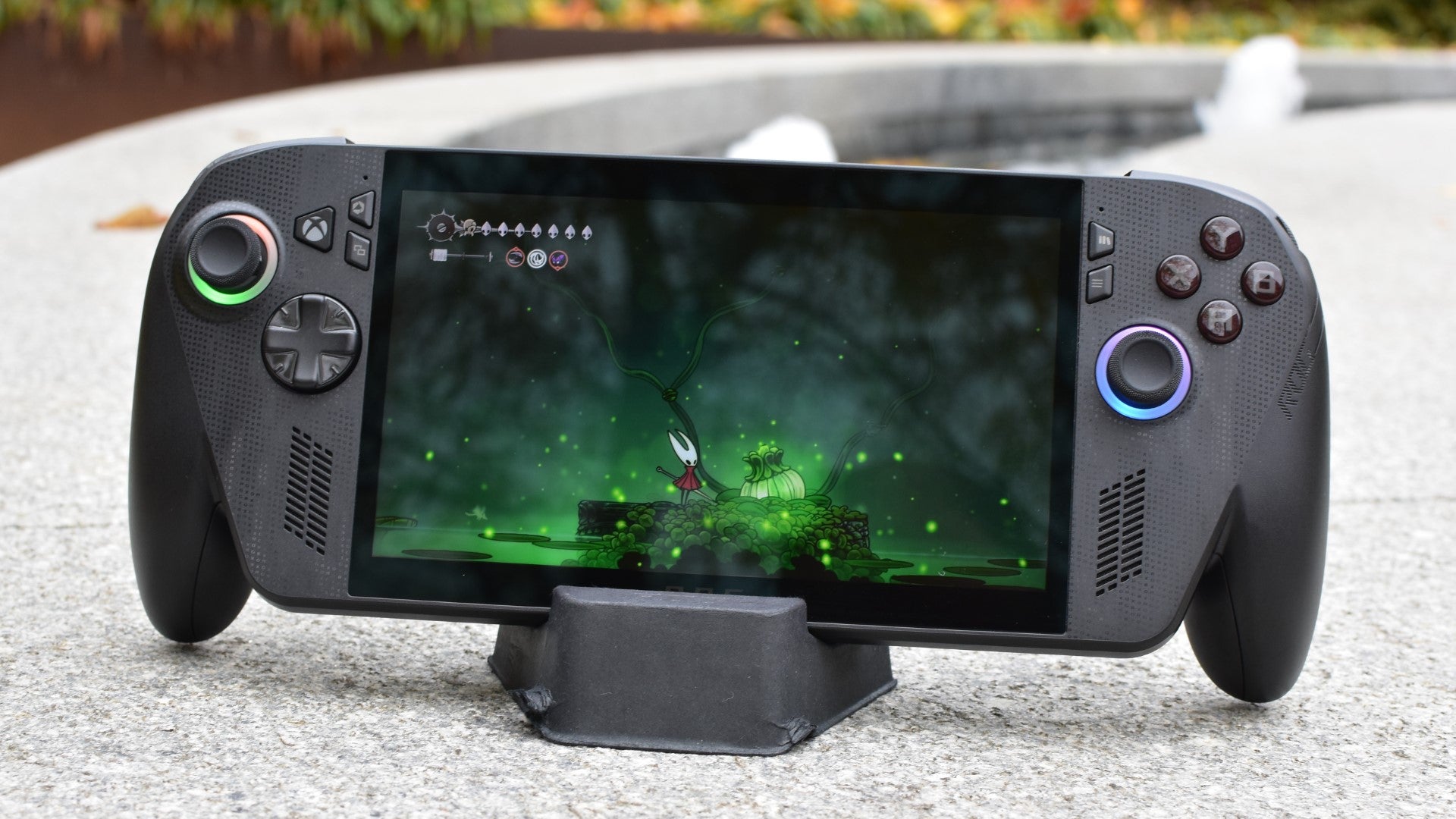
Image credit:Rock Paper Shotgun

Asus ROG Xbox Ally X specs: CPU/GPU: AMD Ryzen Z2 Extreme RAM: 24GB LPDDR5X Storage: 1TB NVMe SSD Display: 7in, 1920x1200, 120Hz IPS Ports: 2x USB-C, 1x 3.5mm, 1x microSD Dimensions: 291x122x51mm Weight: 715g Price: From £800 / $1000
The best thing about the ROG Xbox Ally X is that it finally acknowledges the truth – a truth that, despite continued denials by device after device, at least partly accounts for why the little old Steam Deck still rules the world of handheld PCs despite being slower and lower-rez than almost everything that followed it. You know it, I know it, and at last, Microsoft know it: Windows 11 just isn’t that good as a handheld OS.
Thus, the biggest upgrade that the ROG Xbox Ally X – and its little brother, the ROG Xbox Ally – makes is not to its hardware, but the software. Instead of booting straight into the Windows 11 desktop, a miserable experience when your only navigational tools are thumbsticks and a touchscreen, it defaults to a far more gamepad-optimised (and specifically gaming-focused) ‘Xbox’ mode that provides quick, D-paddable access to your choice of launchers and the games installed within. Yes. Great. Cool. Big fan. I still wouldn’t buy one.
The fact that it costs £800 (or a crisp $1000 in the US) doesn’t help, but then the MSI Claw 8 AI+ already proved that it can be worth splashing out if framerates and practicality are up to premium standards. The ROG Xbox Ally X sometimes makes the cut, though is just as often outpolished or outlasted by its peers, and even suffers from outright faults that undermine Asus and Microsoft’s genuinely good UX work.
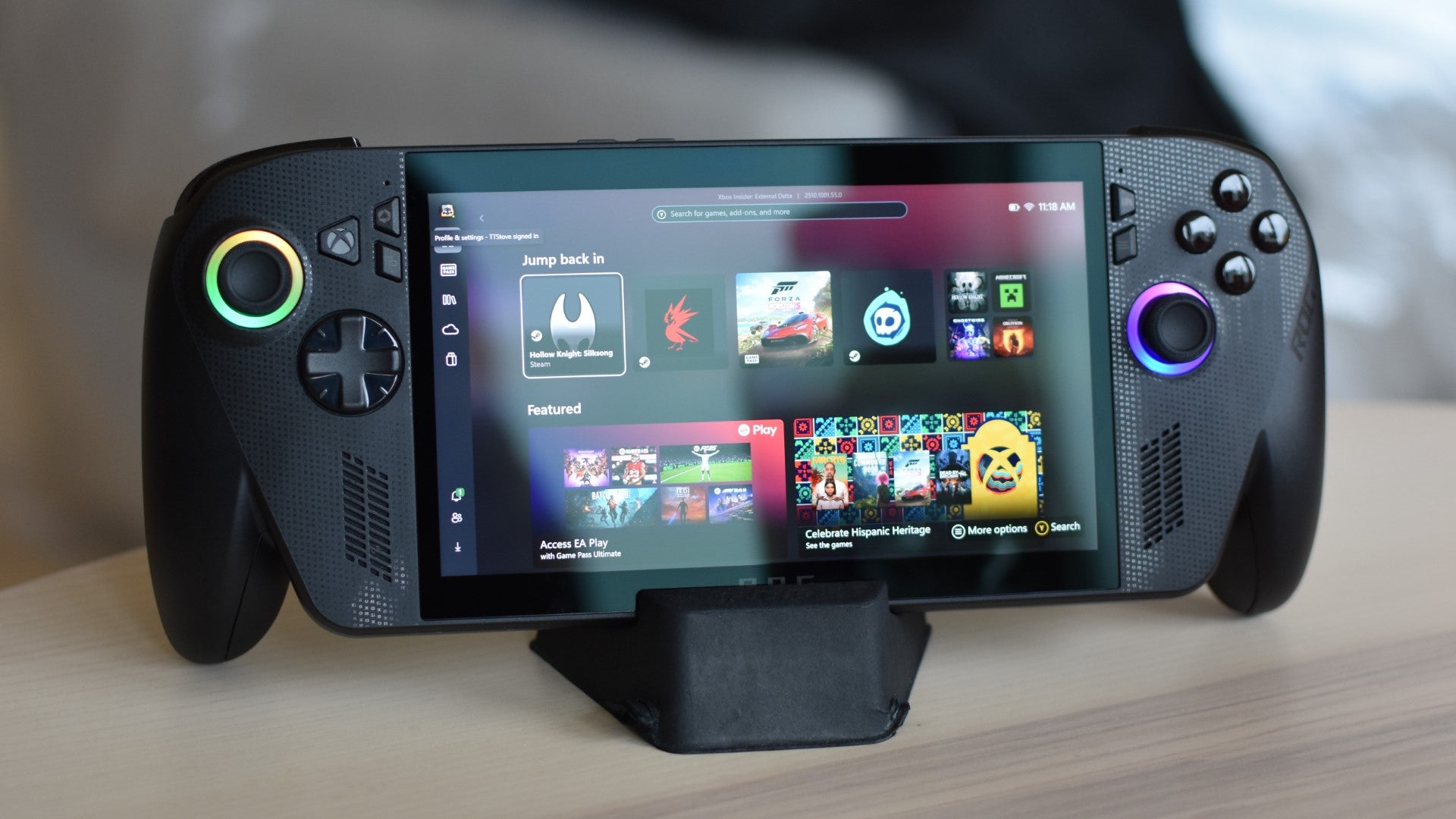
Image credit:Rock Paper Shotgun
While those efforts focused on making the operating system more comfortable, the ROG Xbox Ally X still aims to please your hands. The protruding, controller-style grips are a vast ergonomic improvement on the meagre bumps of the original ROG Ally and ROG Ally X , and the thumbsticks keep the taut, grippy design of the latter. In another instance of feature-lifting from Xbox gamepads, the triggers contain independent rumble motors for more finely-tuned vibration feedback when you pull them. The list of supporting games isn’t amazingly long, but this did add a nice little finger-frisson to hurtling about in Forza Horizon 5 .
It’s also not as heavy as it looks: at 715g it’s only a few dozen grams more than the Steam Deck OLED , and lighter than the Claw 8 AI+. The Claw does have an extra inch of diagonal screen estate, to be fair, and the height added by the ROG Ally X’s stick-out grips will impede on bag space, though keep it in the default Performance mode when on battery power and its cooling system isn’t anywhere near as noisy as the MSI’s.
All this apparent design proficiency, sadly, also serves to highlight when the ROG Xbox Ally X gets it wrong. The D-pad, for one, is a nasty little plate of cheap plastic, incongruous with the fine machining around it. And the face buttons, while functionally serviceable, emit an oddly pronounced percussive sound, giving the whole thing an antisocial noisiness regardless of whether you’ve got headphones plugged in. They’re loudest on the depress, so there’s little sense that this was an intentional attempt at delivering aural feedback, à la the clicky precision of Razer’s Wolverine V3 Pro controller .
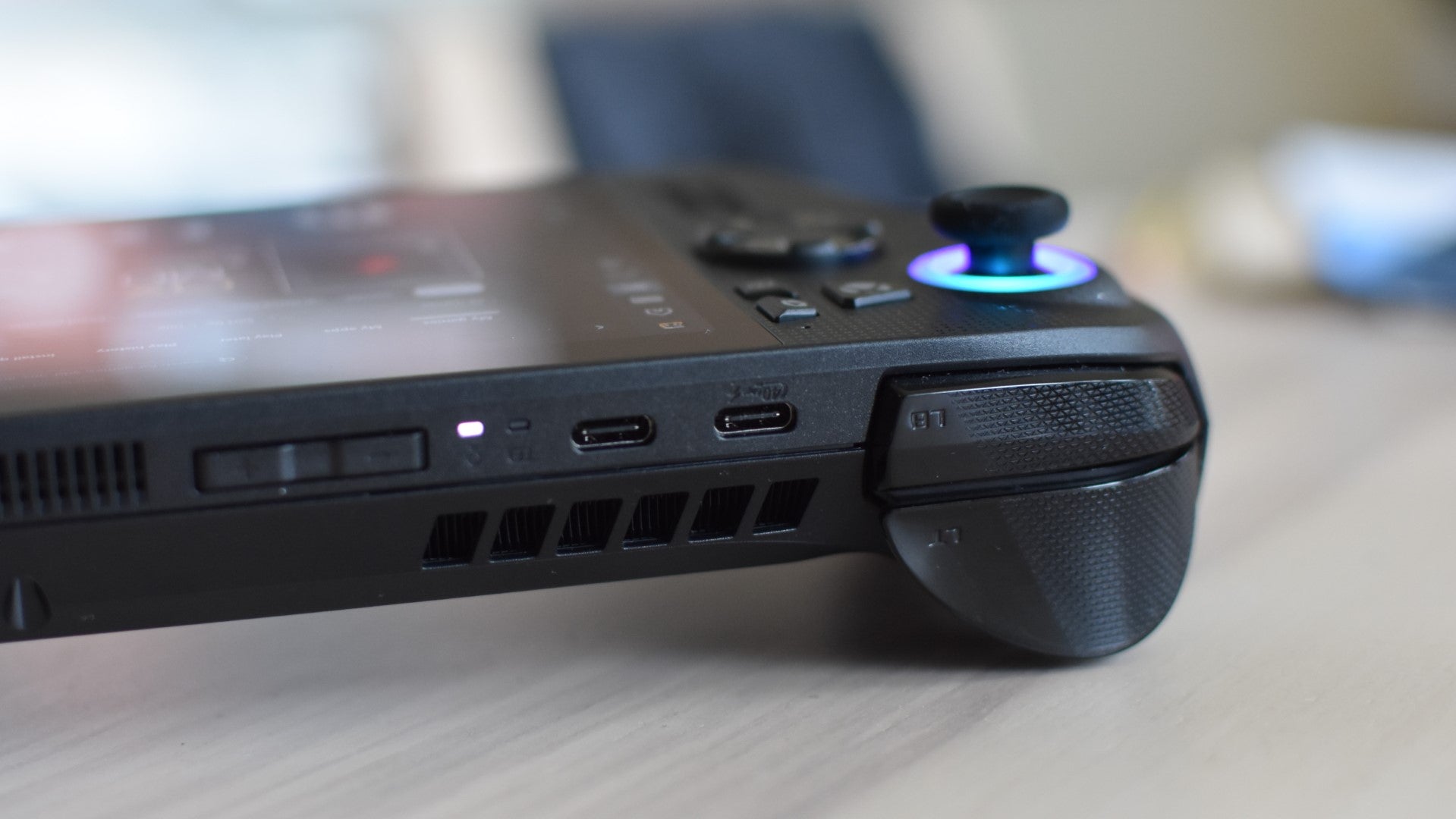
Image credit:Rock Paper Shotgun
Worse, on a couple of occasions, the vibration motors in my test unit – first the right, then the left – decided they’d rather not work for a bit. Both malfunctions occured during otherwise uneventful Hollow Knight: Silksong sessions, when each motor suddenly ceased shaking and instead sent out naught but a shrill rasping sound, which I initially mistook as coming from the speakers. This persisted across other games until fixing itself on a system restart. That’s preferable to the motors breaking down permanently, but still, how many times is that going to happen on your brand-new £800 games machine?
The display, meanwhile, is a downgrade on the ROG Ally X’s. The Xbox-branded model sticks to a 7in, 1920x1080, 120Hz LCD panel, so it’s still sharper and faster than either Steam Deck variant. Yet it’s also slightly duller than its own predecessor, covering 94.6% of the sRGB gamut in my colourimeter tests versus the original Ally X’s 97.1% - meaning it can’t reproduce quite as many different colours. And although the contrast difference is much of a muchness, dropping ever-so-slightly from 1311:1 to 1306:1, there’s a much more noticeable reduction in peak brightness, with the ROG Xbox Ally X maxing out at 462cd/m2. That’s even less luminous than the very first, most basic ROG Ally, and only about half the nits that the Steam Deck OLED can blast through your corneae in HDR games.
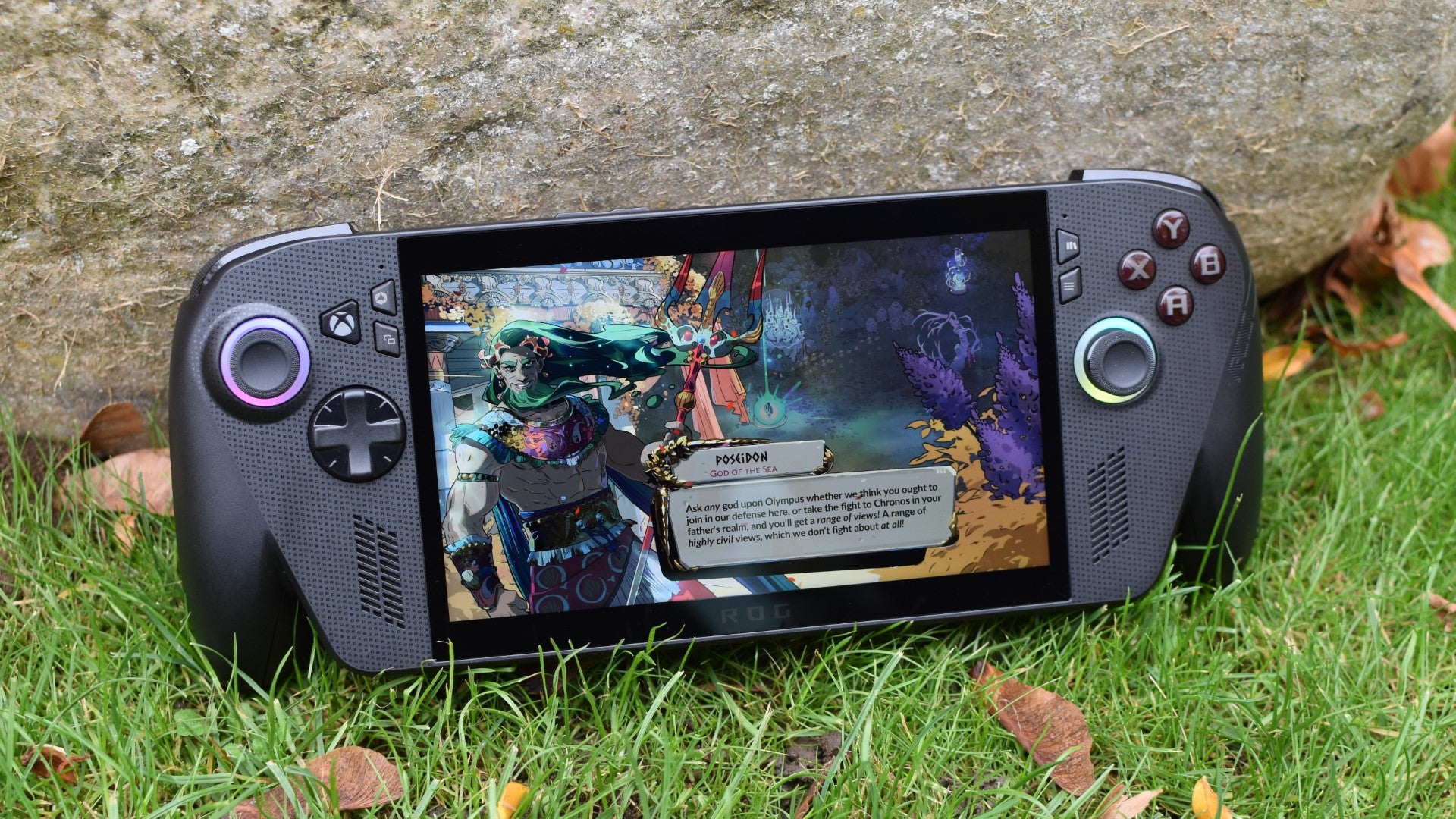
Image credit:Rock Paper Shotgun
None of that is to say the screen looks like an old Nokia’s. It’s fine. It’s big enough, sharp without culling the battery via excessive resolution, and is at least bright enough to use in anything outside of direct, blazing sunlight. But it’s also no better, and in some ways is objectively worse, than the older, cheaper handheld it’s supposed to replace.
Games performance, at least, shows some progress. The ROG Xbox Ally X’s AMD Ryzen Z2 Extreme is a direct-as-you-like upgrade to the Ryzen APU that fueled previous Allies, and even with a disappointing result in Cyberpunk 2077 , manages to thrash both in the standard Performance mode.
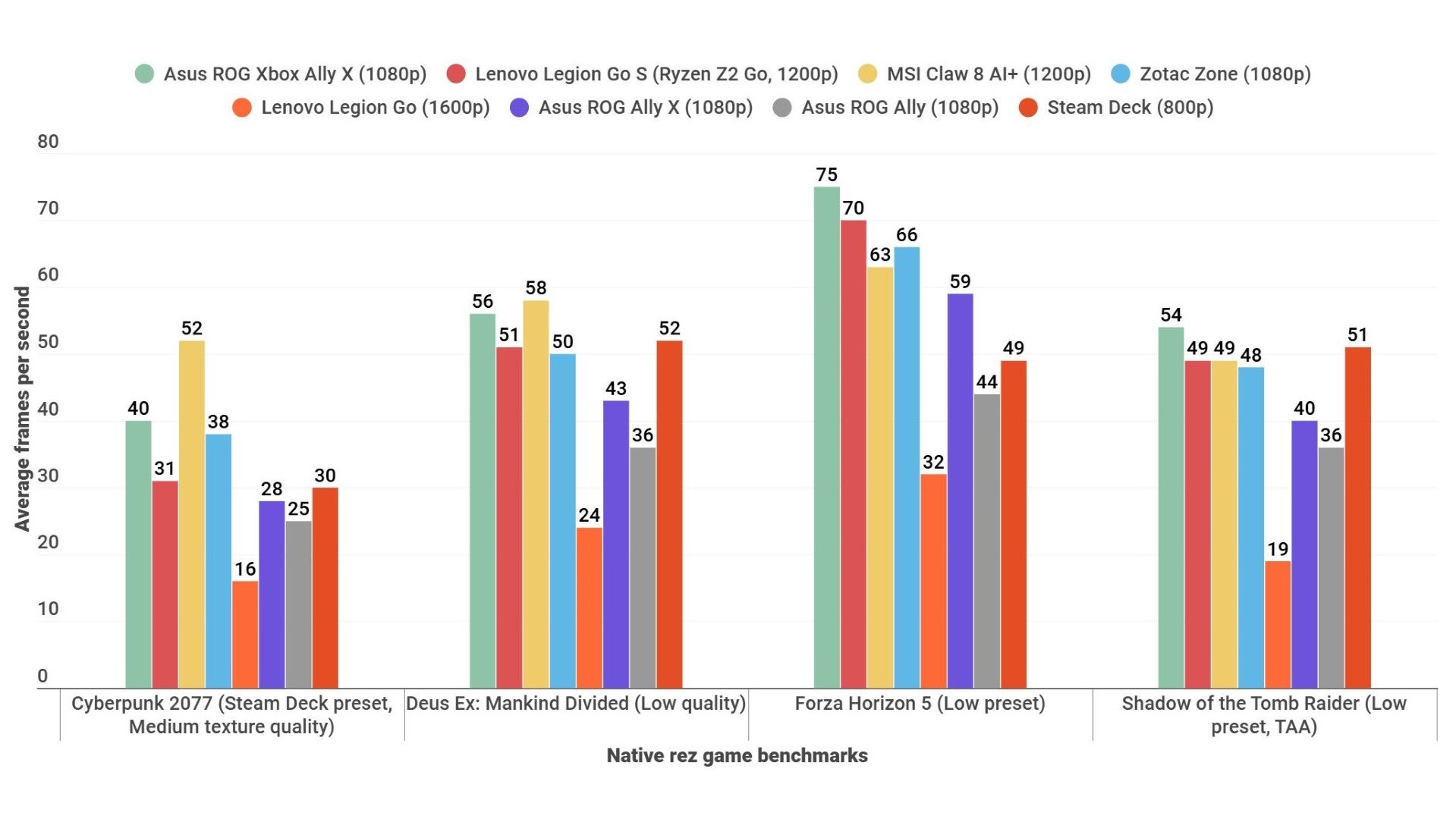
Image credit:Rock Paper Shotgun
Its relationship with other, more recent high performers, namely the Claw 8 AI+ and the Zotac Zone , is more complex. While Asus’ latest comfortably wins out in Forza Horizon 5, it’s the MSI that best handles the more demanding Cyberpunk. It edges ahead of the ROG Xbox Ally X in Deus Ex: Mankind Divided as well, leaving Shadow of the Tomb Raider as merely a modest victory for the Asus x Microsoft collab.
It’s still a scrap after dropping to 1280x720, with the Zone – which I’ve just noticed has dropped from £850 to £499 in the year it’s been on sale – actually beating the ROG Xbox Ally X in half these games and effectively drawing with it in Shadow of the Tomb Raider. In short, the ROG Xbox Ally X is competitive with the other go-fast handheld PCs of its day – and is certainly quicker than any Steam Deck – but it’s not a truly next-gen gamechanger.
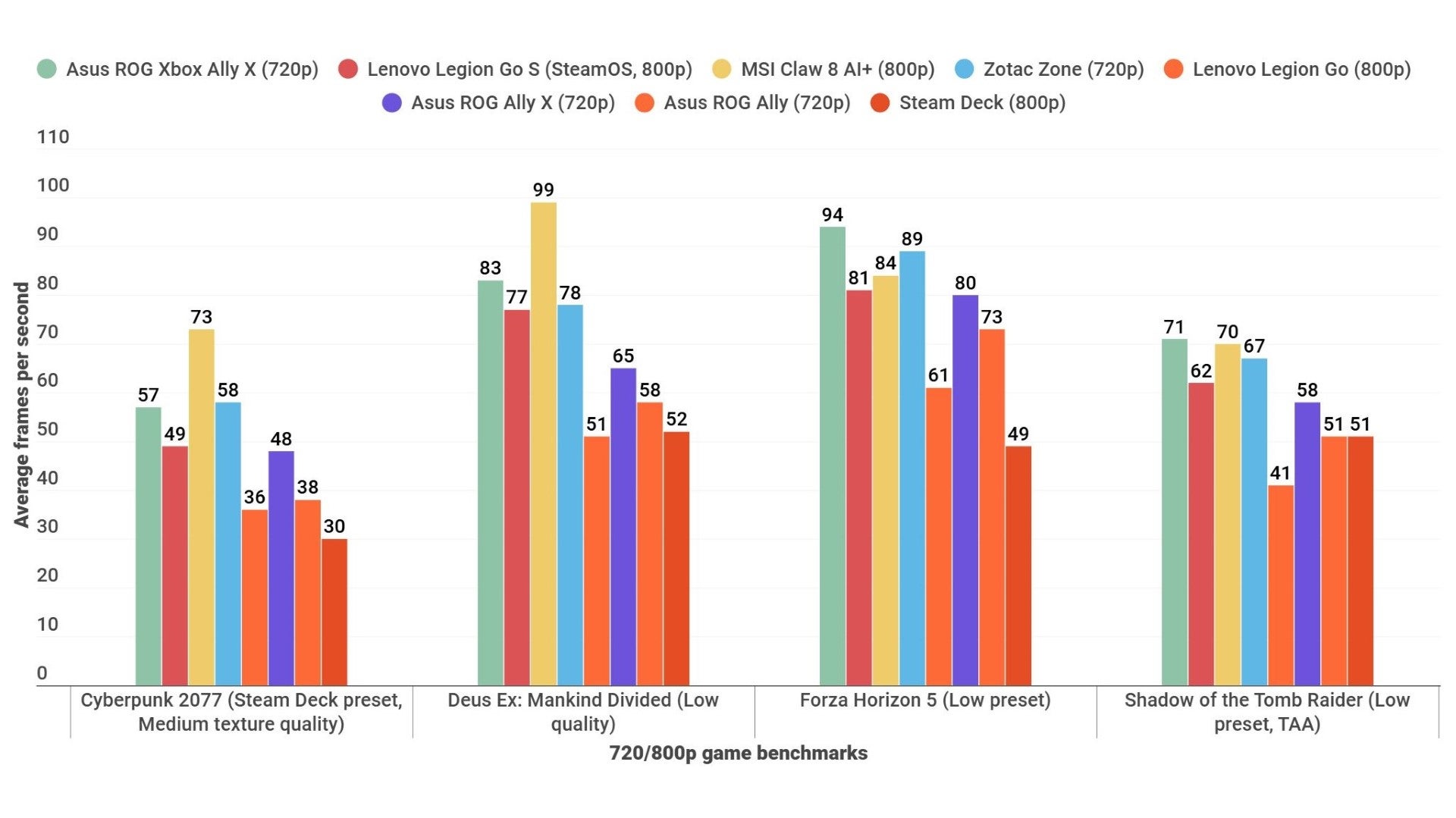
Image credit:Rock Paper Shotgun
“Ah,” I blatantly fabricate you asking, “but what about that Xbox mode? Its lightweight, bloat-disabling version of the OS promises to optimise games performance like no other Windows handheld before it.” First off, all those results are from Xbox mode – it’s the default, and you need to manually switch to the full desktop mode. Second, it turns out that optimisation thing doesn’t pan out.
Here’s another, extended round of benchmarks, performed in both Xbox and traditional desktop modes:
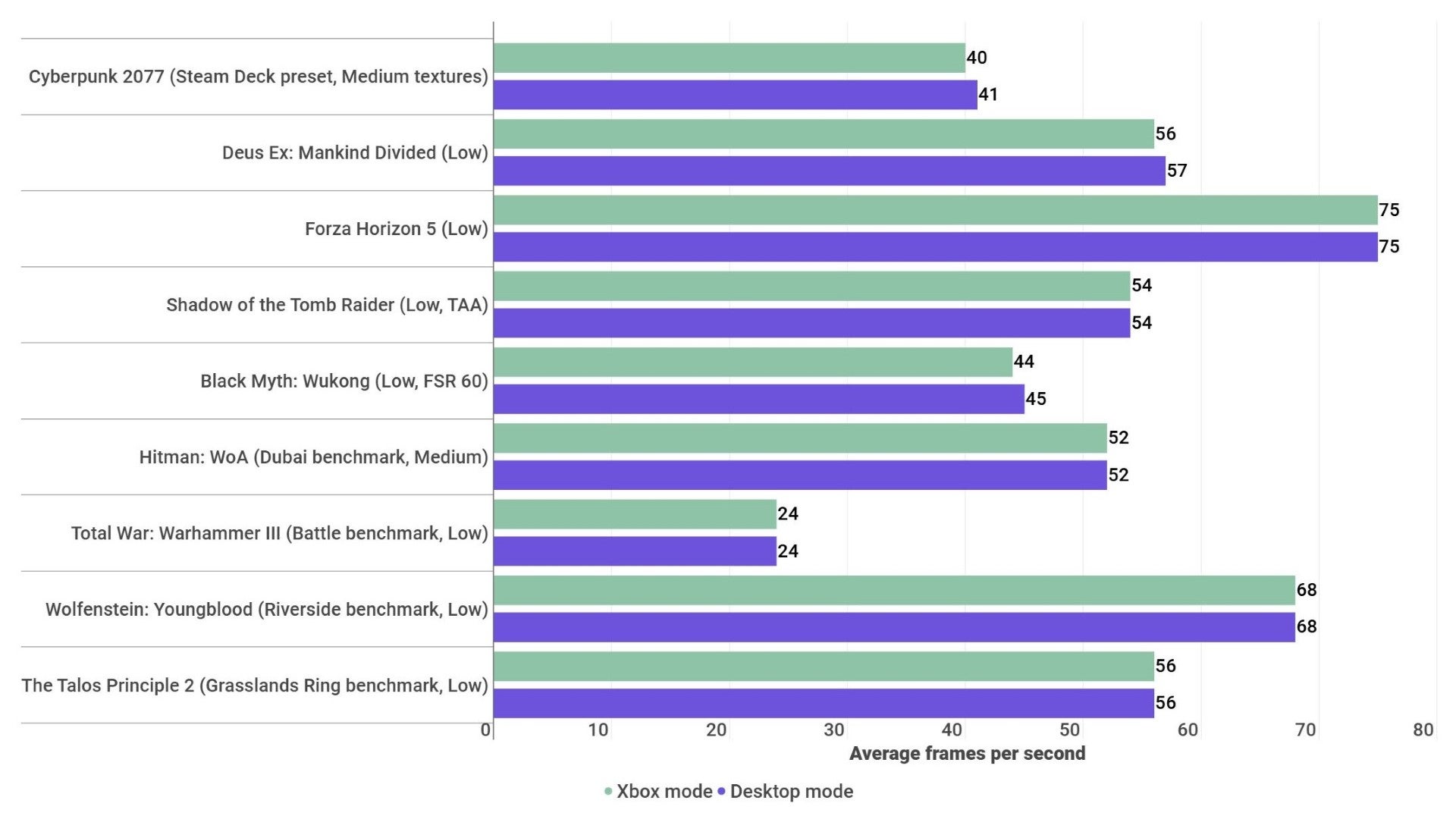
Image credit:Rock Paper Shotgun
What this collection of identical bars shows – especially when desktop mode , not Xbox mode, earns a single extra frame – is that the ROG Xbox Ally X’s special interface is precisely that. An interface improvement, and a welcome one, but not something that can be relied upon to make your games run faster.
It’s inconsistent about helping out with battery life, too. In theory, Xbox mode’s lack of non-gaming background processes should save some juice, but I only saw this happen to a tiny degree in Portal 2, which drank the ROG Xbox Ally X dry in 2h 55m (again, using Performance mode) before switching to desktop mode and running out in 2h 50m. Forza Horizon 5, a first-party Xbox joint you’d think would work great here, in fact went the other way: it lasted 2h 45m in Xbox mode but 2h 51m in desktop mode. At best, that suggests there’s a margin of error in battery life to the tune of a few minutes, which in turn would make the Portal 2 result even more qualified.
There’s also the matter of both these results regressing slightly from the ROG Ally X’s battery scores, which were – under the same conditions of 50% screen brightness and 50% speaker volume – 2h 59m in Portal 2 and 2h 55m in Forza. The MSI Claw 8 AI+ beats it on average too, with 3h 22m and 2h 52m respectively. And once again, if it’s longevity you want, especially for less demanding games, nothing beats the Steam Deck OLED and its 5h 48m in Portal 2.
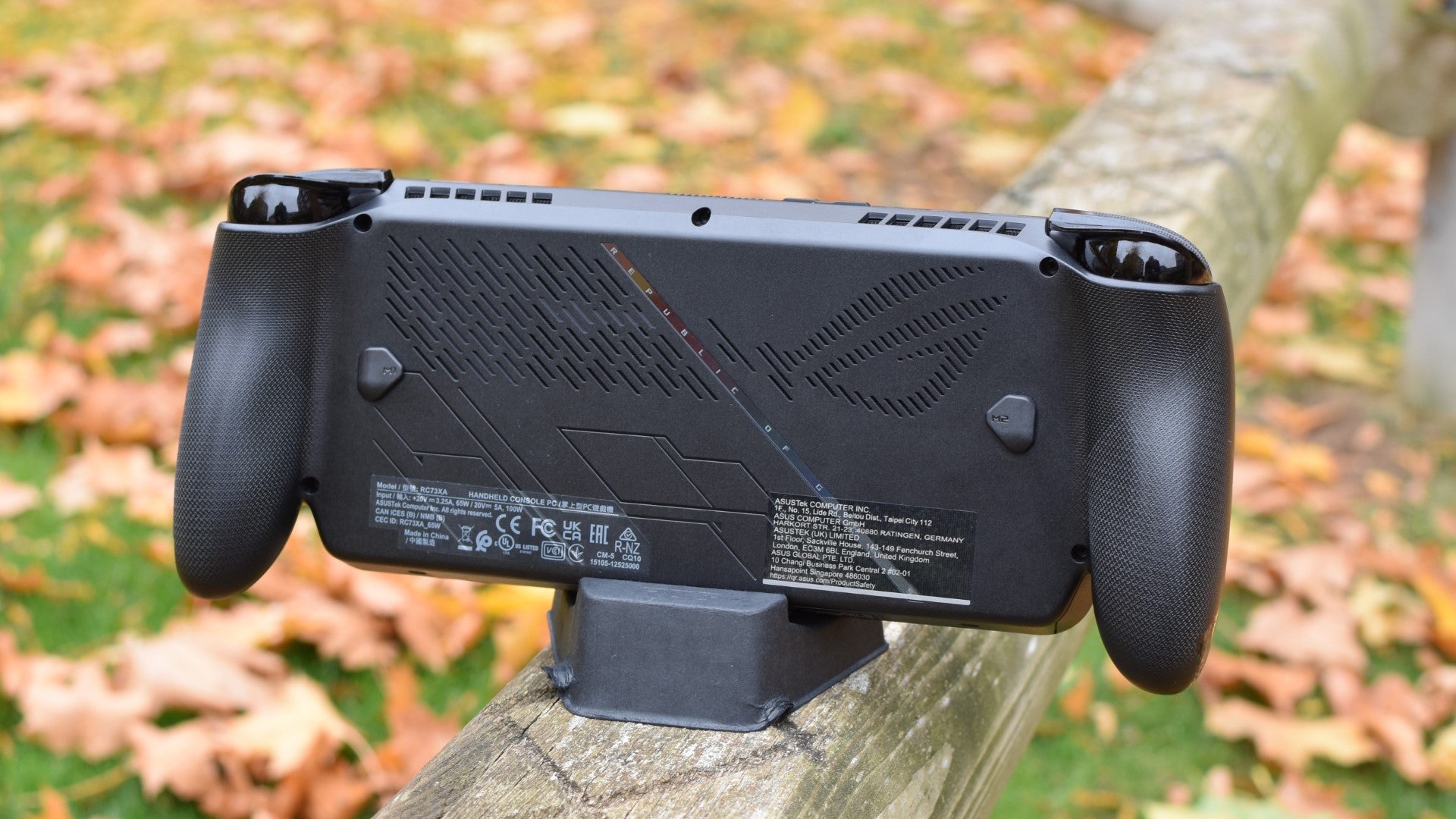
Image credit:Rock Paper Shotgun
The lack of efficiency and display improvements do sometimes give the ROG Ally X an air of “Eh, good enough”, which is bizarre, because I can’t believe it was half-arsed as a whole. The shape of it, the melding of console controller features, all the Windows/Xbox stuff – this is all genuinely radical thinking for a handheld PC, a medium that’s been at risk of settling into routine after that initial burst of post-Steam Deck innovation and excitement.
Maybe Xbox mode doesn’t even need to act as an afterburner for games performance; it’s still good to have as an alternative to bodged cursor controls or poking at tiny Explorer windows with the touchscreen. The main view steers you, expectedly, to Microsoft’s own store and Game Pass offerings, but it graciously brings in shortcuts to recently played games on Steam, Epic, EA Play and so on, all right at the top when you switch on.
The launchers themselves are only a couple of presses away too, with the Xbox button on the left side whipping out a handy menu of shortcuts and settings. And I’m not sure if this counts as an OS or hardware improvement, but the ROG Ally X’s version of Quick Pause and Quick Resume works a lot more reliably than it has on… well, literally every Windows handheld I’ve used before. Previously it was far to common to put your device to sleep mid-game, return later, and find it’s kicked you back to the desktop – here, pausing with the power button is as safe as it is on a Steam Deck.
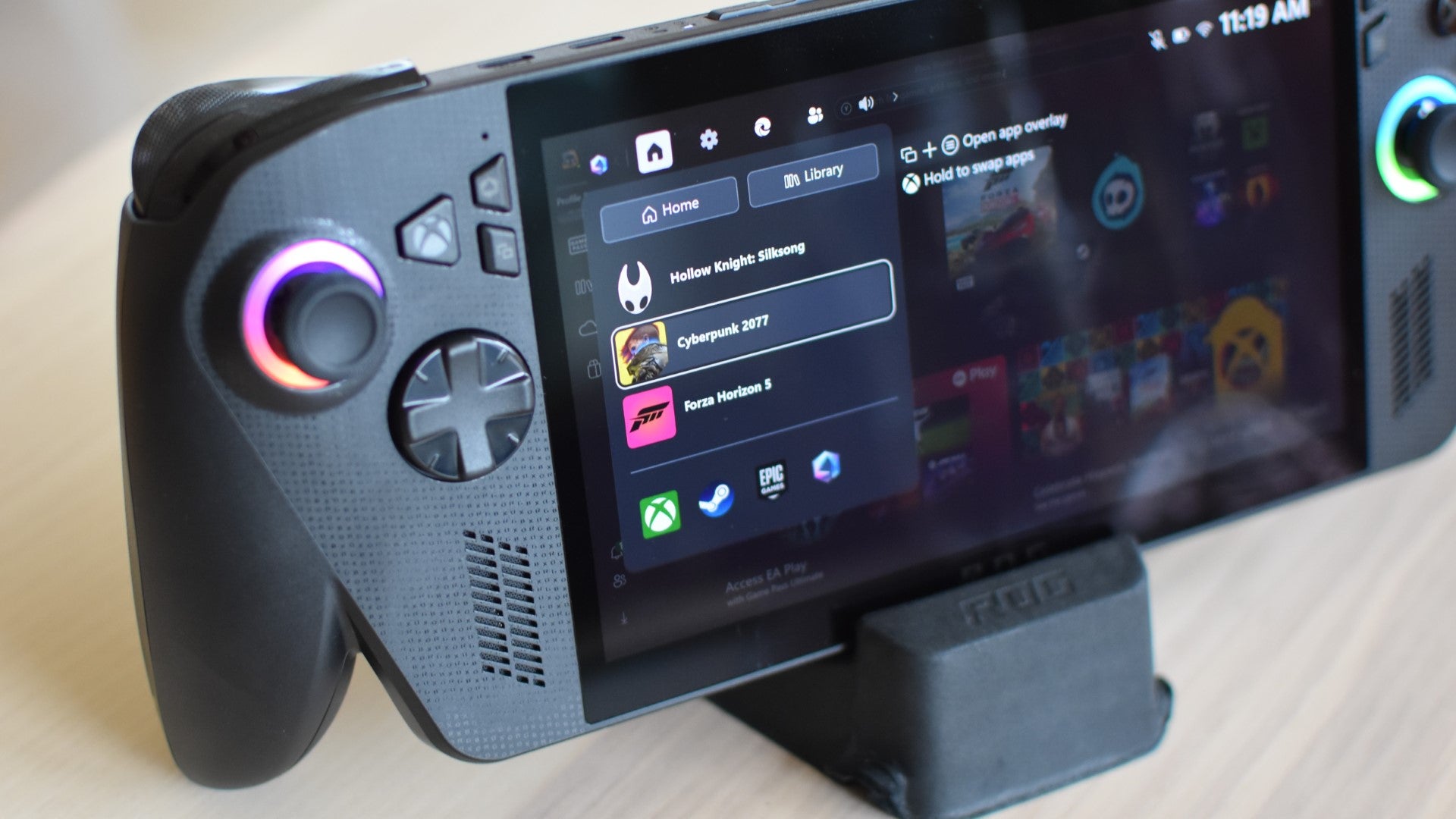
Image credit:Rock Paper Shotgun
Sadly, like the vibration motors, even the headline-featuring OS rejig sometimes goes off-kilter. The gamepad-tuned interface is great but more often than not, Xbox mode simply won’t recognise thumbstick, D-pad, or face button inputs when you boot into it – I’ve had to tap the screen to essentially wake it up, upon which it remembers it’s supposed to be responding. It can also be sluggish when opening overlays, including basic functions like the onscreen keyboard, which I’ve repeatedly had to prod at multiple times before it starts accepting commands.
And, while non-Microsoft launchers are welcome, the ROG Ally X doesn’t really offer a solution for navigating these as effectively as the Xbox view. With the exception of Steam, which can be set to start in its SteamOS-style Big Picture mode, you’re once again the mercy of the touchscreen for apps that were designed for a mouse and keyboard. There’s no trackpad and, at least on its default settings, the ROG Ally X no longer provides a cursor to nudge around with the right thumbstick, so installing and launching games through something like the Epic Games Store is as slow and fiddly as it would be on any other Windows portable.
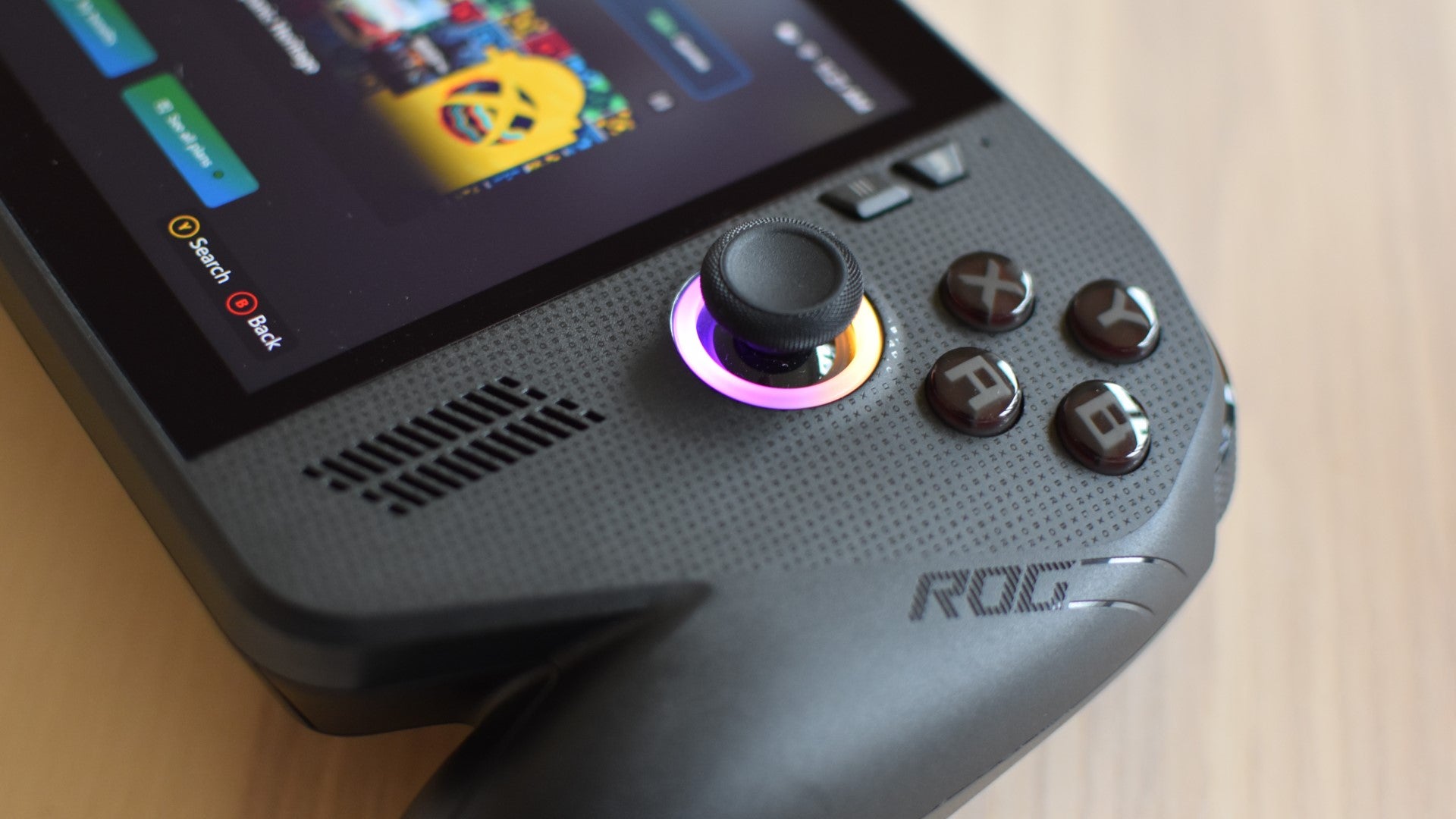
Image credit:Rock Paper Shotgun
While it stumbles in the right direction, then, the ROG Ally X never fully lives up to the promise of being a truly tailored Windows 11 handheld. I don’t want to put that entirely on Xbox mode’s shortcomings, because ultimately the interface (and general, sofa-splayed gameplaying experience) is better than that of vanilla Windows.
But then, I don’t have to. There are enough other reasons – the underwhelming screen, the middling battery life, the aggravating face button noise, the price, and especially the temperamental vibration – to give this handheld a miss. Or, at the very least, wait for some fixes.
Find out how we conduct our reviews by reading our review policy .
Rock Paper Shotgun is better when you sign in
Sign in and join us on our journey to discover strange and compelling PC games.

All 75 Arc Raiders Blueprints and where to get them
These areas have the highest chance of giving you Blueprints

Image credit:Rock Paper Shotgun/Embark Studios

Looking for more Arc Raiders Blueprints? It’s a special day when you find a Blueprint, as they’re among the most valuable items in Arc Raiders. If you find a Blueprint that you haven’t already found, then you must make sure you hold onto it at all costs, because Blueprints are the key to one of the most important and powerful systems of meta-progression in the game.
This guide aims to be the very best guide on Blueprints you can find, starting with a primer on what exactly they are and how they work in Arc Raiders, before delving into exactly where to get Blueprints and the very best farming spots for you to take in your search.
We’ll also go over how to get Blueprints from other unlikely activities, such as destroying Surveyors and completing specific quests. And you’ll also find the full list of all 75 Blueprints in Arc Raiders on this page (including the newest Blueprints added with the Cold Snap update , such as the Deadline Blueprint and Firework Box Blueprint), giving you all the information you need to expand your own crafting repertoire.
In this guide:
- What are Blueprints in Arc Raiders?
- Full Blueprint list: All crafting recipes
- Where to find Blueprints in Arc Raiders Blueprints obtained from quests Blueprints obtained from Trials Best Blueprint farming locations

What are Blueprints in Arc Raiders?
Blueprints in Arc Raiders are special items which, if you manage to extract with them, you can expend to permanently unlock a new crafting recipe in your Workshop. If you manage to extract from a raid with an Anvil Blueprint, for example, you can unlock the ability to craft your very own Anvil Pistol, as many times as you like (as long as you have the crafting materials).
To use a Blueprint, simply open your Inventory while in the lobby, then right-click on the Blueprint and click “Learn And Consume” . This will permanently unlock the recipe for that item in your Workshop. As of the Stella Montis update, there are allegedly 75 different Blueprints to unlock - although only 68 are confirmed to be in the game so far. You can see all the Blueprints you’ve found and unlocked by going to the Workshop menu, and hitting “R” to bring up the Blueprint screen.
It’s possible to find duplicates of past Blueprints you’ve already unlocked. If you find these, then you can either sell them, or - if you like to play with friends - you can take it into a match and gift it to your friend so they can unlock that recipe for themselves. Another option is to keep hold of them until the time comes to donate them to the Expedition.
Full Blueprint list: All crafting recipes
Below is the full list of all the Blueprints that are currently available to find in Arc Raiders, and the crafting recipe required for each item:
| Blueprint | Type | Recipe | Crafted At |
|---|---|---|---|
| Bettina | Weapon | 3x Advanced Mechanical Components 3x Heavy Gun Parts 3x Canister | Gunsmith 3 |
| Blue Light Stick | Quick Use | 3x Chemicals | Utility Station 1 |
| Aphelion | Weapon | 3x Magnetic Accelerator 3x Complex Gun Parts 1x Matriarch Reactor | Gunsmith 3 |
| Combat Mk. 3 (Flanking) | Augment | 2x Advanced Electrical Components 3x Processor | Gear Bench 3 |
| Combat Mk. 3 (Aggressive) | Augment | 2x Advanced Electrical Components 3x Processor | Gear Bench 3 |
| Complex Gun Parts | Material | 2x Light Gun Parts 2x Medium Gun Parts 2x Heavy Gun Parts | Refiner 3 |
| Fireworks Box | Quick Use | 1x Explosive Compound 3x Pop Trigger | Explosives Station 2 |
| Gas Mine | Mine | 4x Chemicals 2x Rubber Parts | Explosives Station 1 |
| Green Light Stick | Quick Use | 3x Chemicals | Utility Station 1 |
| Pulse Mine | Mine | 1x Crude Explosives 1x Wires | Explosives Station 1 |
| Seeker Grenade | Grenade | 1x Crude Explosives 2x ARC Alloy | Explosives Station 1 |
| Looting Mk. 3 (Survivor) | Augment | 2x Advanced Electrical Components 3x Processor | Gear Bench 3 |
| Angled Grip II | Mod | 2x Mechanical Components 3x Duct Tape | Gunsmith 2 |
| Angled Grip III | Mod | 2x Mod Components 5x Duct Tape | Gunsmith 3 |
| Hullcracker | Weapon | 1x Magnetic Accelerator 3x Heavy Gun Parts 1x Exodus Modules | Gunsmith 3 |
| Launcher Ammo | Ammo | 5x Metal Parts 1x Crude Explosives | Workbench 1 |
| Anvil | Weapon | 5x Mechanical Components 5x Simple Gun Parts | Gunsmith 2 |
| Anvil Splitter | Mod | 2x Mod Components 3x Processor | Gunsmith 3 |
| ??? | ??? | ??? | ??? |
| Barricade Kit | Quick Use | 1x Mechanical Components | Utility Station 2 |
| Blaze Grenade | Grenade | 1x Explosive Compound 2x Oil | Explosives Station 3 |
| Bobcat | Weapon | 3x Advanced Mechanical Components 3x Light Gun Parts | Gunsmith 3 |
| Osprey | Weapon | 2x Advanced Mechanical Components 3x Medium Gun Parts 7x Wires | Gunsmith 3 |
| Burletta | Weapon | 3x Mechanical Components 3x Simple Gun Parts | Gunsmith 1 |
| Compensator II | Mod | 2x Mechanical Components 4x Wires | Gunsmith 2 |
| Compensator III | Mod | 2x Mod Components 8x Wires | Gunsmith 3 |
| Defibrillator | Quick Use | 9x Plastic Parts 1x Moss | Medical Lab 2 |
| ??? | ??? | ??? | ??? |
| Equalizer | Weapon | 3x Magnetic Accelerator 3x Complex Gun Parts 1x Queen Reactor | Gunsmith 3 |
| Extended Barrel | Mod | 2x Mod Components 8x Wires | Gunsmith 3 |
| Extended Light Mag II | Mod | 2x Mechanical Components 3x Steel Spring | Gunsmith 2 |
| Extended Light Mag III | Mod | 2x Mod Components 5x Steel Spring | Gunsmith 3 |
| Extended Medium Mag II | Mod | 2x Mechanical Components 3x Steel Spring | Gunsmith 2 |
| Extended Medium Mag III | Mod | 2x Mod Components 5x Steel Spring | Gunsmith 3 |
| Extended Shotgun Mag II | Mod | 2x Mechanical Components 3x Steel Spring | Gunsmith 2 |
| Extended Shotgun Mag III | Mod | 2x Mod Components 5x Steel Spring | Gunsmith 3 |
| Remote Raider Flare | Quick Use | 2x Chemicals 4x Rubber Parts | Utility Station 1 |
| Heavy Gun Parts | Material | 4x Simple Gun Parts | Refiner 2 |
| Venator | Weapon | 2x Advanced Mechanical Components 3x Medium Gun Parts 5x Magnet | Gunsmith 3 |
| Il Toro | Weapon | 5x Mechanical Components 6x Simple Gun Parts | Gunsmith 1 |
| Jolt Mine | Mine | 1x Electrical Components 1x Battery | Explosives Station 2 |
| Explosive Mine | Mine | 1x Explosive Compound 1x Sensors | Explosives Station 3 |
| Jupiter | Weapon | 3x Magnetic Accelerator 3x Complex Gun Parts 1x Queen Reactor | Gunsmith 3 |
| Light Gun Parts | Material | 4x Simple Gun Parts | Refiner 2 |
| Lightweight Stock | Mod | 2x Mod Components 5x Duct Tape | Gunsmith 3 |
| Lure Grenade | Grenade | 1x Speaker Component 1x Electrical Components | Utility Station 2 |
| Medium Gun Parts | Material | 4x Simple Gun Parts | Refiner 2 |
| Torrente | Weapon | 2x Advanced Mechanical Components 3x Medium Gun Parts 6x Steel Spring | Gunsmith 3 |
| Muzzle Brake II | Mod | 2x Mechanical Components 4x Wires | Gunsmith 2 |
| Muzzle Brake III | Mod | 2x Mod Components 8x Wires | Gunsmith 3 |
| Padded Stock | Mod | 2x Mod Components 5x Duct Tape | Gunsmith 3 |
| Shotgun Choke II | Mod | 2x Mechanical Components 4x Wires | Gunsmith 2 |
| Shotgun Choke III | Mod | 2x Mod Components 8x Wires | Gunsmith 3 |
| Shotgun Silencer | Mod | 2x Mod Components 8x Wires | Gunsmith 3 |
| Showstopper | Grenade | 1x Advanced Electrical Components 1x Voltage Converter | Explosives Station 3 |
| Silencer I | Mod | 2x Mechanical Components 4x Wires | Gunsmith 2 |
| Silencer II | Mod | 2x Mod Components 8x Wires | Gunsmith 3 |
| Snap Hook | Quick Use | 2x Power Rod 3x Rope 1x Exodus Modules | Utility Station 3 |
| Stable Stock II | Mod | 2x Mechanical Components 3x Duct Tape | Gunsmith 2 |
| Stable Stock III | Mod | 2x Mod Components 5x Duct Tape | Gunsmith 3 |
| Tagging Grenade | Grenade | 1x Electrical Components 1x Sensors | Utility Station 3 |
| Tempest | Weapon | 3x Advanced Mechanical Components 3x Medium Gun Parts 3x Canister | Gunsmith 3 |
| Trigger Nade | Grenade | 2x Crude Explosives 1x Processor | Explosives Station 2 |
| Vertical Grip II | Mod | 2x Mechanical Components 3x Duct Tape | Gunsmith 2 |
| Vertical Grip III | Mod | 2x Mod Components 5x Duct Tape | Gunsmith 3 |
| Vita Shot | Quick Use | 2x Antiseptic 1x Syringe | Medical Lab 3 |
| Vita Spray | Quick Use | 3x Antiseptic 1x Canister | Medical Lab 3 |
| Vulcano | Weapon | 1x Magnetic Accelerator 3x Heavy Gun Parts 1x Exodus Modules | Gunsmith 3 |
| Wolfpack | Grenade | 2x Explosive Compound 2x Sensors | Explosives Station 3 |
| Red Light Stick | Quick Use | 3x Chemicals | Utility Station 1 |
| Smoke Grenade | Grenade | 14x Chemicals 1x Canister | Utility Station 2 |
| Deadline | Mine | 3x Explosive Compound 2x ARC Circuitry | Explosives Station 3 |
| Trailblazer | Grenade | 1x Explosive Compound 1x Synthesized Fuel | Explosives Station 3 |
| Tactical Mk. 3 (Defensive) | Augment | 2x Advanced Electrical Components 3x Processor | Gear Bench 3 |
| Tactical Mk. 3 (Healing) | Augment | 2x Advanced Electrical Components 3x Processor | Gear Bench 3 |
| Yellow Light Stick | Quick Use | 3x Chemicals | Utility Station 1 |
Note: The missing Blueprints in this list likely have not actually been added to the game at the time of writing, because none of the playerbase has managed to find any of them. As they are added to the game, I will update this page with the most relevant information so you know exactly how to get all 75 Arc Raiders Blueprints.
Where to find Blueprints in Arc Raiders
Below is a list of all containers, modifiers, and events which maximise your chances of finding Blueprints:
- Certain quests reward you with specific Blueprints .
- Completing Trials has a high chance of offering Blueprints as rewards.
- Surveyors have a decent chance of dropping Blueprints on death.
- High loot value areas tend to have a greater chance of spawning Blueprints.
- Night Raids and Storms may increase rare Blueprint spawn chances in containers.
- Containers with higher numbers of items may have a higher tendency to spawn Blueprints. As a result, Blue Gate (which has many “large” containers containing multiple items) may give you a higher chance of spawning Blueprints.
- Raider containers (Raider Caches, Weapon Boxes, Medical Bags, Grenade Tubes) have increased Blueprint drop rates. As a result, the Uncovered Caches event gives you a high chance of finding Blueprints.
- Security Lockers have a higher than average chance of containing Blueprints.
- Certain Blueprints only seem to spawn under specific circumstances: Tempest Blueprint only spawns during Night Raid events. Vulcano Blueprint only spawns during Hidden Bunker events. Jupiter and Equaliser Blueprints only spawn during Harvester events.

Raider Caches, Weapon Boxes, and other raider-oriented container types have a good chance of offering Blueprints. |Image credit:Rock Paper Shotgun/Embark Studios
Blueprints have a very low chance of spawning in any container in Arc Raiders, around 1-2% on average. However, there is a higher chance of finding Blueprints in particular container types. Specifically, you can find more Blueprints in Raider containers and security lockers.
Beyond this, if you’re looking for Blueprints you should focus on regions of the map which are marked as having particularly high-value loot. Areas such as the Control Tower in Dam Battlegrounds, the Arrival and Departure Buildings in Spaceport, and Pilgrim’s Peak in Blue Gate all have a better-than-average chance of spawning Blueprints somewhere amongst all their containers. Night Raids and Electromagnetic Storm events also increase the drop chances of certain Blueprints .
In addition to these containers, you can often loot Blueprints from destroyed Surveyors - the largest of the rolling ball ARC. Surveyors are more commonly found on the later maps - Spaceport and Blue Gate - and if one spawns in your match, you’ll likely see it by the blue laser beam that it casts into the sky while “surveying”.
Surveyors are quite well-armoured and will very speedily run away from you once it notices you, but if you can take one down then make sure you loot all its parts for a chance of obtaining certain unusual Blueprints.
Blueprints obtained from quests
One way in which you can get Blueprints is by completing certain quests for the vendors in Speranza. Some quests will reward you with a specific item Blueprint upon completion, so as long as you work through all the quests in Arc Raiders, you are guaranteed those Blueprints.
Here is the full list of all Blueprints you can get from quest rewards:
- Trigger Nade Blueprint: Rewarded after completing “Sparks Fly”.
- Lure Grenade Blueprint: Rewarded after completing “Greasing Her Palms”.
- Burletta Blueprint: Rewarded after completing “Industrial Espionage”.
- Hullcracker Blueprint (and Launcher Ammo Blueprint): Rewarded after completing “The Major’s Footlocker”.
Alas, that’s only 4 Blueprints out of a total of 75 to unlock, so for the vast majority you will need to find them yourself during a raid. If you’re intent on farming Blueprints, then it’s best to equip yourself with cheap gear in case you lose it, but don’t use a free loadout because then you won’t get a safe pocket to stash any new Blueprint you find. No pain in Arc Raiders is sharper than failing to extract with a new Blueprint you’ve been after for a dozen hours already.

One of the best ways to get Blueprints is by hitting three stars on all five Trials every week. |Image credit:Rock Paper Shotgun/Embark Studios
Blueprints obtained from Trials
One of the very best ways to get Blueprints is as rewards for completing Trials in Arc Raiders. Trials are unlocked from Level 15 onwards, and allow you to earn rewards by focusing on certain tasks over the course of several raids. For example, one Trial might task you with dealing damage to Hornets, while another might challenge you to loot Supply Drops.
Trials refresh on a weekly basis, with a new week bringing five new Trials. Each Trial can offer up to three rewards after passing certain score milestones, and it’s possible to receive very high level loot from these reward crates - including Blueprints. So if you want to unlock as many Blueprints as possible, you should make a point of completing as many Trials as possible each week.
Best Blueprint farming locations
The very best way to get Blueprints is to frequent specific areas of the maps which combine high-tier loot pools with the right types of containers to search. Here are my recommendations for where to find Blueprints on every map, so you can always keep the search going for new crafting recipes to unlock.

Image credit:Rock Paper Shotgun/Embark Studios
Dam Battlegrounds
The best places to farm Blueprints on Dam Battlegrounds are the Control Tower, Power Generation Complex, Ruby Residence, and Pale Apartments . The first two regions, despite only being marked on the map as mid-tier loot, contain a phenomenal number of containers to loot. The Control Tower can also contain a couple of high-tier Security Lockers - though of course, you’ll need to have unlocked the Security Breach skill at the end of the Survival tree.
There’s also a lot of reporting amongst the playerbase that the Residential areas in the top-left of the map - Pale Apartments and Ruby Residence - give you a comparatively strong chance of finding Blueprints. Considering their size, there’s a high density of containers to loot in both locations, and they also have the benefit of being fairly out of the way. So you’re more likely to have all the containers to yourself.
Buried City
The best Blueprint farming locations on Buried City are the Santa Maria Houses, Grandioso Apartments, Town Hall, and the various buildings of the New District . Grandioso Apartments has a lower number of containers than the rest, but a high chance of spawning weapon cases - which have good Blueprint drop rates. The others are high-tier loot areas, with plenty of lootable containers - including Security Lockers.
Spaceport
The best places to find Blueprints on Spaceport are the Arrival and Departure Buildings, as well as Control Tower A6 and the Launch Towers . All these areas are labelled as high-value loot regions, and many of them are also very handily connected to one another by the Spaceport wall, which you can use to quickly run from one area to the next. At the tops of most of these buildings you’ll find at least one Security Locker, so this is an excellent farming route for players looking to find Blueprints.
The downside to looting Blueprints on Spaceport is that all these areas are hotly contested, particularly in Duos and Squads. You’ll need to be very focused and fast in order to complete the full farming route.

Image credit:Rock Paper Shotgun/Embark Studios
Blue Gate
Blue Gate tends to have a good chance of dropping Blueprints, potentially because it generally has a high number of containers which can hold lots of items; so there’s a higher chance of a Blueprint spawning in each container. In my experience, the best Blueprint farming spots on Blue Gate are Pilgrim’s Peak, Raider’s Refuge, the Ancient Fort, and the Underground Complex beneath the Warehouse .
All of these areas contain a wealth of containers to loot. Raider’s Refuge has less to loot, but the majority of the containers in and around the Refuge are raider containers, which have a high chance of containing Blueprints - particularly during major events.
Stella Montis
On the whole, Stella Montis seems to have a very low drop rate for Blueprints (though a high chance of dropping other high-tier loot). If you do want to try farming Blueprints on this map, the best places to find Blueprints in Stella Montis are Medical Research, Assembly Workshop, and the Business Center . These areas have the highest density of containers to loot on the map.
In addition to this, the Western Tunnel has a few different Security Lockers to loot, so while there’s very little to loot elsewhere in this area of the map, it’s worth hitting those Security Lockers if you spawn there at the start of a match.
That wraps up this primer on how to get all the Blueprints in Arc Raiders as quickly as possible. With the Expedition system constantly resetting a large number of players’ Blueprints, it’s more important than ever to have the most up-to-date information on where to find all these Blueprints.
While you’re here, be sure to check out our Arc Raiders best guns tier list , as well as our primers on the best skills to unlock and all the different Field Depot locations on every map.

ARC Raiders
PS5 , Xbox Series X/S , PC
Rock Paper Shotgun is better when you sign in
Sign in and join us on our journey to discover strange and compelling PC games.
