Asus ROG Ally X vs Steam Deck OLED: battle of the beefed-up handhelds
Which portable gaming PC’s upgrade hammer swings the hardest?

Image credit:Rock Paper Shotgun

Is early adoption a chump’s game? I dunno about that, though between the Asus ROG Ally X and the Steam Deck OLED , those who stayed their hand on their earlier handheld gaming PC counterparts do have a couple of quality second-genners to choose from. Valve’s effort manages to wring multiple performance, design, and battery life improvements out of its new display, while the ROG Ally X makes similar upgrades with a bigger-yet-better take on the original ROG Ally .
The only thing to do, clearly, is make them fight. It’s probably in the Irish Code Duello or something: “Should one portable games box impugn another’s honour by releasing shortly after it, satisfaction must be claimed through a comparison article.” My hands are bound here, folks, though if you yourself have been playing the waiting game on a handheld purchase, perhaps this little head-to-head can help you pick the right one.
- Asus ROG Ally X vs Steam Deck OLED: Design
- Asus ROG Ally X vs Steam Deck OLED: Display
- Asus ROG Ally X vs Steam Deck OLED: Performance
- Asus ROG Ally X vs Steam Deck OLED: Battery life
- Asus ROG Ally X vs Steam Deck OLED: Storage
- Asus ROG Ally X vs Steam Deck OLED: OS and software
- Asus ROG Ally X vs Steam Deck OLED: Price and value
- Asus ROG Ally X vs Steam Deck OLED: Verdict

Image credit:Rock Paper Shotgun
Asus ROG Ally X vs Steam Deck OLED: Design
Although the ROG Ally X is girthier than its predecessor – thank the bigger battery for that – it’s undoubtedly better-made. Both the thumbsticks and D-pad have more of a chunky, solid, premium feel than before, while the deeper handgrips and more spacious shoulder buttons help with ergonomics. Under load, it’s also cooler and quieter than the standard ROG Ally, with airflow aided by an additional exhaust vent – which, in turn, is made possible by the wise removal of the original’s rarely-usable connector for the Asus ROG XG external GPU enclosure. You can still hook up a proper graphics card if you want, via the Thunderbolt 4-enabled USB-C port.
The Steam Deck OLED lacks easy GPU enclosure support, but otherwise, most of the ROG Ally X’s design strengths – improved thumbsticks, quiet running, comfortable grips – are shared here too. The Deck OLED is also slightly lighter, at 640g to the ROG Ally X’s 678g, and while it’s also a couple of centimetres wider, it has good reason: the two trackpads. These are useful not just as game controls but for navigating SteamOS’s Desktop Mode , your window into unlocking any Steam Deck ’s true potential as a bonafide PC. The ROG Ally X’s choice of Windows 11 as an operating system means it’s always in a desktop mode of sorts, but it then asks you to work the cursor with thumbsticks, which don’t feel nearly as natural or precise as the Deck’s trackpads.
I’d give the Steam Deck OLED the edge on overall design, though if it weren’t for the trackpads, there’d be even less in it. Both handhelds also let you open up the rear panel and tinker around inside, be it to upgrade the SSD , clean a fan, or install spare parts – which, by the by, are easily available from official resellers .

Image credit:Rock Paper Shotgun
Asus ROG Ally X vs Steam Deck OLED: Display
The ROG Ally X would appear to claim an easy win on screen specs: other than being a few hairs smaller, at 7in to the Steam Deck OLED’s 7.4in, its 1080p resolution is higher and its 120Hz refresh rate is faster than what the 800p, 90Hz Deck can offer.
However, what might be a major advantage on a big desktop display isn’t necessarily a killing blow on a handheld. The ROG Ally X’s screen is visibly shaper, true, but on displays this small, the pixels are so densely packed together that the Steam Deck OLED doesn’t really look blunt by comparison. And, although 120Hz easily bests the 60Hz refresh rate of the original Steam Deck, the OLED version’s 90Hz is still enough to give fast-running games plenty of extra smoothness. That’s assuming, too, that the games you’re playing can even hit high framerates on the low-power internals that these handhelds employ. Easygoing indies and simple side-scrollers can look smoother on the ROG Ally X, but these are rarely the kind of high-fidelity games that aim to make the most of a high-specced screen.
Then there’s the whole, y’know, OLED thing. For as bright and and colourful as the ROG Ally X’s IPS screen is, the Steam Deck OLED’s panel is quite literally on a different level, capable of deeper blacks, more vibant hues, and according to my colorimeter, a peak brightness of 984cd/m2 – almost double that of the ROG Ally X.
This sun-like quality is important for two reasons, the first of which is that it helps defeat the actual Sun. The Steam Deck OLED already has by far the more effective anti-glare coating, so is naturally easier to use when natural light is beaming down upon it, but a higher maximum brightness will also fight off annoying reflections. The second is that 984cd/m2 is high enough for proper HDR. This is something that games themselves need to support, but in those that do, the Steam Deck OLED’s screen seriously pops. It ain’t as sharp and it ain’t as fast as the ROG Ally X’s, but you could definitely say that this screen performs better on the whole.

Image credit:Rock Paper Shotgun
Asus ROG Ally X vs Steam Deck OLED: Performance
Game performance, on the other hand, is more of the ROG’s forte. Comparisons are compounded by it having both a higher default resolution than the Steam Deck OLED and a wider range of power modes, but even on the default Performance profile, dropping to a more Deck-esque 720p shows that the ROG Ally X’s rendering muscles are usually more toned:

Image credit:Rock Paper Shotgun
Not that the Steam Deck OLED can’t punch above its weight sometimes – that F1 22 result especially – but in more demanding games, the ROG Ally X is typically readier to meet them. In Returnal ’s case, the ROG Ally X is able to run a game that’s outright beyond the limits of the Steam Deck OLED and its modest, if custom-built AMD APU. Switch from Performance to Turbo mode, which burns battery faster in exchange for more power, and that 25fps at 1080p actually becomes a playable 30fps. Cyberpunk 2077 also jumps from 28fps all the way to 46fps on Turbo, widening the performance gap even further.
What’s impressive here is that the ROG Ally X is also quite a stretch faster than the original ROG Ally, despite using the same AMD Ryzen Z1 Extreme chip. All that’s changed is a RAM upgrade up to 24GB of slightly faster LPDDR5X memory, yet that’s evidently enough for framerate improvements of 10% or more. The Steam Deck OLED completely swapped out the original Deck’s custom AMD APU for another bespoke chip, and is also a bit faster in most games, but not to the extent of matching the ROG Ally X’s speed boost.

Image credit:Rock Paper Shotgun
Asus ROG Ally X vs Steam Deck OLED: Battery life
Considering how short-lived the first ROG Ally could be, the ROG Ally X’s literally doubled battery size was one of the best changes Asus could make. It worked, too: power-hungry games like Forza Horizon 5 went from drinking the ROG Ally dry in 1h 29m to lasting 2h 29m on the ROG Ally X. For a games machine with portability at its heart, that’s a vital improvement.
It’s just… the Steam Deck OLED is even better. Especially, it turns out, in older games that usually don’t burn the charge as quickly as the latest blockbusters. The ROG Ally X’s 2h 59m in Portal 2 isn’t bad, for instance, but next to the Steam Deck OLED’s marathon 5h 48m, it’s a distant second. Likewise with GTA V: the Steam Deck OLED’s 5h 53m easily beats the ROG Ally’s 3h 12m, even if it did well to get this up from a mere 1h 36m on the original.
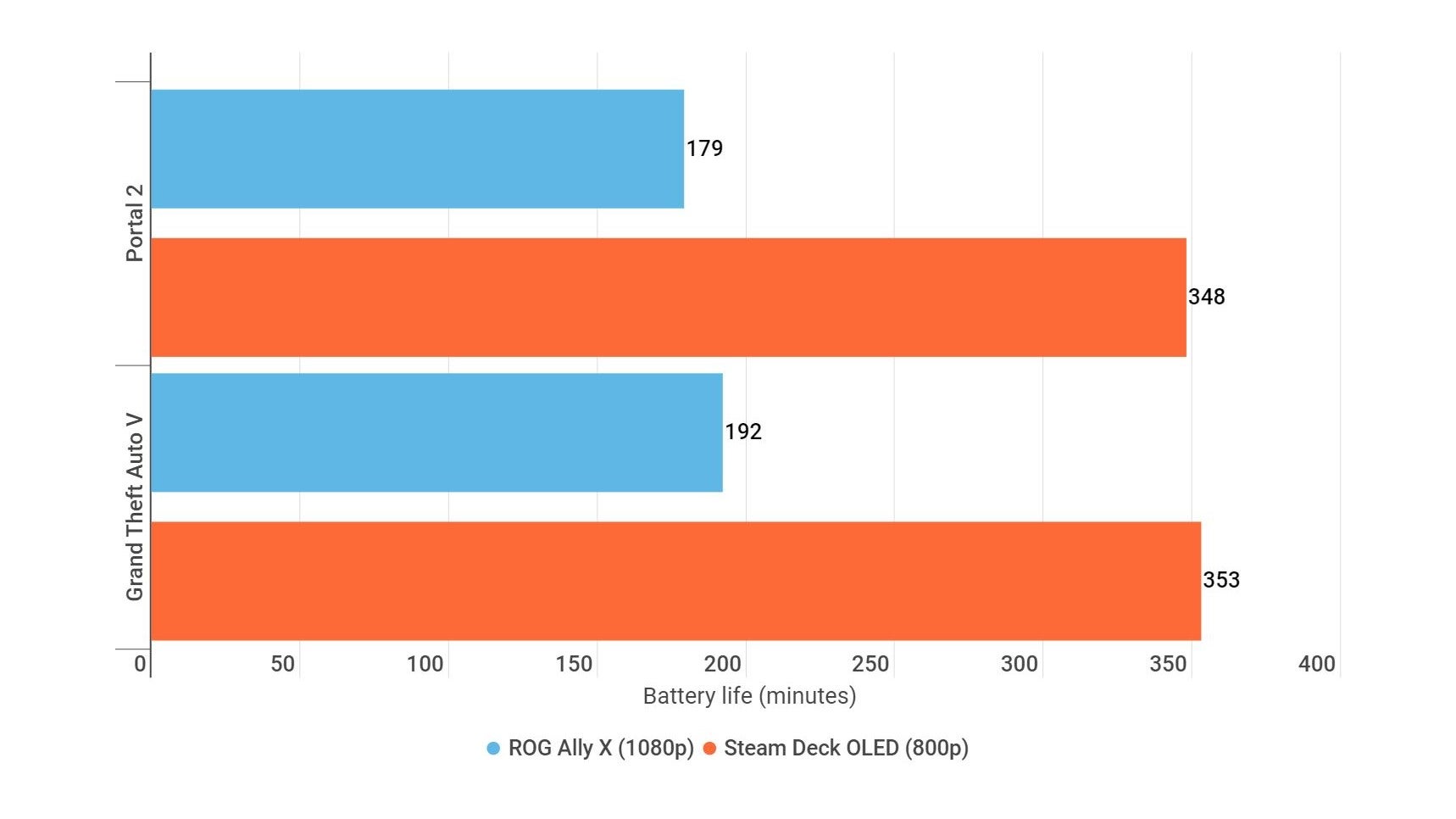
Image credit:Rock Paper Shotgun
You can expect to see a much narrower gap in thirstier games, but that’s not exactly an argument in the ROG’s favour. And its Silent profile – those results are all in the default Performance mode – can stretch battery life out further, but at the cost of game performance, whereas the Steam Deck OLED can keep on trucking without such compromises.
Again, this initially appears to be a defying of the specs, where the ROG’S 80WHr battery capacity should surely crush the Steam Deck OLED’s 50WHr. Of course, that’s not taking into account the latter’s efficiency improvements: besides the 800p resolution and 90Hz refresh rate naturally drawing less power, OLED panels are also inherently more efficient than LCD/IPS, and the updated APU was designed specifically to use less fuel as well.

Image credit:Rock Paper Shotgun
Asus ROG Ally X vs Steam Deck OLED: Storage
Capacity-wise, the Steam Deck OLED takes this round, offering a choice 512GB or 1TB SSDs ; the ROG Ally X currently sticks with 1TB exclusively, so thrifty buyers don’t have the option to save on a cheaper, low-capacity model.
Still, if there is just going to be one size, better that it’s the fatter one, and what’s more, my testing suggests that the ROG Ally X’s specific 1TB drive is quicker on the draw than that of the 1TB Steam Deck OLED. The latter took 16.6s to load Shadow of the Tomb Raider from launcher to main menu, while the ROG Ally X only took 13.4s. The Steam Deck OLED also got pipped in Valve’s own Aperture Desk Job, taking 9s to boot versus the ROG’s 7.7s.
The two drives also come in different form factors: the Steam Deck OLED’s is a titchy M.2 2230 model, whereas the Asus ROG Ally X is the first of the big-name handheld PCs to include a ‘full size’ M.2. 2280 SSD. The kind you might well have in your main desktop, in other words. This has the secondary benefit of giving you a wider range of options, both premium and affordable, to replace the preinstalled SSD outright; there just aren’t that many aftermarket 2230 drives in comparison.
I guess I should also give points for the ROG Ally X’s microSD card slot supporting UHS-II cards, meaning potentially faster read/write speeds than the UHS-I interface that the Steam Deck OLED caps out at. In practice, though, you’re most likely going to end up using UHS-I storage anyway, as UHS-II cards are so much more expensive that they’re not really worth a marginal cut to game load times.

Image credit:Rock Paper Shotgun
Asus ROG Ally X vs Steam Deck OLED: OS and software
The two handhelds take radically different approaches here. In the ROG Ally X corner, you’ve got an absolutely desktop-standard Windows 11, which is capable of running all the same games and game launchers you’re familiar with. Then there’s the Steam Deck OLED’s SteamOS, which… isn’t. With a little elbow grease, you can get non-Steam launchers like Epic and Battle.net up and running, but your Game Pass library? Off limits, unless you’re willing to stream . Deck-specific issues with other launchers have also been widely recorded .
And yet, I almost always find the Steam Deck OLED markedly less prone to inducing muttered curses. Windows 11 is fine when you’re navigating it on a big monitor with a mouse and keyboard, but with thumbsticks and a 7in touchscreen? Not fun. Not fun at all. Asus have tried to smooth out the game-playing part specifically, the ROG Armory Crate SE app doing a serviceable job of consolidating all your disparate launchers into a more gamepad-friendly interface, but its ultimately a plaster over the gaping chainsaw-wound that is the hardware/OS mismatch. I’ve seen a few recurring bugs, too, from apps refusing to launch to borderless-fullscreen games suddenly switching to windowed mode for no apparent reason.
Steam Deck OLED’s operating system, by contrast, looks and feels like it was designed for the hardware specifically – which it was. And even when you need to hop into Desktop Mode, the trackpads and onscreen keyboard – the latter of which is more responsive than Windows’ – can still make for a comfortable time. It never asks if I want to install Office 365, either.
I admit, though, that the allure of fully compatible games might outweigh a slicker UI in many eyes outside of mine own. That’s absolutely not an incorrect preference, especially if you’re attached to your Game Pass collection.

Image credit:Rock Paper Shotgun
Asus ROG Ally X vs Steam Deck OLED: Price and value
Back in the comfortingly objective field of putting numbers next to other numbers, here’s another bunch of figures in the Steam Deck OLED’s favour: the top 1TB model is £569 / $649 , dropping to the £479 / $549 for the 512GB version. That one and only 1TB ROG Ally X? It’ll set you back £799 / $800 .
Let’s be fair here. The ROG Ally X is newer, has a faster APU, a slicker and higher-rez display, and extra RAM. A more premium-leaning price is to be expected. But then, it’s also £100 more than the ROG Ally was at launch, and that’s the kind of cheeky gen-on-gen gouging that rarely happens outside of recent graphics cards. And, as we’ve seen, the ROG Ally X isn’t consistently a technical upgrade over the Steam Deck OLED, so in addition to saving at least £230 on the Valve handheld, you can bask in the knowledge that you’re getting the better display, controls, and battery life as well.
What makes the ROG Ally X’s pricing seem even meaner is the lack of extras. Both Steam Deck OLED variants come packaged with a carrying case – a rather fancy one with a form-hugging removeable liner, if you plump for the 1TB model – yet the ROG’s most notable bundled accessory is a flimsy cardboard stand. These are, lest we forget, portable devices, and it is frankly quite silly that the high-end likes of the ROG Ally X can’t even recognise that by throwing in a basic pouch. Equipping yourself with a third-party case will therefore add to the already high expense, and if you’re upgrading from the original ROG Ally, it’s unlikely that any existing cases – such as the excellent Dbrand Project Killswitch – will fit the X model’s chunkier dimensions.

Image credit:Rock Paper Shotgun
Asus ROG Ally X vs Steam Deck OLED: Verdict
I said in my ROG Ally X review that, even for the vast riches it demands, it arguably is the best Windows-based handheld gaming PC. Neither the cheaper original nor rivals like the Lenovo Legion Go balance game performance and battery life as well, and refinements to the controls and cooling show the care behind its design.
Yet it’s still the Steam Deck OLED that I’ll reach for when I’ve got a long train ride (or a few minutes for some sofa-based Elden Ring) coming up. Its performance is fine, if not quite best-in-class, and until Asus start finding room for trackpads, SteamOS just feels nicer to use on a handheld than Windows. And call me Brunel, because it turns out I’m a sucker for efficiency; not to say it isn’t cool to have Hades II at 1080p/120fps in your hands, just that speed doesn’t matter if the battery is dead.
You, however, might have different priorities, and so while the Steam Deck OLED is overall the superior deal, your playing habits might still make the ROG Ally X (and its more game-compatible OS) a better fit. Regular Game Pass users in particular, or those who gorge on games with their own, SteamOS-unoptimised launchers, will simply have access to more of their library on the Asus device – and that’s a perfectly valid reason to stump up for one.
Rock Paper Shotgun is better when you sign in
Sign in and join us on our journey to discover strange and compelling PC games.

All 75 Arc Raiders Blueprints and where to get them
These areas have the highest chance of giving you Blueprints

Image credit:Rock Paper Shotgun/Embark Studios

Looking for more Arc Raiders Blueprints? It’s a special day when you find a Blueprint, as they’re among the most valuable items in Arc Raiders. If you find a Blueprint that you haven’t already found, then you must make sure you hold onto it at all costs, because Blueprints are the key to one of the most important and powerful systems of meta-progression in the game.
This guide aims to be the very best guide on Blueprints you can find, starting with a primer on what exactly they are and how they work in Arc Raiders, before delving into exactly where to get Blueprints and the very best farming spots for you to take in your search.
We’ll also go over how to get Blueprints from other unlikely activities, such as destroying Surveyors and completing specific quests. And you’ll also find the full list of all 75 Blueprints in Arc Raiders on this page (including the newest Blueprints added with the Cold Snap update , such as the Deadline Blueprint and Firework Box Blueprint), giving you all the information you need to expand your own crafting repertoire.
In this guide:
- What are Blueprints in Arc Raiders?
- Full Blueprint list: All crafting recipes
- Where to find Blueprints in Arc Raiders Blueprints obtained from quests Blueprints obtained from Trials Best Blueprint farming locations

What are Blueprints in Arc Raiders?
Blueprints in Arc Raiders are special items which, if you manage to extract with them, you can expend to permanently unlock a new crafting recipe in your Workshop. If you manage to extract from a raid with an Anvil Blueprint, for example, you can unlock the ability to craft your very own Anvil Pistol, as many times as you like (as long as you have the crafting materials).
To use a Blueprint, simply open your Inventory while in the lobby, then right-click on the Blueprint and click “Learn And Consume” . This will permanently unlock the recipe for that item in your Workshop. As of the Stella Montis update, there are allegedly 75 different Blueprints to unlock - although only 68 are confirmed to be in the game so far. You can see all the Blueprints you’ve found and unlocked by going to the Workshop menu, and hitting “R” to bring up the Blueprint screen.
It’s possible to find duplicates of past Blueprints you’ve already unlocked. If you find these, then you can either sell them, or - if you like to play with friends - you can take it into a match and gift it to your friend so they can unlock that recipe for themselves. Another option is to keep hold of them until the time comes to donate them to the Expedition.
Full Blueprint list: All crafting recipes
Below is the full list of all the Blueprints that are currently available to find in Arc Raiders, and the crafting recipe required for each item:
| Blueprint | Type | Recipe | Crafted At |
|---|---|---|---|
| Bettina | Weapon | 3x Advanced Mechanical Components 3x Heavy Gun Parts 3x Canister | Gunsmith 3 |
| Blue Light Stick | Quick Use | 3x Chemicals | Utility Station 1 |
| Aphelion | Weapon | 3x Magnetic Accelerator 3x Complex Gun Parts 1x Matriarch Reactor | Gunsmith 3 |
| Combat Mk. 3 (Flanking) | Augment | 2x Advanced Electrical Components 3x Processor | Gear Bench 3 |
| Combat Mk. 3 (Aggressive) | Augment | 2x Advanced Electrical Components 3x Processor | Gear Bench 3 |
| Complex Gun Parts | Material | 2x Light Gun Parts 2x Medium Gun Parts 2x Heavy Gun Parts | Refiner 3 |
| Fireworks Box | Quick Use | 1x Explosive Compound 3x Pop Trigger | Explosives Station 2 |
| Gas Mine | Mine | 4x Chemicals 2x Rubber Parts | Explosives Station 1 |
| Green Light Stick | Quick Use | 3x Chemicals | Utility Station 1 |
| Pulse Mine | Mine | 1x Crude Explosives 1x Wires | Explosives Station 1 |
| Seeker Grenade | Grenade | 1x Crude Explosives 2x ARC Alloy | Explosives Station 1 |
| Looting Mk. 3 (Survivor) | Augment | 2x Advanced Electrical Components 3x Processor | Gear Bench 3 |
| Angled Grip II | Mod | 2x Mechanical Components 3x Duct Tape | Gunsmith 2 |
| Angled Grip III | Mod | 2x Mod Components 5x Duct Tape | Gunsmith 3 |
| Hullcracker | Weapon | 1x Magnetic Accelerator 3x Heavy Gun Parts 1x Exodus Modules | Gunsmith 3 |
| Launcher Ammo | Ammo | 5x Metal Parts 1x Crude Explosives | Workbench 1 |
| Anvil | Weapon | 5x Mechanical Components 5x Simple Gun Parts | Gunsmith 2 |
| Anvil Splitter | Mod | 2x Mod Components 3x Processor | Gunsmith 3 |
| ??? | ??? | ??? | ??? |
| Barricade Kit | Quick Use | 1x Mechanical Components | Utility Station 2 |
| Blaze Grenade | Grenade | 1x Explosive Compound 2x Oil | Explosives Station 3 |
| Bobcat | Weapon | 3x Advanced Mechanical Components 3x Light Gun Parts | Gunsmith 3 |
| Osprey | Weapon | 2x Advanced Mechanical Components 3x Medium Gun Parts 7x Wires | Gunsmith 3 |
| Burletta | Weapon | 3x Mechanical Components 3x Simple Gun Parts | Gunsmith 1 |
| Compensator II | Mod | 2x Mechanical Components 4x Wires | Gunsmith 2 |
| Compensator III | Mod | 2x Mod Components 8x Wires | Gunsmith 3 |
| Defibrillator | Quick Use | 9x Plastic Parts 1x Moss | Medical Lab 2 |
| ??? | ??? | ??? | ??? |
| Equalizer | Weapon | 3x Magnetic Accelerator 3x Complex Gun Parts 1x Queen Reactor | Gunsmith 3 |
| Extended Barrel | Mod | 2x Mod Components 8x Wires | Gunsmith 3 |
| Extended Light Mag II | Mod | 2x Mechanical Components 3x Steel Spring | Gunsmith 2 |
| Extended Light Mag III | Mod | 2x Mod Components 5x Steel Spring | Gunsmith 3 |
| Extended Medium Mag II | Mod | 2x Mechanical Components 3x Steel Spring | Gunsmith 2 |
| Extended Medium Mag III | Mod | 2x Mod Components 5x Steel Spring | Gunsmith 3 |
| Extended Shotgun Mag II | Mod | 2x Mechanical Components 3x Steel Spring | Gunsmith 2 |
| Extended Shotgun Mag III | Mod | 2x Mod Components 5x Steel Spring | Gunsmith 3 |
| Remote Raider Flare | Quick Use | 2x Chemicals 4x Rubber Parts | Utility Station 1 |
| Heavy Gun Parts | Material | 4x Simple Gun Parts | Refiner 2 |
| Venator | Weapon | 2x Advanced Mechanical Components 3x Medium Gun Parts 5x Magnet | Gunsmith 3 |
| Il Toro | Weapon | 5x Mechanical Components 6x Simple Gun Parts | Gunsmith 1 |
| Jolt Mine | Mine | 1x Electrical Components 1x Battery | Explosives Station 2 |
| Explosive Mine | Mine | 1x Explosive Compound 1x Sensors | Explosives Station 3 |
| Jupiter | Weapon | 3x Magnetic Accelerator 3x Complex Gun Parts 1x Queen Reactor | Gunsmith 3 |
| Light Gun Parts | Material | 4x Simple Gun Parts | Refiner 2 |
| Lightweight Stock | Mod | 2x Mod Components 5x Duct Tape | Gunsmith 3 |
| Lure Grenade | Grenade | 1x Speaker Component 1x Electrical Components | Utility Station 2 |
| Medium Gun Parts | Material | 4x Simple Gun Parts | Refiner 2 |
| Torrente | Weapon | 2x Advanced Mechanical Components 3x Medium Gun Parts 6x Steel Spring | Gunsmith 3 |
| Muzzle Brake II | Mod | 2x Mechanical Components 4x Wires | Gunsmith 2 |
| Muzzle Brake III | Mod | 2x Mod Components 8x Wires | Gunsmith 3 |
| Padded Stock | Mod | 2x Mod Components 5x Duct Tape | Gunsmith 3 |
| Shotgun Choke II | Mod | 2x Mechanical Components 4x Wires | Gunsmith 2 |
| Shotgun Choke III | Mod | 2x Mod Components 8x Wires | Gunsmith 3 |
| Shotgun Silencer | Mod | 2x Mod Components 8x Wires | Gunsmith 3 |
| Showstopper | Grenade | 1x Advanced Electrical Components 1x Voltage Converter | Explosives Station 3 |
| Silencer I | Mod | 2x Mechanical Components 4x Wires | Gunsmith 2 |
| Silencer II | Mod | 2x Mod Components 8x Wires | Gunsmith 3 |
| Snap Hook | Quick Use | 2x Power Rod 3x Rope 1x Exodus Modules | Utility Station 3 |
| Stable Stock II | Mod | 2x Mechanical Components 3x Duct Tape | Gunsmith 2 |
| Stable Stock III | Mod | 2x Mod Components 5x Duct Tape | Gunsmith 3 |
| Tagging Grenade | Grenade | 1x Electrical Components 1x Sensors | Utility Station 3 |
| Tempest | Weapon | 3x Advanced Mechanical Components 3x Medium Gun Parts 3x Canister | Gunsmith 3 |
| Trigger Nade | Grenade | 2x Crude Explosives 1x Processor | Explosives Station 2 |
| Vertical Grip II | Mod | 2x Mechanical Components 3x Duct Tape | Gunsmith 2 |
| Vertical Grip III | Mod | 2x Mod Components 5x Duct Tape | Gunsmith 3 |
| Vita Shot | Quick Use | 2x Antiseptic 1x Syringe | Medical Lab 3 |
| Vita Spray | Quick Use | 3x Antiseptic 1x Canister | Medical Lab 3 |
| Vulcano | Weapon | 1x Magnetic Accelerator 3x Heavy Gun Parts 1x Exodus Modules | Gunsmith 3 |
| Wolfpack | Grenade | 2x Explosive Compound 2x Sensors | Explosives Station 3 |
| Red Light Stick | Quick Use | 3x Chemicals | Utility Station 1 |
| Smoke Grenade | Grenade | 14x Chemicals 1x Canister | Utility Station 2 |
| Deadline | Mine | 3x Explosive Compound 2x ARC Circuitry | Explosives Station 3 |
| Trailblazer | Grenade | 1x Explosive Compound 1x Synthesized Fuel | Explosives Station 3 |
| Tactical Mk. 3 (Defensive) | Augment | 2x Advanced Electrical Components 3x Processor | Gear Bench 3 |
| Tactical Mk. 3 (Healing) | Augment | 2x Advanced Electrical Components 3x Processor | Gear Bench 3 |
| Yellow Light Stick | Quick Use | 3x Chemicals | Utility Station 1 |
Note: The missing Blueprints in this list likely have not actually been added to the game at the time of writing, because none of the playerbase has managed to find any of them. As they are added to the game, I will update this page with the most relevant information so you know exactly how to get all 75 Arc Raiders Blueprints.
Where to find Blueprints in Arc Raiders
Below is a list of all containers, modifiers, and events which maximise your chances of finding Blueprints:
- Certain quests reward you with specific Blueprints .
- Completing Trials has a high chance of offering Blueprints as rewards.
- Surveyors have a decent chance of dropping Blueprints on death.
- High loot value areas tend to have a greater chance of spawning Blueprints.
- Night Raids and Storms may increase rare Blueprint spawn chances in containers.
- Containers with higher numbers of items may have a higher tendency to spawn Blueprints. As a result, Blue Gate (which has many “large” containers containing multiple items) may give you a higher chance of spawning Blueprints.
- Raider containers (Raider Caches, Weapon Boxes, Medical Bags, Grenade Tubes) have increased Blueprint drop rates. As a result, the Uncovered Caches event gives you a high chance of finding Blueprints.
- Security Lockers have a higher than average chance of containing Blueprints.
- Certain Blueprints only seem to spawn under specific circumstances: Tempest Blueprint only spawns during Night Raid events. Vulcano Blueprint only spawns during Hidden Bunker events. Jupiter and Equaliser Blueprints only spawn during Harvester events.

Raider Caches, Weapon Boxes, and other raider-oriented container types have a good chance of offering Blueprints. |Image credit:Rock Paper Shotgun/Embark Studios
Blueprints have a very low chance of spawning in any container in Arc Raiders, around 1-2% on average. However, there is a higher chance of finding Blueprints in particular container types. Specifically, you can find more Blueprints in Raider containers and security lockers.
Beyond this, if you’re looking for Blueprints you should focus on regions of the map which are marked as having particularly high-value loot. Areas such as the Control Tower in Dam Battlegrounds, the Arrival and Departure Buildings in Spaceport, and Pilgrim’s Peak in Blue Gate all have a better-than-average chance of spawning Blueprints somewhere amongst all their containers. Night Raids and Electromagnetic Storm events also increase the drop chances of certain Blueprints .
In addition to these containers, you can often loot Blueprints from destroyed Surveyors - the largest of the rolling ball ARC. Surveyors are more commonly found on the later maps - Spaceport and Blue Gate - and if one spawns in your match, you’ll likely see it by the blue laser beam that it casts into the sky while “surveying”.
Surveyors are quite well-armoured and will very speedily run away from you once it notices you, but if you can take one down then make sure you loot all its parts for a chance of obtaining certain unusual Blueprints.
Blueprints obtained from quests
One way in which you can get Blueprints is by completing certain quests for the vendors in Speranza. Some quests will reward you with a specific item Blueprint upon completion, so as long as you work through all the quests in Arc Raiders, you are guaranteed those Blueprints.
Here is the full list of all Blueprints you can get from quest rewards:
- Trigger Nade Blueprint: Rewarded after completing “Sparks Fly”.
- Lure Grenade Blueprint: Rewarded after completing “Greasing Her Palms”.
- Burletta Blueprint: Rewarded after completing “Industrial Espionage”.
- Hullcracker Blueprint (and Launcher Ammo Blueprint): Rewarded after completing “The Major’s Footlocker”.
Alas, that’s only 4 Blueprints out of a total of 75 to unlock, so for the vast majority you will need to find them yourself during a raid. If you’re intent on farming Blueprints, then it’s best to equip yourself with cheap gear in case you lose it, but don’t use a free loadout because then you won’t get a safe pocket to stash any new Blueprint you find. No pain in Arc Raiders is sharper than failing to extract with a new Blueprint you’ve been after for a dozen hours already.

One of the best ways to get Blueprints is by hitting three stars on all five Trials every week. |Image credit:Rock Paper Shotgun/Embark Studios
Blueprints obtained from Trials
One of the very best ways to get Blueprints is as rewards for completing Trials in Arc Raiders. Trials are unlocked from Level 15 onwards, and allow you to earn rewards by focusing on certain tasks over the course of several raids. For example, one Trial might task you with dealing damage to Hornets, while another might challenge you to loot Supply Drops.
Trials refresh on a weekly basis, with a new week bringing five new Trials. Each Trial can offer up to three rewards after passing certain score milestones, and it’s possible to receive very high level loot from these reward crates - including Blueprints. So if you want to unlock as many Blueprints as possible, you should make a point of completing as many Trials as possible each week.
Best Blueprint farming locations
The very best way to get Blueprints is to frequent specific areas of the maps which combine high-tier loot pools with the right types of containers to search. Here are my recommendations for where to find Blueprints on every map, so you can always keep the search going for new crafting recipes to unlock.

Image credit:Rock Paper Shotgun/Embark Studios
Dam Battlegrounds
The best places to farm Blueprints on Dam Battlegrounds are the Control Tower, Power Generation Complex, Ruby Residence, and Pale Apartments . The first two regions, despite only being marked on the map as mid-tier loot, contain a phenomenal number of containers to loot. The Control Tower can also contain a couple of high-tier Security Lockers - though of course, you’ll need to have unlocked the Security Breach skill at the end of the Survival tree.
There’s also a lot of reporting amongst the playerbase that the Residential areas in the top-left of the map - Pale Apartments and Ruby Residence - give you a comparatively strong chance of finding Blueprints. Considering their size, there’s a high density of containers to loot in both locations, and they also have the benefit of being fairly out of the way. So you’re more likely to have all the containers to yourself.
Buried City
The best Blueprint farming locations on Buried City are the Santa Maria Houses, Grandioso Apartments, Town Hall, and the various buildings of the New District . Grandioso Apartments has a lower number of containers than the rest, but a high chance of spawning weapon cases - which have good Blueprint drop rates. The others are high-tier loot areas, with plenty of lootable containers - including Security Lockers.
Spaceport
The best places to find Blueprints on Spaceport are the Arrival and Departure Buildings, as well as Control Tower A6 and the Launch Towers . All these areas are labelled as high-value loot regions, and many of them are also very handily connected to one another by the Spaceport wall, which you can use to quickly run from one area to the next. At the tops of most of these buildings you’ll find at least one Security Locker, so this is an excellent farming route for players looking to find Blueprints.
The downside to looting Blueprints on Spaceport is that all these areas are hotly contested, particularly in Duos and Squads. You’ll need to be very focused and fast in order to complete the full farming route.

Image credit:Rock Paper Shotgun/Embark Studios
Blue Gate
Blue Gate tends to have a good chance of dropping Blueprints, potentially because it generally has a high number of containers which can hold lots of items; so there’s a higher chance of a Blueprint spawning in each container. In my experience, the best Blueprint farming spots on Blue Gate are Pilgrim’s Peak, Raider’s Refuge, the Ancient Fort, and the Underground Complex beneath the Warehouse .
All of these areas contain a wealth of containers to loot. Raider’s Refuge has less to loot, but the majority of the containers in and around the Refuge are raider containers, which have a high chance of containing Blueprints - particularly during major events.
Stella Montis
On the whole, Stella Montis seems to have a very low drop rate for Blueprints (though a high chance of dropping other high-tier loot). If you do want to try farming Blueprints on this map, the best places to find Blueprints in Stella Montis are Medical Research, Assembly Workshop, and the Business Center . These areas have the highest density of containers to loot on the map.
In addition to this, the Western Tunnel has a few different Security Lockers to loot, so while there’s very little to loot elsewhere in this area of the map, it’s worth hitting those Security Lockers if you spawn there at the start of a match.
That wraps up this primer on how to get all the Blueprints in Arc Raiders as quickly as possible. With the Expedition system constantly resetting a large number of players’ Blueprints, it’s more important than ever to have the most up-to-date information on where to find all these Blueprints.
While you’re here, be sure to check out our Arc Raiders best guns tier list , as well as our primers on the best skills to unlock and all the different Field Depot locations on every map.

ARC Raiders
PS5 , Xbox Series X/S , PC
Rock Paper Shotgun is better when you sign in
Sign in and join us on our journey to discover strange and compelling PC games.
